At WordCamp Asia in April, 2026, Contact Form 7 creator Takayuki Miyoshi announced that Contact Form 7 will be entering a feature freeze, with Contact Form 7 version 6.2 being the plugin’s last major feature release.
Future Contact Form 7 versions will only focus on necessary security and bug fixes, with no active development on the plugin beyond that. Basically, the developer will do the bare minimum to keep the current plugin working properly, but nothing beyond that.
If you’re currently using Contact Form 7 on your WordPress sites, you might have been wondering:
- What this means for your website(s)
- What other options you have for handling WordPress forms
In this post, we’ll break it all down, including covering some of the reasons why you might want to consider making the switch from Contact Form 7 to Gravity Forms.
What does the Contact Form 7 feature freeze mean for your site(s)?
The Contact Form 7 feature freeze announcement means that the Contact Form 7 team will no longer work on adding new features or other improvements to the plugin.
Version 6.2 will be the last release that adds any feature enhancements or functionality, with no more proactive development work for the plugin.
While some other websites are warning Contact Form 7 users that the feature freeze will expose their sites to security vulnerabilities, there is currently no evidence that this is the case.
The Contact Form 7 team has committed to continuing with minor releases to fix bugs and security issues, which means that the core plugin should continue to be as secure as it has been in the past.
However, what is a fact is that Contact Form 7 will not get any new features or enhancements. The plugin also will not keep up with changes in the WordPress ecosystem, such as enhancements to the WordPress content editor or Site Editor experiences.
All this means that the gap between Contact Form 7 and WordPress form plugins like Gravity Forms will only get larger and larger.
So – what is that gap like now, and what are some of the main reasons why you might want to switch from Contact Form 7 to Gravity Forms? Let’s get into that next…
11 reasons to switch from Contact Form 7 to Gravity Forms
Contact Form 7 is one of the oldest WordPress form plugins and has earned its place in WordPress history since its launch all the way back in 2007.
However, it’s been showing its age for some time now, and hasn’t really kept up with changes in the WordPress form building space.
If you’re just looking for a more user-friendly form building experience, or if you want access to key features and integrations to build more advanced WordPress forms, there are a lot of reasons to consider switching from Contact Form 7 to Gravity Forms.
Let’s go through them…
1. A visual, drag-and-drop builder – no more shortcodes
Contact Form 7’s shortcode-based form builder was intuitive when it launched, but it’s fallen more and more behind the standard for modern WordPress form builder plugins.
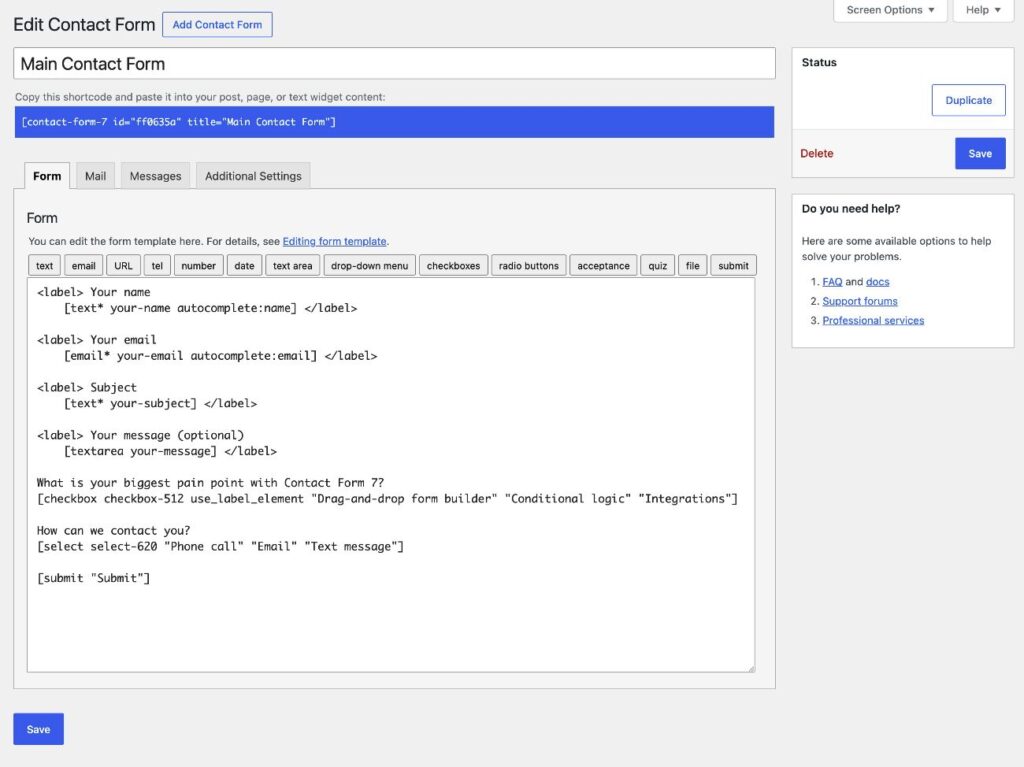
Gravity Forms offers a visual, drag-and-drop form builder interface that makes it a lot easier to not just set up your forms, but also visualize how those forms will actually look to your visitors.
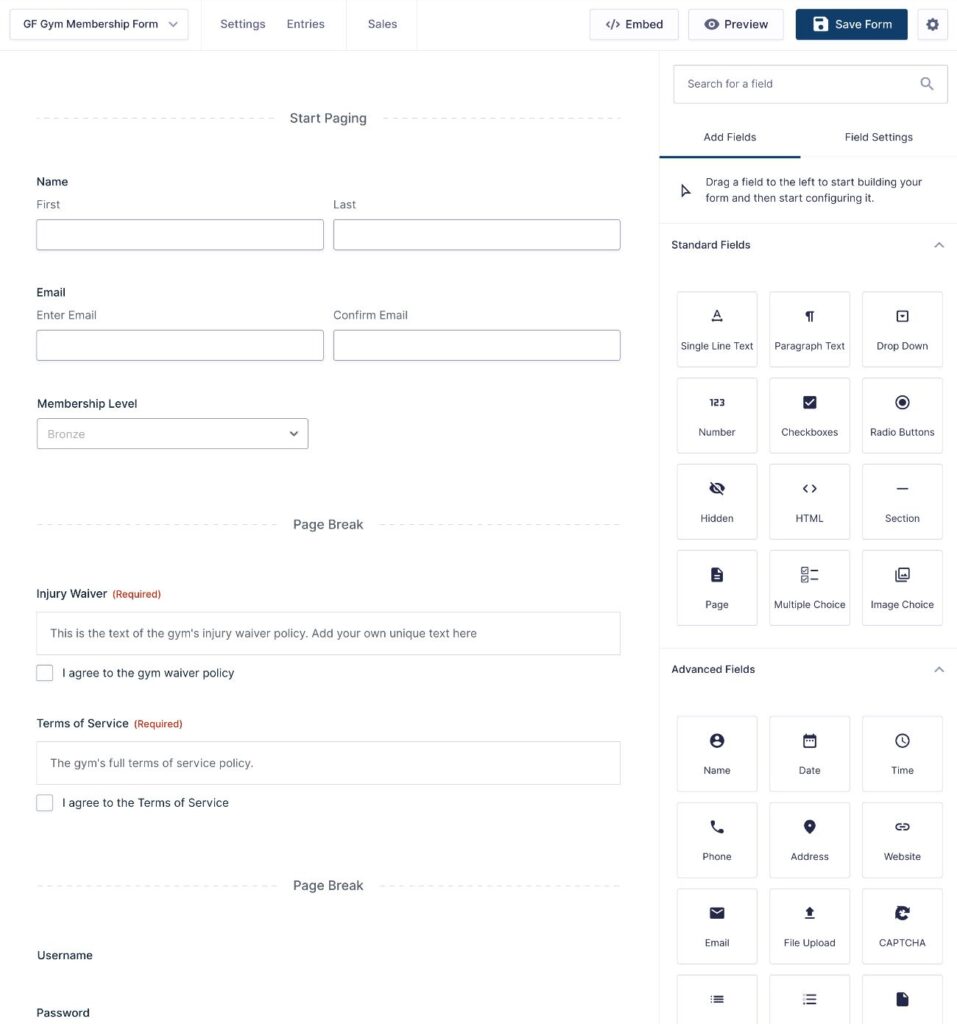
The form builder also goes beyond just adding form fields. It also makes it easier to add conditional logic, break forms into multiple pages with progress indicators, configure field validation rules, create multi-column form layouts, and much more.
If you’re just building a basic three-field contact form without any advanced functionality, it might not be a world-changing difference. But as you get into more complex web forms, you will appreciate how much more intuitive the form builder experience is with Gravity Forms.
2. Code-free form styling – right from the editor
If you want to style the forms that you create with the Contact Form 7 plugin, you need to be able to write custom CSS.
However, a lot of WordPress users lack the ability to use custom CSS. Or, even if you do feel comfortable with CSS, you might not want to jump into the code every time you want to tweak your form’s styling.
While Gravity Forms certainly lets you use custom CSS to style your forms, it also lets you style your forms directly from the editor using simple controls.
When you use the Form block, you’ll get a ton of options in the sidebar that let you style all different aspects of your forms, including colors, inputs, labels, buttons, form images, and more.
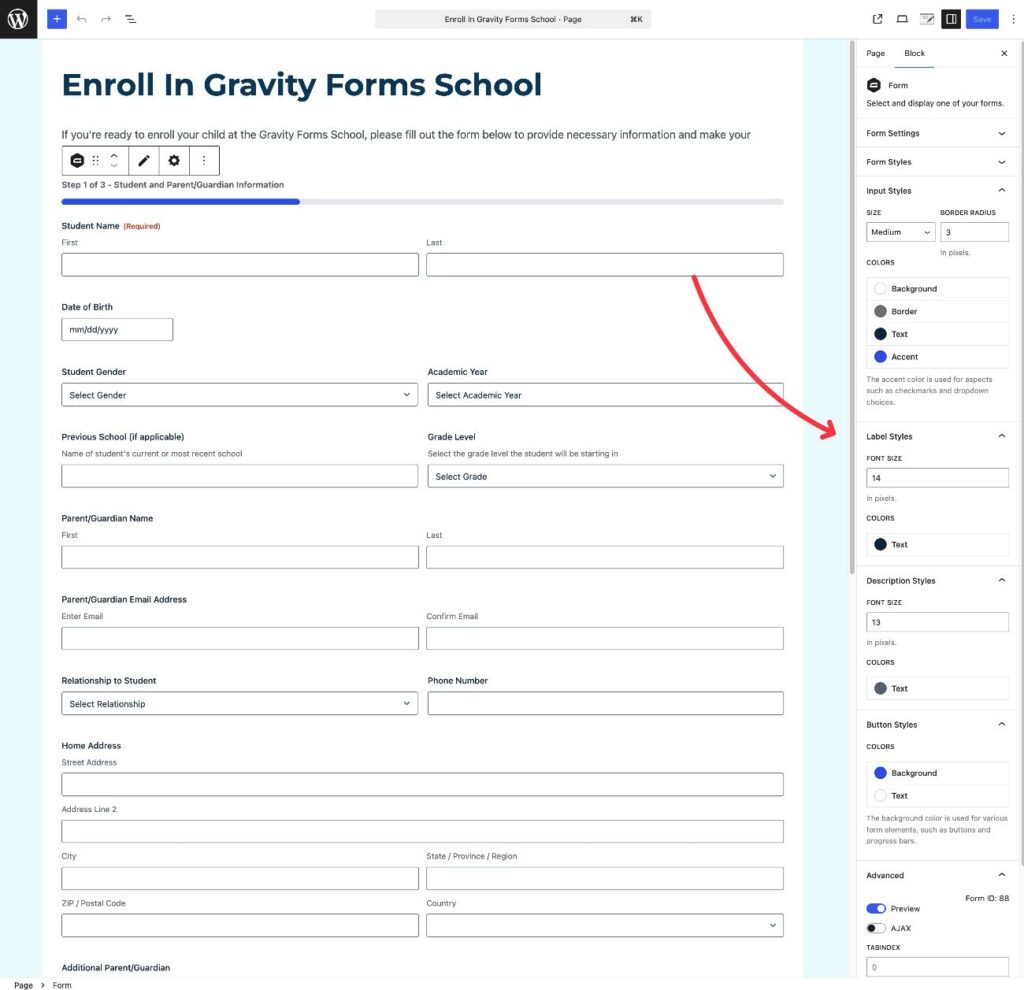
To see it in action, check out our ultimate guide to styling Gravity Forms.
3. Built-in entry management, with lots of configuration options
You probably use WordPress forms for important reasons. Every form entry is a potential customer, payment, email subscriber, lead, registered user, support request, etc.
No matter what your use case is, missing form entries can be a huge problem.
That’s why the fact that the Contact Form 7 plugin doesn’t offer any built-in entry management is a significant consideration. If a form notification email goes missing, you don’t have a record of that submission, and therefore have no way of knowing what the form submission contained.
You can fix that with the Flamingo plugin, but even then, the entry management functionality is pretty basic.
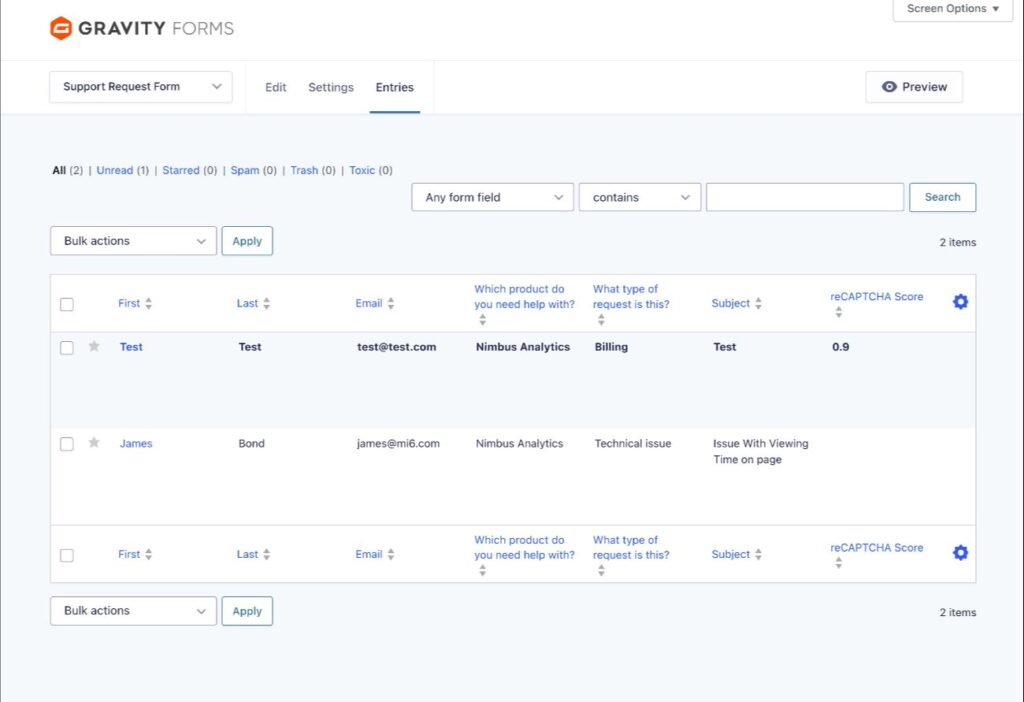
Gravity Forms comes with built-in entry management from day one. You’ll have a detailed record of every single form submission, so you never have to worry about losing track of things.
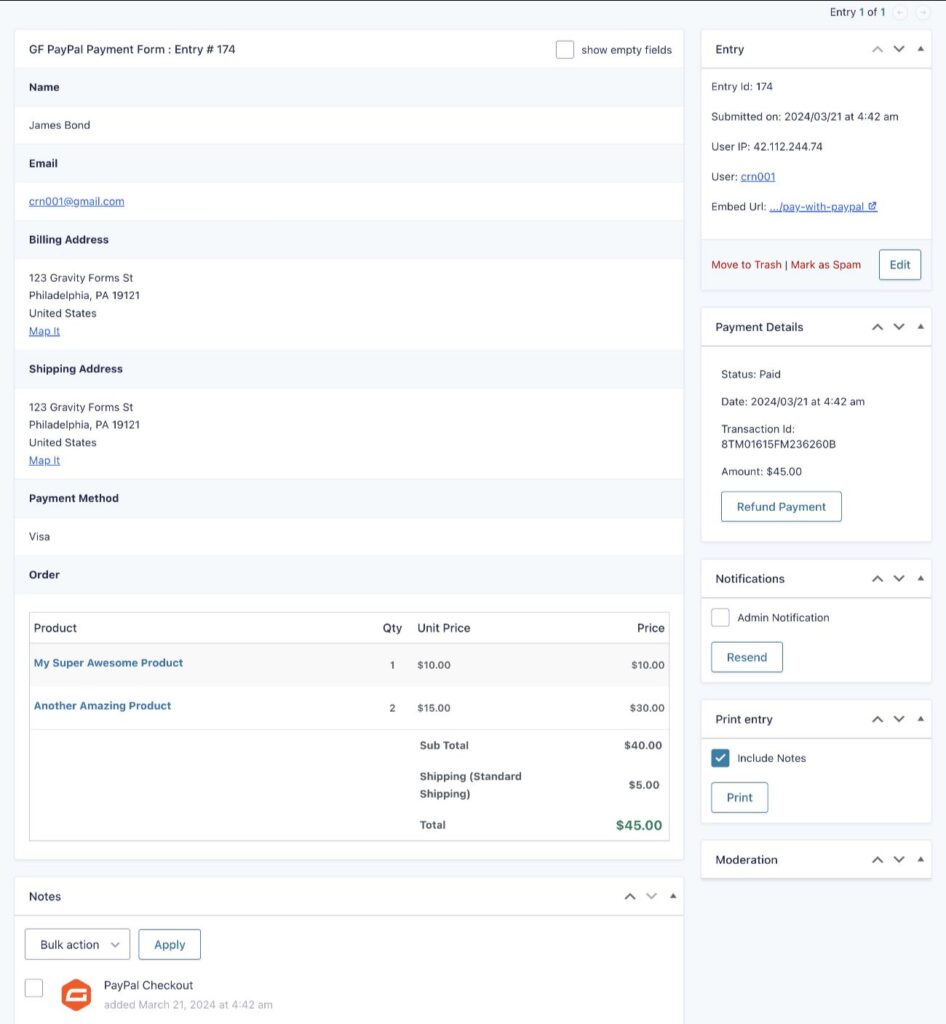
If you open a specific entry, you can see all of the information that was submitted with that form, including attachments, payments, signatures, and other key details.
Beyond that, the entry management features in Gravity Forms are just generally a lot more powerful.
To start, you can fully configure what information shows up in the main entry list, which lets you view important information for each entry without needing to open the full submission details.
For specific form types, you’ll also get dedicated dashboards that go beyond just storing the details of each submission.
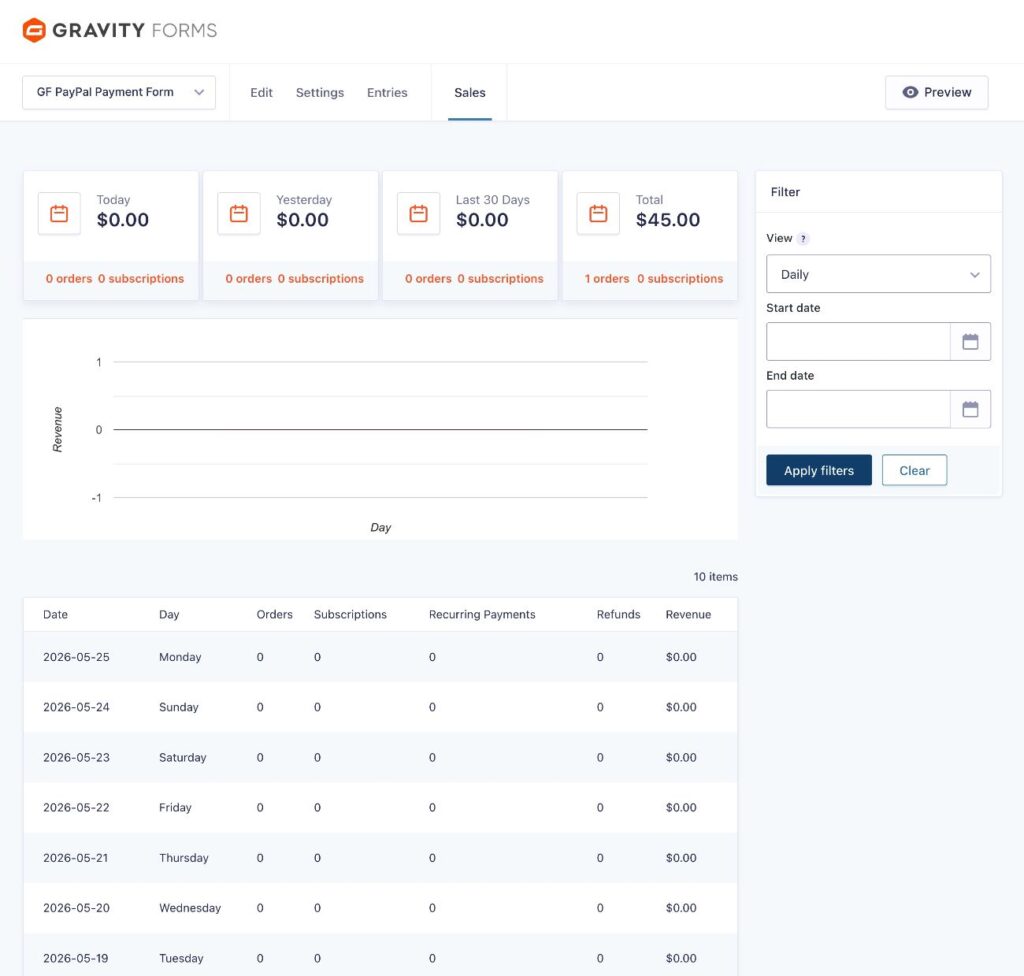
For example, if you create a payment form, you’ll get a dedicated Sales dashboard that shows you orders, subscriptions, refunds, and more – all with flexible filter options. Or, if you create a survey form, you’ll get a dedicated survey analysis report.
4. Even more add-ons and integrations
One of the biggest things that Contact Form 7 has going for it is its huge library of third-party add-on plugins. With these third-party add-ons, you can extend your Contact Form 7 forms with all kinds of useful features and integrations.
While most other WordPress form plugins just can’t match the add-on marketplace that Contact Form 7 offers, Gravity Forms can.
So if you love how many Contact Form 7 add-ons are out there, you’ll feel the same way about Gravity Forms.
Beyond the size of the marketplace, Gravity Forms’s add-on library also has some other advantages over Contact Form 7.
First off, one of the issues with Contact Form 7 is that almost all of the add-on plugins come from third-party developers and there’s no one overseeing the quality of the code.
While some Contact Form 7 add-ons are excellent products, others can be buggy and poorly maintained. If you’re not a developer, it’s hard to figure out which is which, which can lead to issues with your forms.
Gravity Forms solves this in a few ways:
- Official add-ons – Many essential add-ons come directly from the Gravity Forms team, so you can trust their quality.
- Certified Add-Ons – Even though these add-ons come from third-party developers, the Gravity Forms team has certified them, which means you can be confident in their quality.
Finally, just like Contact Form 7, you can also find lots of community add-ons from other developers. Most of these are also quality options, but you should do your own due diligence before installing a community add-on that is not part of the Gravity Forms Certified program.
5. Fully customizable form templates to save you time
Contact Form 7 comes with a default template for a very basic four-field contact form. However, if you want to create any forms beyond that, you need to build them from scratch.
Gravity Forms offers a much broader form template library that includes pre-made templates for a variety of essential use cases, including:
- Simple or advanced contact forms
- Payment forms
- Membership forms
- Registration forms
- Application forms
- Newsletter signup forms
- Consent forms
- Support request forms
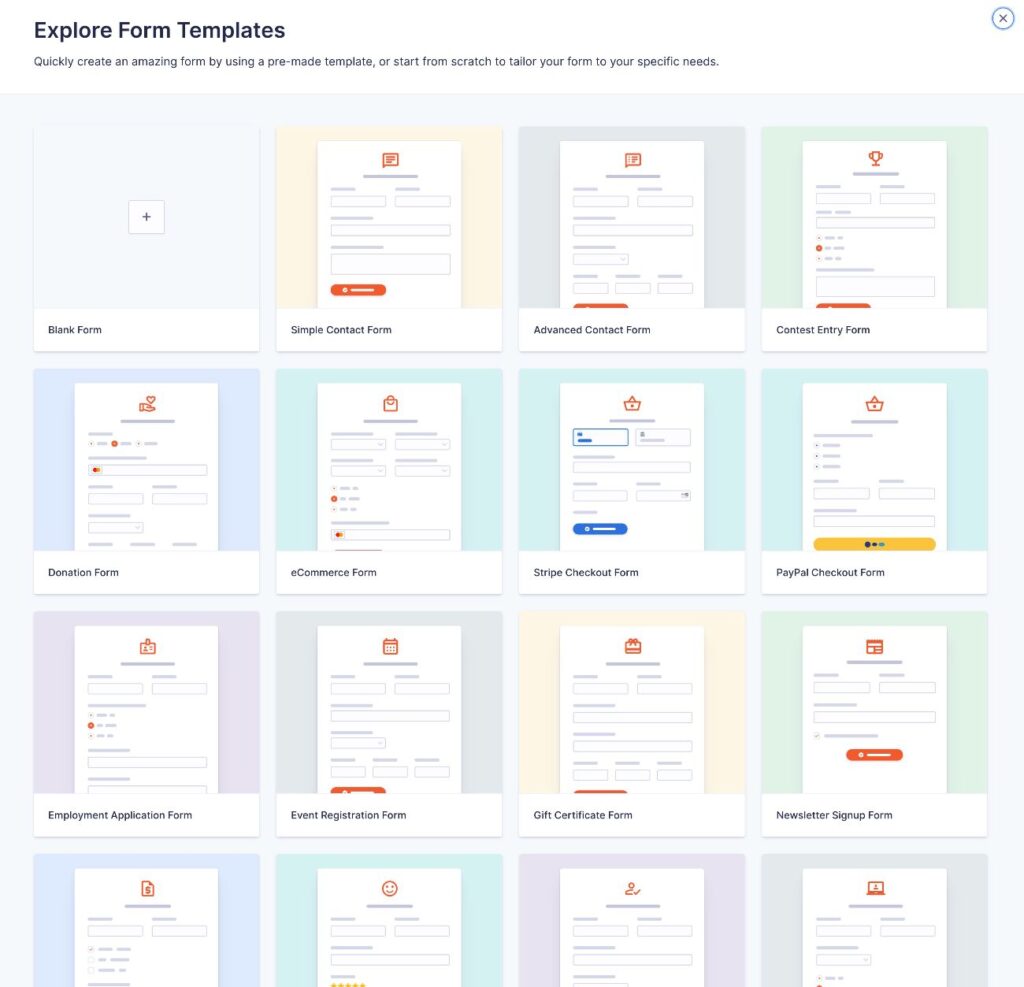
These templates are not just a collection of form fields – they also include email notifications and confirmation messages that are already adapted to the use case.
Having access to more templates can be useful for multiple reasons:
- Templates save you time because you don’t need to set up everything from scratch.
- Templates can help you build more effective forms, especially if you don’t already have experience building certain types of forms. For example, the template can help you make sure that you’re including all of the essential fields that your use case requires.
6. More flexible conditional logic (that’s built in)
Conditional logic is incredibly helpful for building more effective and user-friendly web forms.
Conditional logic can help you personalize your forms, collect more information while keeping your forms short, and just generally create better forms.
For example, you could only display certain fields if a user answers in a specific way.
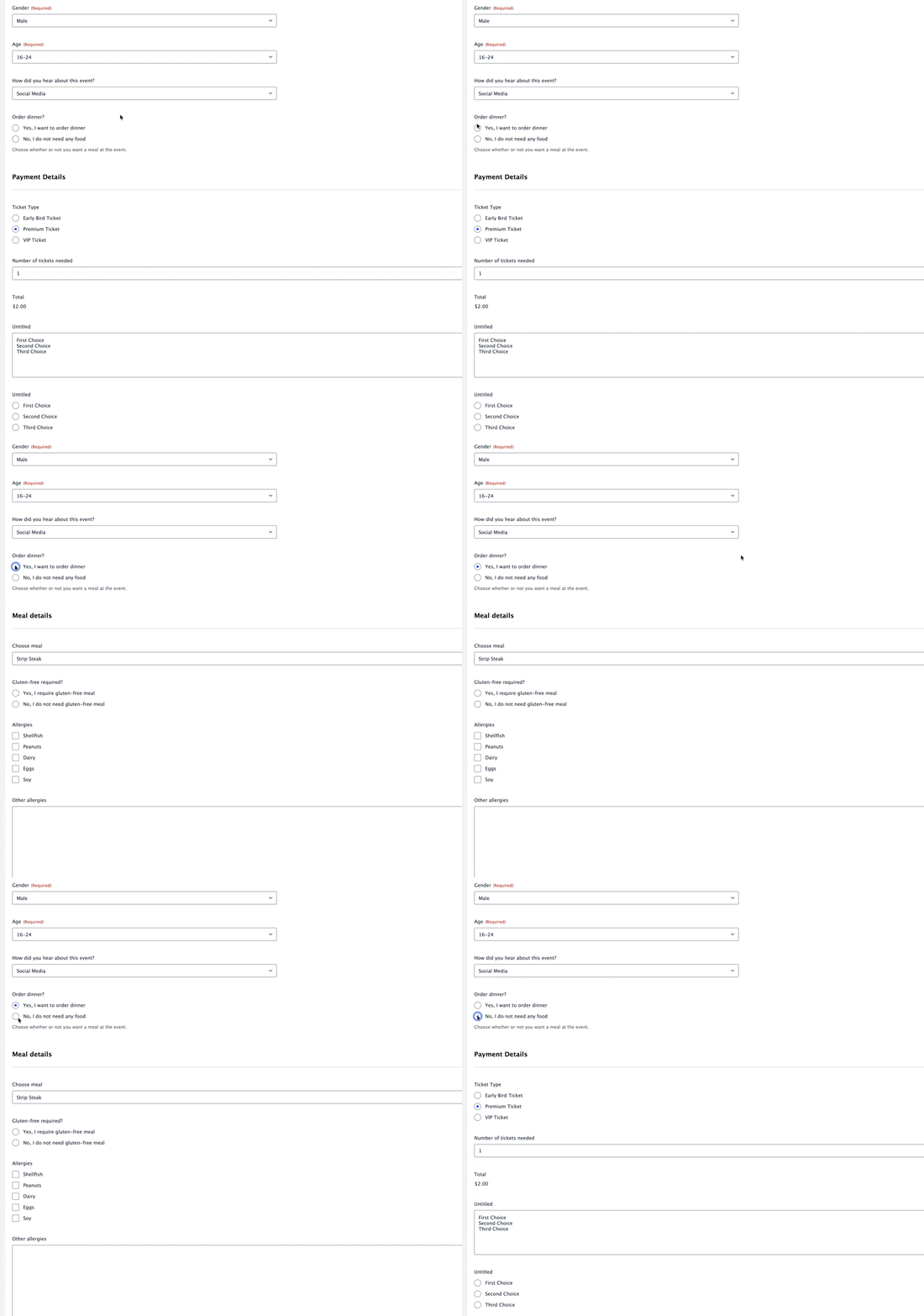
Despite its usefulness, Contact Form 7 doesn’t include any conditional logic functionality. There are some popular third-party add-ons that exist, but even those typically only focus on one specific area of conditional logic (such as showing/hiding fields).
Gravity Forms, on the other hand, has conditional logic built in as a core feature of the form building experience.
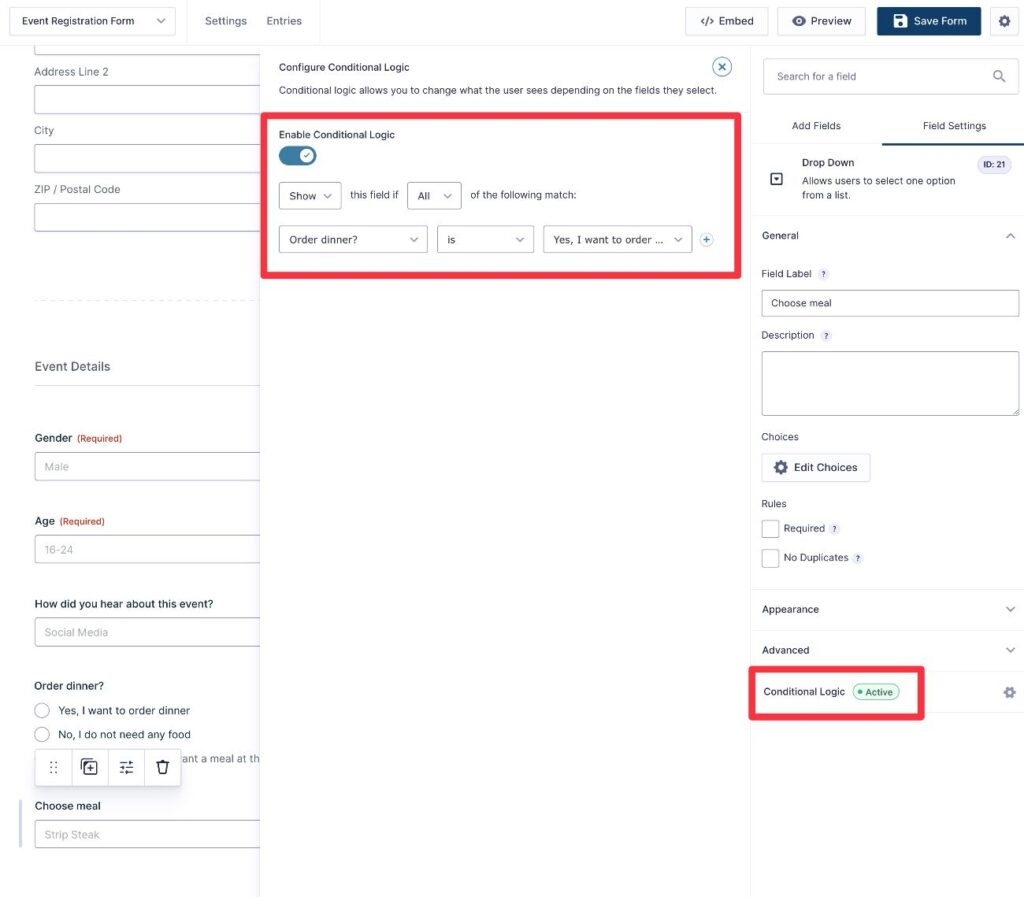
You can add conditional logic in tons of different ways, including the following:
- Showing/hiding individual fields, entire form sections, or entire form pages.
- Connecting to integrations in different ways – for example, switching between charging a one-time payment or setting up a recurring subscription based on how someone answered the form. Or, syncing a contact to your CRM with a different tag depending on how they answered.
- Sending different email notifications – You can adjust the content and/or send emails to different addresses. For example, sending an email notification to your sales team for sales questions and your support team for support questions.
- Showing different confirmation messages or sending users to different pages after they submit the form.
To learn more, check out our ultimate guide to conditional logic in Gravity Forms.
7. Payments that can handle any use case
If you’re using your WordPress forms to accept payments, you don’t want to be limited. Instead, you want a form plugin that can handle real commerce.
Contact Form 7 does offer basic payment support via its Stripe integration. However, it’s very limited. You pretty much get two options via shortcode parameters that allow you to set the amount and currency of the payment.
That might work for very simple use cases, but it’s nowhere near enough flexibility to handle real commerce.
You can’t adjust the payment amount based on form inputs, set up recurring subscriptions, offer coupons or free trials, etc.
Gravity Forms offers much more robust payment functionality, including the following:
- Official support for multiple payment processors – These include Stripe, PayPal, Square, and others.
- One-time or recurring payments – Contact Form 7 only works for one-time payments, but Gravity Forms allows you to set up automatic recurring subscriptions on a schedule that you choose. You can also offer free trials or add one-time signup fees.
- Pricing calculations – Rather than just having one fixed payment amount, you can adjust the amount based on how a person fills out the form.
- Product quantity – You can let people adjust the quantity, such as purchasing multiple items (and subsequently adjusting the price). This can work great for a lightweight ecommerce solution.
- Coupons – You can offer a coupon option to provide discounts.
- Shipping costs – For physical products, you can add shipping costs to the payment amount.
- Authorize and capture – With supported payment processors, you can authorize a person’s payment when they submit the form, but wait to actually capture the money until a later point in time.
- In-dashboard payment management – You can refund a person’s payment or cancel their subscription directly from your WordPress dashboard.
If you want to learn more about payments in Gravity Forms, check out some of these blog posts:
- Ultimate guide to Gravity Forms payments
- Gravity Forms and Stripe payments
- Gravity Forms and Square payments
8. An entire anti-spam toolkit to protect your forms
Because of how popular WordPress is, WordPress sites are a popular target for spammers and other malicious actors. And within WordPress sites, forms are one of the most popular targets for spam.
Contact Form 7 does include some basic spam protection tools via its integrations with services like reCAPTCHA and Akismet.
However, Gravity Forms gives you a much more robust anti-spam toolkit, complete with:
- Additional tools to protect your forms from spam – Gravity Forms supports all of the integrations that Contact Form 7 does, but then it adds even more tools. For example, you can add honeypot fields and submission speed checks.
- More control over how to protect your forms – For example, if you’re using Google reCAPTCHA v3, you can fully customize the spam score threshold so that you can control how aggressive you want to be with your anti-spam efforts. Contact Form 7 integrates with reCAPTCHA, but it doesn’t give you as much control over how to combat spam.
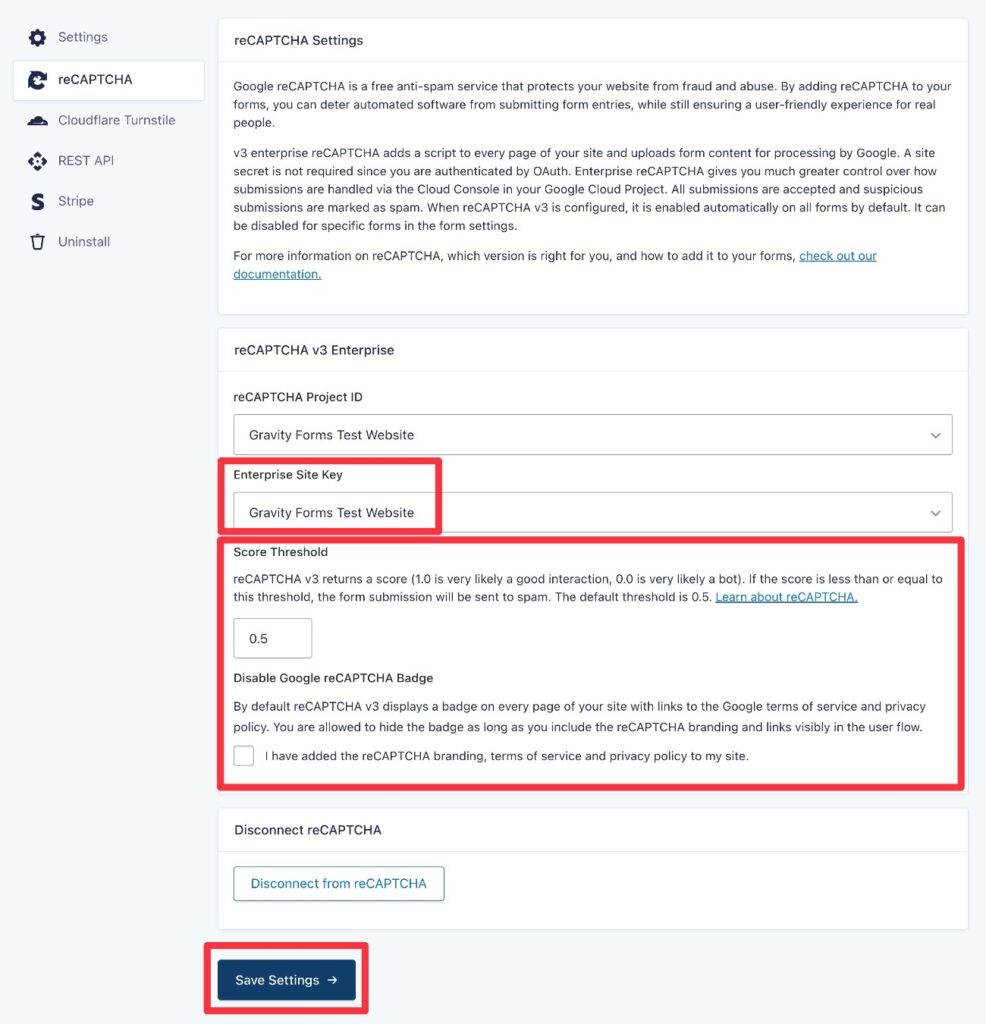
Gravity Forms can also go beyond just protecting against spam and also protect your forms from toxic and malicious entries.
With the Gravity Forms Moderation Add-On, you can use AI to block or filter entries with malicious or toxic language. In addition to relying on the AI analysis, you can also add hard-coded keywords to flag entries.
9. Reliable email delivery via SMTP Add-Ons or Gravity SMTP
Both Contact Form 7 and Gravity Forms offer built-in features to send one or more email notifications after someone submits a form.
However, only Gravity Forms gives you dedicated tools to ensure those emails actually make it to recipients’ inboxes.
Here’s the problem with WordPress email notifications:
The default way that WordPress sends all of its emails, including form notifications, is not very reliable.
Even if your host doesn’t outright block it (which would cause emails not to send), it lacks proper authentication protocols, which means that your site’s emails have a very high chance of getting flagged as spam by most email clients.
The best way to fix this is by configuring your WordPress site to send its emails using a dedicated transactional email service such as SendGrid, Mailgun, or Postmark.
These services are often free for low-volume sending, which means it might not even cost you extra money to make your emails a lot more reliable.
Gravity Forms gives you two ways to connect your site to a transactional email service:
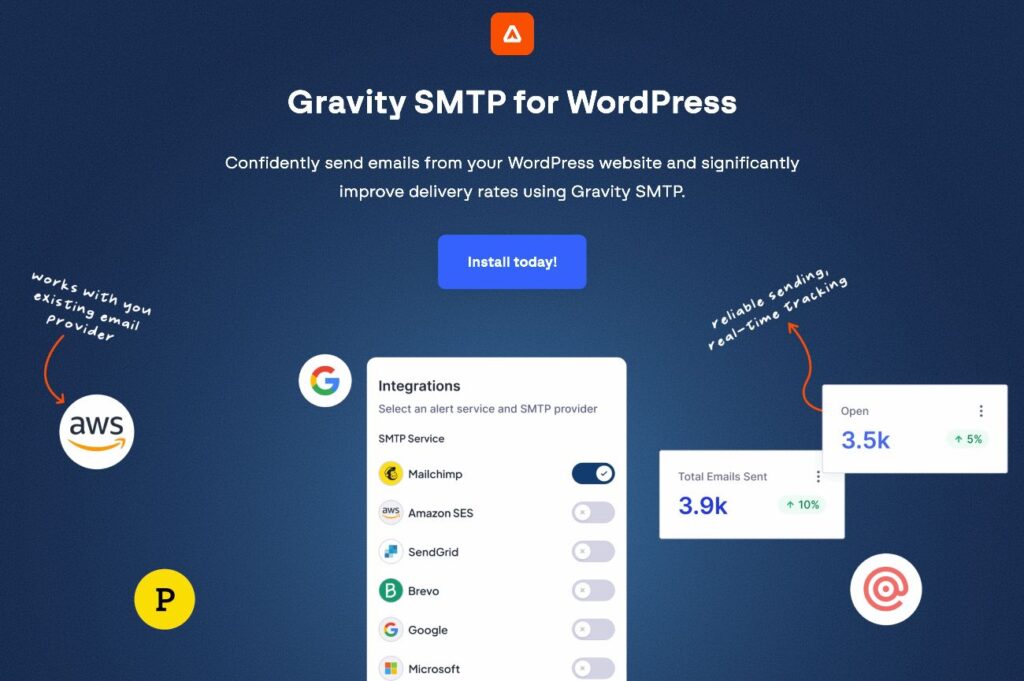
- Gravity SMTP – This full-service SMTP plugin lets you send all of your site’s emails via your choice of 19+ direct integrations, along with giving you access to lots of other useful features. You get it at no additional cost if you’re holding the Gravity Forms Elite, Nonprofit, or Developer license. Check out our ultimate guide to Gravity SMTP for more details.
- Dedicated transactional email add-ons – You can use dedicated add-ons for SendGrid, Mailgun, or Postmark to send your form notifications via those services.
10. Workflow and approval automation with Gravity Flow
A lot of the forms that you build will have background tasks associated with them. They might trigger some type of approval, administrative process, payment request, etc.
With Contact Form 7 and most other WordPress form plugins, you’re left to perform these tasks manually (or using a third-party tool).
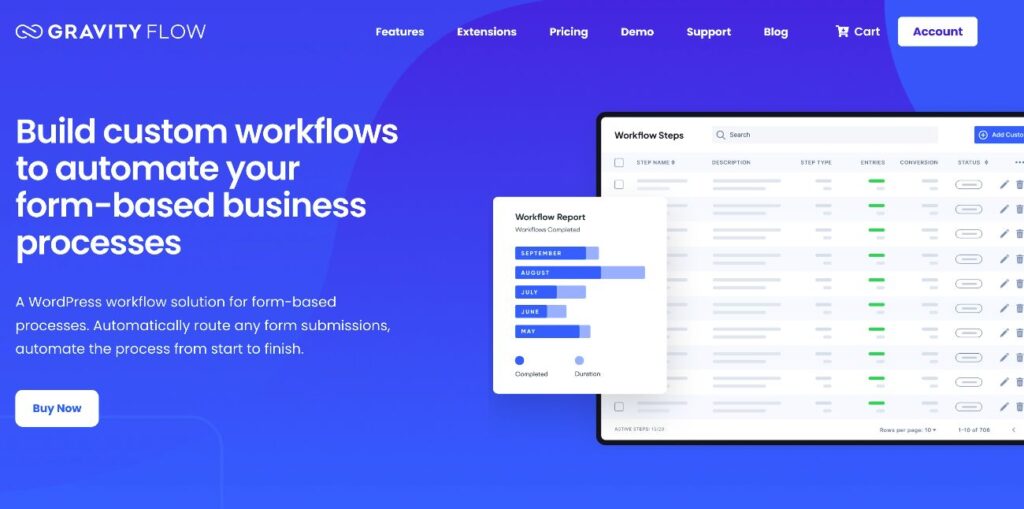
Gravity Forms, on the other hand, lets you build simple or complex workflow automations using the Gravity Flow plugin, which comes from the same team behind Gravity Forms.
Gravity Flow lets you create your workflows using 40+ different action steps. Some of those 40+ steps include:
- Assigning tasks.
- Requiring approvals.
- Collecting additional user input.
- Generating PDF documents.
- Sending email notifications.
- Accepting payments.
- Sending or receiving webhook data.
- Connecting two different forms.
Gravity Forms already lets you do some of these things. For example, processing payments, sending email notifications, etc. However, Gravity Flow adds the ability to perform these steps later in the process.
For example, someone could submit a quote request form with details of their project. Before accepting the person’s payment, you could require manual approval of the quote from you or your team. That way, you don’t accidentally accept payment for a project with an inaccurate quote.
Once you approve the quote, you can then automatically send it back to your client for payment.
Basically, Gravity Forms isn’t just a form plugin like Contact Form 7.
Instead, it can also help you automate the processes behind your forms, which can save you a ton of time and help you build a more efficient business.
11. Dedicated support from the Gravity Forms team
Because Contact Form 7 is a free plugin, it does not offer any type of dedicated support. There’s also no option to purchase a paid support plan.
While this is standard for free plugins and not a knock against Contact Form 7, it does mean that you have no official option to get dedicated support if you need help setting up or managing your forms.
In contrast, Gravity Forms gives you direct expert support on all of its licenses.
If you like to be able to reach out for help if something is going wrong, that’s another reason to consider switching from Contact Form 7 to Gravity Forms.
How to migrate Contact Form 7 to Gravity Forms
If you’re ready to make the switch from Contact Form 7 to Gravity Forms, let’s finish with a quick rundown on some of the options you have to migrate Contact Form 7 to Gravity Forms.
For simple migrations, you can do things manually. For more complex migrations, you can find automated migration plugins from the Gravity Forms community.
Manual method
If you only have a small number of forms and/or simple forms, it might be easiest to just manually recreate your forms in Gravity Forms.
Because Gravity Forms offers a visual, drag-and-drop form builder and plenty of templates, you should be able to recreate simple forms in just a few minutes.
For longer content, such as email notifications or confirmation messages, you can copy and paste them from Contact Form 7 to Gravity Forms.
Contact Form 7 to Gravity Forms migration plugin
If you have a lot of forms and/or more complex forms, you might prefer an automated solution to migrate Contact Form 7 to Gravity Forms.
That’s exactly what the CF7 to Gravity Forms Migrator is for – a free tool from Gravity Labs, included with every Gravity Forms license.
The plugin scans your site for existing Contact Form 7 forms, lets you preview the mapped fields and settings before you commit, and imports them as native Gravity Forms forms – fields, notifications, and confirmations included. You can migrate forms one at a time or use Import All to move everything at once.
To use it:
- Go to Forms → CF7 to GF in the WordPress admin.
- The plugin will scan for Contact Form 7 forms in your database.
- Review the list of detected forms.
- Click Preview to inspect the mapped fields, mail settings, warnings, and raw Contact Form 7 template.
- Click Import to Gravity Forms to migrate a single form.
- Or click Import All Forms to migrate all detected forms at once.
After import, the new form is created in Gravity Forms and can be edited like any other Gravity Forms form.
As with all Labs add-ons, the CF7 to Gravity Forms Migrator is shared as-is and outside our standard support channels – but it’s built and maintained by the Gravity team, not a third party.
As always, we recommend running it on a staging site or local environment first before applying changes to your live site.
Make the change from Contact Form 7 to Gravity Forms
Even before the recently announced Contact Form 7 feature freeze, we already believed that we had built Gravity Forms to be a better WordPress form solution for most users.
Now, with that feature freeze in effect, the gap between Contact Form 7 and Gravity Forms will only get larger.
Make the switch from Contact Form 7 today to access a more user-friendly and flexible form building experience, tons of useful features and integrations, and dedicated support directly from the Gravity Forms team.
If you’re ready to get started, you can purchase your Gravity Forms license here.

Newsletter
If you want to keep up-to-date with what’s happening on the blog sign up for the Gravity Forms newsletter!
"*" indicates required fields