We are pleased to announce that we’ve updated reCAPTCHA. With reCAPTCHA 2.2.3 you’ll find a number of updates…
- Added security enhancements.
- Added a setting to enable reCAPTCHA by default for v3 Classic and v3 Enterprise, that can be overridden with form settings.
- Added new score status to entry meta to distinguish v2 entries from genuine v3 disconnected.
Choose your default spam protection
You can now decide whether reCAPTCHA is turned on by default across your site when you’re using v3 Classic or v3 Enterprise. Set your preference once in the reCAPTCHA settings, and every form follows it automatically.
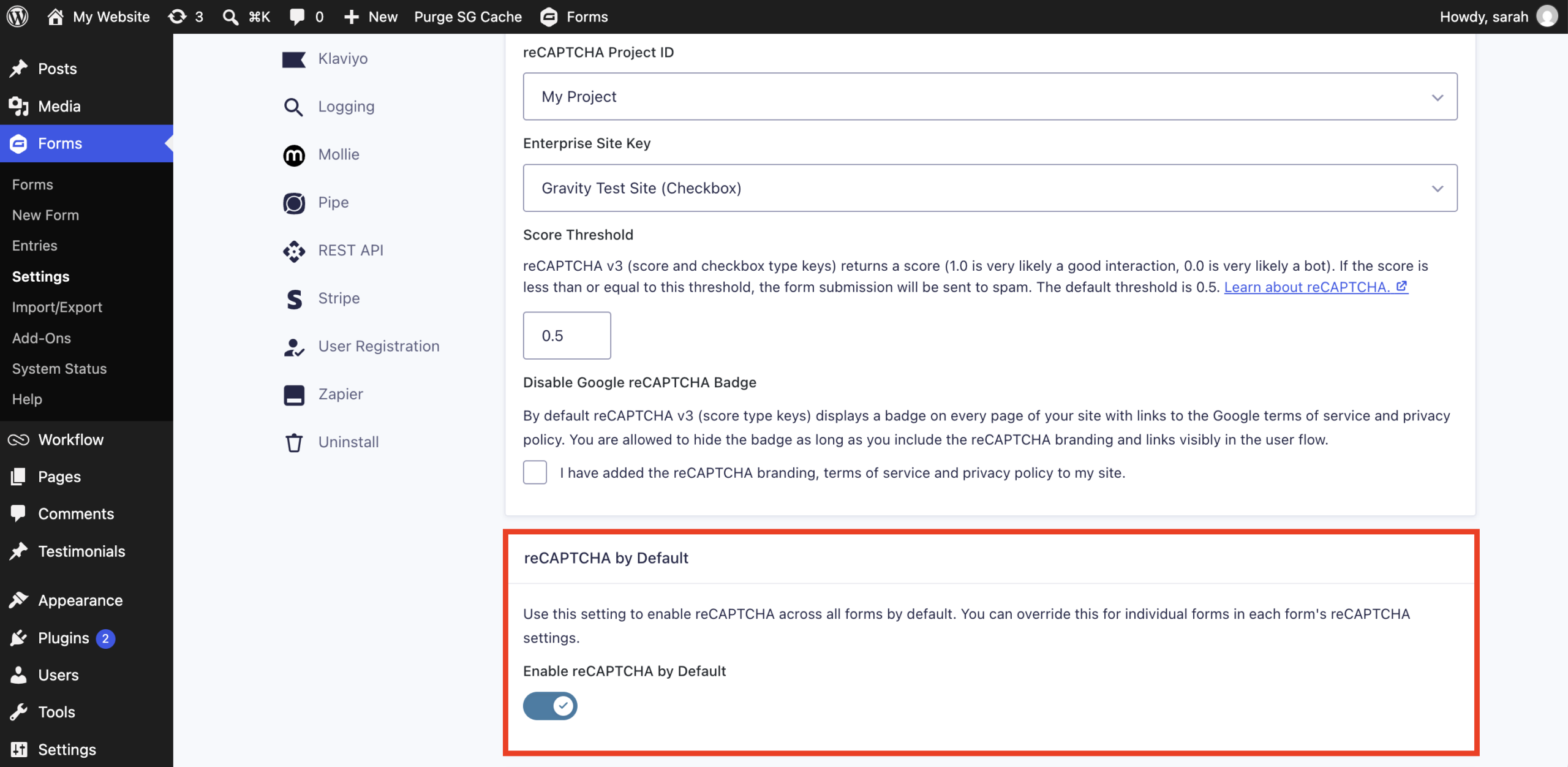
Need a different approach for a particular form? Each form’s settings can override the default, so you keep full control over exactly where reCAPTCHA runs.
Key features of reCAPTCHA
- Invisible protection – Stop spam without asking visitors to solve puzzles or click checkboxes.
- Score-based spam detection – Each submission receives a score, and anything below your chosen threshold is marked as spam.
- Scores saved with entries – Review each entry’s reCAPTCHA score to see why a submission was flagged.
- v3 Classic and v3 Enterprise support – Connect the version of reCAPTCHA that best fits your site and your Google account.
- Site-wide or per-form control – Apply reCAPTCHA across all of your forms, or fine-tune it form by form.
For more information about setting up reCAPTCHA, be sure to check out the Gravity Forms documentation.
Note: reCAPTCHA is available with all Gravity Forms licenses. Visit our pricing page for more information on the features and other add-ons available on each plan.
reCAPTCHA 2.2.3 changelog
- Added security enhancements.
- Added a setting to enable reCAPTCHA by default for v3 Classic and v3 Enterprise, that can be overridden with form settings.
- Added new score status to entry meta to distinguish v2 entries from genuine v3 disconnected.
- Updated the uninstall process to include the removal of v2 settings when the add-on is uninstalled.
- Updated to set a form level validation error message with Gravity Forms 3.0.3 and newer when the submission doesn’t include the score-based reCAPTCHA response or it is invalid.
- Fixed a fatal error during submission when validating the reCAPTCHA response fails.
- Fixed an issue where a completed reCAPTCHA Checkbox field prevents a Conversational Form from being submitted.
- Fixed an issue where if the keys are deleted without disconnecting, the settings screen gets stuck at the connection type selection.
- Fixed a JavaScript error that occurs when the reCAPTCHA script is blocked and the badge is disabled.
- Fixed an issue where the legacy settings screen displayed both the reCAPTCHA v2 and v3 Classic settings at the same time.
- Fixed an issue where form submissions can fail validation or be marked as spam when the reCAPTCHA API returns an error.
If you are a Gravity Forms license holder, reCAPTCHA 2.2.3 can be updated in your WordPress dashboard, or downloaded manually from your Gravity account.

Newsletter
If you want to keep up-to-date with what’s happening on the blog sign up for the Gravity Forms newsletter!
"*" indicates required fields