
Somebody approved it. Nobody can prove who.
That sentence is the ending of a thousand business stories: the invoice that got paid twice, the policy nobody remembers agreeing to, the contract that went out with terms someone was sure had been signed off. When the question finally gets asked, and an auditor, an accountant, or a lawyer will eventually ask it, the answer turns out to live in a forwarded email chain, a scanned signature page, or the memory of someone who left the company last year.
In this post we’ll build the alternative: a sign-off workflow where every document, policy, and invoice approval moves through the right people in the right order, and where every decision is timestamped, attributed, and logged automatically. Nobody keeps the record, because the record keeps itself.
The division of labor is simple: Gravity Forms captures the thing that needs approval, and Gravity Flow runs the sign-offs and writes the audit trail.
For agencies: your client brings the problem, you bring Gravity Flow
Listen for the word prove. When a client says “we need to be able to prove who approved what,” or tells you about an audit that turned into a week of email archaeology, they’re not asking for a form. They’re asking for a workflow.
This is also the build where keeping things on the client’s own server stops being a preference and becomes the pitch. Compliance-sensitive clients, and regulated ones especially, are exactly the buyers who hesitate to put approval records in a per-seat SaaS tool they don’t control.
A sign-off workflow that runs in their own WordPress database, on their own domain, with their own backups, answers the objection before it’s raised. You’re not selling them software; you’re selling them custody of their own records.
Building sign-offs for your own business rather than a client’s? Everything below works exactly the same. Let’s get into it…
The problem with email sign-offs
Approvals by email feel like they work, right up until you need to rely on one:
- The record is scattered: The document is an attachment on one email, the first approval is a reply, the second is a forward with “fine by me,” and reconstructing the sequence means searching three inboxes, one of which belongs to someone who left.
- Order isn’t enforced: The policy says legal reviews before the director signs. Email has no opinion about order, so sometimes the director signs a version legal never saw, and nobody notices until it matters.
- “Approved” is ambiguous: A thumbs-up on a thread: was that approval of the document, the idea, or the meeting time? An audit trail built on interpretation isn’t an audit trail.
The fix is a workflow where the sign-offs happen in sequence, each one is an explicit decision marked against the document itself, and the record writes itself as the entry moves.
What this workflow does
Here’s the finished system we’re building:
- Someone submits the item needing sign-off: a policy document, a contract, or an invoice, with the file attached.
- The entry moves through sequential approval steps, each assigned to the right reviewer, each in the order your process requires.
- Approvals that only apply sometimes, like a second sign-off on invoices above a threshold, fire automatically when their condition is met.
- On final approval, the outcome goes where it needs to: the policy is distributed, the invoice is cleared for payment, the requester is notified.
- Every decision is logged in the entry’s timeline with a name and a timestamp, building the audit trail as a byproduct of the process itself.
Step 1 is Gravity Forms. Steps 2 through 5 are all Gravity Flow. The form is short, so nearly all of the build time goes on the workflow.
What you’ll need
- Gravity Forms (any license) to build the submission form
- Gravity Flow to run the sign-offs and keep the record
Gravity Flow is a separate plugin that extends Gravity Forms. With both installed and activated, you’ll find a Workflow tab in each form’s settings, and that tab is where everything from Step 2 onwards happens.
Step 1: Build the submission form (Gravity Forms)
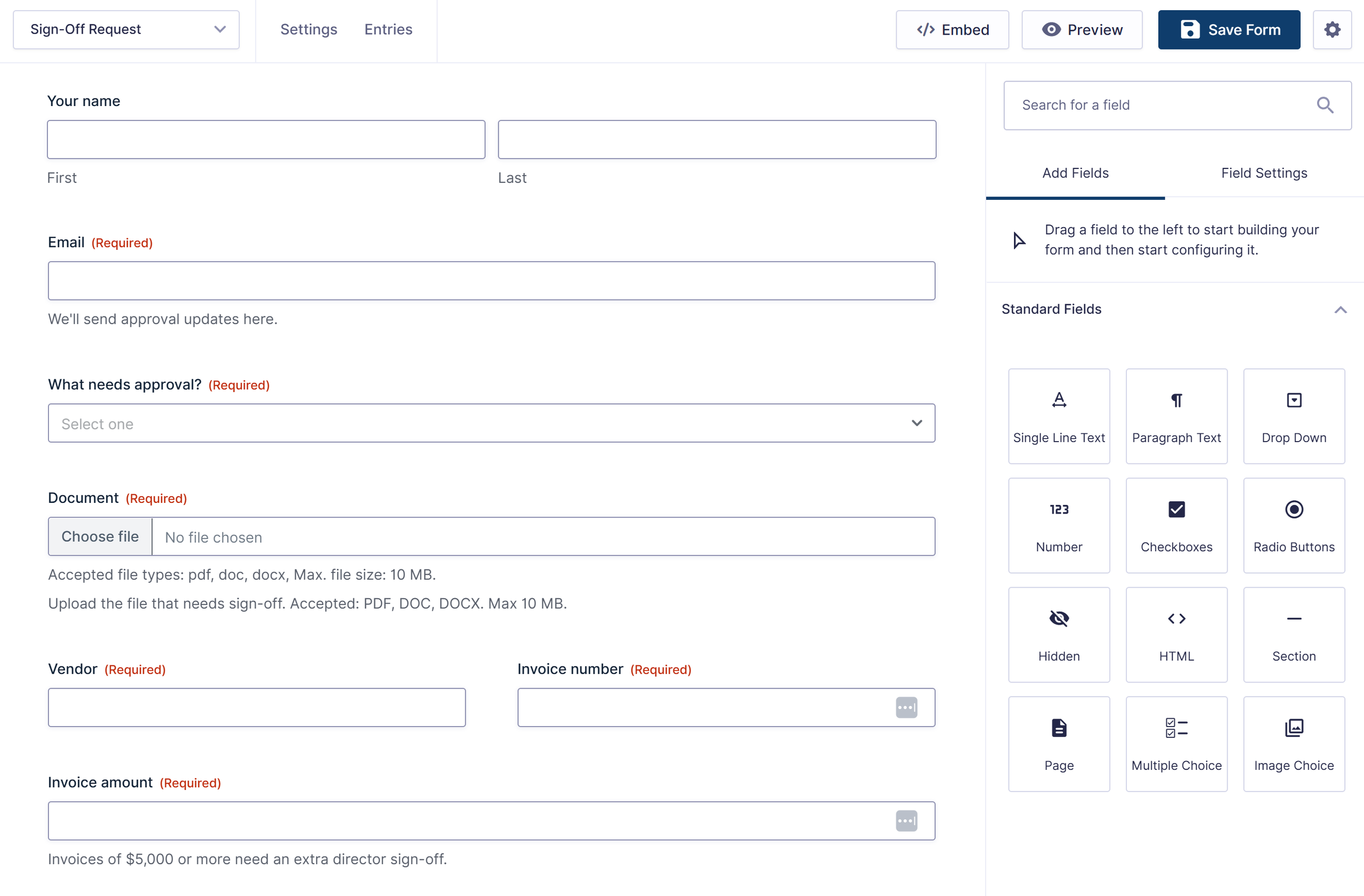
One form can handle everything that needs sign-off. Keep it simple:
- Submitter name and email
- What needs approval (dropdown: policy document, contract, invoice, other). Conditional logic uses this to show the right fields.
- The document (File Upload, required). The thing being approved travels with its own approvals.
- For invoices: vendor, invoice number, and amount (a proper Number field, because a condition in Step 3 reads it).
- Summary of what’s being requested (paragraph field), so a reviewer can understand the ask without opening the attachment.
Conditional logic keeps the form short and relevant. For example, the invoice fields (vendor, number, amount) only show when someone picks Invoice, so people submitting a policy or contract don’t wade through fields that don’t apply. One form, one entry list, one audit trail for everything the business signs off.
Now for the workflow. From here on, everything we build lives in Gravity Flow.
Step 2: Add the first sign-off (Gravity Flow)
Add a new step in the form’s Workflow tab, set the type to Approval, and name it for the role, not the person: “Legal review,” “Manager approval,” or “Bookkeeper check,” depending on what your process starts with.
The assignee receives a notification with the document attached and the summary in front of them, and they approve or reject directly from the notification. A rejection can send the entry back to the submitter with a note, so revisions happen inside the same recorded process rather than off in email.
One routing note worth keeping: if different submission types should follow entirely different sign-off chains, the Choice Routing step from Gravity Flow 3.1 can read the What Needs Approval field and send each type down its own branch. For a shared chain where only the reviewer differs, assignee routing inside the step does the job.
Step 3: Stack the sign-offs in sequence
Your process already has an order. This is the step that makes it mandatory instead of just intended. Add an Approval step for each stage of your process, in order: legal review, then the department director, then the managing partner, or whatever your chain actually is.
Gravity Flow moves the entry through the steps in sequence, which means the director genuinely cannot sign before legal has reviewed. The order isn’t a convention anymore; it’s a mechanism.
Steps can also be conditional, so sign-offs that only apply sometimes fire automatically when they should. The classic example is invoice approval: add a “Director sign-off” step with a condition so it only applies when the invoice amount is $5,000 or more. Small invoices clear with one approval, large ones collect two, and nobody has to remember which rule applies.
Our purchase order approval article walks through threshold conditions in detail if you want the full mechanics.
Step 4: The audit trail that writes itself
This is the reason to build sign-offs this way, so it’s worth being precise about what you get.
Every entry in Gravity Flow carries a timeline: a running, timestamped record of every event in its life. Who submitted it and when. Which step it reached, who it was assigned to, what they decided, and the exact time they decided it.
Any notes a reviewer attached. Any routing decision the workflow made, including conditional steps that were skipped and why. None of it is typed up by anyone; it accrues automatically as the entry moves.
The result is that the question “who approved this, and when?” changes from an investigation into a lookup. Open the entry, read the timeline, and the answer is there with names and timestamps, alongside the exact document that was approved. When the auditor asks in March about an invoice from September, the week of email archaeology becomes a thirty-second click.
And because all of it lives in your own WordPress database, the record is yours: on your server, in your backups, under your retention rules, with no per-seat subscription standing between you and your own approval history.
Step 5: Deliver the outcome
A completed sign-off should end with the result in the right hands, so finish with notification steps:
- On final approval: Notify the submitter, and deliver the outcome where it goes. A cleared invoice notification goes to whoever runs payments, and an approved policy can go out to the whole team, with the entry recording that it was sent.
- On rejection at any step: Notify the submitter with the reviewer’s note, so the revision starts immediately and inside the same recorded process.
One thing worth noting: every step here runs on email, so it’s worth making sure those notifications actually get delivered. Gravity SMTP sends your WordPress email through a proper delivery service, so the approval requests and outcome notices don’t land in spam.
The workflow at a glance
A short form and a chain of Approval steps – here’s the complete build, end to end:
Document or invoice submitted with the file attached → Sign-offs in sequence (Approval steps in your required order) → Conditional sign-offs fire when needed (invoice amounts above threshold) → Outcome delivered (payment cleared, policy distributed) → Timeline records everything, automatically.
Sign-offs you can prove
That’s the build. Approvals happen in the order the process requires, every decision has a name and a timestamp, and the audit trail assembles itself while everyone just does their job. The next time someone asks who approved what, the answer is a link.
Already using Gravity Forms? The submission form is the part you already know. Gravity Flow adds the sequential sign-offs, the conditional steps, and the timeline that makes it all provable. Check out Gravity Flow pricing to get started, or sign up for a personalized demo to see an intake workflow in action.
More workflow builds on the blog: time off requests, client intake forms, expense reimbursement, and employee onboarding.

Newsletter
If you want to keep up-to-date with what’s happening on the blog sign up for the Gravity Forms newsletter!
"*" indicates required fields