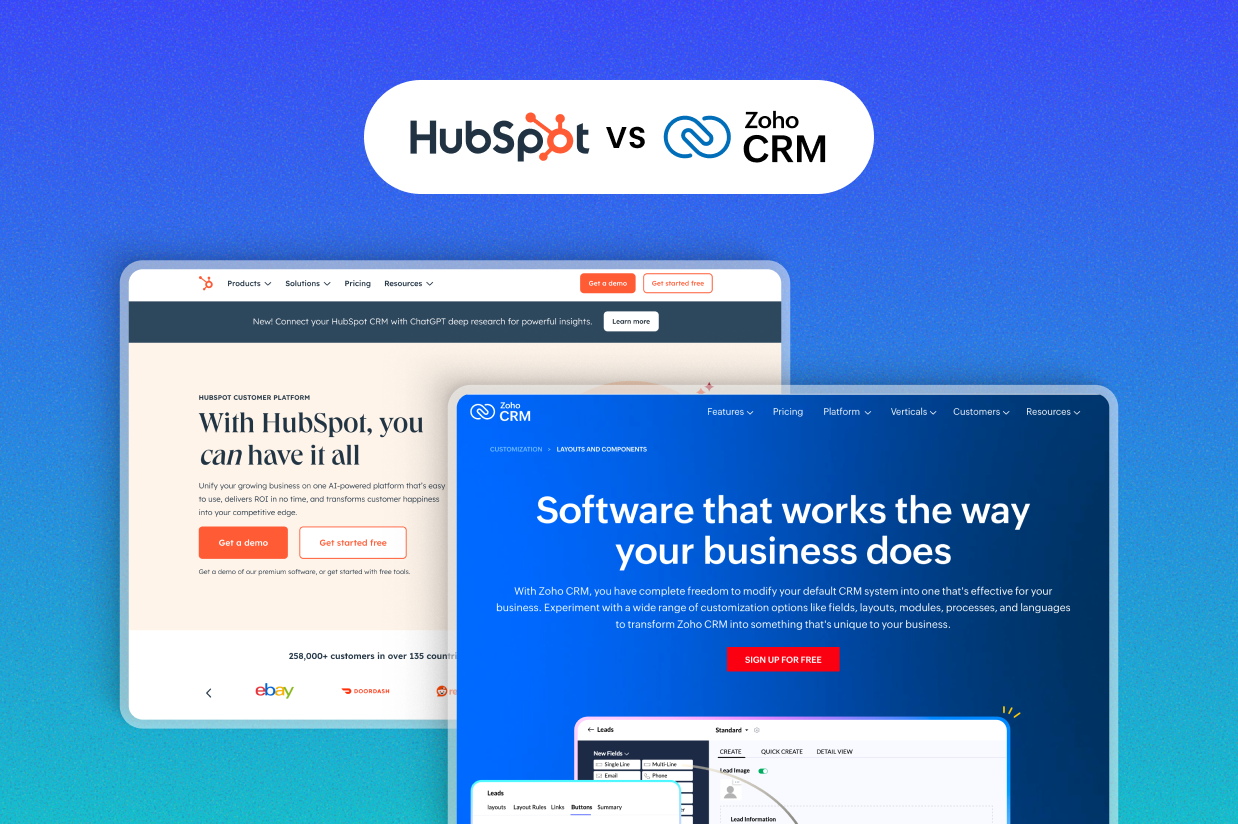
Trying to decide between HubSpot vs Zoho CRM as the CRM for your business?
Both HubSpot and Zoho CRM can be quality options for businesses of all sizes. However, there are also some differences between the two that might push your business in one direction or the other.
To help you make the right choice for your business, we’ll compare Zoho CRM and HubSpot in the following areas:
- Functionality and scope of features
- Ease of use
- Customizability
- Pricing
If you’re using WordPress for your business’s website, we’ll also cover how the Gravity Forms plugin can help you integrate your WordPress website with both HubSpot and Zoho CRM.
Functionality and scope of features: What can you do with each tool?
Both HubSpot and Zoho CRM use the same basic approach:
- You can access the core CRM for free.
- You can pay to extend the core CRM with additional features for marketing, sales, and customer service. You could choose specific areas to focus on or use unified plans to access functionality in all areas.
Let’s go through things in a little more detail…
HubSpot
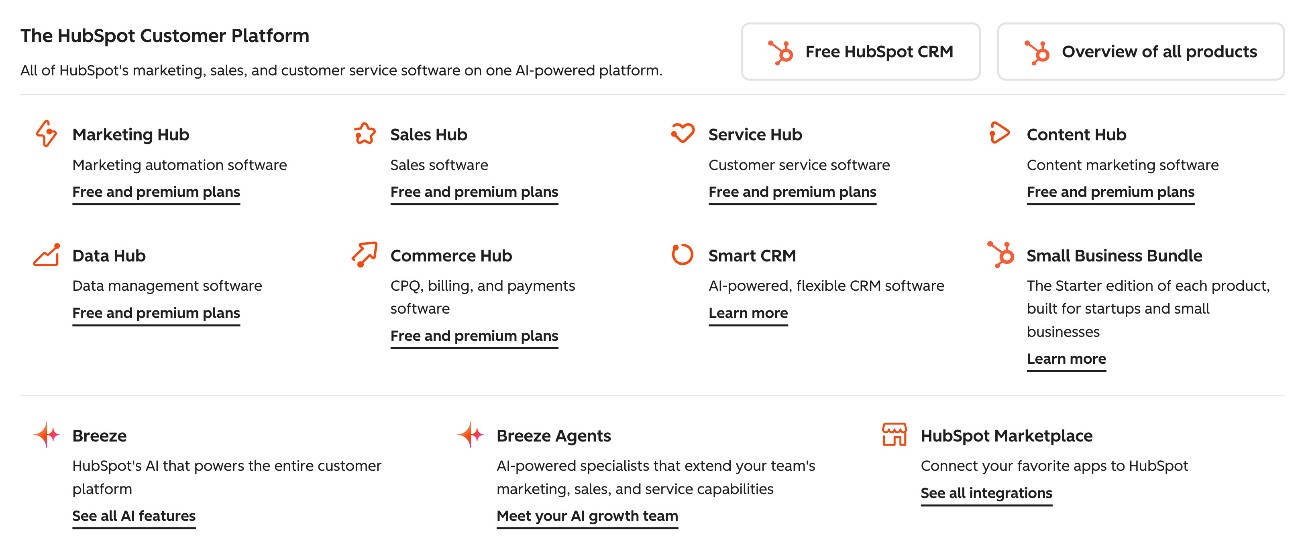
The core of HubSpot is its CRM, which HubSpot calls “Smart CRM”.
Then, HubSpot divides its extended functionality into different products, which it calls “hubs”.
HubSpot currently offers six different hubs that you can use to extend the Smart CRM:
- Marketing Hub – Tools to help with all aspects of marketing, including marketing automation.
- Sales Hub -Tools to help individuals and teams manage the entire sales cycle.
- Service Hub – Tools to offer support via multiple channels, with the ability to offer both human and/or AI agent support.
- Content Hub/CMS Hub – Tools to help businesses create a website with built-in content personalization. For WordPress users, these are probably not needed, but they can be helpful for businesses that don’t already have a website.
- Data Hub – Formerly known as Operations Hub, this offers tools to manage multiple data sources and discover actionable insights.
- Commerce Hub – While this hub is not a full ecommerce solution, it does offer tools to help businesses get paid, including invoices, quotes, subscriptions, and payment links.
HubSpot also offers an AI tool called Breeze, which is built into all of the different hubs. Breeze can help with customer support, content creation, data intelligence, and more.
Zoho
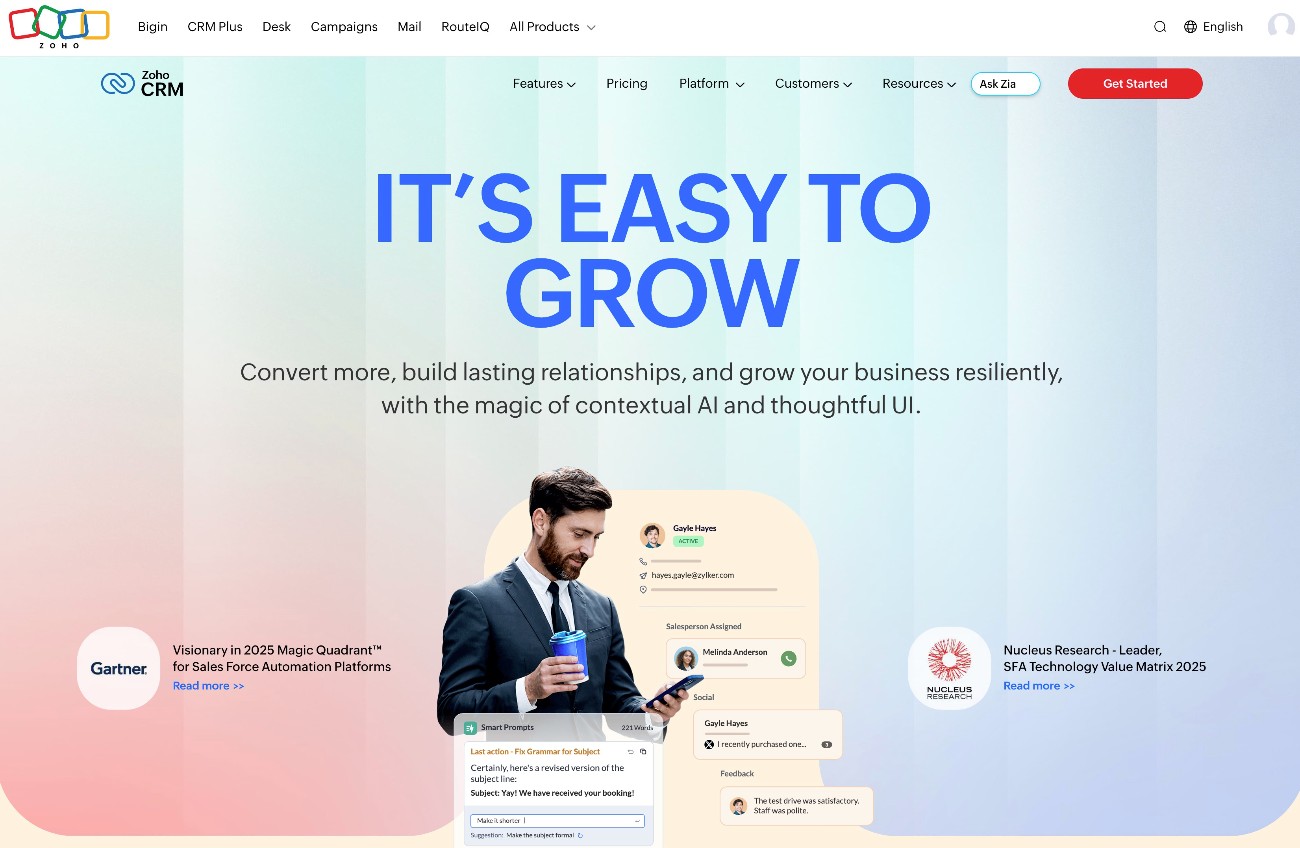
The core Zoho CRM is primarily built to be a sales CRM.
However, like HubSpot, Zoho also offers a number of other services that you can use to extend the CRM into other areas, including marketing and customer service.
Here are some of the most notable companion services for Zoho CRM:
- Zoho Campaigns – Tools to extend the core CRM with much more robust email marketing functionality.
- Zoho Marketing Automation – Tools to set up multi-channel marketing automation strategies.
- Zoho Desk – Tools for customer support. These include helpdesk software, ticket management, knowledge base, omnichannel support, and more.
- Zoho SalesIQ – More extended tools for sales, including live chat and analytics.
- Zoho PageSense – Tools to personalize your website and optimize it for conversions.
- Zoho Analytics – A data studio that lets you connect and visualize different data sources.
This is just a small sampling of the services that Zoho offers. In total, Zoho offers over 55 different business applications, though not all of them are focused on the CRM. For example, Zoho also offers apps for commerce and invoicing, which could help you achieve similar functionality to HubSpot’s Commerce Hub.
You can browse all of Zoho’s apps here.
This is also a difference between HubSpot and Zoho – HubSpot’s core focus is its CRM, whereas a CRM is just one of the many services that Zoho offers.
Ease of use: Which tool is easier to use?
In general, both HubSpot and Zoho are easy to use, even for non-technical users. For example, if you compare them to a third tool like Salesforce, both HubSpot and Zoho CRM are generally a lot easier to use for non-technical users.
Whereas Salesforce often requires a lot of setup to get it working, both HubSpot and Zoho CRM pretty much work out of the box. Even non-technical marketing and sales team members should feel comfortable working in either tool.
Interface design and user experience are always subjective, but HubSpot generally feels a little more polished in terms of the user experience of its interfaces.
HubSpot feels like a lot of thought has gone into the interface design and the functionality, while Zoho CRM can feel a bit more like most of the focus is on functionality. Part of this might be because Zoho CRM can be a lot cheaper than HubSpot – more on that later.
The Zoho CRM interface certainly isn’t “bad” – it can just feel a bit utilitarian, as you can see in this screenshot:
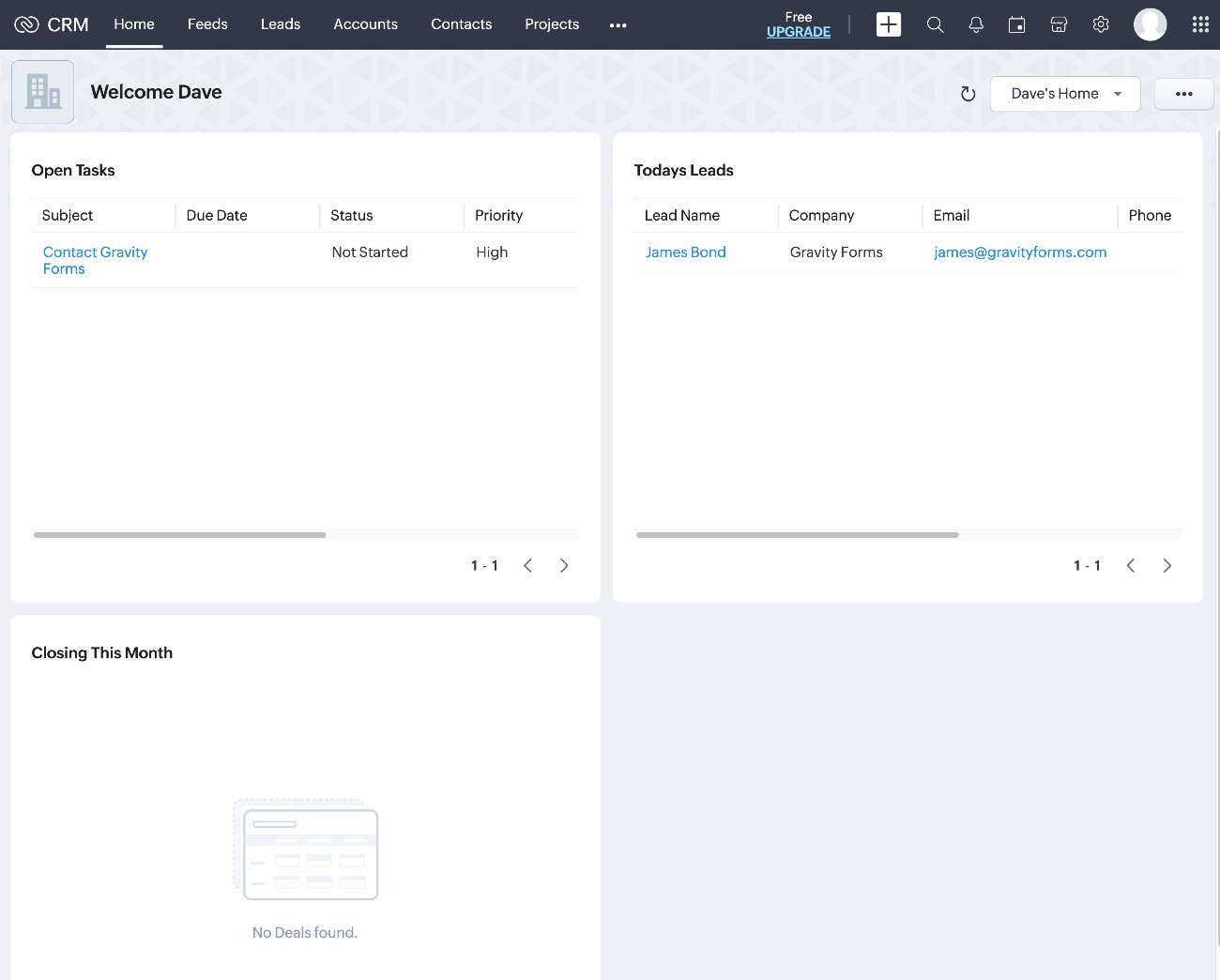
Overall, most people will probably find HubSpot to be a bit more “pleasant” to use, though ease of use is generally pretty good in both tools.
Customizability: Which tool gives you more options for customization?
For many businesses, the out-of-the-box setup in HubSpot and Zoho CRM will be fine.
However, some businesses will want to customize things to adjust to certain unique needs and use cases.
In terms of customizability, HubSpot is probably the slight winner, though neither platform is as customizable as a CRM like Salesforce.
Both platforms let you add custom fields, record layouts, dashboards, etc. This already covers a lot of the customization options that most businesses will need.
Where HubSpot goes a little further is its app integration marketplace, its JavaScript framework for building custom elements, programmable automations, and other more advanced areas.
HubSpot also offers a bit more robust support for custom objects, though Zoho does also support similar functionality via custom modules.
All in all, both tools offer the basic customizations that most businesses need – especially small businesses. However, as you start getting into more advanced customizations, HubSpot is a bit ahead.
Pricing: What will you pay for HubSpot vs Zoho CRM?
Comparing HubSpot vs Zoho CRM pricing can be a little difficult because there are a lot of pricing variables within each service.
Both services offer unified plans that give you access to most/all features for one inclusive price, as well as more a la carte offerings where you can pick and choose which features you want to pay for. Both services also offer free plans that could work for small businesses.
With that being said, we’ll do our best to compare pricing on as even a basis as possible
In general, Zoho CRM has the potential to be the cheaper option of the two services in most situations – especially as you get into higher-tier plans. However, HubSpot could end up cheaper in certain situations, so we encourage you to do the math for your specific use case.
Free plans
To start, both HubSpot and Zoho offer free plans that you can use to access basic functionality at no cost.
Depending on your use case, you might be fine to use these free plans, at least at the beginning.
With HubSpot, you can access the CRM, along with other basic marketing, sales, and service features. The free plan also allows you to connect WordPress to HubSpot using the Gravity Forms HubSpot Add-On – more on that in the next section.
You can visit this page and scroll down to the Features table to learn more about what’s available in HubSpot’s free plan.
Zoho also offers a free plan for its CRM, along with many of its other tools. As with HubSpot, you can also connect WordPress to Zoho CRM using its free plan and the Gravity Forms Zoho Add-On – also more on that later.
You can visit this page to see a feature comparison table between the Zoho CRM free plan and its paid plans.
Paid plans
As we mentioned above, Zoho CRM’s paid plans are cheaper than HubSpot’s paid plans in many, but not all, situations.
Both services use the same basic approach:
- You can use an all-in-one plan that gives you access to most/all features for one flat price.
- You can pick and choose specific services to use. If you only need help with a single area – e.g. sales – this can be more affordable. However, if you want access to broad functionality, it’s usually cheaper to choose a unified plan.
Let’s go through the options…
HubSpot paid plans
The most inexpensive way to get access to a broad feature set in HubSpot is via the HubSpot Customer Platform, which includes tools from all of HubSpot’s “hubs” – Marketing Hub, Sales Hub, Service Hub, Content Hub, and Data Hub.
The Customer Platform Starter plan is very affordable, but prices quickly scale from there:
- Starter – from $9/month/seat.
- Professional – from $1,300/month, which includes six seats (additional seats from $45/month).
- Enterprise – from $4,700/month, which includes eight seats (additional seats from $75/month).
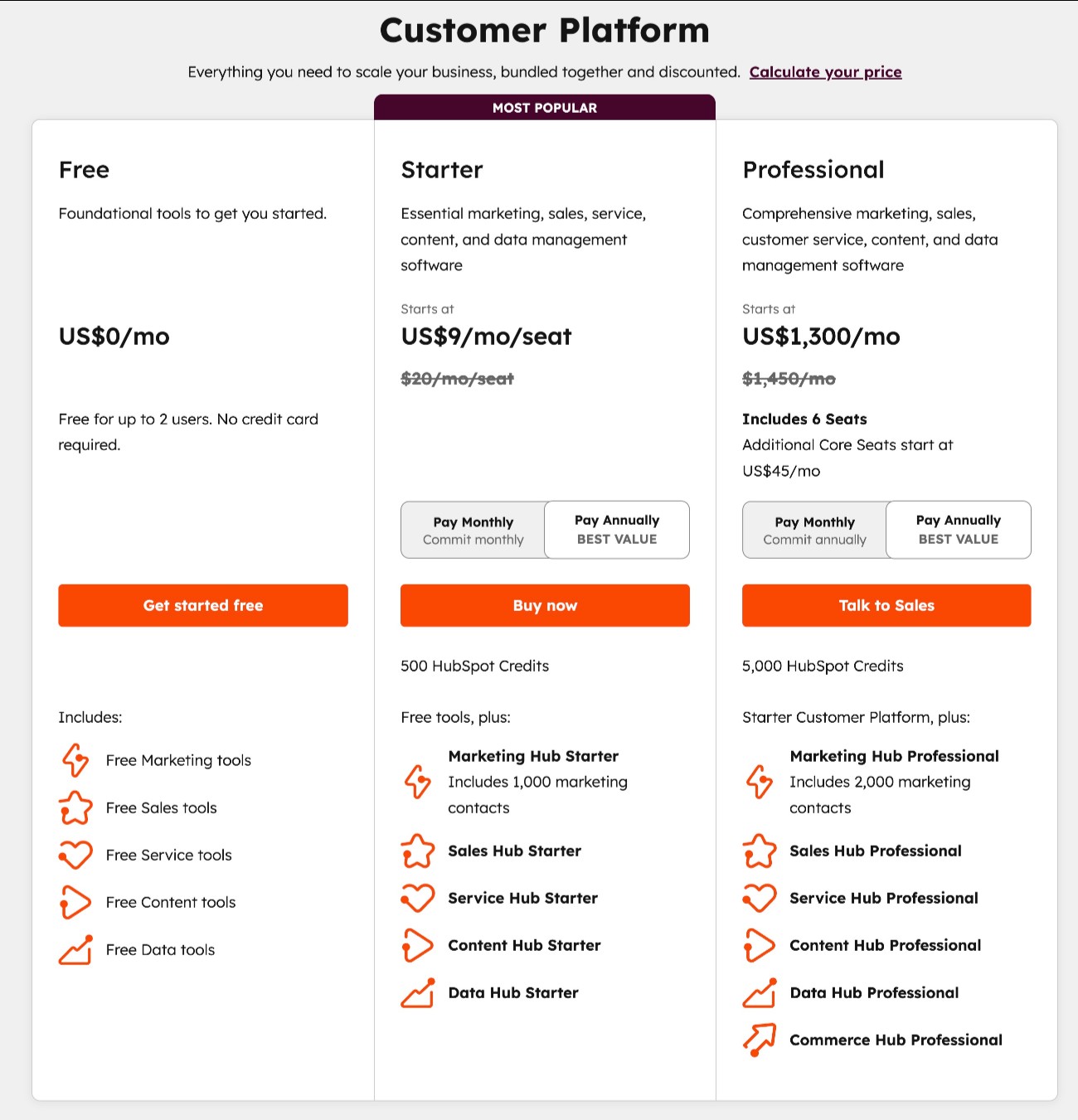
You can also pay for individual hubs instead of the entire Customer Platform. These plans vary in price depending on the hub.
Here are the details for HubSpot’s Marketing Hub:
- Starter – from $9/month/seat.
- Professional – from $800/month, which includes three seats (additional seats from $45/month).
- Enterprise – from $3,600/month, which includes five seats (additional seats from $75/month).
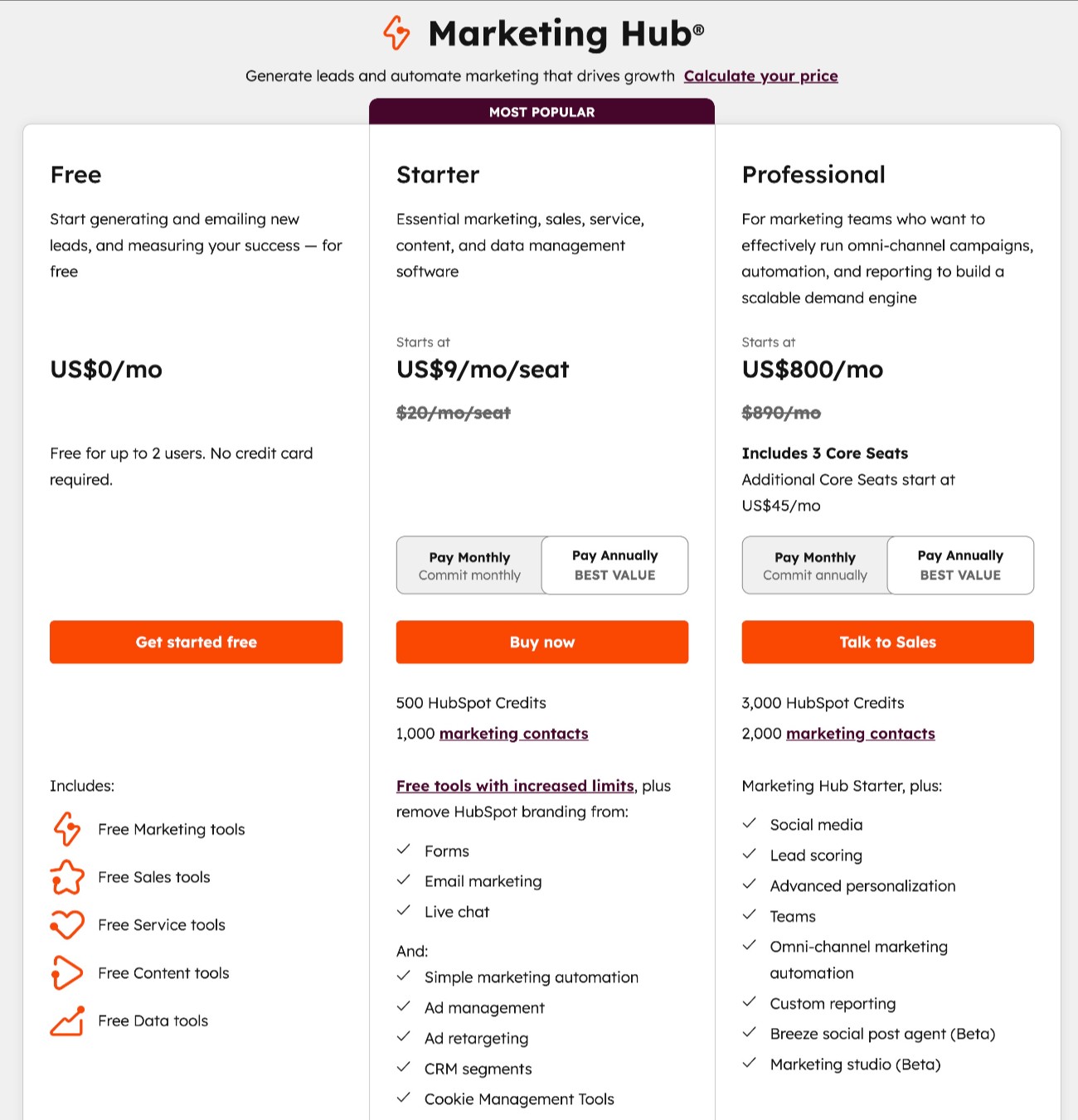
Finally, there are also specific Smart CRM plans that extend the core CRM functionality, but without giving you access to the area-specific features of the specialized hubs. The Smart CRM plans start at $45/month/seat for the Professional plan and $75/month/seat for the Enterprise plan.
You can go here for all of the pricing details.
Zoho paid plans
As with HubSpot, Zoho lets you sign up for individual services directly, but it also offers a unified plan that gets you access to multiple features for one flat price.
If you just want access to Zoho CRM itself, the plans start at $14/user/month, which is similar to HubSpot’s Starter plan. However, where you’ll see much bigger differences is in the higher-tier plans.
For example, Zoho CRM’s most expensive plan tops out at $52/user/month, which is significantly cheaper than HubSpot’s $3,600/month Enterprise plan for its Marketing Hub.
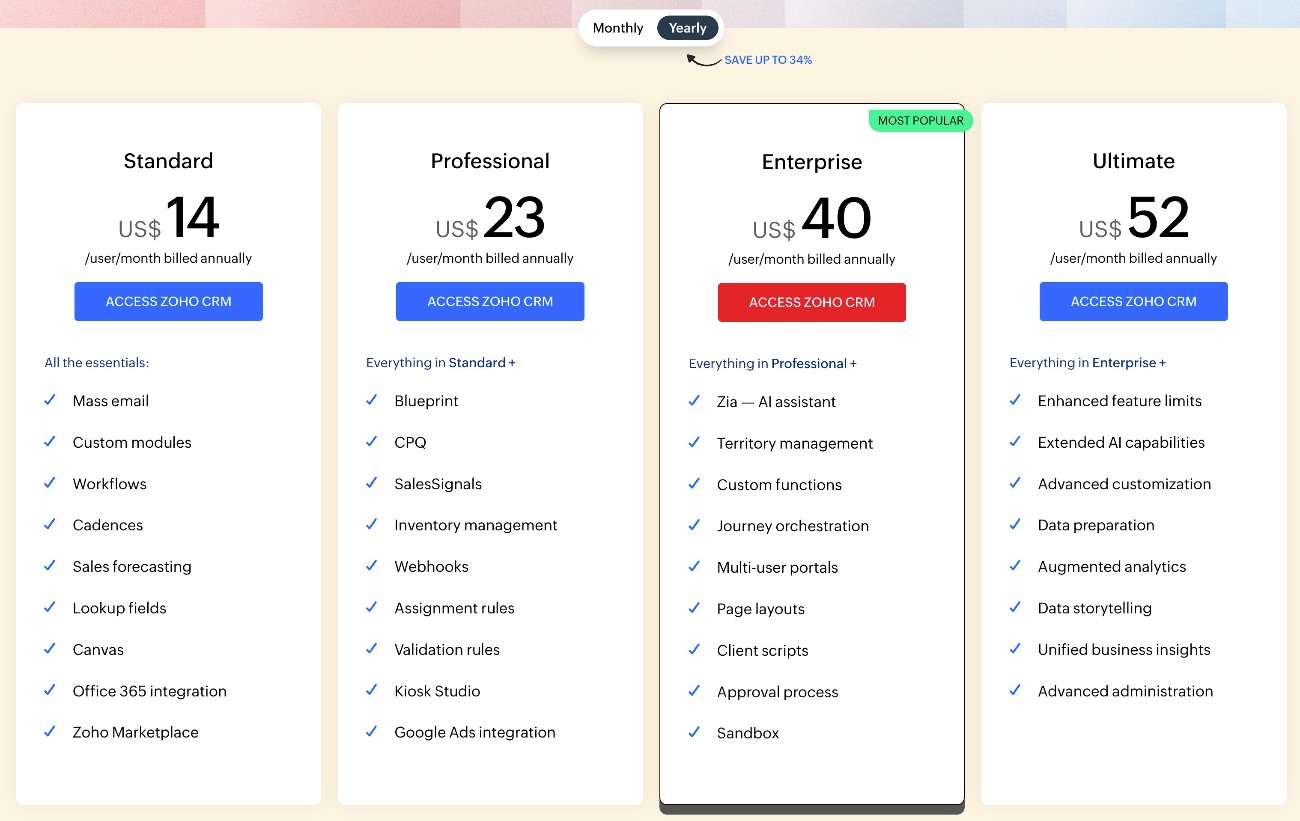
The same trends hold true in terms of Zoho’s unified CRM Plus plans, which include features for sales, marketing, and customer service.
The CRM Plus plans have one Enterprise option, which starts at $57/user/month. This is significantly cheaper than HubSpot’s $4,700/month Enterprise Customer Platform.
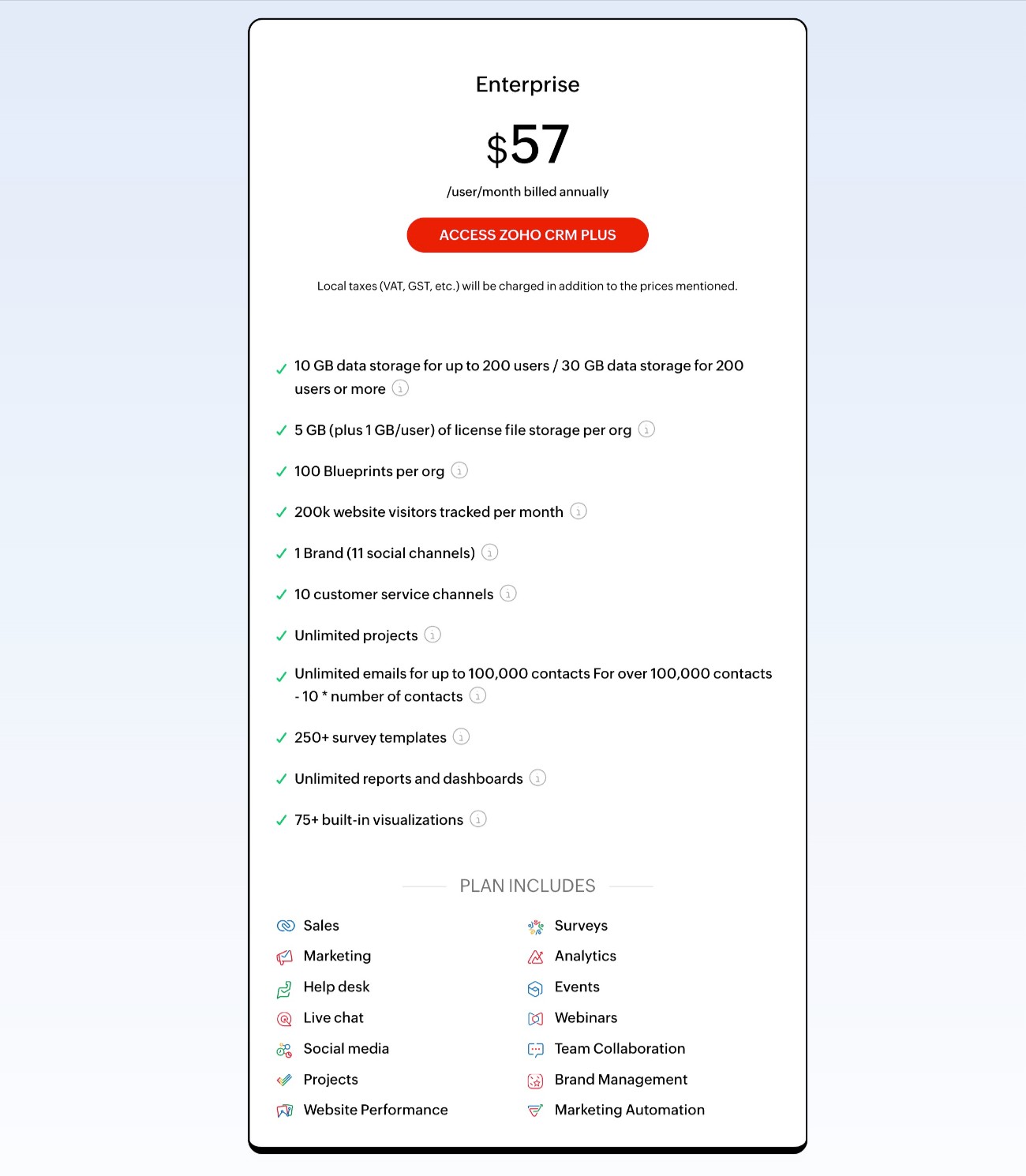
Basically, if Zoho’s offerings meet your needs, you can probably save a significant amount of money by using Zoho. However, you’ll need to do the math on whether the differences between the two offerings are worth the cost savings.
WordPress connections with HubSpot and Zoho CRM
If you’re using WordPress for your website, the Gravity Forms plugin offers dedicated integration add-ons for both HubSpot and Zoho CRM that let you sync form submissions to your CRM.
You could use these add-ons to create dedicated lead generation forms. Or, you could add a CRM integration to other types of forms, such as storing/tagging a customer in your CRM after they make a purchase using a payment form that you create with Gravity Forms.
Below, we’ll go through how both of these add-ons work…
Gravity Forms HubSpot Add-On
The Gravity Forms HubSpot Add-On is available on all Gravity Forms licenses, including the Basic license.
To start, the add-on offers a very easy setup process that lets you connect your WordPress site in just a few clicks using the HubSpot authorization flow.
Once you connect your site, you get a number of options for syncing your WordPress forms with HubSpot. Here are some of the most notable features:
- Control lead status, stage, and owner – When you sync a contact with HubSpot, you’re able to customize its contact owner, lead status, and lifecycle stage. You can also use conditional logic to assign a different contact owner depending on how the person fills out the form.
- Map form fields to HubSpot fields – You can fully control how to map the data from fields in your form to HubSpot CRM, including support for any custom fields that you’ve added to HubSpot.
- Add conditional logic rules – You can add your own conditional logic rules to only sync contacts to HubSpot if they meet certain conditions. Or, you could sync contacts in different ways depending on how they fill out the form.
To see it in action, check out our guide on how to create a HubSpot contact form in WordPress.
Gravity Forms Zoho CRM Add-On
The Gravity Forms Zoho CRM Add-On is available on the Pro, Elite, and Nonprofit licenses.
With it, you can connect all of your forms to Zoho CRM. Here are some of the notable options you get for controlling the connection:
- Create contacts or leads (or update) – Choose whether to create a new contact or lead in Zoho CRM when someone submits the form. If the person’s information already exists, you can also choose to update the existing details instead of creating a new entry.
- Map form fields to Zoho CRM – Map data from form fields to any field in Zoho CRM.
- Assign contact/lead owner – Assign contacts/leads to specific owners, including using conditional rules to assign different owners depending on how the person filled out the form.
- Assign other lead details – You can also assign other details such as lead source, rating, and description.
- Upload file attachments to Zoho CRM – If you add a file upload field to your form, you can attach those files to the lead/contact in Zoho CRM.
- Create tasks – You have the option to create a new task in Zoho CRM for the lead.
- Enable other options – You can also enable many other options in Zoho CRM including Approval Mode, Workflow Mode, Email Opt Out, and more.
- Add conditional logic rules – Add your own custom conditional logic rules to most of these elements. You can use conditional logic to choose whether or not to sync a contact’s details in the first place, as well as how to sync those details (such as assigning different owners or tags).
To see how it works, you can read our guide to connecting WordPress to Zoho.
Final thoughts
Choosing between HubSpot vs Zoho CRM really comes down to your specific situation.
If you want the most powerful, user friendly, and easily customizable option, HubSpot could be the better choice. However, while HubSpot’s Starter plans are affordably priced, HubSpot can quickly get significantly more expensive than Zoho CRM if you need the Professional or Enterprise version of its tools/hubs.
While Zoho CRM isn’t quite as polished as HubSpot, it can do a lot of the same basic functionality at a significantly lower price. For that reason, it could be a good option if you want to keep costs as low as possible, while still accessing solid CRM functionality.
Regardless of whether you choose HubSpot or Zoho, Gravity Forms offers direct integration add-ons for both services that help you connect your WordPress forms to your CRM.
The Gravity Forms HubSpot Add-On is available on any Gravity Forms license, including the Basic, Pro, Elite, and Nonprofit licenses. The Gravity Forms Zoho CRM Add-On is available on the Pro, Elite, and Nonprofit licenses, but not the Basic license.
If you’re ready to get started with either service, you can purchase your Gravity Forms license here.

If you want to keep up-to-date with what’s happening on the blog sign up for the Gravity Forms newsletter!
"*" indicates required fields