We’re excited to announce the launch of a brand new Gravity Forms Add-On – Klaviyo. The Klaviyo integration allows you to send form submissions directly to your Klaviyo account, creating and updating profiles and adding them to your chosen lists.
The Gravity Forms Klaviyo Add-On is currently in beta, and we’re asking members of our community to install the add-on and provide us with feedback. There’s also something new this time around: alongside finding the Klaviyo Add-On in your Gravity Forms account as usual, it’s also now available on Gravity Labs, where you can find out more about the integration and download it too (more on that below).
It is important to note that the Klaviyo beta is not recommended for production sites – you should install and test the beta add-on in a sandbox environment.
Read on to find out more about the add-on and how to get started with the beta today…
Klaviyo: Everything you need to know!
Klaviyo is a powerful marketing automation platform built for ecommerce and beyond, helping businesses turn customer data into personalized email and SMS campaigns that drive growth.
Its standout features include:
- Customer profiles – Klaviyo centralizes your customer and subscriber data, giving you a single source of truth for every contact and their activity.
- Email & SMS marketing – Reach your audience across channels with a drag-and-drop email editor, a large library of templates, and built-in tools for campaigns and one-off sends.
- Powerful segmentation – Build highly targeted segments based on behavior, demographics, and engagement so the right message reaches the right person at the right time.
- Automation & flows – Set up automated flows for welcome sequences, abandoned carts, post-purchase follow-ups, and more, triggered by your customers’ actions.
- Analytics & AI – Lean on predictive insights, A/B testing, and detailed reporting to refine your strategy and get more from every campaign.
Klaviyo offers a free plan supporting up to 250 active profiles, with 500 email sends and 150 mobile messaging credits per month. Paid email plans start at $20 per month (at time of writing).
Klaviyo Add-On beta: An introduction
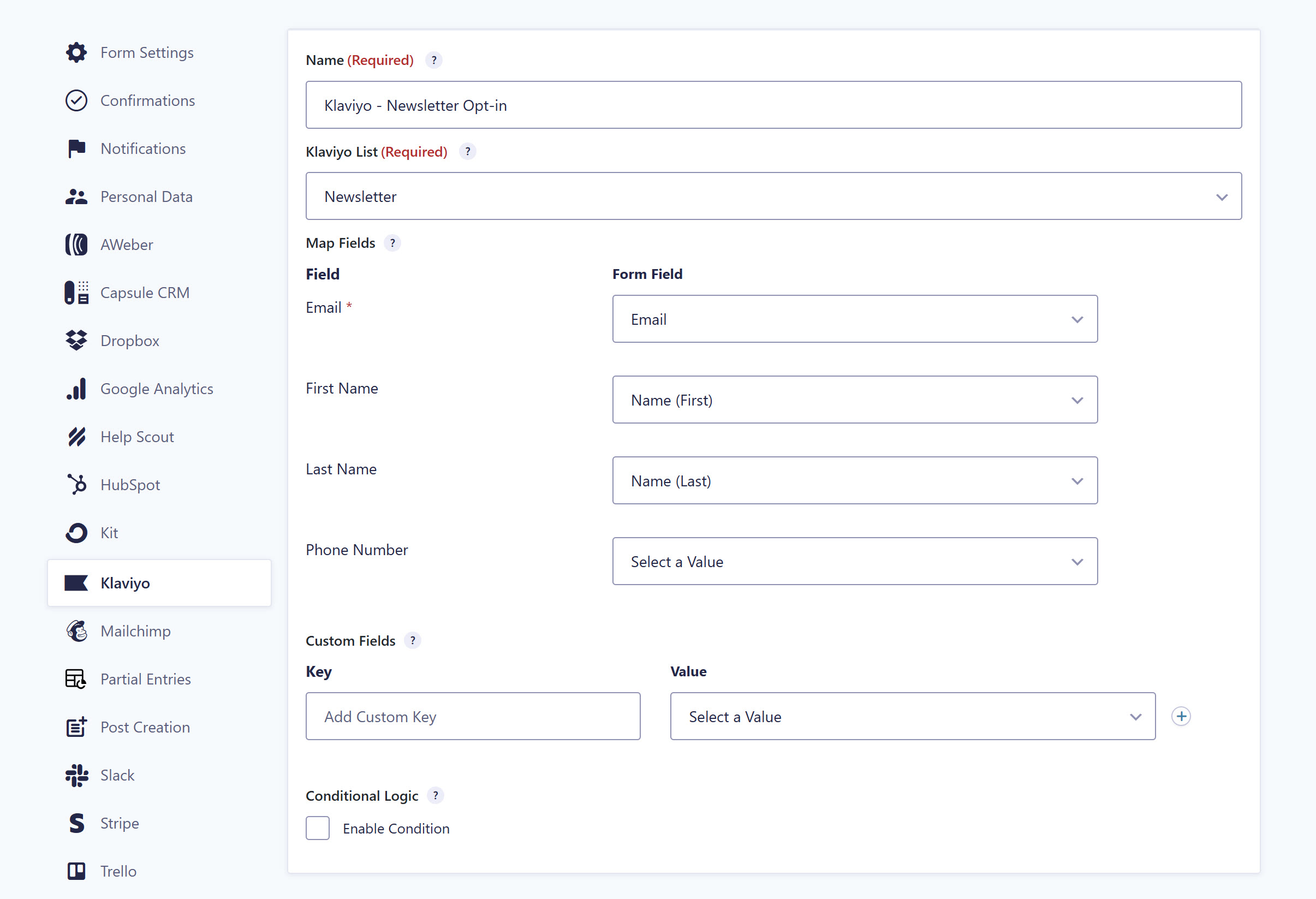
With the new Gravity Forms Klaviyo integration, you can now send form submission data directly to your Klaviyo account. Capture leads through Gravity Forms, then automatically create or update Klaviyo profiles and add them to your lists – ready to be segmented, nurtured, and engaged.
Key features of the Klaviyo Add-On include:
- Create or update profiles – Create new Klaviyo profiles, or update existing ones when a submitted email address already exists, so your data stays up to date.
- Automatic list subscription – Automatically add form submissions to a selected Klaviyo list, making it easy to organize contacts and send targeted campaigns.
- Field mapping – Map Gravity Forms fields to Klaviyo profile fields like email, first name, last name, and phone number.
- Custom fields – Create and map custom fields to Klaviyo profile properties for further segmentation and personalization.
- Conditional Logic – Use Gravity Forms’ built-in conditional logic to control exactly which entries are sent to Klaviyo, ensuring only qualified leads or specific submissions are processed.
For more details on the Klaviyo Add-On, check out the Labs site.
Install the Klaviyo Add-On today!
As is normal for a beta, we can’t guarantee a totally smooth ride. Therefore, please note that we do not recommend the Klaviyo Add-On beta for use on production sites – you should only install and test the beta in a sandbox environment.
You can now get the Klaviyo Add-On from two places:
- Download from your Gravity Forms account – Open your Gravity Forms Account and under Downloads scroll down to Basic Add-Ons, where you’ll find the Klaviyo Add-On ready to download.
- Download from Gravity Labs – The Klaviyo Add-On is also available on Gravity Labs, our home for early ideas, side projects, and experimental tools from across the Gravity team. Head to the Labs site to read more about the add-on and download it directly from there.
Whichever route you choose, install and activate the add-on on your test site as normal, then go to Forms > Settings > Klaviyo to connect your Klaviyo account and start building feeds.
For help with setting up the add-on, check out the Labs documentation.
Best practice for testing the Klaviyo Add-On beta
Here are a few top tips and resources to help you get started with the new Klaviyo Add-On…
- Don’t install the Klaviyo beta on your live site – The Klaviyo Add-On has been released as a beta and is not recommended for production sites. You should only install and test the beta in a sandbox environment.
- Explore it on Gravity Labs – Visit the Gravity Labs site to learn more about the add-on, see it alongside our other experimental tools, and download the latest build.
- Question for Support? – You can reach out via our normal help channels if you have questions about setting up or using the add-on. Additionally, you can contact us via our Community Forums.
- Give Us Feedback – The beta period enables us to collect feedback from our customers – if you have any questions, concerns, or come across any issues that we may need to know about, please let us know.
Thanks for supporting the beta release of this new add-on – we look forward to hearing your feedback!

Newsletter
If you want to keep up-to-date with what’s happening on the blog sign up for the Gravity Forms newsletter!
"*" indicates required fields