We’re pleased to announce the release of Gravity Forms 3.1.2. This release includes a number of updates and fixes including…
- Added security enhancements.
- Added merge tag modifiers for the Phone and Time fields so that phone numbers can be output without formatting and time values can be output as the hour, minute, or AM/PM.
- Updated the legacy reCAPTCHA v2 settings page to include a way to remove the keys from the read-only settings.
Get exactly the phone and time output you need
Merge tags for the Phone and Time fields now support modifiers, so you have more control over how those values show up in notifications, confirmations, and anywhere else you use merge tags.
Phone field merge tags can now be output without formatting, giving you the raw digits when that’s what your workflow or a connected integration expects.
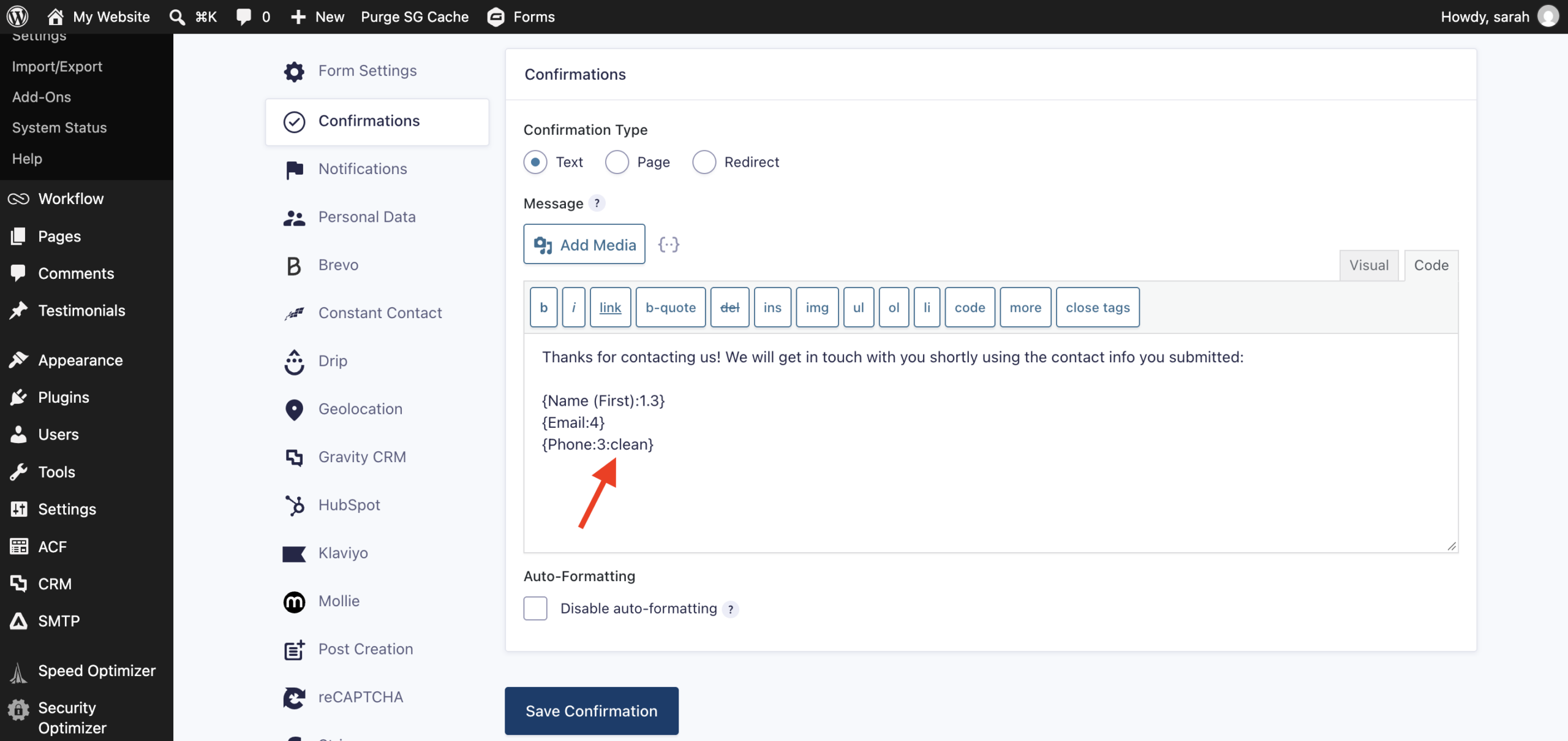
Time field merge tags gained matching flexibility, with modifiers to output just the hour, the minute, or AM/PM instead of the full time value.
This pairs with an updated default for the International Formatted Phone field: the {all_fields} merge tag and the {Phone:<id>} merge tag now display only the formatted phone number, keeping your default output clean and predictable.
Visit our documentation to learn more about working with merge tags in Gravity Forms.
Built to run your business, not just collect information
Gravity Forms gives you a form builder that grows with your business – from a simple contact form to the systems that run your leads, payments, registrations, and approvals.
Design forms visually with the drag-and-drop editor, or start from a ready-made template and customize it to fit your needs.
Every submission can trigger a notification, kick off a payment, sync to your CRM, or move a process forward automatically, so your team spends less time on manual data entry and more time on the work that matters.
With a wide library of integrations and add-ons, Gravity Forms scales alongside your business – and when you need a hand, our support team is ready to help.
Why choose Gravity Forms:
- Intuitive form builder – Easily create custom forms using our visual drag-and-drop editor – no coding required.
- Ready-to-use templates – Get started fast with a collection of prebuilt, customizable form templates for common use cases.
- Powerful integrations – Extend your forms with integrations that connect to leading CRMs, payment processors, email marketing tools, and more.
- Developer-friendly documentation – From basic tutorials to advanced customization guides, our comprehensive docs are here to help every step of the way.
- Responsive expert support – Have a question? Our knowledgeable support team is here to help you troubleshoot and succeed.
- Email reliability with Gravity SMTP – Improve email deliverability by connecting your WordPress site to trusted email services. Gravity SMTP is included free with the Elite license.
Want to try Gravity Forms before purchasing your license? Try a free online demo.
Gravity Forms 3.1.2 changelog
- Added security enhancements.
- Added the gform_addon_pages_using_components filter to allow modifying the add-on pages that use Gravity Forms components.
- Added merge tag modifiers for the Phone and Time fields so that phone numbers can be output without formatting and time values can be output as the hour, minute, or AM/PM.
- Updated the legacy reCAPTCHA v2 settings page to include a way to remove the keys from the read-only settings.
- Updated the license key setting to be editable when GoDaddy defines an expired Starter license using the GF_LICENSE_KEY constant.
- Updated the default behavior of the International Formatted Phone Field merge tags. The {all_fields} merge tag now only displays the formatted phone number, and the {Phone:1} merge tag now only displays the formatted phone number.
- Fixed a JavaScript error when adding or removing a List field row while editing an entry.
- Fixed the interface for the List field multiple columns setting.
- Fixed a fatal error that can occur when a Radio or Checkbox field receives a malformed array value.
- Fixed an issue where multi-file asynchronous uploads could exceed the configured Maximum File Size when uploaded in chunks.
- Fixed an issue where fields using custom icons could not be dragged properly in the form editor.
- Fixed an issue where the strings for the datepicker day initials use the wrong translation function.
- Fixed an issue where the “value was sanitized” logging statement is recorded on form display for some field types when the field value is empty.
- Fixed an issue where the entry list star toggle is not accessible via keyboard or screen readers.
- Fixed an issue where the “Choose File” button overlaps with the field border in conversational forms when using Safari.
- Removed an extra slash from the Jetpack Autoloader file path used to include the canonical WordPress MCP Adapter package.
Note: After updating, clear your site’s cache to ensure you’re running the latest version. We also recommend excluding pages that include Gravity Forms from caching and script optimization, as cached form pages can interfere with dynamic population, field validation, honeypot, and add-ons that rely on time-sensitive tokens. Read our FAQ on Cache and Script Optimizer Issues for details and exclusion steps by host/plugin.