Gravity Forms is pleased to announce the release of the HubSpot Add-On version 3.0.3. This release contains the following updates…
- Added HubSpot Form Options section to the feed settings with options to always create a contact for new email addresses and to exclude the HubSpot tracking cookie from form submissions.
- Updated the add-on to show which Portal Id the user is connected to.
More control over how contacts are created in HubSpot
We’ve added a new HubSpot Form Options section to the HubSpot feed settings, giving you greater control over how form submissions are handled in HubSpot.
The new Always create contact for new email address setting lets you determine whether HubSpot should create a brand-new contact record for every unique email submitted through your form.
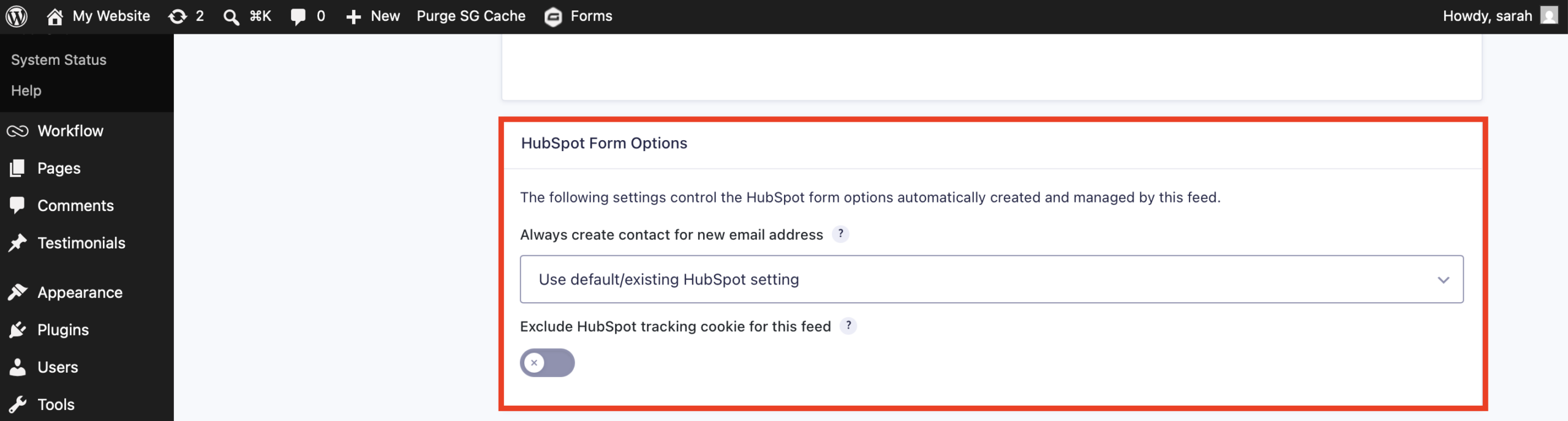
When enabled, each new email address results in a separate contact record. When disabled, HubSpot may use browser tracking cookies to associate the submission with an existing contact, which can result in records being updated or merged.
We’ve also added an Exclude HubSpot tracking cookie for this feed option, allowing you to prevent HubSpot’s tracking cookie from being included with form submissions when needed. This gives you additional flexibility over how visitor data is associated with contacts in HubSpot.
Why use the Gravity Forms HubSpot integration:
HubSpot unifies marketing, sales, and CRM in one powerful platform, with flexible plans that support teams at every stage of growth.
The Gravity Forms HubSpot integration connects your WordPress forms directly to HubSpot, so submissions can create or update contacts and kick off workflows automatically. More features include…
- Effortless contact syncing – Automatically create or update contacts in HubSpot whenever someone fills out a form on your site.
- Custom data mapping – Control exactly what data gets sent to HubSpot and where it goes. Use conditional logic to fine-tune when and how submissions are processed.
- Automated email follow-ups – Trigger HubSpot email sequences right after a form is submitted, helping you stay connected and top-of-mind.
- Insight-driven engagement – Track form activity and site behavior in HubSpot to better understand your leads and deliver more relevant, high-converting messages.
Want to get started? Check out our article featuring HubSpot.
Note: The HubSpot integration is available with all Gravity Forms licenses. Visit our pricing page for more information on the features and other add-ons available on each plan.
HubSpot Add-On v3.0.3 Changelog
- Added HubSpot Form Options section to the feed settings with options to always create a contact for new email addresses and to exclude the HubSpot tracking cookie from form submissions.
- Updated the addon to show which Portal Id the user is connected to.
- Fixed an issue where single checkbox type HubSpot properties are missing from the feed field mapping.
If you are a Gravity Forms license holder, the HubSpot 3.0.3 can be updated in your WordPress dashboard, or downloaded manually from your Gravity account.