Written by the editorial team at Siren Affiliates
If you are looking for a practical way to track referrals and reward the partners who generate them, you are in the right place.
With Gravity Forms and Siren, you can turn an existing WordPress form into a trackable referral touchpoint. Gravity Forms collects the information your team needs, while Siren identifies the referring partner and creates the corresponding lead, sale, and reward records.
In this tutorial, we’ll build a consultation-request referral program from start to finish. You’ll learn how to connect both tools, attribute each submission to the right partner, configure the reward, and test the complete workflow.
Note: Siren is a third-party solution. Gravity Forms does not offer support for this platform, nor is this article intended to be a Gravity Forms endorsement of this platform, its developers, or quality of support. As always, we recommend you extensively evaluate all solutions to ensure their suitability for your purpose.
What is the Siren Gravity Forms Add-On?
The Siren Gravity Forms Add-On connects Gravity Forms submissions with Siren’s partner attribution and reward engine.
The integration runs on the same WordPress site as Gravity Forms. Once both plugins are installed and active, Siren can detect Gravity Forms without a separate external connector. You then create a Siren feed for the relevant form and choose the program that should receive its submissions.
What can you build with Gravity Forms and Siren?
Because the form and reward logic are configured separately, the same integration can support several program types:
- Pay-per-lead programs – Reward a partner with a fixed bounty when a referred visitor submits a qualified lead form.
- Form-based sales commissions – Pay a flat or percentage-based commission when a form with product fields records an eligible sale.
- Partner application and onboarding workflows – Use a Gravity Forms submission to create a new collaborator and add the person to a program.
- B2B referral programs – Attribute demo requests, quote requests, consultations, and other high-intent submissions to the referring partner.
- Ambassador and community programs – Reward members or advocates for sending qualified people to a registration, event, or campaign form.
Siren can support fixed bounties, percentage commissions on eligible sales, signup bonuses, tiered rewards based on volume, and workflows that require manual approval before a reward becomes payable.
Benefits of connecting form submissions with attribution and rewards
A direct connection gives each form submission business context. The Gravity Forms entry remains the source record for the information submitted, and Siren records the partner relationship, program, reward, and status around that event.
- Reduce manual reconciliation – The partner, form submission, and reward remain connected, so your team does not need to repeatedly compare exports from separate systems.
- Use the right reward for each form – A demo request might earn a fixed lead bounty, while a paid order might earn a percentage commission.
- Add a qualification step – Keep rewards pending until your team confirms that a lead meets the program criteria or a payment is valid.
- Give partners clearer feedback – Partners can see which referred actions were recorded and how their rewards progress through the workflow.
What you’ll need to get started
Before building the workflow, make sure you have:
- A WordPress website with Gravity Forms installed and activated.
- The Siren plugin installed and activated on the same website.
- A new or existing Gravity Forms form for the action you want to track.
- A clear definition of a qualifying submission, including any required fields or payment status.
- A reward rule, such as a fixed amount per approved lead or a percentage of an eligible sale.
- At least one test partner or collaborator with a personalized referral link.
It also helps to decide whether submissions should be approved automatically or reviewed first. Manual approval is often useful for lead programs because it lets you reject duplicates, spam, incomplete inquiries, or submissions that do not meet the agreed criteria.
7 steps to track referrals accurately and reward partners with Gravity Forms and Siren
An accurate referral workflow needs to answer four questions:
- What action happened?
- Which partner drove it?
- Which program and attribution rule apply?
- What reward is now owed?
Gravity Forms captures the submission, while Siren preserves the connection between that event and the resulting reward.
Step 1: Define the referral action and reward
Start by deciding what the form submission represents: a lead, application, partner signup, or sale. Then define what makes that action eligible.
Choose the reward at the same time, and if submissions require human qualification, keep the reward pending until your team reviews it.
Step 2: Create or choose the Gravity Forms form
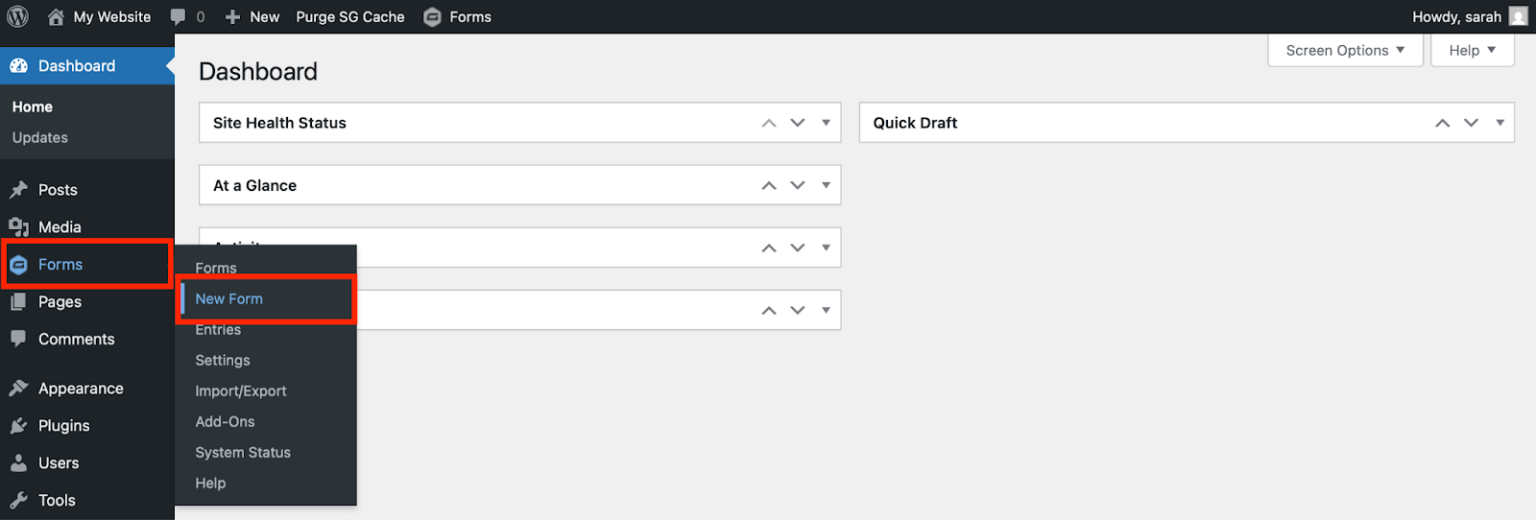
Navigate to Forms > New Form to create the referral form, or open the existing form you want partners to promote. Include the fields your team needs to follow up and determine whether the submission qualifies, but avoid adding fields that create unnecessary friction.
A form with product fields can record a sale event and calculate a commission from the eligible transaction. Configure the confirmation and notification emails as you normally would in Gravity Forms.
Step 3: Create the program and reward rule in Siren
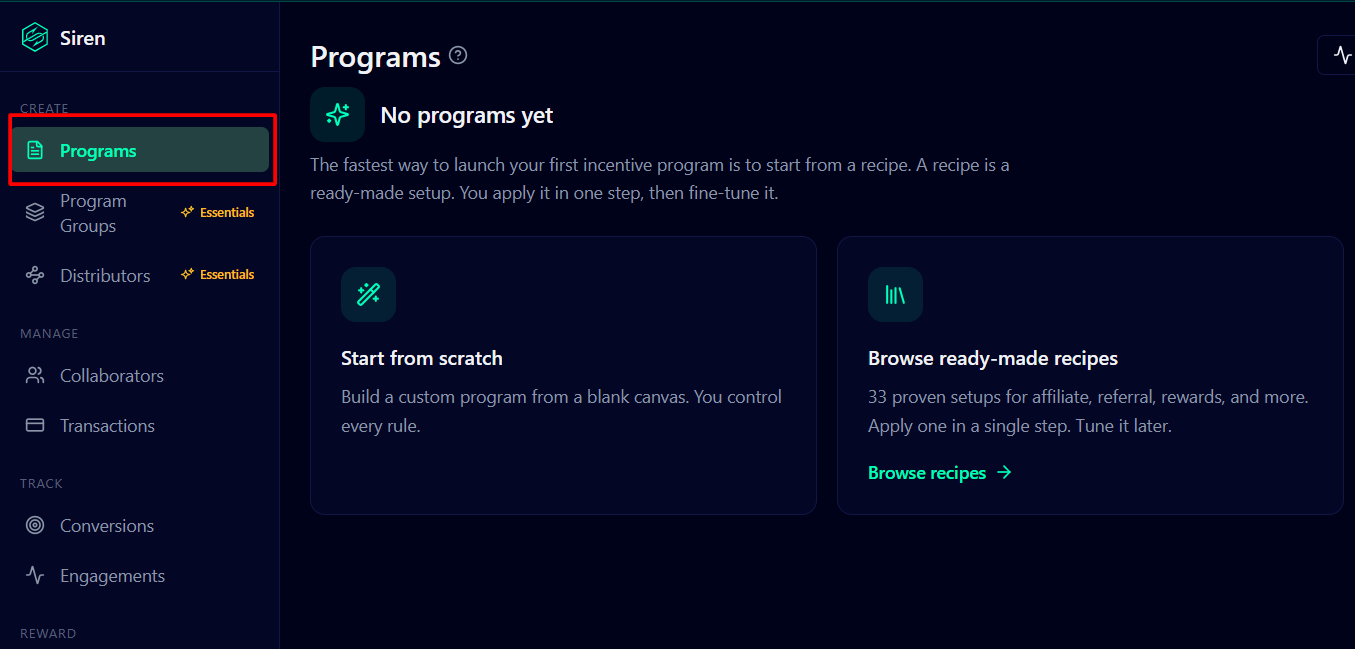
In Siren, create a program for the outcome you defined and select Gravity Forms submission as the conversion type. Give the program a descriptive internal name so it is easy to distinguish from other partner programs.
Configure the reward amount, qualification requirements, and approval behavior. Then add the participating collaborators. Each collaborator receives a personalized referral link that can point to the page containing the form.
Step 4: Connect the form with a Siren feed
Open the form settings, select Siren, and create a feed for the program. Choose the correct program and save the feed. This feed tells Siren how to interpret this form when a visitor submits it.
This is important when you have several forms or programs. A quote request, partner application, and paid order can each use a different feed, qualification rule, and reward without requiring you to rebuild the forms.
Step 5: Send visitors through each partner’s referral link
Give each partner their personalized referral link and point it to the page where the connected form is embedded. When a visitor follows that link and submits the form, Gravity Forms stores the entry, and Siren uses the referral context to associate the lead or sale with the correct collaborator and program.
Step 6: Review the attribution and approve the reward
Now confirm that Gravity Forms received the entry and that Siren recorded the expected lead or sale. Siren then applies the program’s reward rule to calculate what the partner earned.
With manual approval, your team can check for duplicates, spam, poor-fit leads, failed payments, or refunds before the reward becomes payable. Approved rewards move forward; rejected or adjusted submissions do not have to generate a payout.
Step 7: Test the complete referral journey
Run an end-to-end test before distributing links to partners. Use a private or incognito browser window, then:
- Open the landing page through a test collaborator’s referral link.
- Submit the form with clearly identifiable test data.
- Confirm that the entry appears under Forms > Entries in Gravity Forms.
- Verify that Siren credited the correct collaborator and program.
- Check the reward amount, approval status, and notification workflow.
- Approve the test reward and confirm that it becomes available for payout.
If something is missing, check the referral link, embedded form, active Siren feed, selected program, product fields, and approval settings before changing the reward logic.
Best practices for a reliable referral workflow
- Define a qualified action before launch – State exactly which submissions are eligible and how duplicates, spam, test entries, refunds, or cancellations will be handled.
- Start with one form and one program – Validate the complete workflow before introducing additional forms, partner types, or reward models.
- Use manual approval where quality matters – A review step can protect the program when the value of a lead depends on geography, company size, intent, or other criteria.
- Keep naming consistent – Use recognizable form, feed, and program names so your team can understand how the pieces connect.
- Retest after changes – Submit a new referral test whenever you modify the form, feed, program, attribution rules, or reward calculation.
Turn form submissions into a partner growth channel
Gravity Forms gives you the flexibility to collect leads, applications, registrations, and payments. Siren adds the partner attribution and reward workflow needed to turn those submissions into a repeatable program.
Start with one meaningful conversion and one easy-to-explain reward. Once the complete workflow is accurate, you can apply the same approach to additional forms and programs without moving the experience away from WordPress.
To explore the integration, review the Siren Affiliates Add-On in the Gravity Forms marketplace and Siren’s Gravity Forms integration page.
For a deeper look at planning the program itself, read How to Create a Partner Referral Program in WordPress With Siren and Gravity Forms.

Newsletter
If you want to keep up-to-date with what’s happening on the blog sign up for the Gravity Forms newsletter!
"*" indicates required fields