Written by the editorial team at ApiX-Drive…
If you run events for a living, you already know the bottleneck isn’t the form. It’s everything that happens after someone fills it in.
A prospect signs up for your webinar. Now someone on your team has to add them to the calendar invite, drop them into the right email list, and ping the account manager so they know a new lead just landed. Multiply that by fifty signups a day across three event types, and you’ve built yourself a full-time copy-paste job.
This post walks through how to take that job off your team’s plate using Gravity Forms as the entry point, with ApiX-Drive routing the data to the tools you’re already using.
Note: ApiX-Drive is a third-party solution. Gravity Forms does not offer support for this platform, nor is this article intended to be a Gravity Forms endorsement of this platform, its developers, or quality of support. As always, we recommend you extensively evaluate all solutions to ensure their suitability for your purpose.
The scenario
Picture a small online education company running daily sessions: trial lessons in the morning, live demos at lunchtime, paid webinars in the evening. Attendance is small per session — ten to thirty people — but the volume across a week adds up fast.
Every signup needs four things to happen:
- The attendee gets added to the right Google Calendar event so they receive an invite
- Their email goes into the matching list in Drip so they get the right pre-event sequence
- The session owner gets a Slack ping so they know who’s coming
- None of the above breaks if the person running ops takes a day off
Gravity Forms handles step zero — capturing the signup. ApiX-Drive handles steps one through four.
The stack
Four tools, one job each:
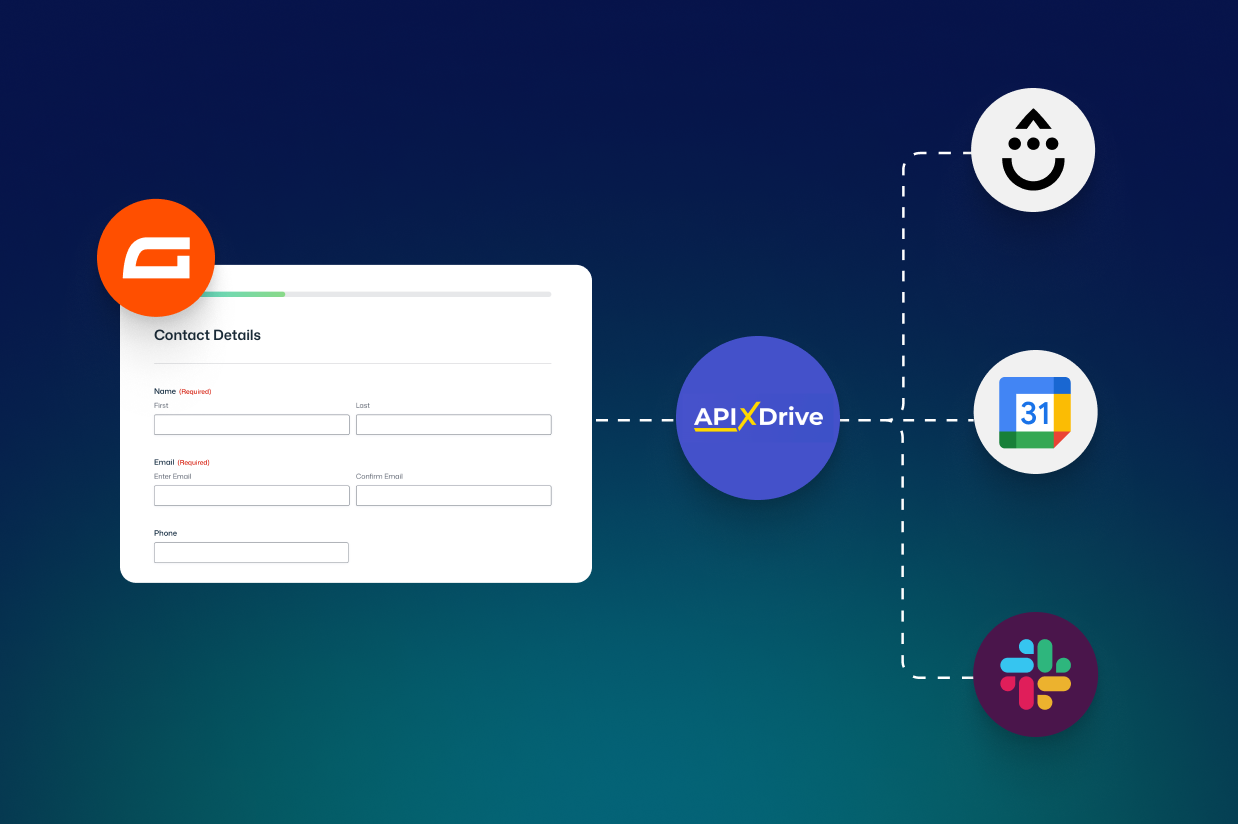
Gravity Forms — the form on your event landing page. Whatever fields you need: name, email, which session they’re booking, dietary requirements if it’s in-person, job title if you want to segment. This is the source of truth for every downstream step, so the field structure matters. Get it right here and the rest is plumbing.
Google Calendar — where the event lives. When a new entry comes in, ApiX-Drive creates a calendar event with the attendee attached, so they get the invite without anyone manually adding them.
Drip — the email tool. New attendees get added to a list (or tagged, depending on how you’ve set Drip up) so the right pre-event and post-event sequences fire automatically. You can split lists by event type, by audience, or by whatever segmentation makes sense for your campaigns.
Slack — internal notification. A message goes to whichever channel owns that event type — #webinars, #sales, #demos — so the person running it knows someone new just signed up.
ApiX-Drive sits between Gravity Forms and the rest, watching for new form entries and pushing the data where it needs to go. No code to worry about, no developer needed to wire it up.
Why this stack and not another
The tool choices here aren’t arbitrary, and they’re worth thinking through before you copy them.
Google Calendar works because the events are frequent, small, and time-specific. Each session is its own entry; a separate event is created in the calendar for each respondent. If you ran one big conference a year with five hundred attendees, Calendar would be the wrong tool — you’d want Google Sheets or a proper events platform, because nobody needs a calendar invite with five hundred guests on it.
Drip works because the marketing logic is sequence-based — pre-event reminders, post-event follow-up, re-engagement for no-shows. If your email tool of choice is Mailchimp, ActiveCampaign, HubSpot, or anything else, ApiX-Drive can route to those instead. The pattern is what matters.
Slack works because the team is already there. If your team lives in Telegram or Discord, swap it out. The point is that the notification lands somewhere people are actually looking.
Setting it up
The Gravity Forms side is the part you’ll spend most of your time on, and the part most worth getting right. A few things to think about:
- Add a hidden field for the event ID or session type so downstream tools know which calendar entry, which Drip list, and which Slack channel to use. This is what makes one form work for multiple event types.
- Use conditional logic to show different fields based on event type — a paid webinar might need a job title; a free trial lesson probably doesn’t.
- Decide what happens on the confirmation page versus what happens by email. The calendar invite from Google is doing some of the confirmation work for you, so your post-submit page can be lighter than usual.
Once the form is shaped right, everything else is built and configured inside ApiX-Drive’s interface: connect Gravity Forms as the data source, then add Calendar, Drip, and Slack as destinations, mapping the fields across.
What to watch for:
A few things that catch people out when they wire this up for the first time:
- Test with a real signup, not a test entry. The email confirmations from Calendar and Drip behave differently when the data is genuinely new versus when you’re firing the same test record repeatedly.
- Decide what happens if someone signs up twice. Do they get two calendar invites? Two welcome emails? Build the dedupe logic before you launch, not after.
- Pick one person to own the Slack channel the notifications land in. A channel nobody owns is a channel nobody reads.
When automation isn’t the answer
One last thing, because it’s worth saying: not every event needs this. If you run two events a year, a spreadsheet and a calendar invite you send manually are fine. The automation pays off when volume crosses the line where copy-paste is eating real time, or when the cost of a mistake — wrong email, missed signup, attendee dropped off the invite — is high enough that you’d rather a system handled it than a person at the end of a long day.
For event teams running sessions weekly or daily, that line gets crossed quickly. And once it’s crossed, the time you get back tends to be the part of the week you actually wanted to spend on the event itself.
ApiX-Drive is a no-code integration platform that connects Gravity Forms with 150+ other apps, including Google Calendar, Drip, Slack, and most major CRMs and email tools.