We’re pleased to announce the release of Gravity SMTP 2.3.6 with the following updates…
- Fixed an issue where HTML emails sent with the Microsoft integration can show quoted-printable codes and broken HTML.
New in v2.3.5: Keep your uploads folder tidy with Delete Saved Attachments
When Gravity SMTP logs an email, it can save that email’s attachments so you can review exactly what was sent. Until now, those files stayed in your uploads folder even after the Log Retention Period removed the email itself.
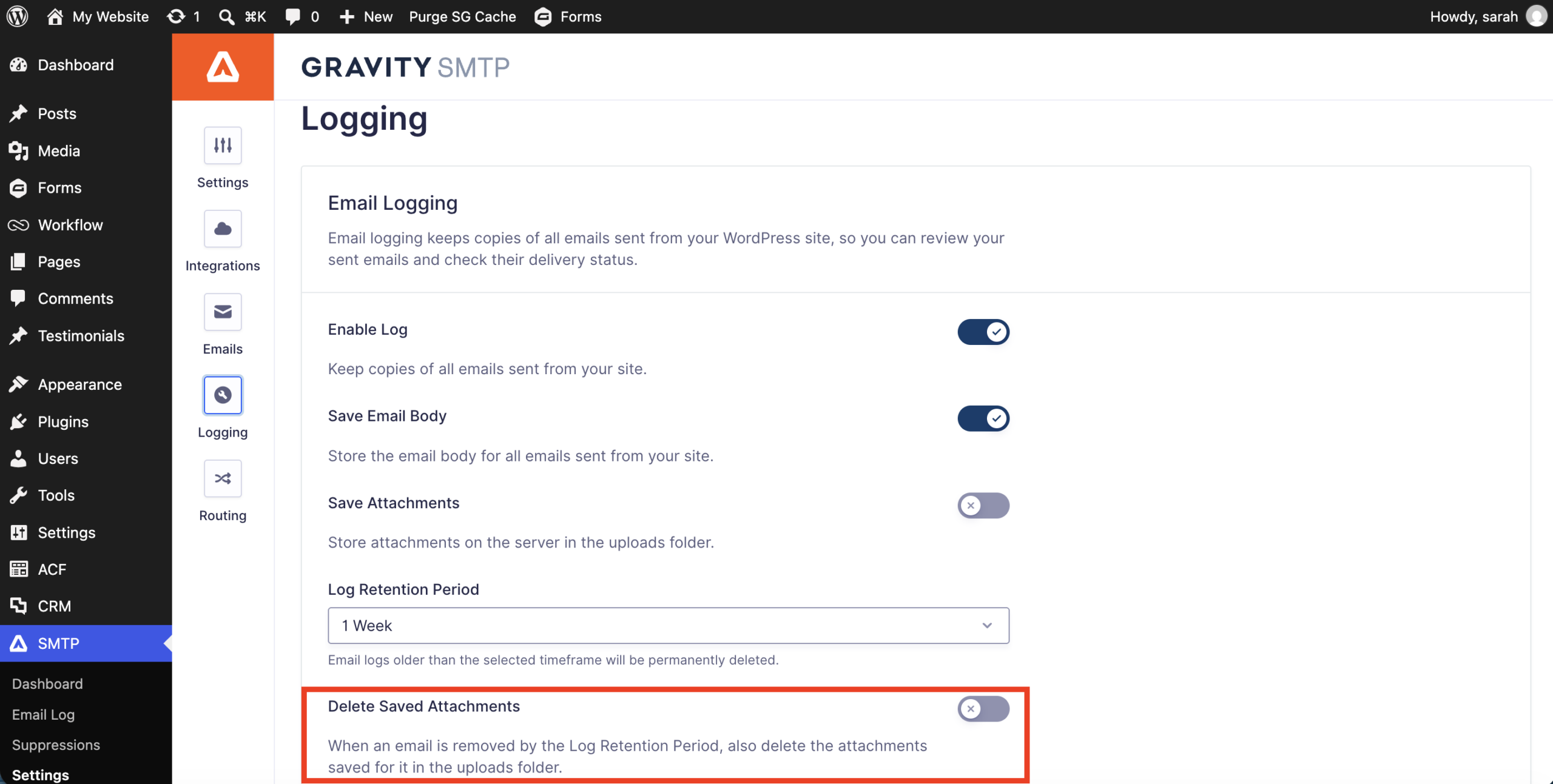
The new Delete Saved Attachments setting closes that gap. Turn it on, and when an email reaches the end of its retention period, its saved attachments are removed from the uploads folder along with it. Your Email Log and your server storage now stay in step, so old files don’t quietly pile up over time.
Faster, more dependable cleanup for large email logs
Additionally, Gravity SMTP 3.2.5 includes several fixes that target sites with very large Email Logs:
- The retention cron job no longer runs into a fatal memory error
- Events are no longer deleted one at a time (which could time out and never finish),
- Very large Email Log tables no longer slow things down.
Together, these changes mean your log retention settings do their job, even on busy sites.
For more information about setting up Gravity SMTP, be sure to check out the Gravity SMTP documentation.
Note: Gravity SMTP is available at no extra cost with the Gravity Forms Elite, Nonprofit, and Developer licenses. Not yet a customer? Visit our pricing page for more information.
Gravity SMTP 2.3.6 changelog
- Fixed an issue where HTML emails sent with the Microsoft integration can show quoted-printable codes and broken HTML.
Gravity SMTP 2.3.5 changelog
- Added a Delete Saved Attachments setting that removes an email’s saved attachments from the uploads folder when the Log Retention Period deletes the email.
- Added a notice to the Microsoft 365 / Outlook connector settings explaining that sending from an alias is not currently supported.
- Fixed a fatal error on multisite subsites that have no administrator role.
- Fixed a fatal memory error in the Email Log retention cron job on large logs.
- Fixed an issue that can cause very-large Email Log tables to perform slowly.
- Fixed an issue where scripts in a logged email could run when the email is viewed in the Email Log.
- Fixed an issue where the license key was not reported correctly in the optional weekly usage report.
- Fixed an issue where the Microsoft and Google connectors could not be reconnected after the stored token expired.
- Fixed an issue where the Share Gravity SMTP Analytics setting was not applied correctly.
- Fixed an issue where translated text and debug log entries with apostrophes or quotes displayed HTML codes such as ' instead of the character.
- Fixed header values that contain a colon being cut off at the first colon, which broke headers such as List-Unsubscribe.
- Fixed integrations not being listed in alphabetical order, with Custom SMTP last, in the Send With dropdown on Tools and throughout the Integrations settings.
- Fixed the Log Retention cron deleting events one at a time, which could time out and never finish on large Email Logs.
- Fixed the Log Retention Period default of 1 Week not being applied until the setting was saved at least once. Sites that never saved this setting will begin deleting emails older than 7 days.
- Fixed webhook alerts reporting failure when the endpoint returned a 2xx response other than 200.
- Updated license key handling to be consistent with Gravity Forms.
If you are an Elite, Nonprofit, or Developer Gravity Forms license holder, Gravity SMTP 2.3.6 can be updated in your WordPress dashboard, or downloaded manually from your Gravity account.

Newsletter
If you want to keep up-to-date with what’s happening on the blog sign up for the Gravity Forms newsletter!
"*" indicates required fields