It’s 9:15 a.m. on someone’s first day. Their laptop hasn’t arrived, because IT found out they existed on Friday afternoon. Their tax forms are somewhere in an email thread. Their manager is in back-to-back meetings and assumed HR had the morning covered, and HR assumed the manager did. The new hire, who was excited about this job a week ago, is sitting at an empty desk filling out a W-4 on their phone.
None of this happened because anyone dropped the ball. It happened because there was no ball. In this post we’ll build the ball: an employee onboarding form that captures the new hire’s details, and a workflow behind it that hands each department its tasks, chases the stragglers, and logs everything, so nobody’s first day depends on anybody’s memory.
The division of labor is simple: Gravity Forms captures the new hire’s information, and Gravity Flow runs the process that follows, across IT, HR, and the hiring manager, all on the WordPress site you already run.
If you’re an agency or consultant, this one is for you first.
For agencies: your client brings the problem, you bring Gravity Flow
Clients never describe this one as a workflow problem. You’ll hear “things keep slipping with new hires,” or a story about a laptop that didn’t arrive, and they’ll file it under HR chaos, nothing a website person can help with. That’s the misread to correct. The checklist in someone’s head is a workflow waiting to be built, and it belongs on the site you already run for them.
It’s also the stickiest build in this series. Time off requests and purchase approvals prove their value weekly; onboarding proves it at the moments your client cares most about, every hire, forever. A client whose new starters get provisioned, welcomed, and checked in on by a system you built does not shop around at renewal time.
Onboarding your own team rather than a client’s? Everything below reads exactly the same. Let’s get into it…
The problem with onboarding
Most onboarding “processes” are a checklist in one person’s head, a folder of PDFs, and a set of assumptions about who does what. That works right up until the moment it doesn’t:
- The process lives in one person’s head – When that person is on vacation, or two hires start the same week, steps get dropped and nobody notices until the new hire does.
- Departments find out too late – IT can’t provision a laptop they learned about on Friday. Lead times need the workflow to start when the offer is signed, not the week before the start date.
- Nothing confirms completion – A checklist document shows what should happen. It can’t show whether it did, or who was supposed to do it.
The fix is a workflow where every task has an owner, a deadline, and a completion state, and where the record keeps itself.
What this workflow does
Here’s the finished system we’re building:
- HR or the hiring manager submits a short kickoff form with the essentials: name, role, department, location, start date, employee or contractor.
- The new hire receives a link to complete their own paperwork from home, before day one.
- Tasks fan out to IT, HR, and the hiring manager, each one tracked to completion.
- Contractors branch off to their own, shorter track automatically.
- Welcome messages and a week-one check-in go out on schedule, timed off the start date.
Step 1 is Gravity Forms. Steps 2 through 5 are all Gravity Flow. The form is the easy part, so we’ll move through it quickly and spend our time where the value is: the workflow.
What you’ll need
- Gravity Forms (any license) to build the kickoff form
- Gravity Flow to run the onboarding process on top
Gravity Flow is a separate plugin that extends Gravity Forms. With both installed and activated, you’ll find a Workflow tab in each form’s settings. That tab is where everything from Step 2 onwards happens.
Step 1: Build the kickoff form (Gravity Forms)
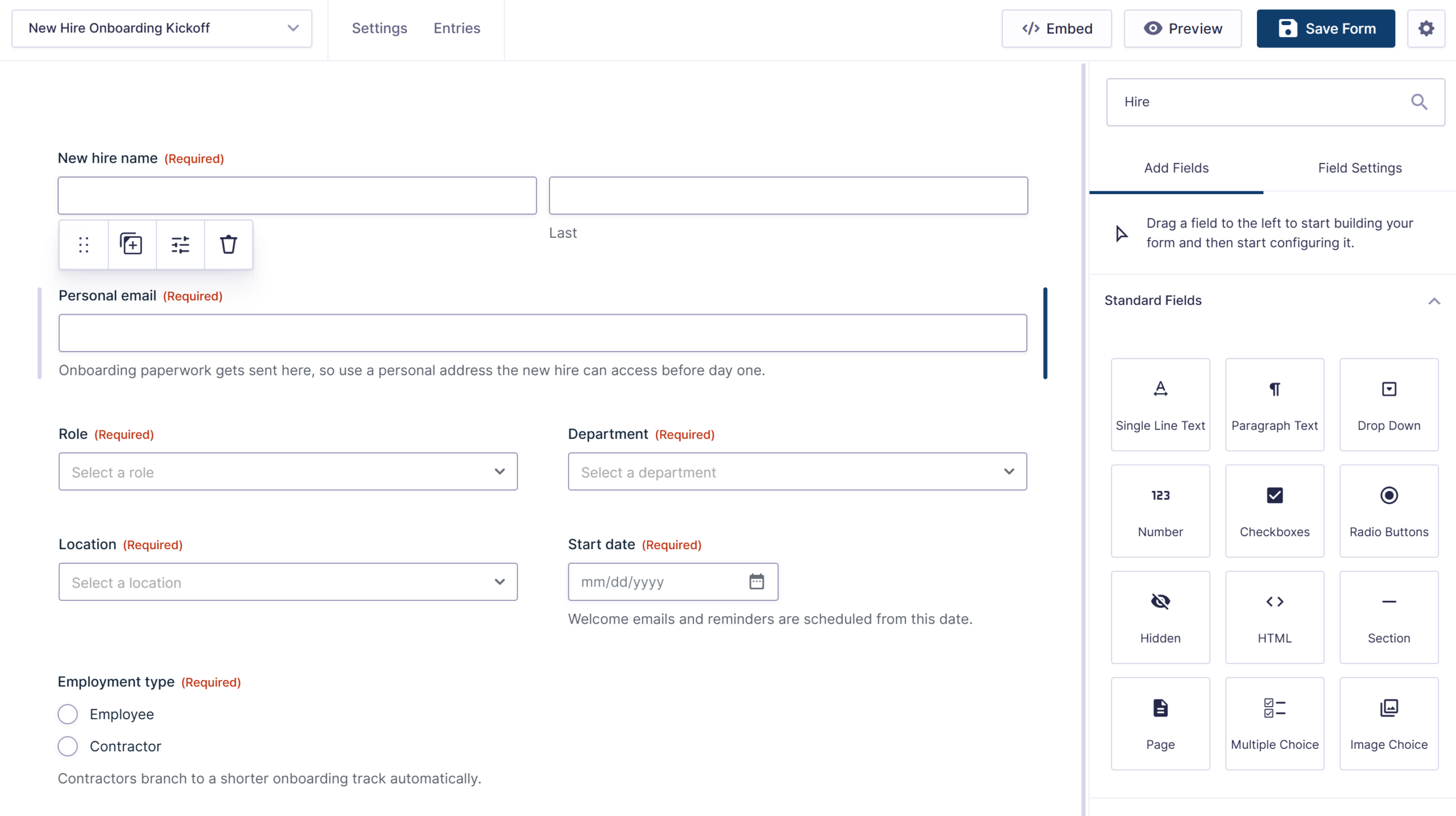
Resist the urge to build a giant intake form. The cleanest pattern is a short kickoff form that HR or the hiring manager submits with the essentials, because the new hire’s own paperwork comes later, as a step inside the workflow. Don’t make a new hire’s first interaction with the company a forty-field form.
The kickoff form needs:
- New hire name and personal email
- Role and department (dropdown)
- Location or remote (dropdown)
- Start date (Date field) – The scheduled steps in Step 5 are timed off this field, so it has to be a proper Date field.
- Employee or contractor (radio buttons) – The workflow branches on this in Step 4.
Conditional logic can trim the form further: remote hires show shipping-address fields instead of a desk assignment, and contractors skip anything benefits-related. One form covers every hire, and the dropdowns give the workflow everything it needs to route.
Now for the part that fixes the 9:15 a.m. problem. From here on, everything we build lives in Gravity Flow.
Step 2: Let the new hire complete their own paperwork (Gravity Flow)
The first workflow step is a User Input step assigned to the new hire. When the entry reaches this step, the new hire receives an email notification containing a link to complete their own section of the entry: personal details, tax forms, emergency contacts, and document uploads.
They can fill everything in from home before their start date, and they don’t need to log in to your WordPress admin or create an account to do it.
This is the single biggest first-day upgrade in the whole build. The paperwork that would normally take up a new hire’s entire first morning is finished before they arrive, and HR can see at a glance whether it’s done.
File Upload fields on this step handle the signed documents: the offer letter, W-4, I-9 documentation, and direct deposit form all land attached to one entry instead of scattered across an inbox.
Step 3: Fan the tasks out to departments
Once the new hire’s paperwork is in, the workflow moves on to the tasks that other people need to complete. Each one becomes its own User Input step. When the entry reaches a step, the assignee receives a notification, opens the entry, and confirms their tasks are complete by filling in a short checklist of fields. That confirmation is what moves the workflow on to the next step, so nothing progresses on assumption.
Three steps cover most onboarding processes:
- IT provisioning, assigned to the IT team – IT confirms that accounts have been created, hardware has been ordered, and system access has been granted. Because the workflow starts the moment the kickoff form is submitted, IT finds out about the new hire when the offer is signed, not the Friday before the start date. That’s the difference between a laptop on the desk and a laptop in the mail.
- HR processing, assigned to HR – HR confirms that the paperwork has been verified, payroll has been set up, and the benefits enrollment has been sent to the new hire.
- Manager checklist, assigned to the hiring manager – The manager confirms that the first-day schedule is set, the first-week goals are written, and team introductions are arranged.
Each step is a task with an owner and a completion state, not a line in a document. Nobody can quietly skip their part, because the entry shows exactly which steps are done and which are still sitting with whom.
Step 4: Route the hires that need a different path
No two hires follow exactly the same onboarding. A marketing hire and an engineering hire report to different managers. An employee and a contractor need entirely different paperwork. The workflow has to handle both kinds of hires, and Gravity Flow gives you a tool for each.
When the difference is only who handles a step, use assignee routing. The manager checklist is a good example. Every new hire needs one, but it has to reach a different hiring manager depending on the department. Assignee routing handles this inside a single step: you build one routing rule per department, and the step is assigned to the correct manager automatically.
When the difference is the process itself, you need a fork in the workflow. For instance, contractors don’t get the benefits step or the hardware order; they get an agreement, an invoice setup, and a smaller set of system access.
That fork is exactly what the new Choice Routing step in Gravity Flow 3.1 is for. It reads the Employee or Contractor field from the kickoff form and sends each entry down its own branch of steps, with no conditional logic to build or maintain across the rest of the workflow. Multi-location businesses can use the same approach to give each office its own track where the processes genuinely differ.
One rule of thumb carries across this whole series: when only the person changes, route the assignee; when the path changes, route with Choice Routing.
Step 5: Schedule the welcome touches
Onboarding has a calendar as well as a checklist, and the workflow can run that too. Gravity Flow steps can be scheduled relative to a date field on the form, which means the start date the kickoff form captured can drive a sequence of well-timed steps:
- A few days before the start date, a notification goes to the new hire with the practical details: where to go, who to ask for, and what the first day will look like.
- On day one, a welcome notification goes out to the team, introducing the new hire so their arrival isn’t a surprise to the people sitting next to them.
- At the end of week one, a User Input step lands with the manager. It’s a short check-in confirming that the first-week goals were set and that a real conversation happened. This is the step that turns “we should do check-ins” from a good intention into a task somebody owns.
Reminders and step expirations handle the chasing. If IT hasn’t confirmed provisioning three days before the start date, the workflow escalates it automatically rather than relying on someone to notice in time.
And every step, completion, and routing decision is recorded in the entry’s timeline. When someone asks whether hire number thirty-one returned their signed policy acknowledgment, the answer is on the entry, timestamped, not in anyone’s memory. For anything compliance-adjacent, like I-9 timing or policy sign-offs, that trail is the difference between “we think so” and “here’s the record.”
What this build doesn’t do
A few honest limits, because onboarding is a crowded category:
- It’s not an HRIS – Payroll, benefits administration, and PTO balances live elsewhere. The workflow can hand data to those systems (a webhook or Zapier step can push new hire details wherever they need to go), but it doesn’t replace them.
- It doesn’t provision accounts itself – The workflow tells IT what to do and tracks that they did it. Creating the accounts is still IT’s job, unless you wire a webhook into your identity tooling.
- At real scale, HR platforms earn their keep – If you’re onboarding twenty people a month across five countries, buy the platform. For the enormous number of businesses hiring steadily but not constantly, this build does the job at a fraction of the cost, with the data on your own server.
The workflow at a glance
Here’s the complete build, end to end:
Kickoff form submitted → New hire completes their paperwork (User Input step, before day one) → IT, HR, and manager tasks fan out (User Input steps, routed and tracked) → Contractors branch to their own track (Choice Routing) → Scheduled welcome and week-one check-in (steps timed off the start date). Every step logged in the entry’s timeline.
One kickoff form, a handful of User Input steps, one Choice Routing fork, and a few scheduled notifications. Before your next real hire, run a test entry through as both an employee and a contractor to watch the two tracks work.
First days that run themselves
That’s the build. IT finds out about new hires when offers are signed. Paperwork is done before day one. Every task has an owner and a record, and the week-one check-in actually happens.
Already using Gravity Forms? Then the kickoff form is territory you know, and Gravity Flow is what turns it into the process: the assigned tasks, the scheduling, the chasing, the record. Check out Gravity Flow pricing to get started, or sign up for a personalized demo and we’ll walk through an onboarding workflow live.
More builds in this series: time off requests and purchase orders are live now.

Newsletter
If you want to keep up-to-date with what’s happening on the blog sign up for the Gravity Forms newsletter!
"*" indicates required fields