The grants committee is meeting at 2pm to vote, and at 1:40 half the applications aren’t ready. One is missing its 501(c)(3) determination letter. Two haven’t been through finance, so nobody can say whether the budgets hold up. The program officer is scrolling an email thread trying to work out whether the borderline application got its second read or just looked like it did. The clear yeses and clear nos take ten minutes. Everything else takes the rest of the afternoon.
This is what grant management looks like when the application form is the only part that got built. Collecting applications is the easy bit. The hard part is everything between “application received” and “funding decided”: checking eligibility, getting the right people to review on merit, having finance sanity-check the numbers, surfacing a decision the committee can vote on, and replying to every applicant in a way that doesn’t make them feel processed by a machine.
That’s a workflow, not a form. This post covers how to build it on the WordPress site you already run, using Gravity Forms, Gravity Flow, and Gravity SMTP. It’s written for the grantmaking side: community foundations, family foundations, and nonprofits running small-grants funds.
What the workflow involves
Before the build, here’s what the end-to-end needs to handle:
- Collect applications through a public form, with the attachments a real review needs (budget, financial statements, determination letter)
- Confirm receipt so applicants know it went through
- Screen for eligibility before anything reaches a reviewer
- Route each application to the right program reviewers and collect their scores
- Run a finance check on the budget and financials
- Surface a decision-ready summary the committee can vote on
- Send award and decline emails that arrive, on the timeline you promised
- Move funded applications into the next stage (agreement, payment, reporting)
A standalone form does step 1. The rest is where grant cycles actually go wrong.
Why WordPress is the right home for this
Dedicated grant management platforms exist, and some are good. Submittable and SurveyMonkey Apply handle high-volume open calls well. Foundant and SmartSimple are built for foundations with full-time grants staff. If you’re processing hundreds of applications a cycle with formal multi-round review, they earn their cost.
For everyone else, the pricing is the problem. These platforms charge per-seat or per-cycle fees that can exceed the value of the smaller grants being awarded.
Running the process on your existing WordPress site means:
- Application data lives in your own database, which matters for your records, your reporting, and your privacy obligations.
- Reviewers use the WordPress accounts your site already has, not a parallel login system.
- The application form lives on your domain, styled to match your site, on a page you control.
- The cost is the plugins, not a per-application platform fee.
The trade-off is setup work. For a fund that awards three grants a year on a single conversation, a form and a spreadsheet are fine. For anything with defined cycles, multiple reviewers, and a committee, the build below pays back in the first cycle.
The application form (Gravity Forms)
Data quality gets set here. If the form lets incomplete applications through, every later stage inherits the gaps.
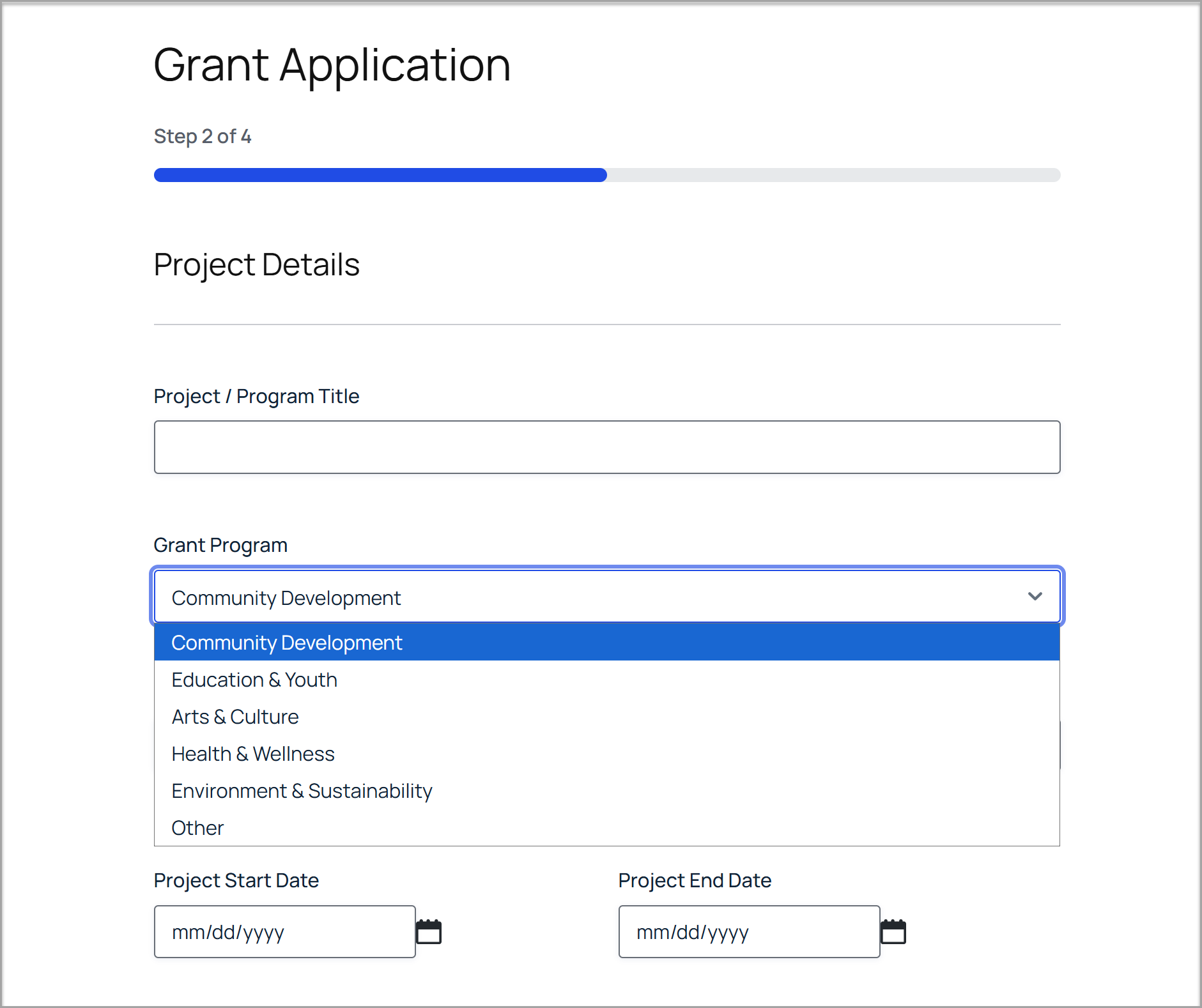
Attachments as required fields. Budget, most recent financial statements, and the 501(c)(3) determination letter are the three that hold up reviews when missing. File upload fields with the right formats allowed, marked required, mean the committee never meets with half the paperwork absent. Use conditional logic to only show the determination letter field to organizational applicants; individuals applying to an artist or scholarship fund don’t have one.
Character limits on narrative fields. Reviewers compare applications, and they can only compare what they’ll actually read. A 2,000-character limit on the project description and a 1,000-character limit on “what will this funding change?” produces tighter applications and fairer reviews than an open text box that rewards whoever writes longest.
Save and continue. Grant applications are long, and applicants assemble budgets and attachments over days. Gravity Forms’ save and continue feature lets them save a partial application and return to it by link. Without it, you lose good applicants to a lost browser tab.
One form, many cycles. If you run more than one grant program, or the same program annually, use a hidden field or URL parameter to identify the cycle rather than cloning the form. One form to maintain, one entry list to report from, filtered by cycle.
A stated decision date. “You’ll hear back by [date]” on the form, then a workflow that actually delivers it. Applicants plan around your timeline. Nothing damages a fund’s reputation with its community faster than silence.
The review workflow (Gravity Flow)
This is the part a form plugin alone can’t do. A submitted application needs to pass through eligibility, program review, and finance before the committee sees it, and every application needs to be visibly somewhere in that sequence at all times. The structure:
Step 1: Eligibility screening. An approval step assigned to the grants administrator. Is the applicant in your geographic area, is the request within the fund’s range, is the organization the right type? Out-of-scope applications get declined here, quickly and kindly, before they consume reviewer time.
Step 2: Program review. Gravity Flow can route each application to reviewers by program area, so the arts applications reach the arts reviewers without anyone forwarding emails. Reviewers score through a User Input step: a handful of 1-5 ratings (alignment, feasibility, impact, budget realism) plus comments, entered into administrative fields on the application form that applicants never see. A calculation field averages the scores once reviews are in.
Step 3: Finance review. A separate User Input step for whoever holds the finance role: does the budget add up, do the financial statements support the organization’s capacity to deliver, are there red flags. Finance sees the numbers, not the narrative scores, so the two reviews stay independent.
Step 4: Committee decision. The committee (or program chair) sees each application with its averaged program scores and finance notes attached, and records approve, decline, or defer. The workflow’s job is to make sure every application arrives at this step complete. The judgment stays human.
Step 5: Communication. The decision triggers the right email automatically, and funded applications move into the post-award stage.
Three practical notes from funds that run this:
- Set reviewer deadlines and build in the nudge. A Gravity Flow step reminder 48 hours before the deadline is the difference between reviews arriving and reviews being chased.
- Bake in conflict of interest. Reviewers should be able to flag “I know this applicant” and have the application reassigned without an awkward conversation.
- For the first cycle, run it with one reviewer per application and add the multi-reviewer scoring once the basic path works. Debugging both at once is miserable.
All of this happens on your own website. Reviewers log in, see only the applications assigned to them, score, and move on. If you’d rather keep reviewers out of the WordPress dashboard entirely, Gravity Flow’s inbox can sit on a front-end page of your site instead, which suits external committee members well. Either way, roles control who sees what: reviewers see their queue, finance sees theirs, the committee sees decision-ready summaries, and the administrator sees the whole board.
Award and decline emails (Gravity SMTP)
Decline emails are where grant programs quietly damage themselves. They go out late, or land in spam, or don’t go out at all because someone meant to send them after the committee meeting and the meeting ran long. The applicant, who built their program plan around your stated date, hears nothing.
Gravity SMTP handles the arrival half of the problem. It routes your WordPress email through a transactional service (SendGrid, Mailgun, Postmark, Amazon SES) with delivery logs, so you can see that the decline to a specific applicant arrived on a specific date. For a funding decision, that log is worth having.
The workflow handles the timing half: decline emails fire from the decision step, not from someone’s to-do list.
Tone is the last piece. A decline should be brief, honest about the math, and not falsely consoling:
Hi [name],
Thank you for applying to [fund] for “[project title].” We received [X] applications this cycle and could fund [Y]. Yours wasn’t one of them. That’s a reflection of the pool, not a judgment that the work doesn’t matter.
You’re welcome to apply again next cycle, and we’d encourage it.
Award emails should be specific and actionable: the amount, what happens next, the agreement to sign, the reporting dates, who to contact. Name everything in one email rather than scattering it across the next month.
After the decision
Funded applications don’t leave the system. The same entry moves into a post-award stage: the grant agreement goes out for signature, payment details get collected, and reporting deadlines get scheduled. Gravity Flow’s scheduled steps can send the six-month report reminder automatically, months after everyone has stopped thinking about that cycle.
The audit trail matters here too. Every step in the workflow is time-stamped: who reviewed, who approved, when the decision was made, when the applicant was told. When the board or an auditor asks how a funding decision was reached, the answer is in the entry, not in someone’s memory.
What this doesn’t do
A few honest limits:
- Payment disbursement. The workflow gets you to “approved, agreement signed.” Cutting the check or sending the ACH happens in your accounting system. A webhook step can push approved grant details to it, but the money moves there, not in WordPress.
- Long-term grants management. Multi-year grant relationships, portfolio-level reporting, and payment scheduling across dozens of active grants are what Foundant and SmartSimple are for. This workflow covers the application-to-decision cycle, plus basic post-award follow-up.
- Bias in review. Structured scoring and independent finance review reduce some kinds of bias. They don’t replace a thoughtful committee.
- Volume at scale. Past a few hundred applications per cycle, dedicated platforms start to justify their pricing. Below that, this approach is faster to run and keeps the data yours.
Getting started
If your next grant cycle opens in the coming months:
- Build the application form first and have a colleague submit a dummy application end-to-end, attachments included. They’ll find the confusing field before a real applicant does.
- Build the Flow workflow with one reviewer and test the full path with dummy data: submit, screen, review, decide, email.
- Set up Gravity SMTP before the cycle opens. If decline emails land in spam, you’ll find out months after the damage is done.
- Write the award and decline templates before applications arrive, not the week of the committee meeting.
- Run a small cycle first if you can. A pilot fund with fifteen applications is the right size to find the problems.
The application form is the visible part of a grants program, and the least of it. What applicants remember is whether the process was clear, whether the decision came when promised, and whether they were treated like people either way.
The workflow behind the form is what makes those things reliable rather than dependent on everyone having a good week. Build it once, and every cycle after runs on it.
If your organization is a registered nonprofit, you can get started with all of the functionality in Gravity Forms by purchasing the Gravity Forms Nonprofit license.
Already using Gravity Forms? You have half of this built. Gravity Flow and Gravity SMTP add the rest. Check out Gravity Flow pricing to get started, or try a personalized demo to see a time off workflow in action.

Newsletter
If you want to keep up-to-date with what’s happening on the blog sign up for the Gravity Forms newsletter!
"*" indicates required fields