-
CSS Selector
View Addon: CSS SelectorGravity Forms has CSS Ready Classes to style your form fields. Using these classes, you can easily create more advanced layouts for the fields in your forms. Excellent idea, however, the problem is you always need to remember what the exact class name is. Now with this CSS Selector, you don’t need to remember. Simply click on a button to launch the pop-up and choose…
-
Confetti
View Addon: ConfettiA fun, celebratory confetti effect can be enabled on any Gravity Form submission confirmation. After the user submits, they will be shown the effect to congratulate them! You can choose up to 6 different confetti effect styles and further customize all aspects of the confetti such as colors, speed, timing, placement, and many other options.
-
Merge Tags
View Addon: Merge TagsThis Gravity Forms Add-on adds an admin page to your WordPress back-end with a list of all the merge tags in your form. Besides that it gives you information (in different tabs) about field types (for example text, radio, hidden, select, email, checkbox, etc), Standard (Meta) Gravity Forms Merge Tags (and Merge Tags from GravityView and Gravity Flow), a replacement for the all_fields Merge Tag…
-
Live Summary for Gravity Forms
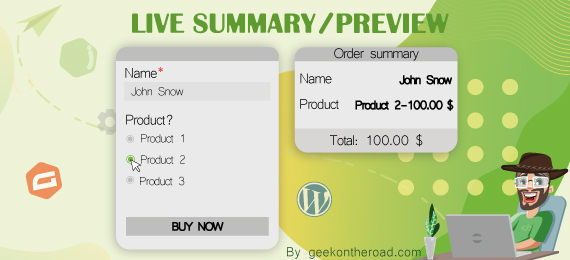
View Addon: Live Summary for Gravity FormsThis add-on is a must-have for any order or booking form. It helps you to easily add any type of live summary/Preview to a gravity form. No coding required. Simply check the fields you want to see and save your form. Free Features The free version lets you setup a live summary inside a sidebar with just a few clicks! Works in real time as…
-
Better Address for Gravity Forms
View Addon: Better Address for Gravity FormsEnhance the address field with your choice of international address types. You can also specify the default state, and also decide if you’d prefer email notifications to come through with either the name or the code (for example New York or NY). Support for many countries including… Argentinian Provinces Angolan Provinces Australian States Bangladesh Districts Bolivian Departments Brazilian States British Countries Bulgarian Districts Chinese Provinces…
-
Gravity Flow
View Addon: Gravity FlowTurn your email and spreadsheet chaos into secure, scalable and efficient workflow systems => shorter cycle times, improved transparency & increased flexibility. Suitable for Any Business Process Vacation requests, Purchase Orders, Admissions Forms, RFPs, Project Initiation Plans, Case Management… any form that requires a process. Improve Communication and Reduce Confusion Stop micro-managing. Keep everyone in the loop. Help internal teams focus more on the task…
-
Chained Selects
View Addon: Chained SelectsSeamless Integration Easily add a Chained Selects cascading field to your form with the Chained Selects field. This field will then allow you to create various select fields that will dynamically change based on the previous selection, providing an impressive user-experience for your audience. Manage Choices Via CSV or Hooks/Filters With the Chained Selects Add-On, you can upload a CSV file to import the choices…
-
Coupons
View Addon: CouponsEasy to Use Implementing Coupons is as easy as adding a Coupon Field to your payment form and then creating your coupon code! You can create a coupon that can be used only on a specific form or coupons that can be used on any payment form with a Coupon Field. It’s entirely up to you how you configure it! Top Features Here’s just a…
-
Partial Entries
View Addon: Partial EntriesSeamless Integration It’s not uncommon for visitors to abandon a form before actually submitting it. With the Gravity Forms Partial Entries Add-On, you can easily capture those partial entries and view the information submitted, helping you to recover the details of potential leads and future customers. View Partial Form Entries All partial entries can be viewed in your WordPress dashboard. Not only can you access…
-
Polls
View Addon: PollsQuick and Easy Set Up The Gravity Forms Polls Add-On makes it easy to add a poll to your website, capture responses, and display the results of the poll after a form is submitted. You can add fields to your form that ask your visitors “Yes/No” questions, encourage them to select from a list of choices, or select multiple options. Results can be viewed directly…
-
Signature
View Addon: SignatureProfessional Forms Collecting a user’s signature via a form on your WordPress website can save time, reduce paperwork, and provide an impressive user experience for your clients and customers. With Gravity Forms and our Signature Add-On, you can quickly create professional forms that capture signatures and cater to any business requirements. Easy to Use The Gravity Forms Signature Add-On allows you to easily capture signatures…
-
Survey
View Addon: SurveyCreate Custom Surveys Want to know how your clients feel about your service, whether your employees like their jobs, or what your subscribers think of your membership site? Creating surveys with Gravity Forms is just as fast and pain-free as creating any other kind of form. Types of surveys you can create with the Gravity Forms Survey Add-On include… Product or Service Feedback Survey –…