-
GF No Duplicates
View Addon: GF No DuplicatesGravity Forms already has some built-in duplicate submission prevention techniques, including the No Duplicates setting for a field in your form, preventing the same field value from being used multiple times for the same form. Using this setting is a rock solid approach to avoid duplicate submissions, but it requires having a field in your form that you can consider as a source of unique…
-
Advanced Merge Tags
View Addon: Advanced Merge TagsThe GravityWP – Advanced Merge Tags Add-on for Gravity Forms adds advanced Merge Tags & Modifiers to your Gravity Forms, Views and Flows. From the most common used functions like capitalize, count characters and words (length), converting to ASCII characters (removing accents), url encoding of text to changing date formats, getting slug information and securely retrieving data from other forms. Features Get the current timestamp:…
-
Bookings For Gravity Forms
View Addon: Bookings For Gravity FormsBookings For Gravity Forms plugin manages all types of online appointments & schedules within Gravity Forms using Google Calendar for businesses that rely on an appointment operation. The primary goal is to provide a quick and convenient way to make an online appointment or booking page. In addition, it simplifies and streamlines the online registration process. It is ideal for event directors and entrepreneurs looking…
-
Smart Uploads in Gravity Forms
View Addon: Smart Uploads in Gravity FormsSmart Uploads in Gravity Forms Add-on gives your users the power to preview their files before uploading them. Although Gravity Forms’ default functionality allows you to upload multiple files, you can not preview the files before uploading online. You can not even make minor changes like sorting them in the order you prefer. Smart Uploads’ advanced image editor allows users to edit any image with…
-
Import Entries In Gravity Forms
View Addon: Import Entries In Gravity FormsImport Entries In Gravity Forms allows the admin to import data from a CSV file to the entries section of the Gravity Form. The admin will also be able to update existing entries by selecting the fields (from the CSV file) that match the Entry ID. You can easily import digitally captured signatures, coupon details, and survey data gathered through your Gravity Forms. Just map…
-
Restrict Dates In Gravity Forms
View Addon: Restrict Dates In Gravity FormsRestrict Dates In Gravity Forms add-on adds a date field to your Gravity Form and allows you to manage it. You can restrict or allow dates for your users by selecting the date ranges and days through the back-end settings. Features ✓ Set a date range (minimum and maximum) that limits the user’s selectable choices. ✓ Allow only specific dates for selection on the date…
-
CSS Selector
View Addon: CSS SelectorGravity Forms has CSS Ready Classes to style your form fields. Using these classes, you can easily create more advanced layouts for the fields in your forms. Excellent idea, however, the problem is you always need to remember what the exact class name is. Now with this CSS Selector, you don’t need to remember. Simply click on a button to launch the pop-up and choose…
-
Confetti
View Addon: ConfettiA fun, celebratory confetti effect can be enabled on any Gravity Form submission confirmation. After the user submits, they will be shown the effect to congratulate them! You can choose up to 6 different confetti effect styles and further customize all aspects of the confetti such as colors, speed, timing, placement, and many other options.
-
Merge Tags
View Addon: Merge TagsThis Gravity Forms Add-on adds an admin page to your WordPress back-end with a list of all the merge tags in your form. Besides that it gives you information (in different tabs) about field types (for example text, radio, hidden, select, email, checkbox, etc), Standard (Meta) Gravity Forms Merge Tags (and Merge Tags from GravityView and Gravity Flow), a replacement for the all_fields Merge Tag…
-
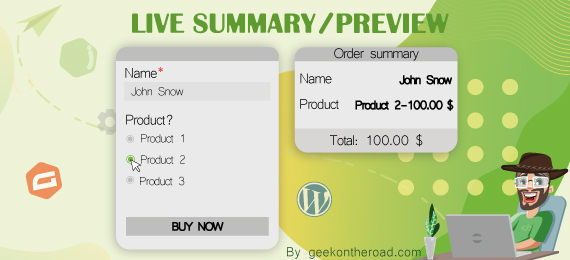
Live Summary for Gravity Forms
View Addon: Live Summary for Gravity FormsThis add-on is a must-have for any order or booking form. It helps you to easily add any type of live summary/Preview to a gravity form. No coding required. Simply check the fields you want to see and save your form. Free Features The free version lets you setup a live summary inside a sidebar with just a few clicks! Works in real time as…
-
Better Address for Gravity Forms
View Addon: Better Address for Gravity FormsEnhance the address field with your choice of international address types. You can also specify the default state, and also decide if you’d prefer email notifications to come through with either the name or the code (for example New York or NY). Support for many countries including… Argentinian Provinces Angolan Provinces Australian States Bangladesh Districts Bolivian Departments Brazilian States British Countries Bulgarian Districts Chinese Provinces…
-
Gravity Flow
View Addon: Gravity FlowTurn your email and spreadsheet chaos into secure, scalable and efficient workflow systems => shorter cycle times, improved transparency & increased flexibility. Suitable for Any Business Process Vacation requests, Purchase Orders, Admissions Forms, RFPs, Project Initiation Plans, Case Management… any form that requires a process. Improve Communication and Reduce Confusion Stop micro-managing. Keep everyone in the loop. Help internal teams focus more on the task…