If your business serves customers across multiple countries, collecting a phone number shouldn’t create friction.
Unfortunately, that’s exactly what happens on many websites. Visitors are left wondering which format to use, country selection isn’t always obvious, and forms can become difficult to navigate for users relying on assistive technologies.
Gravity Forms 3.0 adds support for international phone formats – with clearer labeling, better accessibility, semantic HTML, and an updated interface that makes collecting international phone numbers easier for everyone.
Whether you’re capturing leads, processing registrations, accepting job applications, or supporting customers around the world, these improvements help create a smoother experience without requiring additional plugins or custom development.
Better international forms start with better phone fields
The Phone field has been redesigned to make entering international phone numbers more intuitive.
Visitors can quickly choose their country and enter their phone number using a layout that’s easier to understand and easier to navigate.

For businesses, that means fewer formatting mistakes, less confusion for users during form completion, and cleaner contact information for your team.
Read on and visit the Gravity documentation for more information on Gravity Forms 3.0.
Clearer labels improve usability
One of the biggest improvements is also one of the simplest.
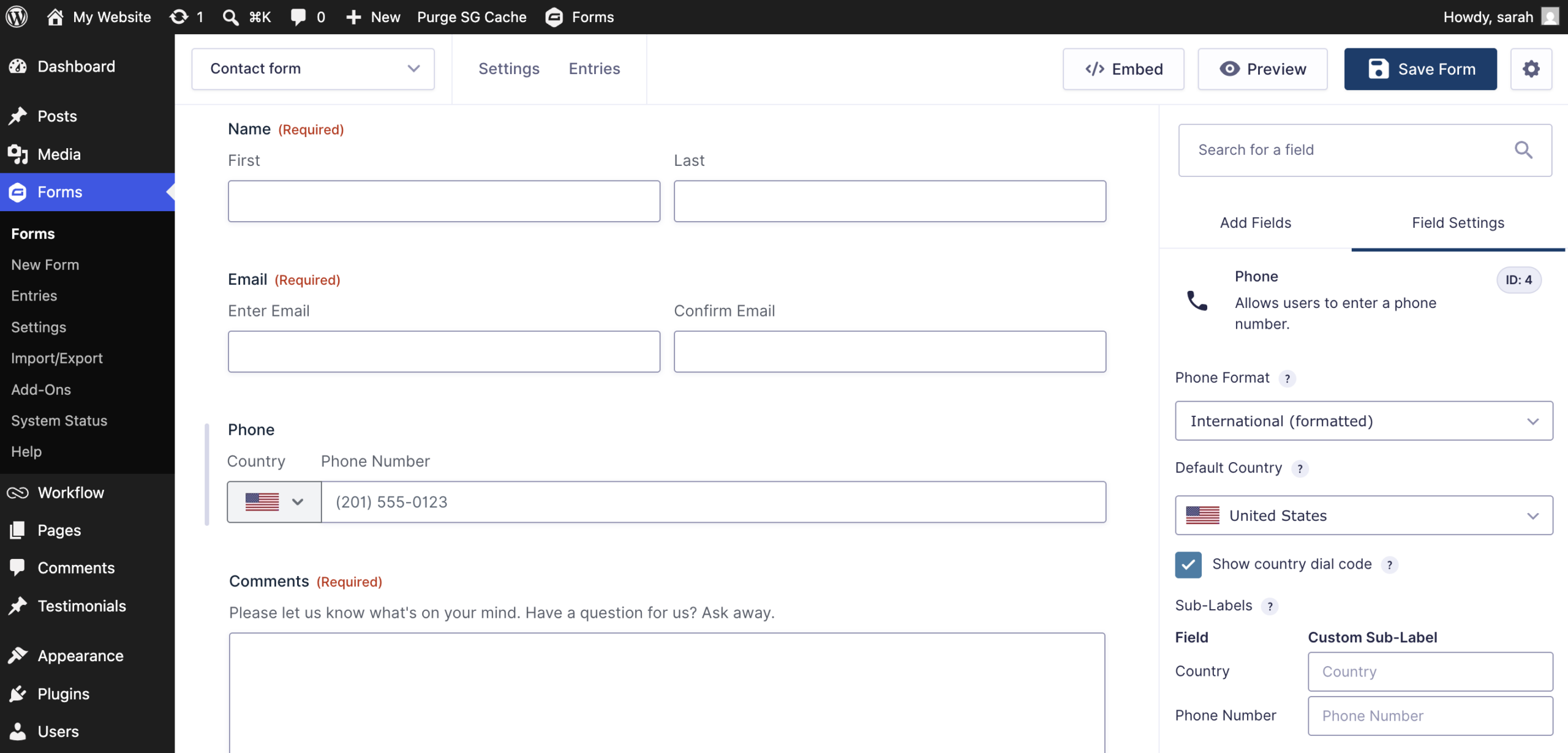
The country selector and phone number input now display visible sub-labels, making it immediately clear what information belongs in each field.
Instead of relying on placeholders or context alone, users can clearly distinguish between selecting a country and entering a phone number.
If you’d like to customize those labels, you can do so directly within the Phone field’s Sub-Labels setting in the form editor.
Built with accessibility in mind
The improvements go well beyond visual changes.
Gravity Forms 3.0 updates the underlying structure of the International Phone field using more semantic HTML.
The field wrapper now uses a <fieldset> element, while the primary field label is rendered as a <legend> instead of a standard <label>.
These changes provide better structure for assistive technologies and help screen readers communicate the relationship between the country selector and phone number input more effectively.
Improved country search
Finding the correct country is now easier for screen reader users.
As visitors search within the country dropdown, an aria-live region announces how many matching countries were found.
This provides immediate feedback during the search process, helping users navigate long country lists more efficiently without guessing whether their search returned results. For businesses that work with customers across multiple countries, it’s a simple improvement that removes one more obstacle between a visitor and a completed submission.
Better visual feedback
Gravity Forms 3.0 also includes small visual improvements that make a noticeable difference.
For example, the “No countries found” message now meets WCAG color contrast recommendations, making it easier to read for users with low vision or anyone viewing forms in challenging lighting conditions.
It’s a subtle update, but one that contributes to a more accessible overall experience.
International formatting available in the Phone field
These improvements apply specifically to the Phone field when selecting the International (Formatted) setting.
When editing a Phone field, you’ll also find the updated Sub-Labels settings under the field’s General Settings, giving you control over how the country selector and phone input are labeled.
Better phone numbers. Better user experiences.
Collecting an international phone number should feel as natural as entering a name or email address.
Gravity Forms 3.0 improves every part of that experience with clearer labels, better accessibility, semantic HTML, enhanced country search, and improved visual design.
The result is a Phone field that’s easier for visitors to use, easier for developers to customize, and better suited for modern websites serving audiences around the world.
Get started with Gravity Forms
To get started with Gravity Forms 3.0, navigate to the Plugins page in your WordPress admin and click Update Now, or download the latest version directly from your Gravity Forms Account.
New to Gravity Forms? Try a free demo or visit our pricing page to see how Gravity Forms makes it easy to build forms for a global audience.
Note: Caching and script optimization plugins or services can sometimes affect form functionality after an update. We recommend clearing your website, CDN, and browser caches once Gravity Forms 3.0 has been installed.
If you have any questions about Gravity Forms 3.0, our Support team is here to help.
Learn more about Gravity Forms 3.0
Want to explore everything included in this release? Check out these additional resources:
- What’s new in Gravity Forms 3.0
- International Phone Field documentation
- Accessibility improvements in Gravity Forms 3.0
- Gravity Forms 3.0 documentation

Newsletter
If you want to keep up-to-date with what’s happening on the blog sign up for the Gravity Forms newsletter!
"*" indicates required fields