
Most nonprofit membership forms do one thing well: they take the money. An applicant picks a tier, enters a card, pays, and becomes a member in the same minute. For open memberships, that’s exactly right.
But plenty of nonprofits don’t work that way. They vet their members. Somebody checks a document, confirms eligibility, or puts the application to a vote, and the yes comes before the money. Run that kind of membership on a pay-at-submission form and the form fights the process at every step, which is usually where the refund checks come in.
The fix isn’t a better form. It’s the order of operations: review before decision, decision before payment, payment before welcome. This post covers how to build that sequence on the WordPress site you already run, using Gravity Forms for the application, Gravity Flow for the review and the payment step, Square for the payments, and Gravity SMTP to make sure the decision actually lands in the applicant’s inbox.
Square Promotion – Free Processing
Gravity Forms and Square have teamed up to offer an exclusive promotion for new Square customers — enjoy free processing fees for up to 180 days!
Here’s how it works:
- Free Payment Processing – Get $5,000 in credit card transactions processed for free within your first 180 days. After that, standard Square fees apply.
- $20 Off Square Hardware – Receive a $20 discount on Square hardware once you sign up.
To take advantage of this promotion, simply sign up for a Square account using this link and start processing payments with no extra fees.
The nonprofits this works for
If your nonprofit reviews applications before anyone officially becomes a member, this build is for you. That describes more organizations than you might think, and most of them are running the process today out of a shared inbox and a spreadsheet. Here are four of the most common:
- Associations of nonprofits – If you run a state nonprofit association, a food bank network, or a coalition, your members are organizations rather than people. Before a new member can be admitted, someone on staff needs to check the determination letter and confirm the organization’s 501(c)(3) status, and because membership payments are usually tiered by budget size, you can’t even send the right invoice until that review has happened.
- Volunteer fire companies and rescue squads – Joining a fire company has never been as simple as filling in a form. The membership officer looks over each application, anyone applying for a call-responding role goes through a background check, and the existing membership votes on whether to admit them. The annual payment is only collected once that vote has passed.
- Clubs with waitlists and eligibility rules – Community gardens, pools, and sports clubs often cap their membership, so new members come off a waitlist as spots open up. The coordinator confirms that each applicant lives in the right area or qualifies for a senior or household rate, and only then should they be asked to pay, at the rate they actually qualify for.
- Membership organizations with a vote – In granges, legions, and civic clubs, the members themselves decide who joins, and that decision can take a meeting cycle or two. Nobody’s card should sit charged while the club makes up its mind.
The missions are different, but the shape is the same. In each case someone has to say yes before anyone pays, and the yes usually decides the amount too. Everything below is built around that order.
Where membership applications break
In practice, the process tends to break down in four places:
- Payment arrives before approval does – When the form charges on submission, every rejected application and every wrong-tier application becomes a refund, and refunds by check are how treasurers lose their evenings.
- Eligibility lives in email – Determination letters, proof of service, references, and budget figures get requested one reply at a time, and the coordinator becomes the only person who knows what’s still missing.
- The payment amount is a guess – Tiered payments depend on facts the review is supposed to confirm. If you invoice before the review, you’re either chasing a top-up later or issuing a partial refund.
- Nobody knows what stage an application is at – The applicant emails to ask, the coordinator digs through the thread, and the board hears about applications at whichever meeting they happen to surface.
The fix is to run the process as a fixed sequence. The application goes in with everything attached, the right person reviews it, a decision gets made, and money only moves once the answer is yes.
The application form (Gravity Forms)
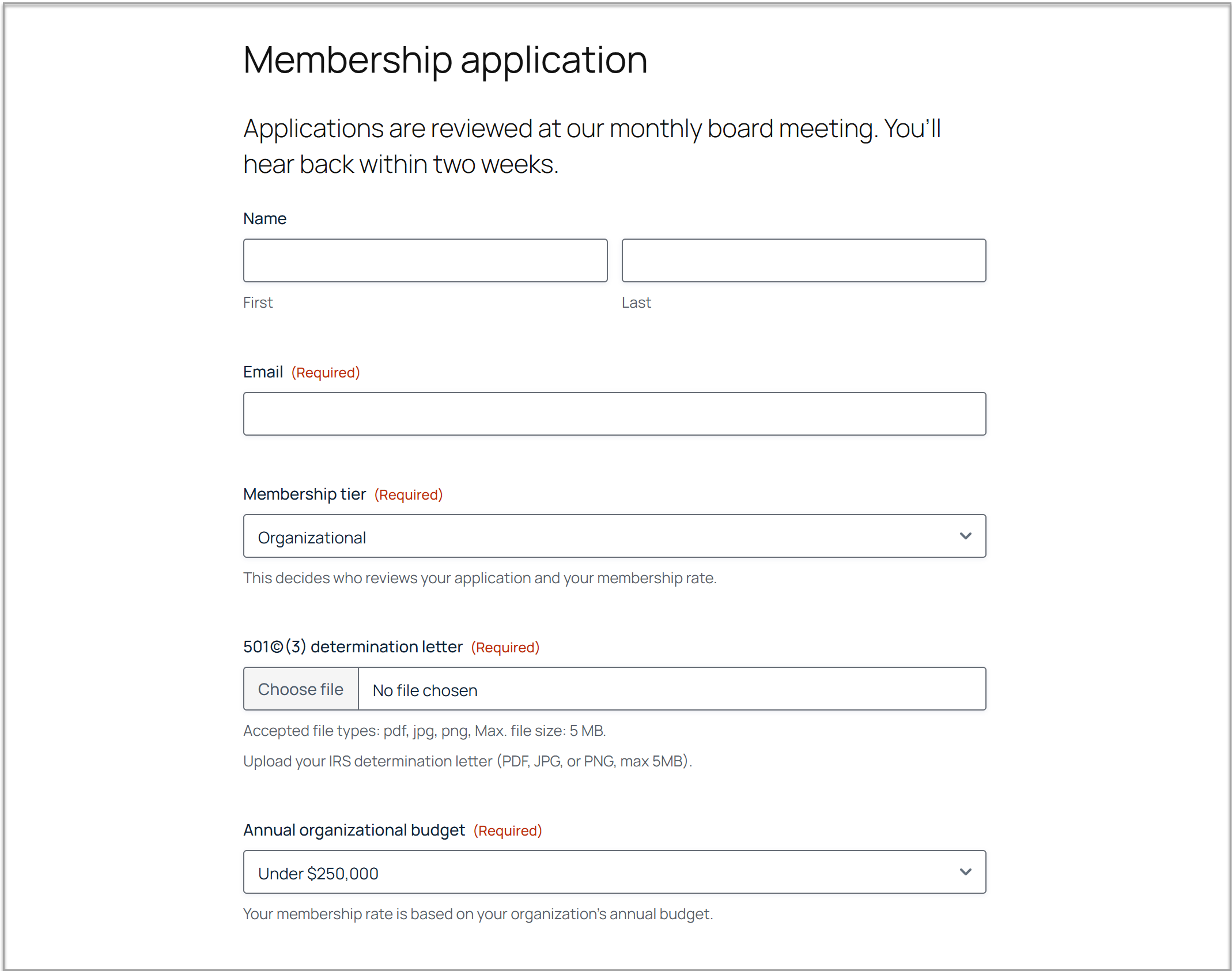
Everything downstream depends on what this form collects. If it lets an application through without its documents, the review inherits the gap.
- The tier field does the heavy lifting– A membership tier dropdown (individual, organizational, household, or whatever your structure is) is the one field the rest of the build reads from. It decides who reviews the application and what the payment will be, so make it a required dropdown rather than a free-text box.
- Ask for proof at the start – Add required file upload fields for whatever your eligibility check needs, whether that’s a determination letter, proof of service, or a reference. Use conditional logic so each applicant only sees the fields their tier requires. Organizational applicants can be shown the determination letter upload and a budget question, while individual applicants never see either.
- Leave payment off the form entirely – This form deliberately has no pricing fields and no card field. It gathers the application, and the payment gets its own form later, after approval. Leaving payment off also lowers the bar to applying, which matters for organizations that need a board conversation before committing money.
- Tell applicants when they’ll hear back – Put “you’ll hear back by [date]” or “applications are reviewed at our monthly board meeting” on the form itself, and then build a workflow that actually delivers on it. Applicants plan around your answer, and silence reads as rejection.
The review and approval (Gravity Flow)
A submitted application needs to reach the right reviewer, get a decision, and stay visible the whole way through. That’s what Gravity Flow adds on top of the form.
The core of it is an approval step. The reviewer receives an email with the application details and links to the uploaded documents, and they can record the decision directly from that notification without ever logging in to the WordPress admin. A rejection can carry a note from the reviewer, so “no” reaches the applicant with a reason attached.
Routing sends each application to the person who can actually verify it. Individual applications might go to the membership coordinator while organizational applications go to the executive director, and that’s set up with one routing rule per tier. Where a tier changes the process rather than just the reviewer, the workflow can branch. In a nonprofit youth sports league, for example, anyone applying to join as a coach or team volunteer goes through a background check step before their membership is approved, while families signing up to play go straight to the decision.
Here are two practical notes from organizations that already run this process:
- If your bylaws require a membership vote, keep the vote in the meeting and record the outcome in the workflow. The workflow’s job is to make sure every application arrives at that meeting complete, with its documents verified. The judgment stays human.
- Run the first month with a single reviewer before adding branches and second approvers. Debugging the routing and the process at the same time is miserable.
Payment after the yes (Gravity Flow and the Square Add-On)
Here’s the part most membership builds miss, and the reason this one exists.
Start by creating a second, much smaller payment form. It needs a product field with each tier’s rate, a Square field, and nothing else. Square then processes the payment whenever this form is submitted, either as a one-time annual payment or as a recurring subscription, whichever matches your membership cycle.
Back in the application’s workflow, add a Form Submission step (this step type comes with Gravity Flow’s Form Connector extension) directly after the approval and point it at the payment form. When an approved application reaches it, the applicant receives an email with a link to pay.
The workflow holds at this step, and because this form has a payment feed attached, it doesn’t complete when the form is submitted. It completes when the payment processes successfully. A failed card leaves the step pending so the applicant can simply try again, and nobody has to notice, chase, or reconcile anything.
Map the approved tier through from the application into a hidden field on the payment form, and let that field set the rate. Gravity Flow protects mapped hidden values from tampering, so an applicant approved as an individual member is charged the individual rate and can’t pick a cheaper one at checkout.
There are two details worth getting right here:
- Put a deadline on the payment step – An expiration of two weeks or so, with a reminder scheduled before it, means an approved applicant who hasn’t paid gets a nudge instead of silently going stale, and the coordinator gets one short list of who to call.
- Don’t reach for authorize-and-capture here – If you built the sponsorship workflow, you’ve seen the Square feed’s Authorize Only setting hold a card until sign-off, and it’s the right tool when approval takes a day or two. Membership decisions that wait for a board meeting outrun the authorization window Square allows, and applicants shouldn’t be handing over a card before any decision exists anyway. The pay-after-approval step has neither problem.
As mentioned, if your organization is new to Square, Gravity Forms and Square currently offer new Square customers free processing on an initial volume of card transactions.
Welcome and decline emails (Gravity SMTP)
Most applicants get approved, so the email that matters most is the welcome. Square sends its own payment receipt when the transaction has an email attached to it, and that receipt confirms the charge, but it doesn’t tell a new member what they’ve joined, when the next meeting is, or who to contact.
That’s the welcome’s job, and it’s the first real impression someone gets as a paying member. If it lands in spam or never fires, a member who just said yes and paid starts out wondering whether anything went through.
The workflow handles the timing. The welcome fires the moment the payment clears rather than waiting on someone to get around to it, and any later onboarding emails can be scheduled to arrive over the following days.
Gravity SMTP handles the arrival, routing your WordPress email through a transactional service with delivery logs, so you can see that the welcome to a specific member reached them on a specific date.
The welcome should be specific and actionable, covering what they’ve joined, when the next meeting or renewal falls, and who to contact, all in one email rather than scattered across a month. Declines matter too, and they’re where membership programs quietly damage themselves when the email goes out late or not at all.
Keep the decline brief and honest, and include the reviewer’s reason. An applicant who was turned down kindly and quickly applies again, or refers someone who will, while an applicant who heard nothing tells that story instead.
What this doesn’t do
This build has a few honest limits:
- It isn’t a member portal – There’s no directory, login area, or self-service profile here. The User Registration Add-On can create WordPress accounts for approved members, but that’s a separate build.
- It won’t replace an association management system at scale – Thousands of members, chapters, event credits, and continuing education tracking are what dedicated AMS platforms are for, and at that size they earn their subscription. Below that size, which is where most memberships live, this build is faster to run and keeps the data in your own database.
- It takes the first payment, not every renewal – Recurring payments can run as a Square subscription from the payment form, but renewal reminders and lapsed-member follow-up are their own workflow.
The first payment that doesn’t need a refund
The application form is the visible part of a membership program, and the least of it. What an applicant remembers is whether the process was clear, whether the decision came when promised, and whether anyone asked for money before anyone had said yes.
Run the sequence in the right order, on your own site, and the coordinator stops being the process. The entry list shows you at a glance who has applied, who has been approved, and who has paid, the treasurer writes receipts instead of refund checks, and every decision has a timestamp and a name on it. Build it once, and every application after runs on it.
If your organization is a registered nonprofit, you can get started with all of the functionality in Gravity Forms by purchasing the Gravity Forms Nonprofit license.
Already using Gravity Forms? You have half of this built. Gravity Flow and Gravity SMTP add the rest. Check out Gravity Flow pricing to get started, or try a personalized demo to see a time off workflow in action.

Newsletter
If you want to keep up-to-date with what’s happening on the blog sign up for the Gravity Forms newsletter!
"*" indicates required fields