We’re excited to announce the release of Gravity Forms 3.0!
3.0 brings international phone formats to the Phone field, giving your users a smoother experience when entering phone numbers no matter where they’re based. Accessible settings are on from day one, so you can build inclusive forms right out of the box. We’ve also added full Block API v3 support and a number of developer improvements to make building on Gravity Forms faster and easier.
A big thank you to everyone who tested the beta and release candidate and shared feedback. Your input helped us polish this release, and we’re delighted to now make it available to everyone.
Watch the video and read on to find out what’s new in Gravity Forms 3.0, and how to update today…
International phone formats: Build better forms for a global audience
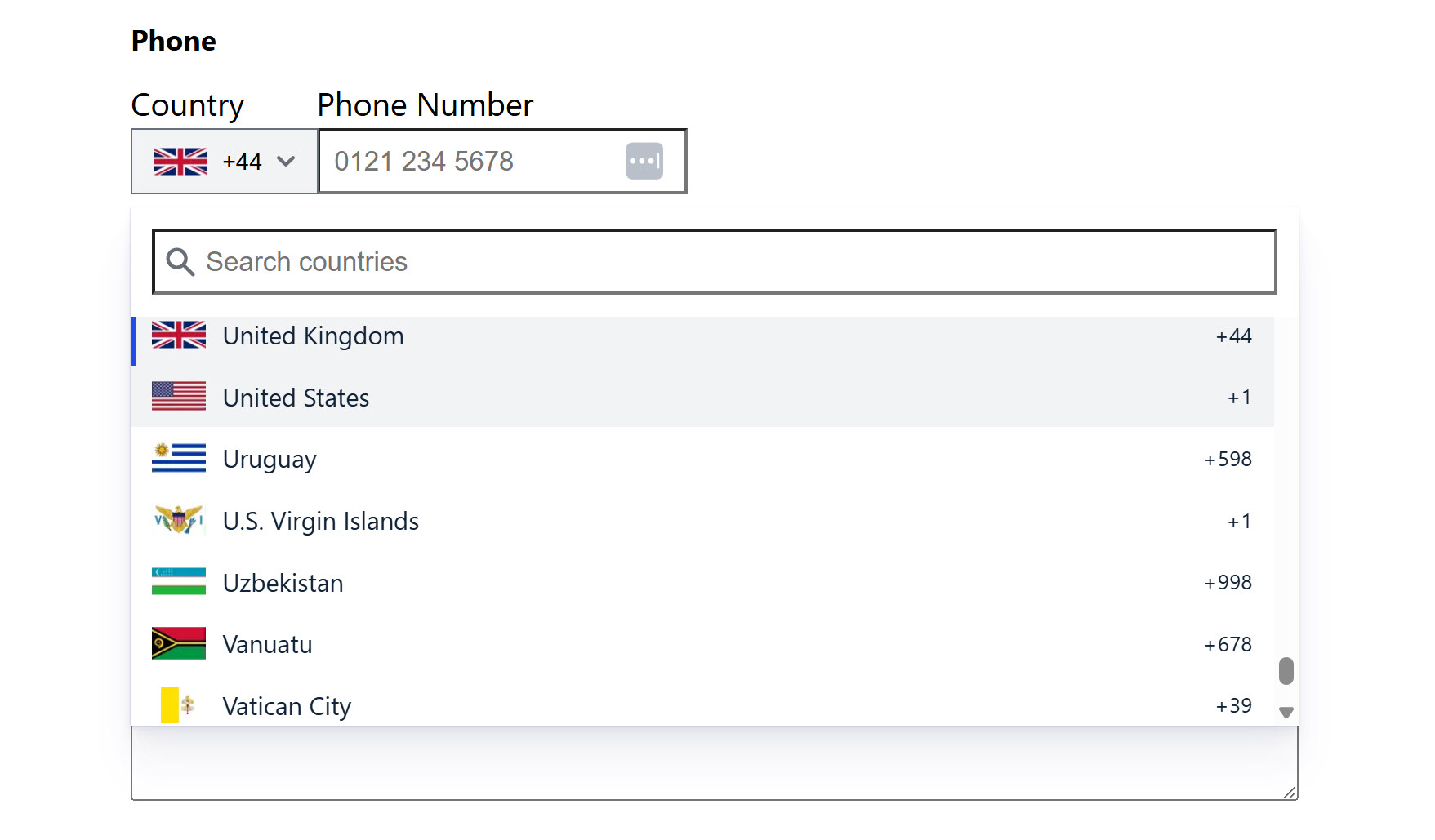
The Phone field now offers full support for international phone formats, helping you create better experiences for users around the world.
You can set a default country for the field, allow users to select their country by name or country code, and rely on built-in validation to ensure the number is accurate and correctly formatted for the country in question.
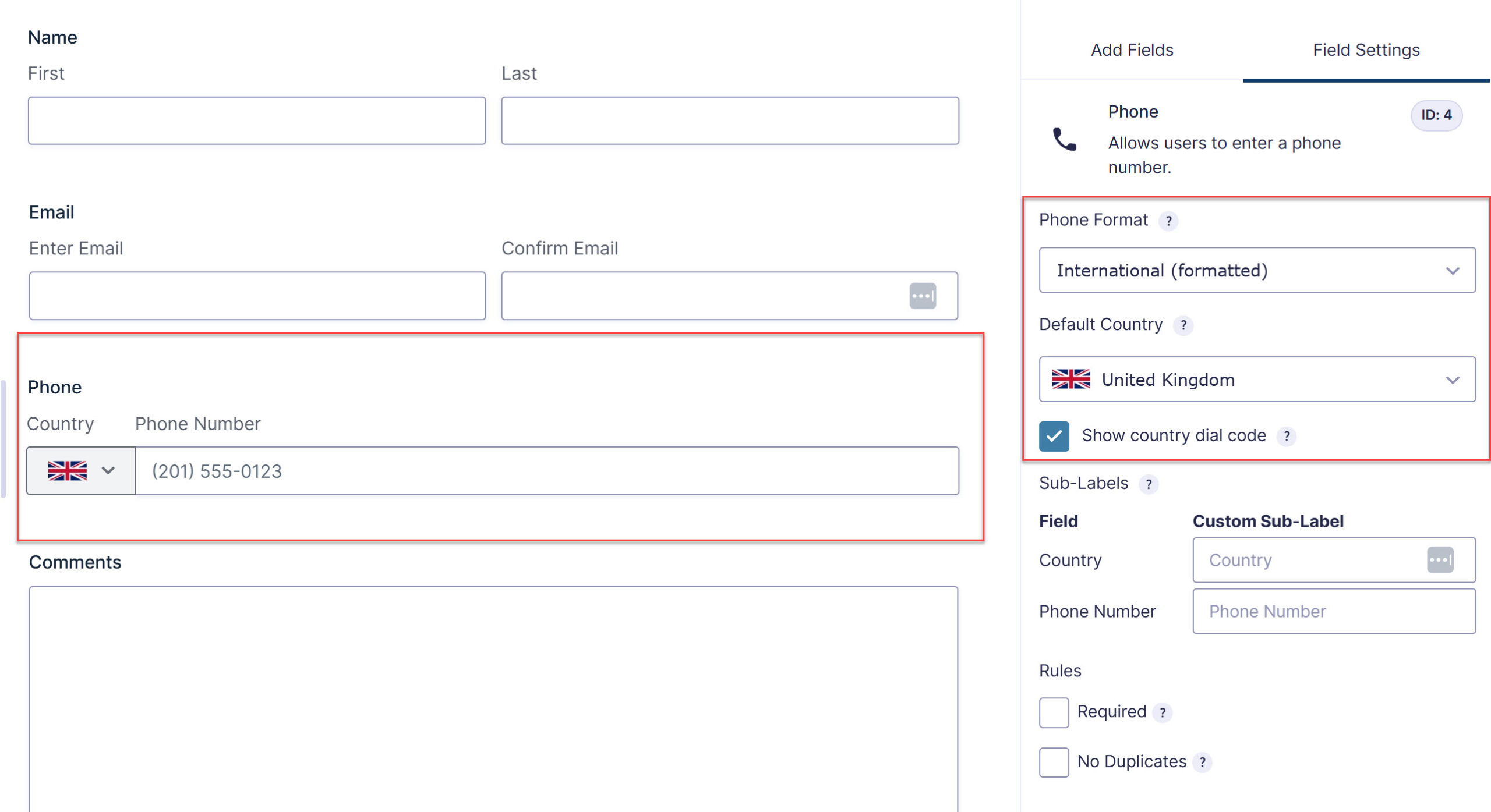
The international format has also been built with accessibility in mind:
- Visible sub-labels: The country selector and phone input now display clear sub-labels, so users know exactly what each part of the field is for. You can customize these in the form editor under the field’s General Settings.
- Semantic structure: The field uses a
fieldsetwrapper with alegendfor the label, providing better structure for screen readers and other assistive technologies. - Accessible country search: When users search for a country in the dropdown, a live region announces the number of results found, helping screen reader users move through the list efficiently.
If you’re collecting inquiries from across the globe, the new Phone field gives your users a smoother, more intuitive experience, and helps you capture accurate numbers, wherever they’re based.
For more information on international phone formats, check out the documentation.
Accessibility by default: Inclusive forms, right out of the box
Building WCAG 2.1 AA-compliant forms just got easier!
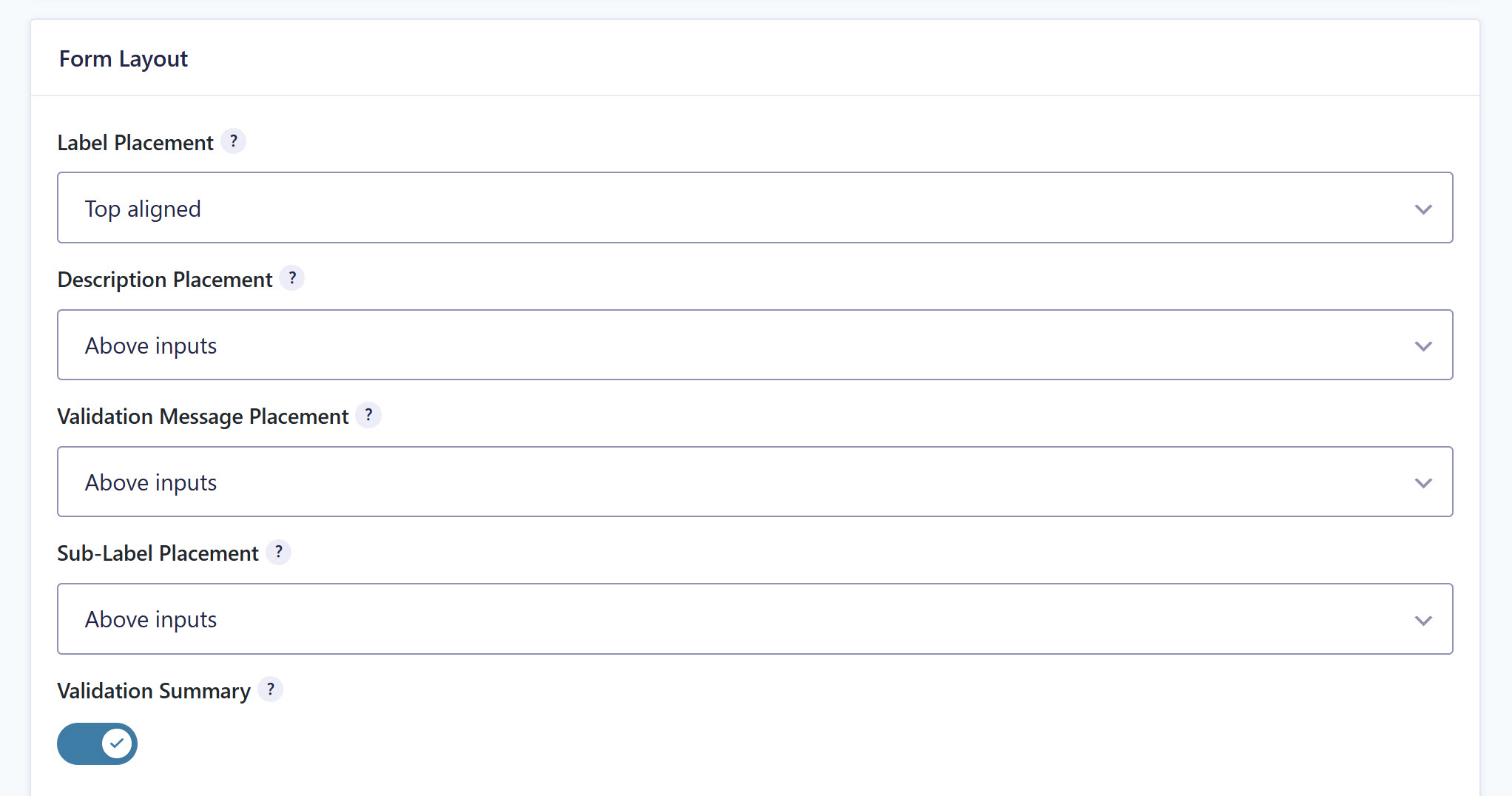
With Gravity Forms 3.0, accessible settings are now enabled by default for every new form you create, no extra configuration required. This reduces manual setup and helps you avoid inadvertent mistakes when working towards WCAG 2.1 AA standards.
The datepicker has had an upgrade, too. The Date field now uses the WhatSock library in place of jQuery UI, delivering fully accessible date selection, with improved keyboard navigation and screen reader support, and no jQuery dependency.
Form submit buttons also now use semantic <button> elements instead of <input> elements, creating more consistent, accessible button markup across your forms and giving you greater styling flexibility.
And to make consistent layouts easier, the Checkbox, Radio, and Multiple Choice fields now share a single Choice Alignment setting. Display choices vertically, horizontally, or in columns, all controlled from the same place across every choice-based field.
For more information on accessibility and WCAG improvements, check out the documentation.
Block API v3: A smoother block editor experience
Gravity Forms 3.0 adds full support for the WordPress Block API v3, allowing blocks to be registered using block.json version 3.
The result is better compatibility with current themes and tools, and a smoother experience embedding and styling your forms inside the block editor.
Developer features: Easier to build on than ever
As well as the features above, 3.0 includes a number of improvements aimed at developers, helping to make Gravity Forms easier to build on.
- Modern input masking: The jQuery-dependent jquery.maskedinput.js library has been replaced with imaskjs, a vanilla JavaScript solution that loads asynchronously and improves the accessibility of input masks.
- Updated JavaScript libraries: The libraries powering formatted inputs and character counts have been updated for a more modern experience.
New filters and hooks
3.0 also introduces several new filters and hooks for greater customization and control over form behavior:
- The
gform-phone-countriesfilter lets you customize the list of countries displayed in the international phone field. - The
gform_state_pre_encodeaction hook allows you to add values to the form state before it is encoded. - The
gform_text_counter_templatefilter allows developers to modify the text counter template string (replacinggform_counter_script, which is no longer supported). - The
gform-form_editor-initializedevent is triggered after the form editor has been initialized, allowing developers to perform actions once the editor is ready. - The
gform-datepicker-pre_initfilter can be used to modify the options used to initialize a field’s datepicker before it is rendered (replacinggform_datepicker_options_pre_init, which is no longer supported).
Check out our documentation for more information on the key features of Gravity Forms 3.0.
Update to Gravity Forms 3.0
Gravity Forms 3.0 is available now to all customers, and it’s important to note that the Gravity Forms plugin does not auto-update for major releases. To get started with Gravity Forms 3.0, simply navigate to the Plugins page within your WordPress Admin, scroll down to Gravity Forms and select Update Now.
You can also download the latest version from within your Gravity Forms Account.
New to Gravity Forms? Head over to our pricing page to get started, or test drive Gravity Forms with our free demo to see it in action.
Note: Caching and script optimization plugins or services can sometimes affect form functionality after an update. We recommend clearing your website, CDN, and browser caches once Gravity Forms 3.0 has been installed.
If you have any questions about Gravity Forms 3.0, our Support team is happy to help.
Gravity Forms 3.0.3 changelog
- Added security enhancements.
- Added new icons to the Common Icons library.
- Updated the Datepicker to use the WordPress “Week Starts On” setting as the default first day of the week.
- Updated the entry list page filter and action hooks to use gf_apply_filters() and gf_do_action(), so throwable errors from hooked callbacks can be caught.
- Updated the Address field countries list to use the country code as the choice value for improved compatibility with third-party plugins.
- Updated the Datepicker type Date field to use the input mask library on manual entry.
- Updated the validation summary to show a single message when no fields have been filled out.
- Fixed an issue introduced in WordPress 7.1 where the Add New feed button is misaligned.
- Fixed an issue where there is a gap above the Entries and Forms tables when there are no entries or forms.
- Fixed an issue introduced in WordPress 7.1 where the Form List table columns display the word ‘Title’ over the form name on mobile view.
- Fixed an issue where the Post Category field entry value changed in 3.0 resulting the post category name not being included in the field merge tag output.
- Fixed issue where card setting descriptions are not announced by screen readers.
- Fixed inconsistent spacing for all color picker settings in the form editor sidebar.
- Fixed an issue where an extra colon appears next to feed status indicators on mobile devices.
- Fixed a performance issue where default lists containing translatable strings (e.g., currencies, countries, US states, and Canadian provinces) can be translated multiple times per page load.
- Fixed an issue where the enhanced UI is initialized for some Drop Down and Multi Select fields that don’t have it enabled.
- Fixed an issue with the International (formatted) type Phone field where the sub-labels remain visible when the Sub-Label Placement setting is set to Hidden.
- Fixed an issue where GFAPI::update_entry_field() does not update entry values when numeric strings contained leading zeros.
- Fixed Datepicker parsing and editor preview for selected date formats.
- Fixed an issue that prevents chained forms from properly working when new AJAX is enabled.
- Fixed a Firefox browser deprecation notice.
- Fixed an issue where some fields and buttons can still be included in the conditional logic init script when conditional logic is disabled.
- Fixed an issue where the gform_disable_css filter does not disable Gravity Forms CSS completely when using the Orbital theme.
- Fixed an issue where a warning is thrown on console when using the Coupons Add-On and creating a new coupon.
- Fixed an issue where the selected value of the Address field default country setting can be lost when the user/site locale changes.
- Fixed an issue with the order of the choices in the Address field country drop down when translated.
- API: Fixed an issue that prevents the gform_product_total filter from being triggered if the form doesn’t have a total field.
Gravity Forms 3.0.2 changelog
- Fixed an issue where Orbital theme styles were reset on the Save & Continue page when email validation failed on the Send Link form while using the new AJAX submission method.
- Fixed a PHP deprecation warning that appears when showing/hiding the QR code.
- Fixed a PHP fatal error that occurs when the form includes a Phone field that is set to a custom format that no longer exists.
- Fixed an issue where window.gformShowSpinner was not defined in some cases.
- API: Updated gf_apply_filters() and gf_do_action() to attempt to catch throwable PHP errors from hooked callbacks when WP_DEBUG is disabled.
Gravity Forms 3.0.1 changelog
- Fixed console error that occurred when adding a page field to an empty form.
- Fixed an issue where a Phone field that was previously configured to use the “International (formatted)” format can display JSON data in the input when the entry is edited.
- Fixed an issue that causes the International Formatted Phone field to fail validation if it is submitted with a default value.
- Fixed low contrast on focus state radio inputs in settings pages.
- Fixed an issue that sometimes causes the text of the submit button to appear outside the button.
- API: Fixed an issue with GF_Query that could affect sorting when performing an explicit join.
Gravity Forms 3.0 changelog
- Added security enhancements.
- Added a new international variant of the Phone Field.
- Added multiple accessibility improvements to the dashboard.
- Added imaskjs to replace the old jQuery based input mask library for US phone fields and text fields with input mask.
- Added improvements to the honeypot feature.
- Added new
gform_text_counter_templatefilter so that the text counter format can be customized. - Added several merge tag modifiers for the repeater field:
:countto get the number of repeats;:textto get the value without HTML markup;:field_ids=to get only the values of the specified field IDs (separate multiple IDs with a |); and:valueto get only the value with no label or HTML markup. - Added textareaHeight setting to the Paragraph Field and usage notice to all Field Size settings.
- Added total field validation for existing fields.
- Added the
gform_state_pre_encodehook, so that add-ons can add additional non-field values to the state before it is encoded. - Added the
gform_enable_repeater_field_buttonfilter to allow enabling the beta Repeater field. - Added additional logging details to the processing of gf-download links.
- Updated many default form and field settings to be accessible by default on new forms.
- Updated drop-zones in the form editor to indicate when a field cannot be dropped in a specific location.
- Updated form buttons to use elements instead of elements for better accessibility and styling flexibility. It is no longer necessary to use the
gform_submit_buttonfilter to change the submit input into a button, and use of that filter might cause unexpected issues. - Updated form theme/frontend based scripts to load on block editor pages.
- Updated the layout editor so that it doesn’t use jQuery UI libraries.
- Updated Save and Continue to use
GFFormDisplay::validate_field()with a$contextofsend-link-submitto validate the send link email field, so thegform_email_field_rejectable_valuesandgform_field_validationfilters are triggered. - Updated state validation to support additional field types, including fields added by add-ons that extend the GF_Field class.
- Updated the appearance of the Repeater field in the form editor, the frontend, Entry Details page, and in the
{all_fields}merge tag output. - Updated the Dashboard Widget setting to be off by default.
- Updated the datepicker field to use a new datepicker library that is fully accessible and does not rely on jQuery.
- Updated the form submission spinner to display inside the submit button instead of next to it.
- Updated the Gravity Forms block to use the Block API version 3.
- Updated the settings for the Radio, Checkbox, and Multiple Choice fields so that they all have the same settings for displaying vertically, horizontally, and in columns.
- Updated the accessibility settings for the Submit and Page Navigation buttons when the button type is set to Image.
- Updated the location and naming of the Choice Layout settings for the Radio, Checkbox, and Multiple Choice fields.
- Updated the accepted files filter for the Import Forms upload input to
.jsonfiles. - Updated the name of the “Field Size” setting to “Field Height” for the Paragraph, Post Body, Post Excerpt, and Post Custom Field fields.
- Updated the browser log so that it doesn’t contain the characters
-->, which can trigger WAF rules and cause form submissions to be rejected. - Updated the validation used by the Submission Speed Check.
- Fixed several bugs with the beta Repeater field.
- Fixed a JavaScript error that occurs when editing a page with an embedded form that includes a multi-file upload field.
- Fixed an issue where empty required fields can be submitted if the value is sanitized.
- Fixed an issue where some fields are displayed incorrectly on block editor pages.
- Fixed an issue with the consent field description spacing in the Orbital Theme.
- Fixed an issue with the consent field for the field required indicator and description spacing and placement in the Gravity Forms 2.5 Theme.
- Fixed an issue with the required field indicator placement and spacing in the Orbital Theme.
- Fixed an issue with the notifications list and edit pages where you can’t see that a notification is assigned to an event that is missing.
- Fixed deprecation notices on MySQL 8.0 caused by the use of the deprecated
SQL_CALC_FOUND_ROWSmodifier. - Fixed an issue where
falseis output in thegf_global.number_formatsvariable instead of the selected format when the number field visibility is set to administrative and dynamic population is enabled. Developers: use$field->set_context_property( 'adminonly_hidden', true )instead of$field->inputType = 'adminonly_hidden'. - Fixed a fatal error when the
$textvalue passed toGFCommon::replace_variables()is not a string. - Fixed an issue that causes the Submit button to lose its appearance settings when it is set to display inline and another field is added to the end of the form.
- Fixed an issue that can cause PHP warnings with PHP 8.1+ when a color selected in the Form block settings is a CSS variable defined in
theme.json. - Fixed an issue where the reCAPTCHA v2 Invisible field label is displayed, or space is reserved for it, when no label is provided.
- Fixed an issue where multiple forms with an inline submit button embedded on the same page output a duplicate element ID for the submit button container.
- Fixed an issue where the user selection dropdown doesn’t display all users.
- Fixed an issue where an administrative List field with dynamic population enabled causes a fatal error when the form is submitted or the entry is viewed.
- Fixed an issue where the dropdown caret on the Settings page overlaps the text in RTL languages instead of appearing on the leading (left) side.
- Fixed an issue where the Personal Data page doesn’t display a Gravity Forms alert when the form doesn’t contain an Email field.
- Removed the
gform_ajax_spinner_urlandgform_spinner_urlfilters. You can use CSS to replace the default spinner. - Removed the
gform_always_show_spinnerfilter. You can use CSS to hide the spinner. - Removed the form button section from the form settings page.
- Removed the gform_price_change JQuery event.
- Removed the Preview toggle in the block editor.
- Removed “display grid” and “show structure” from the form preview
- Removed reCAPTCHA from the Global Settings page when no site key or secret key is configured.
- API: Added get_value_save_input() to replace the deprecated functions get_value_save_entry() and GFFormsModel::prepare_value().
- API: Added a
conditional_descriptionsproperty to the setting field class that can be used to conditionally display descriptions based on the field’s value.

Newsletter
If you want to keep up-to-date with what’s happening on the blog sign up for the Gravity Forms newsletter!
"*" indicates required fields