We’re pleased to announce the release of Gravity SMTP 2.3. This update introduces a much requested feature – email routing – giving you the ability to send emails through different integrations based on conditional rules.
Alongside email routing, you’ll find smarter suppression handling with a new filtered status, a message stream setting for the Postmark integration, and support for custom attachment file names across six more integrations.
Gravity SMTP is available for free to anyone with an active Gravity Forms Elite, Nonprofit, or Developer license. If you hold one of these licenses, simply head on over to your Gravity Forms Account section to download Gravity SMTP today!
Watch the video or read on to take a closer look at what’s new in Gravity SMTP 2.3…

New conditional email routing feature
Until now, Gravity SMTP could send all of your WordPress emails through a single primary integration, with an optional backup. That works well for most sites, but plenty of you told us you wanted more control over which service sends which email.
With email routing, you have it. You can now create conditional rules that determine which integration handles each message.
A few examples of what that makes possible:
- Send your Gravity Forms notifications through Brevo, while your WooCommerce order emails go out via Amazon SES.
- Route email to a specific recipient domain through Google Workspace, while everything else uses your default integration.
- Send emails with “Invoice” or “Receipt” in the subject line through Postmark, built for exactly this kind of transactional email.
How email routing works
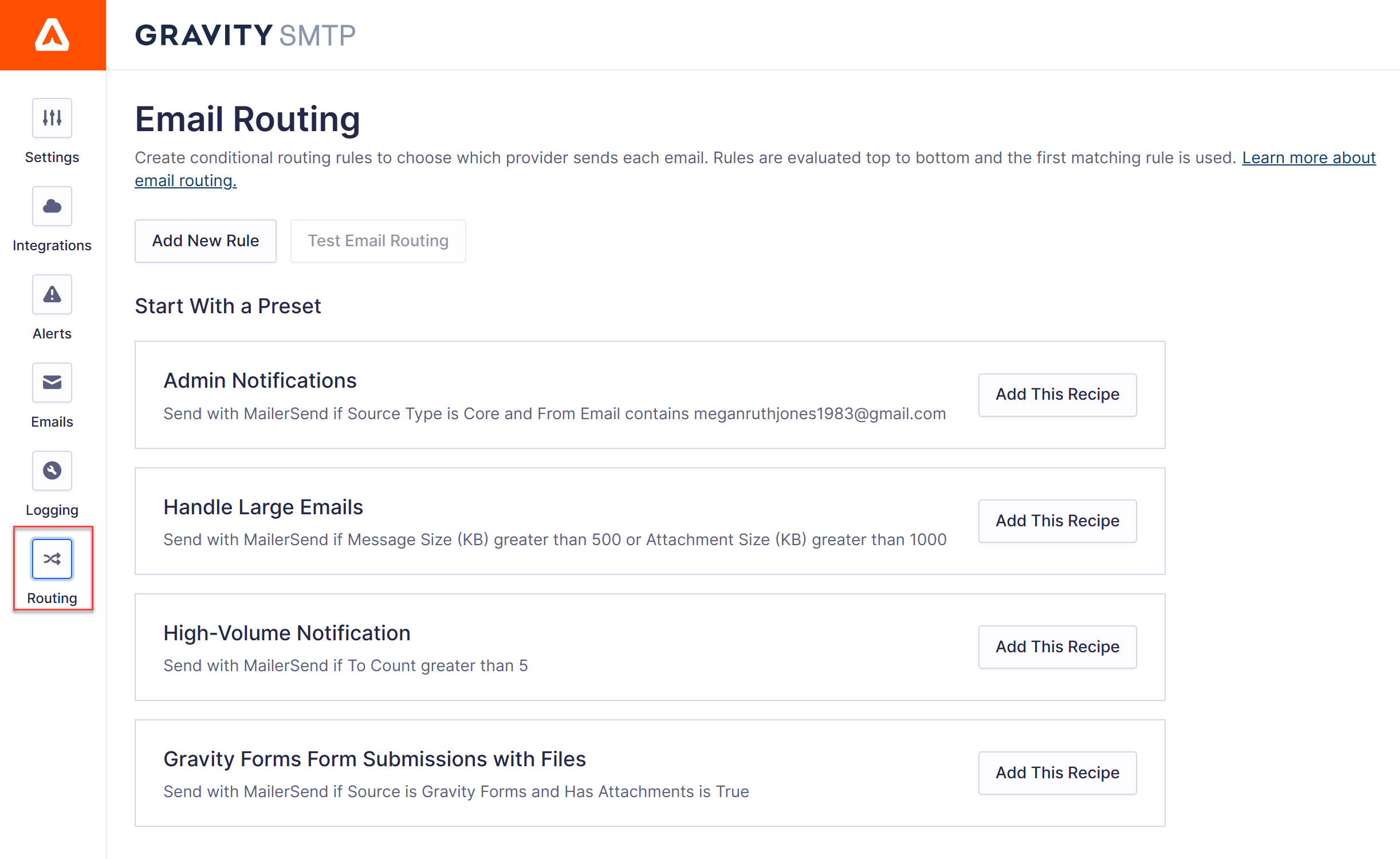
Setting up email routing means creating one or more routes. Each route matches emails against a condition, such as the subject line, sender address, or source, and sends them through the integration you choose.
To save you building common configurations from scratch, email routing ships with a set of presets you can add and customize:
- Admin Notifications separates your site’s system emails from user-facing mail.
- Handle Large Emails routes messages over 500 KB, or with attachments over 1000 KB, to a specific integration.
- High-Volume Notification routes sends of more than 5 emails at once to a dedicated integration.
- Gravity Forms Form Submissions with Files routes form notification emails that include file attachments.
If WooCommerce is active on your site, you’ll also see a WooCommerce Priority Orders preset. All presets are fully editable, so treat them as starting points rather than fixed templates.
Building and customizing routes
Whether you’re editing a preset or creating a route from scratch, the conditions are flexible. As well as exact matches, they can check whether a value contains, starts with, or ends with your chosen text, with regex support for more complex patterns.
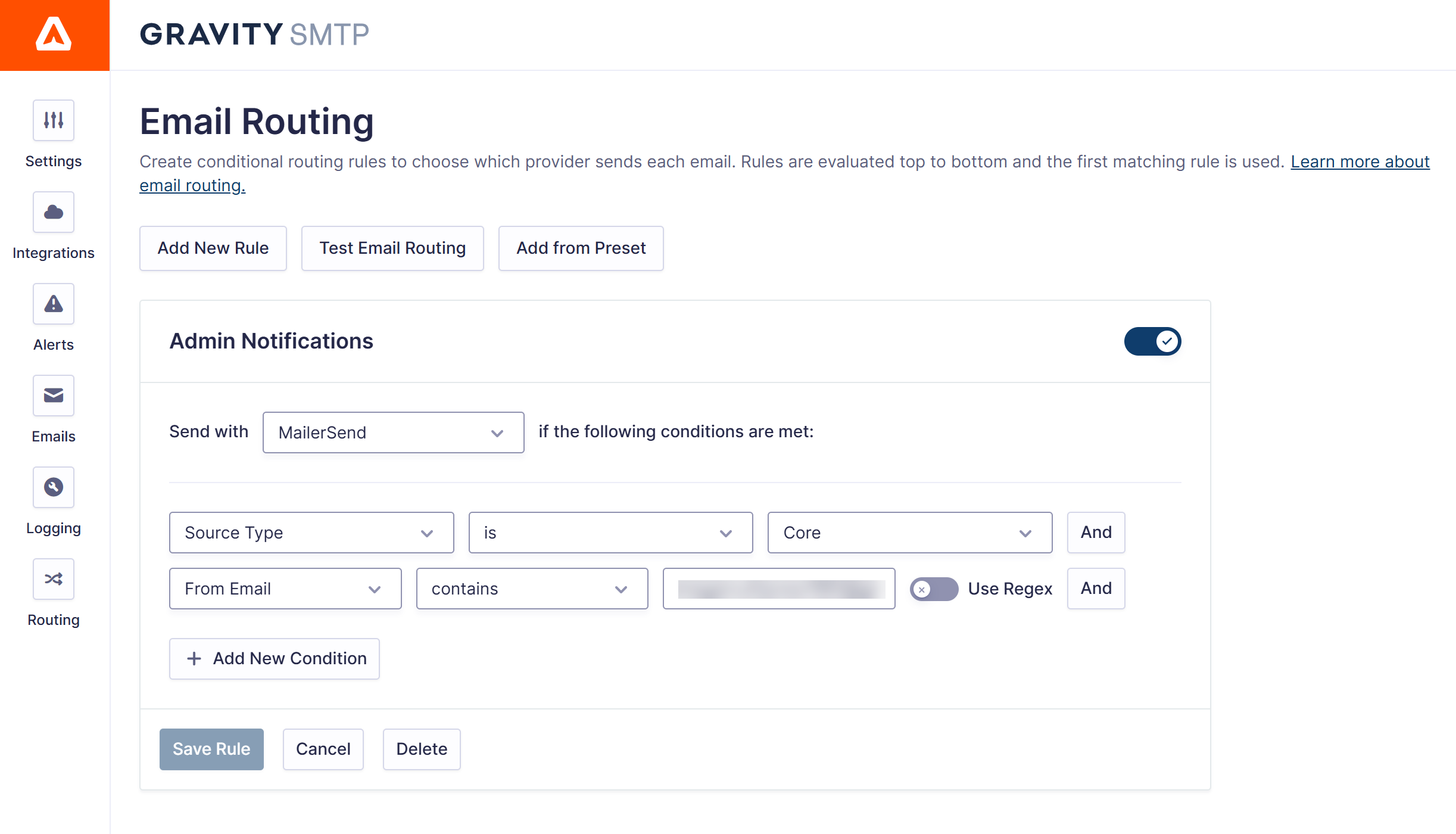
Routes are checked in order from top to bottom, and the first one that matches is used. If nothing matches, the email is sent through your default integration, and if the integration chosen by a route fails to send, Gravity SMTP automatically tries your backup before logging the failure in the Email Log.
One thing to note: You’ll find the new settings under Settings > Email Routing. However, email routing needs at least two active integrations, so the settings screen only appears once you have two or more configured.
Test before you go live
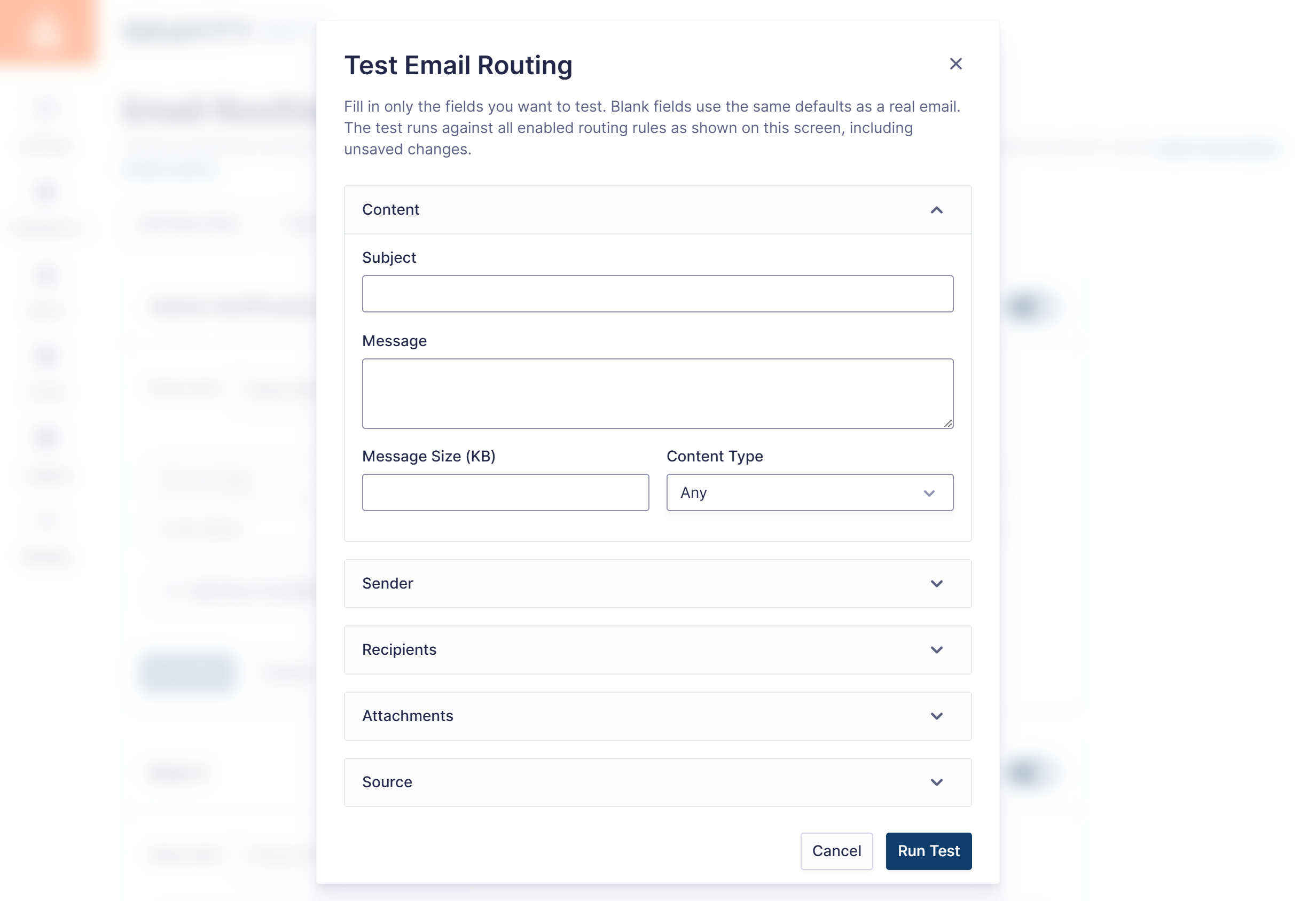
Routing rules are the kind of thing you want to be sure about before real email is on the line. The new test email routing feature lets you simulate an email against your current rules and see exactly which rule and integration would handle it, evaluated in the same order as live sending.
For more information, check out the Email Routing documentation.
Smarter suppression handling
Gravity SMTP 2.3 also improves how the suppression list works when an email has multiple recipients.
Previously, suppression only checked the first recipient of an email. Now every address in the to, cc, and bcc fields is checked, and any suppressed addresses are removed before sending.
When that happens, the email is marked with a new Filtered status in the log, so you can see at a glance that an email went out with one or more recipients removed.
Additional updates
Additionally, Gravity SMTP 2.3 includes the following updates:
- Postmark: Message Stream setting – Postmark users can now specify a Message Stream when sending emails, making it easier to keep transactional and broadcast sending separate on the Postmark side.
- Custom attachment file names – Support for custom file names in attachments now extends to the Custom SMTP, PHP Mail, Amazon SES, Google, Microsoft, and Zoho integrations.
- Developer filter update – The
gravitysmtp_connector_for_sendingfilter now receives the email source as a third parameter, so if you’re choosing connectors in code, you can now route based on where an email came from.
Get Gravity SMTP today!
As mentioned, Gravity SMTP is available for free with a Gravity Forms Elite, Nonprofit, or Developer license. If you hold one of these licenses, or want to upgrade simply head on over to your Gravity Forms Account section to get Gravity SMTP today.
Alternatively, if you’re not yet a customer, head on over to the pricing page to make a purchase.
Want to find out more? You can explore our ultimate guide to Gravity SMTP for step-by-step plugin setup instructions and detailed coverage of its extensive range of integrations and features.
Gravity SMTP 2.3 changelog
- Added an Email Routing settings screen for sending emails through different connectors based on conditions.
- Added a Filtered status for emails that had suppressed addresses removed from the to, cc, or bcc fields.
- Added a Message Stream setting to the Postmark connector.
- Added support for custom file names in attachments for Custom SMTP, PHP Mail, Amazon SES, Google, Microsoft, and Zoho connectors.
- Fixed an issue that can cause PHP warnings if a service fails to send an email.
- Fixed an issue that can cause the settings pages to fail to load when notification settings are missing.
- Fixed an issue that causes important headers to be ignored in the Event Log.
- Fixed an issue where email suppression only checked the first recipient.
- Fixed an issue where the connector settings modal could fail to open after an error occurs while changing the primary or backup connector on the Integrations screen.
- Fixed an issue where the email activity digest would send even when the setting was disabled.
- Updated the gravitysmtp_connector_for_sending filter to pass the email source as a third parameter.
Gravity SMTP 2.3.1 changelog
- Fixed an issue that can cause fatal errors when an email is sent with attachments as a string.
As always, if you have any questions about Gravity SMTP or how to get started, our expert Support team is available to help!

Newsletter
If you want to keep up-to-date with what’s happening on the blog sign up for the Gravity Forms newsletter!
"*" indicates required fields