We are pleased to announce the release of Gravity Forms 3.0 beta 2!
3.0 brings international phone formats to the Phone field and makes accessibility the default for every new form, helping you build more user-friendly, accessible forms from the get-go. It also adds full support for the WordPress Block API v3, along with a host of behind-the-scenes improvements to keep your forms modern and consistent.
As with all our major releases, 3.0 has been released as a beta, and we very much look forward to members of our community testing this latest version of Gravity Forms. A beta period enables us to collect feedback, identify bugs and compatibility problems, and issue updates, as well as give developers time to ensure their products and integrations are compatible.
Read on to find out more about Gravity Forms 3.0 and how to get started testing the beta…
International phone formats
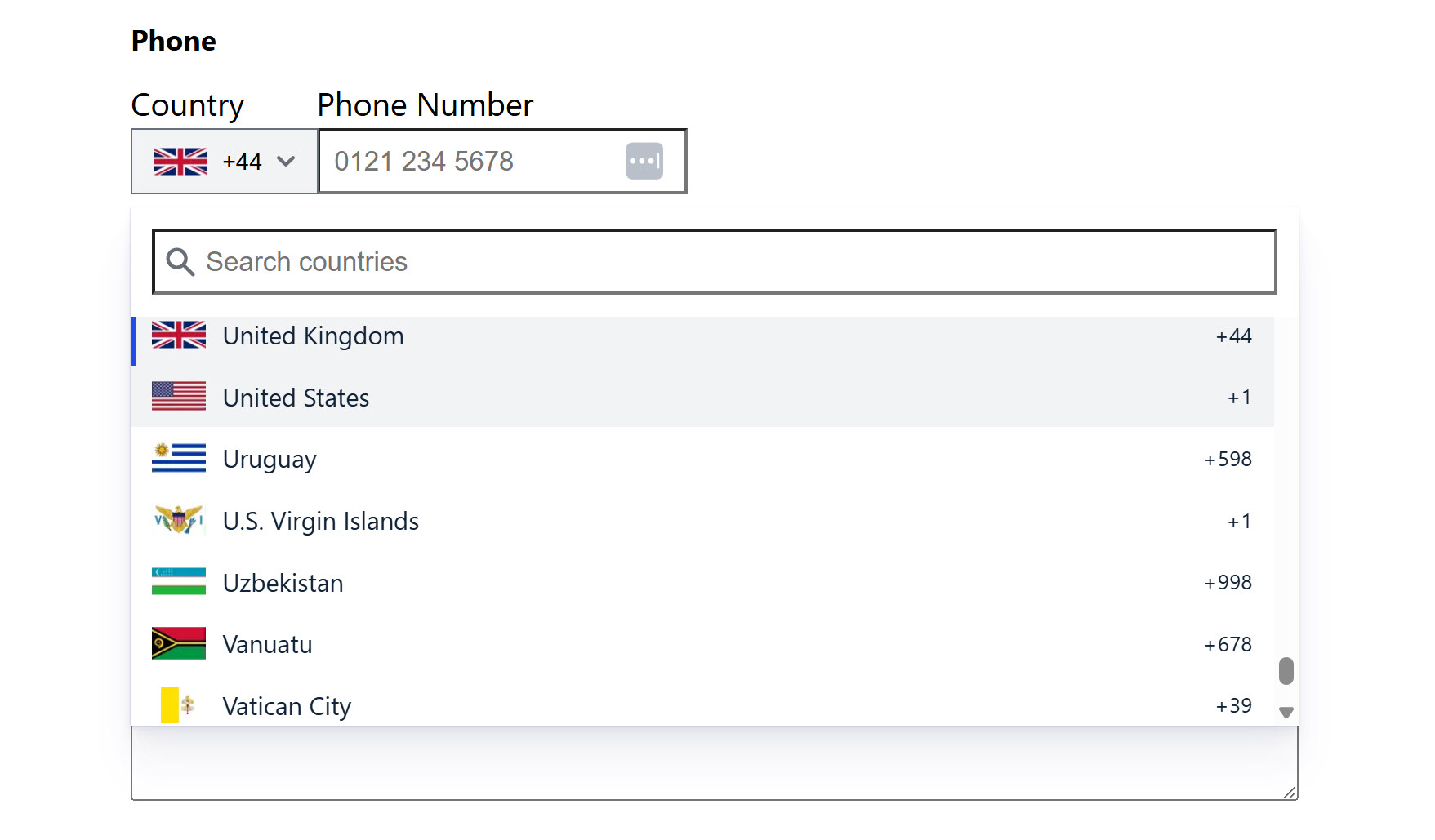
With Gravity Forms 3.0, the Phone field now offers full support for international phone formats, helping you create better experiences for users around the world.
You can set a default country for the field, allow users to select their country by name or country code, and rely on built-in validation to ensure the number is accurate and correctly formatted for the country in question.
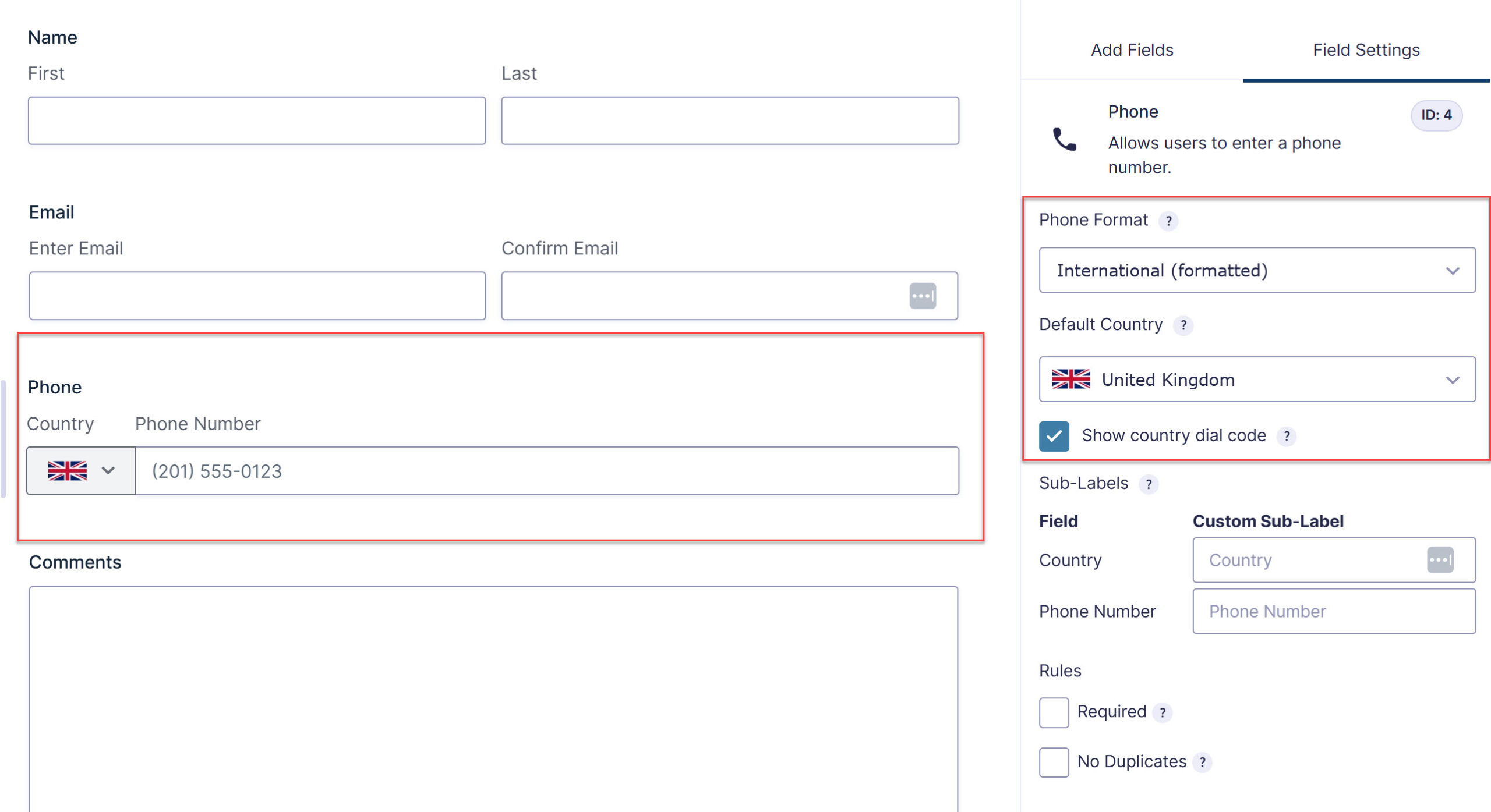
If you’re collecting inquiries from across the globe, the updated Phone field gives your users a smoother, more intuitive experience – and helps you capture accurate numbers, wherever they’re based.
You can read more about the international phone formats in the 3.0 documentation.
Accessibility, built in
Building WCAG 2.1 AA-compliant forms just got easier!
With Gravity Forms 3.0, accessible settings are now enabled by default for every new form you create – so you can build more inclusive forms right out of the box, no extra configuration required.
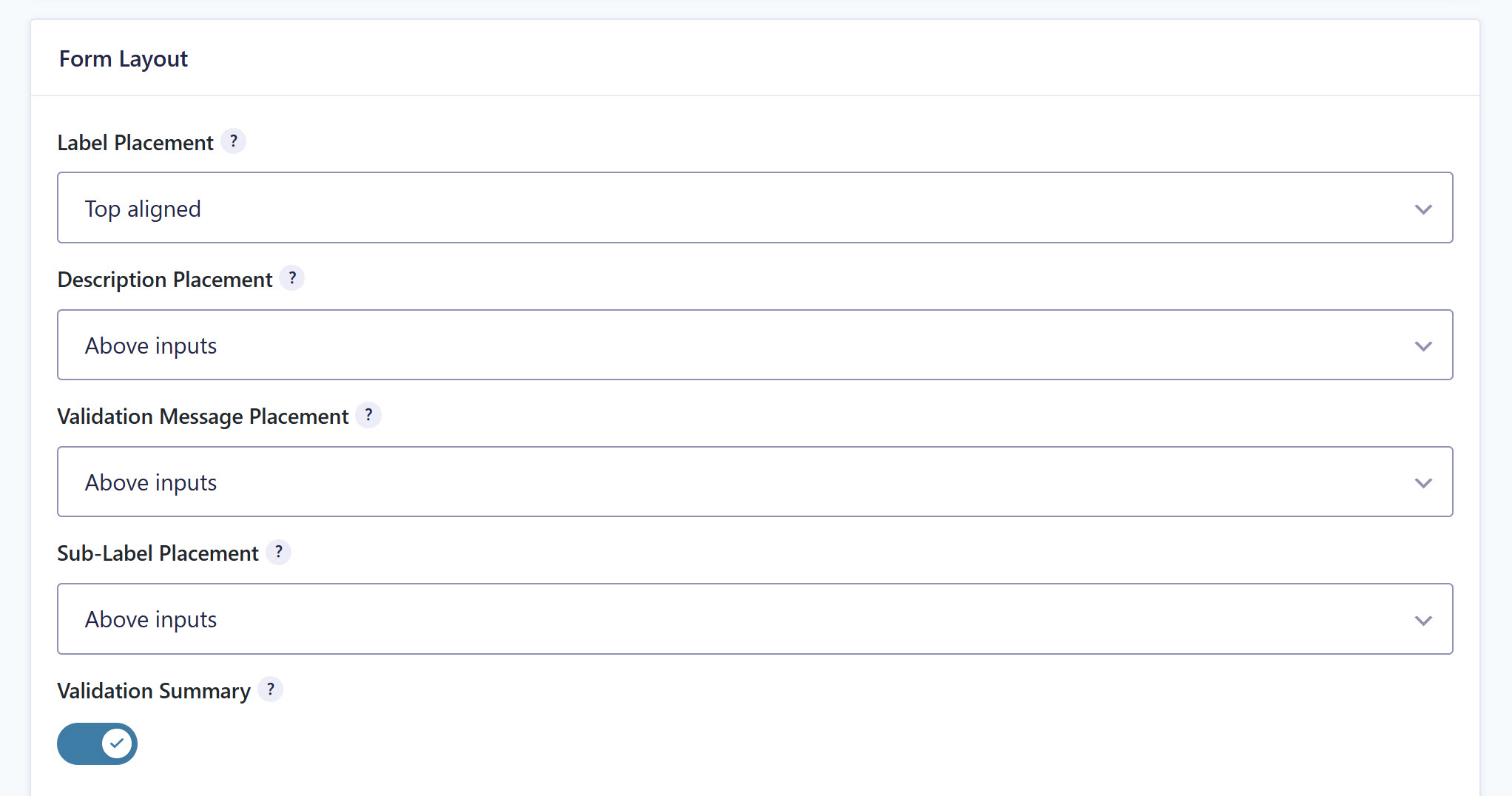
And the datepicker has had an upgrade, too. The Date field now uses the WhatSock library in place of jQuery UI, delivering fully accessible date selection without the jQuery dependency.
For information on accessibility and WCAG improvements, check out the documentation.
Block API v3 support
Additionally, Gravity Forms 3.0 adds full support for the WordPress Block API v3, allowing blocks to be registered using block.json version 3.
The result is better compatibility with current themes and tools, and a smoother experience embedding and styling your forms inside the block editor.
Developer features
As well as the features above, 3.0 includes a number of improvements aimed at developers, helping to make Gravity Forms easier to build on.
- Modern input masking – The jQuery-dependent
jquery.maskedinput.jslibrary has been replaced with imaskjs, a vanilla JavaScript solution that loads asynchronously and improves the accessibility of input masks. - Updated JavaScript libraries – The libraries powering formatted inputs and character counts have also been updated for a more modern experience.
- Consistent button markup – More consistent button markup makes it easier to style forms and create a more polished finish across your site.
New filters and hooks
3.0 introduces several new filters for greater customization and control over form behavior:
- The gform-phone-countries filter lets you customize the list of countries displayed in the international phone field.
- The gform_state_pre_encode action hook allows you to add values to the form state before it is encoded.
- The gform_text_counter_template filter allows developers to modify the text counter template string (replacing
gform_counter_script, which will no longer be supported). - The gform-form_editor-initialized event is triggered after the form editor has been initialized, allowing developers to perform actions once the editor is ready.
- The gform-datepicker-pre_init filter can be used to modify the options used to initialize a field’s datepicker before it is rendered (replacing
gform_datepicker_options_pre_init, which will no longer be supported).
Check out our documentation for more information on the key features of Gravity Forms 3.0.
Install Gravity Forms 3.0 beta 2 today!
We can’t wait for the Gravity Forms community to test 3.0 and we look forward to receiving your feedback and answering any questions. This will help us continue to identify and make the necessary changes and improvements needed before the final release of 3.0.
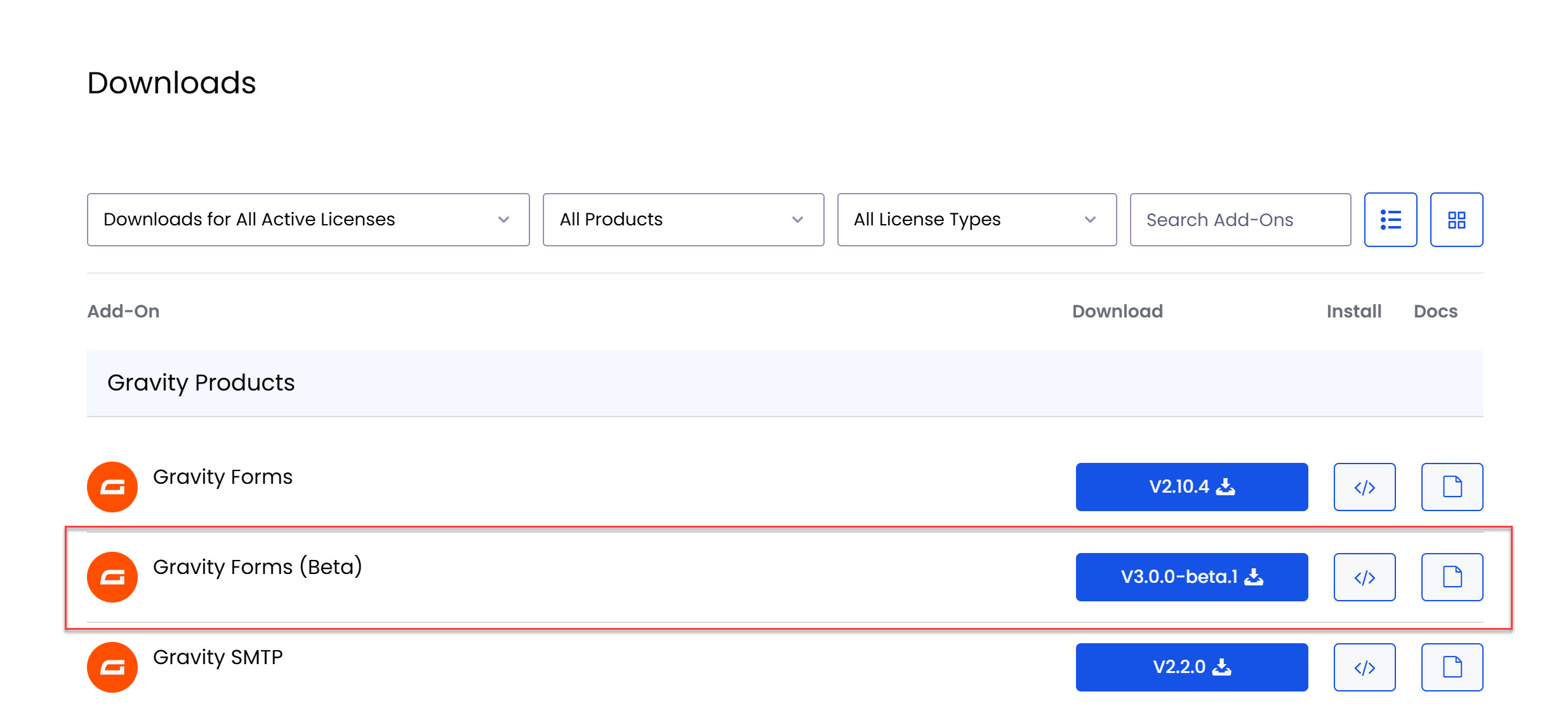
To get your hands on Gravity Forms 3.0 beta 2, simply head on over to your Gravity Forms account and, under Downloads, you will find 3.0-beta-2.
Best practice for 3.0 beta 2
Check out these top tips for testing Gravity Forms 3.0 beta 2…
- Don’t install 3.0 beta on your live site – As we mentioned, 3.0 beta is not recommended for production sites. Even if you test 3.0 and think everything is working, you should still not use it on your live site.
- Check out the docs – As always, the Gravity Forms Support team has written supporting documentation to help everyone easily access 3.0 beta and understand its new features.
- Question for Support? – You can reach out via our normal help channels if you have questions about the features and updates within Gravity Forms 3.0 beta.
- Give us feedback – The beta period enables us to collect and evaluate feedback from our customers. If you have any suggestions or discover any issues, please contact our Support team and let us know!
Thanks for supporting the beta release of Gravity Forms 3.0 – we look forward to hearing your feedback!
Gravity Forms 3.0 beta 1 changelog
- Added a new international variant of the Phone Field.
- Added multiple accessibility improvements to the dashboard.
- Added imaskjs to replace the old jQuery based input mask library for US phone fields and text fields with input mask.
- Added improvements to the honeypot feature.
- Added new
gform_text_counter_templatefilter so that the text counter format can be customized. - Added several merge tag modifiers for the repeater field:
:countto get the number of repeats;:textto get the value without HTML markup;:field_ids=to get only the values of the specified field IDs (separate multiple IDs with a |); and:valueto get only the value with no label or HTML markup. - Added textareaHeight setting to the Paragraph Field and usage notice to all Field Size settings.
- Added total field validation for existing fields.
- Added the
gform_state_pre_encodehook, so that add-ons can add additional non-field values to the state before it is encoded. - Added the
gform_enable_repeater_fieldfilter to allow enabling the beta Repeater field. - Updated many default form and field settings to be accessible by default on new forms.
- Updated drop-zones in the form editor to indicate when a field cannot be dropped in a specific location.
- Updated form buttons to use elements instead of elements for better accessibility and styling flexibility. It is no longer necessary to use the
gform_submit_buttonfilter to change the submit input into a button, and use of that filter might cause unexpected issues. - Updated form theme/frontend based scripts to load on block editor pages.
- Updated the layout editor so that it doesn’t use jQuery UI libraries.
- Updated Save and Continue to use
GFFormDisplay::validate_field()with a$contextofsend-link-submitto validate the send link email field, so thegform_email_field_rejectable_valuesandgform_field_validationfilters are triggered. - Updated state validation to support additional field types, including fields added by add-ons that extend the GF_Field class.
- Updated the appearance of the Repeater field in the form editor, the frontend, Entry Details page, and in the
{all_fields}merge tag output. - Updated the Dashboard Widget setting to be off by default.
- Updated the datepicker field to use a new datepicker library that is fully accessible and does not rely on jQuery.
- Updated the form submission spinner to display inside the submit button instead of next to it.
- Updated the Gravity Forms block to use the Block API version 3.
- Updated the settings for the Radio, Checkbox, and Multiple Choice fields so that they all have the same settings for displaying vertically, horizontally, and in columns.
- Fixed several bugs with the beta Repeater field.
- Fixed a JavaScript error that occurs when editing a page with an embedded form that includes a multi-file upload field.
- Fixed an issue where empty required fields can be submitted if the value is sanitized.
- Fixed an issue where some fields are displayed incorrectly on block editor pages.
- Fixed an issue with the consent field description spacing in the Orbital Theme.
- Fixed an issue with the consent field for the field required indicator and description spacing and placement in the Gravity Forms 2.5 Theme.
- Fixed an issue with the required field indicator placement and spacing in the Orbital Theme.
- Removed the
gform_ajax_spinner_urlandgform_spinner_urlfilters. You can use CSS to replace the default spinner. - Removed the
gform_always_show_spinnerfilter. You can use CSS to hide the spinner. - Removed the form button section from the form settings page.
- Removed the gform_price_change JQuery event.
- Removed the Preview toggle in the block editor.
- Removed “display grid” and “show structure” from the form preview
- API: Added get_value_save_input() to replace the deprecated functions get_value_save_entry() and GFFormsModel::prepare_value().
Gravity Forms 3.0 beta 2 changelog
- Added additional logging details to the processing of gf-download links.
- Updated the location and naming of the Choice Layout settings for the Radio, Checkbox, and Multiple Choice fields.
- Updated the accepted files filter for the Import Forms upload input to
.jsonfiles. - Updated the placement of the accessibility warnings on the Form Settings page.
- Fixed deprecation notices on MySQL 8.0 caused by the use of the deprecated
SQL_CALC_FOUND_ROWSmodifier. - Fixed an issue with the required field indicator placement and spacing in the Orbital Theme.
- Fixed an issue where
falseis output in thegf_global.number_formatsvariable instead of the selected format when the Number field visibility is set to Administrative and dynamic population is enabled. Developers: use$field->set_context_property( 'adminonly_hidden', true )instead of$field->inputType = 'adminonly_hidden'. - Fixed the layout of the International Phone field when the sub-labels are long enough to wrap to the next line.
- Fixed a fatal error when the
$textvalue passed toGFCommon::replace_variables()is not a string. - Fixed an issue that causes the Submit button to lose its appearance settings when it is set to display inline and another field is added to the end of the form.
- API: Added a
conditional_descriptionsproperty to the setting field class that can be used to conditionally display descriptions based on the field’s value.