
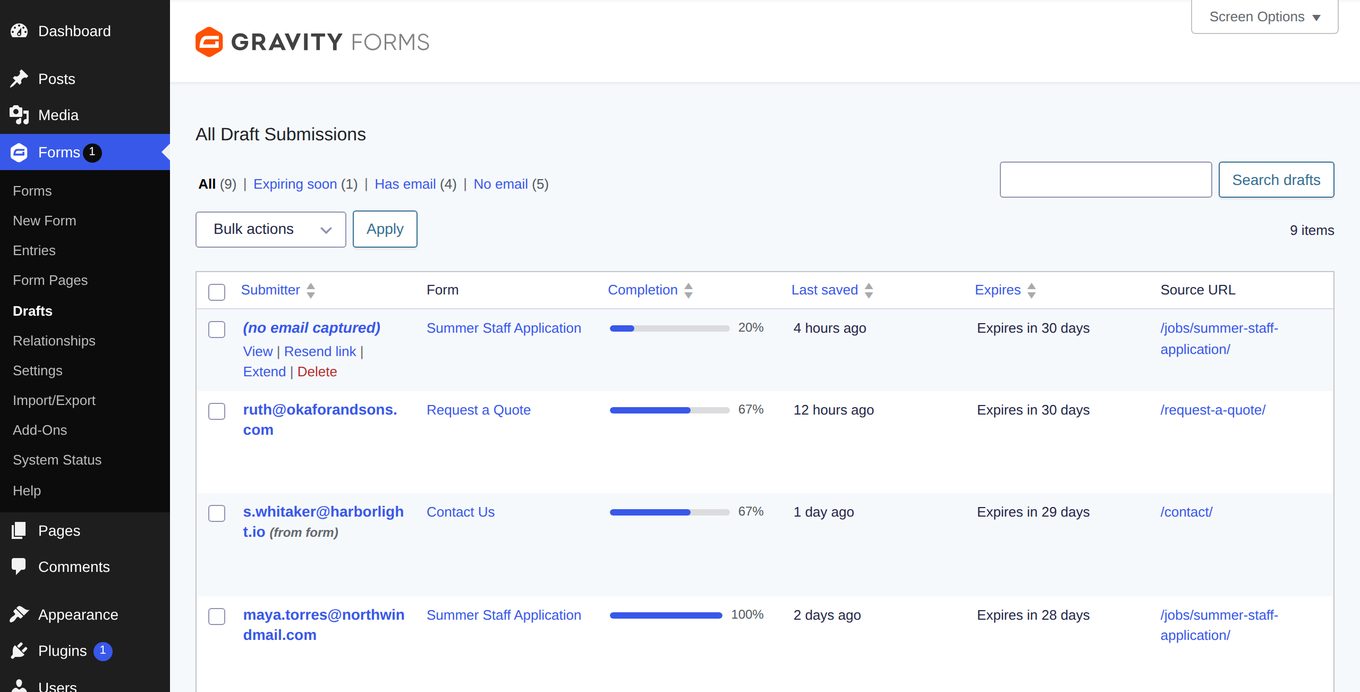
Save & Continue lets visitors save a half-finished form and come back later — but Gravity Forms stores those drafts out of sight, with no admin screen to view them. Manage Drafts opens them up: a native Drafts screen under Forms → Drafts where you can read, annotate, remind, extend, export, and delete every in-progress submission.
See every draft
- All Save & Continue drafts across every form in one list: submitter, form, completion progress, last saved, expiry, and source URL.
- Filter tabs (All / Expiring soon / Has email / No email), search, sortable columns, and Screen Options — it works like the native entries list.
- Entry-style draft detail view, including pending file uploads and values from fields that were later removed from the form.
- Submitter email detection with clear provenance — addresses derived from form fields are labeled “(from form)”.
Recover the submission
- Send the submitter a reminder email containing their private resume link, through the Gravity Forms notification pipeline or a configurable fallback template.
- Reveal & copy the resume link on demand — it is treated like a password and never printed in the page until you ask for it.
- Extend a draft’s expiry date, or act in bulk: remind, extend, export, or delete many drafts at once.
- Add notes to a draft; when the draft is submitted, its notes migrate to the entry’s native notes.
Understand why forms stall
- Stall analytics per form: which page people abandon on, and which required fields go unfilled.
- Dashboard widget with draft totals by form, and an optional scheduled digest email summarizing aging drafts.
- CSV export with decoded field labels and values (the resume token is never exported).
Built to fit Gravity Forms
- Access follows Gravity Forms capabilities (view entries, edit entries, delete entries, export entries), with a configurable view capability.
- Per-form setting to choose the canonical submitter email field.
- The core screens — drafts list, detail view, resume-link reveal, notes, and delete — work without a license. A license adds reminder emails, expiry extension, CSV export, completion tracking, stall analytics, the dashboard widget, and the scheduled digest, plus automatic updates.