
The official Gravity Forms connector for Power Automate – 1,500+ integrations, no per-task fees, no code.
Every form submission can trigger a real business process. Route entries to Excel. Drop files into SharePoint. Alert your team in Microsoft Teams. Create Dynamics 365 leads, kick off approvals, fire marketing sequences, or run anything else Power Automate supports – on the Microsoft 365 license you already have.
Microsoft Certified. Built and maintained by Reenhanced, the team behind the official Power Automate connectors for WordPress, WooCommerce, and Contact Form 7.
What you can automate
- Form entries flowing into a live Excel spreadsheet
- Submissions filed in SharePoint, attachments and all
- New leads appearing in your Dynamics 365 CRM the moment a form is submitted
- Teams channels notified on every entry
- Approval workflows, document generation, and marketing sequences firing automatically
- IoT and line-of-business systems reacting to form data in real time
- Every other Gravity Forms add-on you already use, still working
Why teams pick this over generic automation tools
- No per-task pricing. Run 100 submissions or 100,000 – your cost doesn’t change.
- Uses the Microsoft stack your IT team already trusts, audits, and licenses.
- Multiple feeds per form with conditional logic – one form can drive many flows.
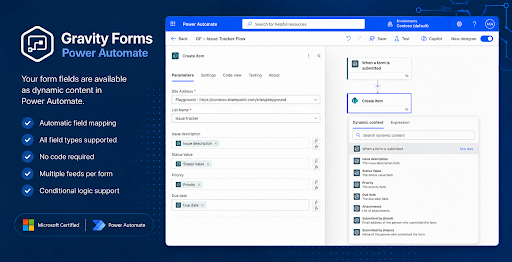
- Field mapping is automatic. Your form fields appear as dynamic content in Power Automate the moment your feed activates.
Setup takes about 5 minutes
- Install and activate the plugin
- Enter your license key under Forms → Settings → Power Automate
- Add a feed to any form you want to connect
- Build your flow in Power Automate – your fields are already there
Need to do more than trigger flows? The Standard edition is built for one job, done well: firing Power Automate flows when entries are created. If you need to create, update, delete, fetch, or validate entries from inside Power Automate – or trigger on payments, approvals, status changes, or notes – upgrade to Gravity Forms Power Automate Professional. Pro also runs on a direct, bi-directional connection between Power Automate and your site with an additional secret-key security layer.
Try it free for 30 days. Use coupon onemonthfree at checkout on the 1-month, 1-domain plan. Keep it if it earns its place. Cancel if it doesn’t. Every plan is backed by a 30-day no-questions-asked money-back guarantee.