
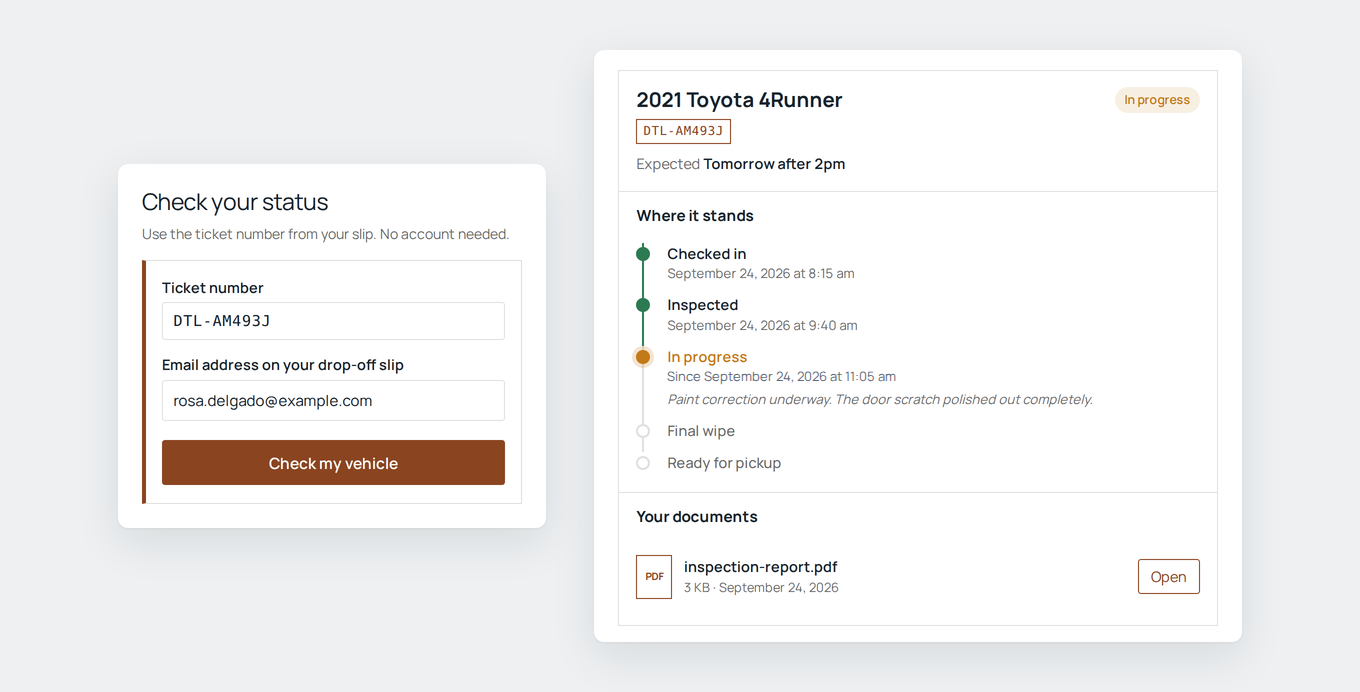
When someone submits a form and then has to wait, they call or email to ask where things stand. Record Lookup gives them a way to check for themselves.
Every entry gets a reference number, either generated or taken from a field the form already collects, and it appears in the confirmation and emails through a merge tag. To look up their record, the customer enters that number plus a detail only they would know, such as their email address. Everything has to match or nothing is shown, the same message appears whether or not a reference exists, and repeated wrong guesses lock the lookup for a while. No customer accounts are involved.
The business decides what the customer sees: which fields, grouped by the form’s own section breaks, a record title, and wording that fits them, so it reads as a ticket number to a repair shop and a permit number to a city. Records move through the business’s own stages from the entry screen or in bulk from the Entries list, with notes for the customer, an expected date, and documents like reports, photos or invoices released when they’re ready. Stage changes can trigger regular Gravity Forms notifications, with a choice of which stages email the customer, and customers with several submissions can see all of their records at once.
Setup lives in each form’s settings, with a checklist that shows what’s left and can add the reference to the confirmation, create the lookup page, and add a status email in one click each. The lookup goes on any page with a block or shortcode, and uses the site’s own fonts with an accent color of the owner’s choosing.
It fits any business that takes requests through a form and makes people wait: repair and service shops, maintenance requests, permits and applications, testing labs, custom orders, claims and complaints.