
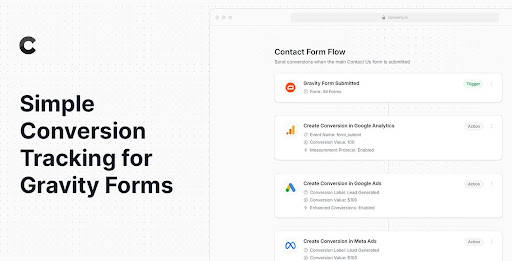
Converly is the best way to send conversions to Google Ads, Meta Ads, Microsoft Ads, LinkedIn Ads, and more whenever someone submits a Gravity Form on your website.
How it Works
Sending conversions to your ad platform and analytics tools is easy with Converly:
- Add the Converly code to your site – Sign up for a 14-day free trial of Converly, and you’ll get a small snippet of code to add to your website.
- Build your conversion flow – Build your conversion flow in our simple drag-and-drop builder. Simply select a trigger (I.e. a Gravity Form is submitted) and then select your actions (i.e., Send a conversion to Google Ads, Send a conversion to Meta Ads, etc)
- See conversions in your ad accounts and analytics tools – Converly listens for form submissions and sends conversions to your chosen destinations. You can then track which campaigns, ads, etc., are generating you the most leads.
Why use Converly
Here’s why Converly is the best way to send conversions to your ad platforms and analytics tools:
Simple to set up
Build your conversion flow in a simple drag-and-drop builder (similar to Zapier or Gravity Flow). You simply pick a Trigger (like a Gravity Form being submitted on your site) and then select your desired Actions (Send conversion to Google Ads, Send conversion to Meta Ads, etc)
Sends conversions server-side
Converly sends conversions directly to the ad platform’s servers. This bypasses ad blockers, privacy restrictions in Safari and iOS, and similar measures, ensuring you get more accurate conversion tracking. Google’s own data suggests this increases tracked conversions by 19% (Meta’s data shows a 23% increase).
Sends more data
Converly captures information from the visitor’s browser (like the Google Click ID, Facebook Click ID, IP address, Device, Browser, etc) as well as data from the form submission (name, email, etc) and sends it over with each conversion. According to Meta’s own data, this results in a 95%+ match rate (versus a 40% match rate from browser-only data).
Full debug log
Conversion tracking can often be a black box, and you have no idea whether it’s working properly. Converly gives you a full log of every conversion, showing exactly what data was captured, what data was sent to each ad platform, whether it was received successfully, etc. This gives you confidence that your conversion tracking is working properly and allows you to spot issues when it isn’t.
Proper support from analytics experts
Ever tried to ask Google or Meta to help with your conversion tracking setup? You probably got nowhere. Our team has 20+ years of experience in marketing analytics and is on hand to help make sure your conversion tracking is set up properly.