WordPress vs Wix: How to choose your website builder
 By Colin Newcomer
Published January 2, 2026 · Updated December 22, 2025
By Colin Newcomer
Published January 2, 2026 · Updated December 22, 2025
Debating between using WordPress vs Wix to build your website?
While WordPress and Wix will both give you the ability to create a unique website for your business, they go about it in pretty different ways:
- WordPress is an open-source, self-hosted content management system. You can install it on your own web hosting and fully customize every single aspect of your site, including using 60,000+ extensions to add new features and integrations. By the numbers, WordPress powers over 43% of all the websites on the internet.
- Wix is a closed-source, SaaS/hosted website builder. You can register for an account and start building. Wix handles all of the setup/maintenance for you, but you don’t get as much flexibility because you’re playing in Wix’s sandbox. Wix powers around 4% of all websites, so it’s not nearly as popular as WordPress.
In this comparison, we’re going to dig into those similarities and differences in more detail so that you can make the right choice for your business or personal website.
To make that happen, we’ll compare WordPress vs Wix in the following areas:
- What types of websites you can build
- Ease of use
- Extensibility
- Design options
- Content creation experience
- Pricing and costs
If you want the best of both worlds, we’ll also share a few tips for how you can make WordPress more like Wix.
What can you build with Wix and WordPress?
Let’s kick off our comparison by talking about the types of websites that you can build with Wix and WordPress.
What can you build with WordPress?
One of the big reasons why WordPress has grown to power over 43% of all the websites on the internet is that you can use WordPress to build pretty much any type of website.
From simple blogs and portfolios to complex ecommerce stores or membership communities, WordPress can do it all.
Here are some examples of the many types of websites that you can build with WordPress, though this is by no means a complete list:
- Business brochure websites
- Portfolios
- Blogs
- Ecommerce stores
- Membership websites with restricted content
- Online courses
- Social communities
- Forums
- Knowledgebases
- Multisite networks of connected sites (e.g. having six locations for a local business and creating a separate, but connected, site for each)
- …lots more
You can also use WordPress internally in lots of interesting ways, such as using it to power your customer support helpdesk, your customer relationship manager (CRM), and more.
Even if your initial use case is to just create a basic website, the fact that WordPress can handle so many different use cases is still valuable.
Basically, when you use WordPress, you can be confident that you’ll be able to evolve and adapt your website as your business’s needs evolve and adapt.
What can you build with Wix?
For a website builder, Wix is also pretty flexible in terms of the types of websites that it lets you build. It can handle most common use cases, including the following:
- Brochure websites
- Portfolios
- Blogs
- Ecommerce stores
- Membership websites
- Social communities
- Online courses
It might not be as flexible as WordPress for unique implementations of certain use cases, but it is better than most other SaaS website builders in terms of giving you the ability to build lots of different website types.
Ease of use
Ease of use is another important consideration for choosing a website builder, especially for non-technical people.
Neither WordPress nor Wix requires any technical knowledge to use, so anyone can use either platform to build a website.
However, if you want the absolute simplest way to get started, Wix does make the process of launching and hosting a website a little bit simpler. There are ways to make the WordPress experience more like Wix, though, which we’ll discuss later in the post.
WordPress
The “normal” WordPress setup process is a little bit more complicated than Wix because you’ll need to purchase your own web hosting and install the WordPress software.
While this might sound complex, the process is actually a lot easier than it sounds. Because WordPress is so popular, most hosting services offer dedicated WordPress installer tools.
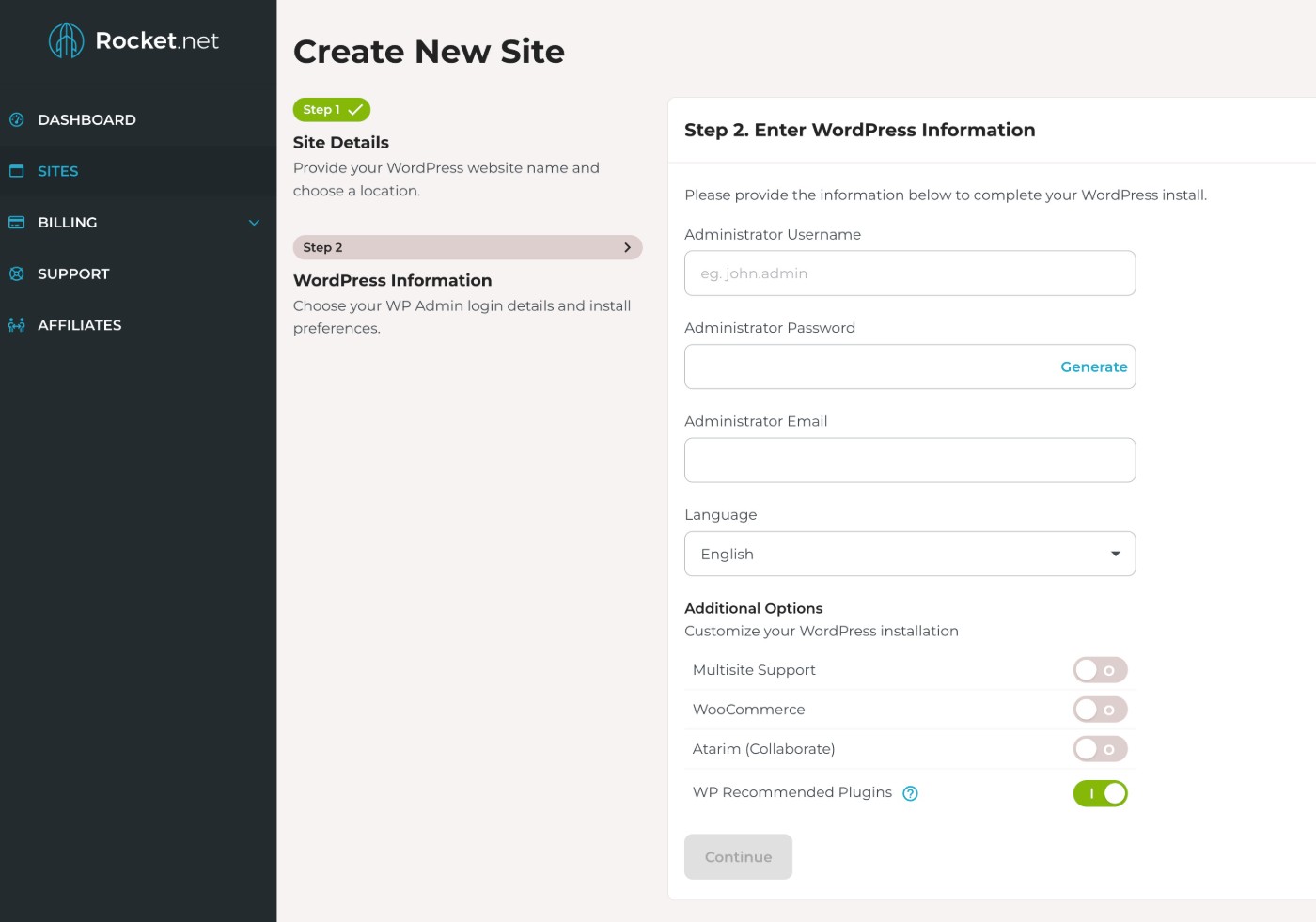
For example, at Rocket.net, a hosting provider, installing the WordPress software is as simple as filling out this form:
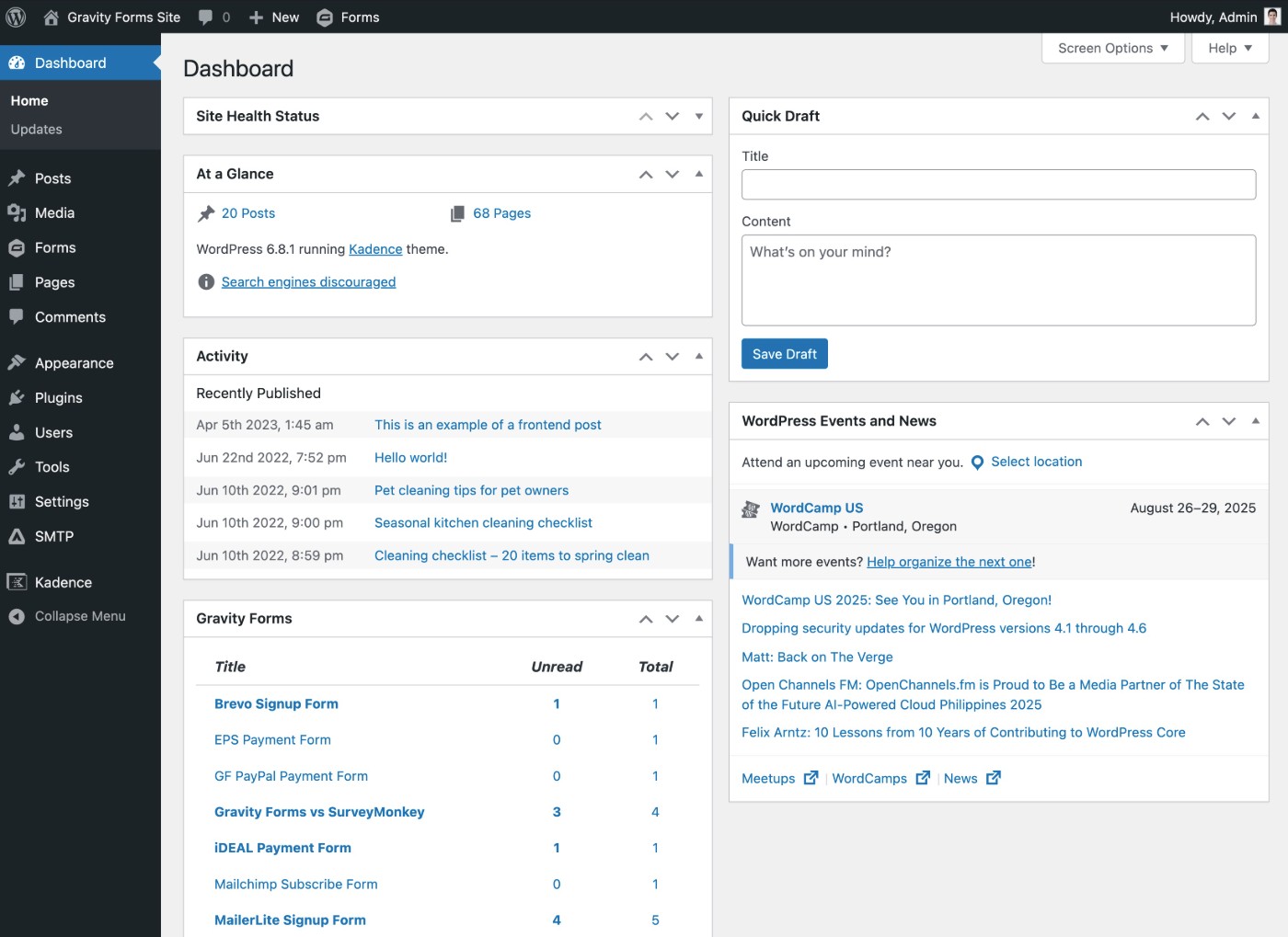
Once you’ve installed the WordPress software, you’ll be able to manage everything about your website from a non-technical dashboard that looks something like this:
With WordPress, you will also be responsible for maintaining your sites and applying updates. However, if you use a managed WordPress hosting provider, your hosting provider can handle a lot of this for you. There are also even more hands-off services if you really don’t want to deal with any maintenance – more on that later.
Wix
Because Wix is a hosted website builder, the setup process is pretty much as simple as registering for an account.
When you create your website, you can choose between using Wix’s AI website builder to generate a design for your site or starting from one of Wix’s pre-made templates (which is the “Set up without Chat” option in the screenshot below).

Once you’ve done that, you can manage everything about your site from a dashboard that looks like this:
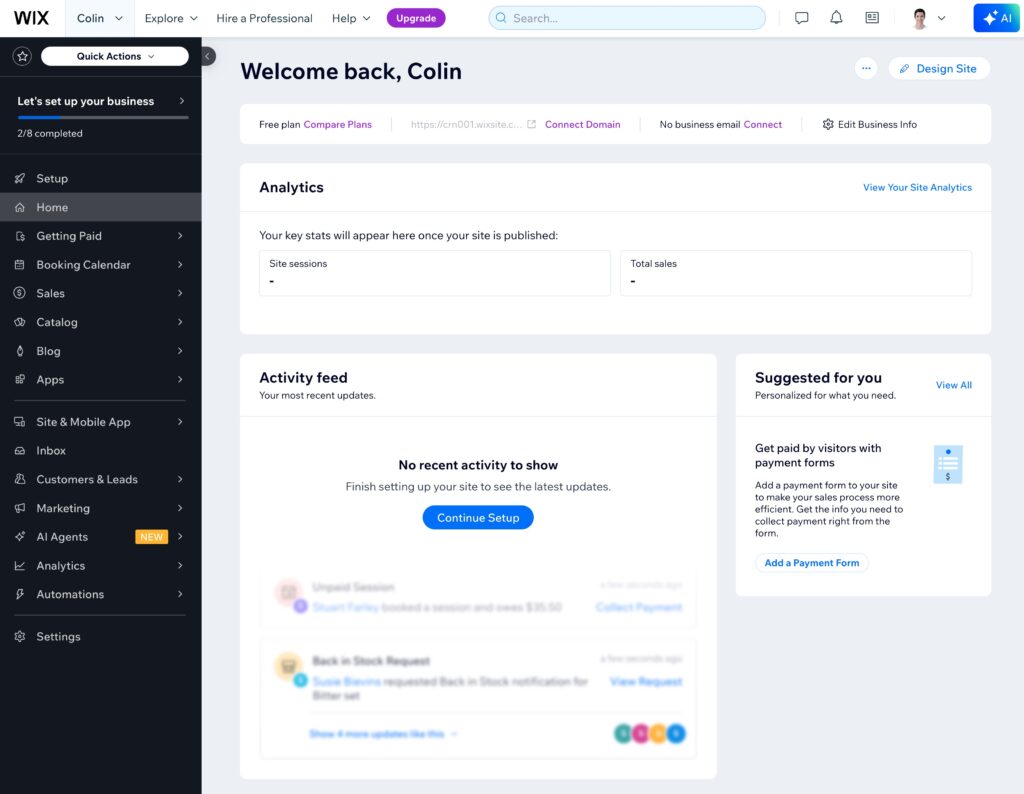
While Wix does a good job of giving you access to a lot of settings, some people might find the dashboard a little cluttered when compared with some other website building tools. However, once you learn where everything is, it’s generally pretty easy to manage your Wix site.
The nice thing about Wix is that you don’t need to deal with any maintenance or updates, as the platform handles all that for you.
Extensibility
A website builder’s extensibility refers to the options that you have to extend the core website building experience with additional features, tools, and integrations. Typically, you’ll see these extensions called “plugins”, “apps”, “add-ons”, etc.
In addition to giving you more control over your website while you create it, having the ability to extend your site with new features is also essential for giving you the ability to grow and scale your website as your business grows.
In general, WordPress is more extensible than Wix (and pretty much any other website builder). Wix is more extensible than some other website builders like Squarespace and Weebly, but Wix still can’t match what WordPress offers.
WordPress
Since its inception, WordPress has always been designed with extensibility in mind. The core WordPress software covers the essential basics of making a website, but you’re then expected to use plugins to add features that are specific to your use case.
Because of WordPress’s popularity and its emphasis on plugins, you get an absolutely massive library of plugins to choose from.
There are over 60,000+ free plugins listed at the official WordPress.org plugin directory. Then, you can find thousands of additional plugins available directly from developers or at premium plugin marketplaces like CodeCanyon.
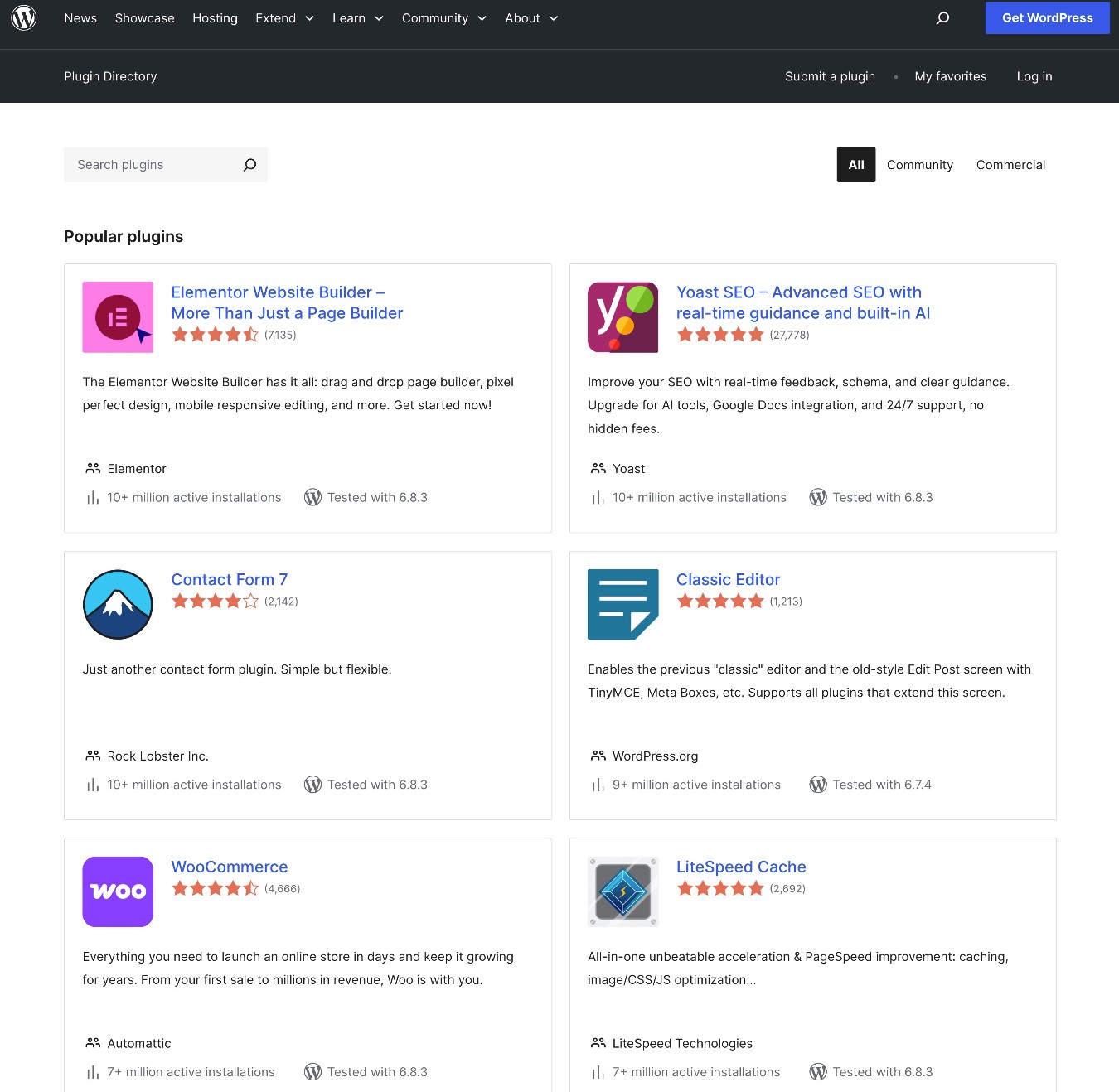
You can find a plugin for pretty much any use case, including adding frontend or backend features, integrating with other tools, etc.
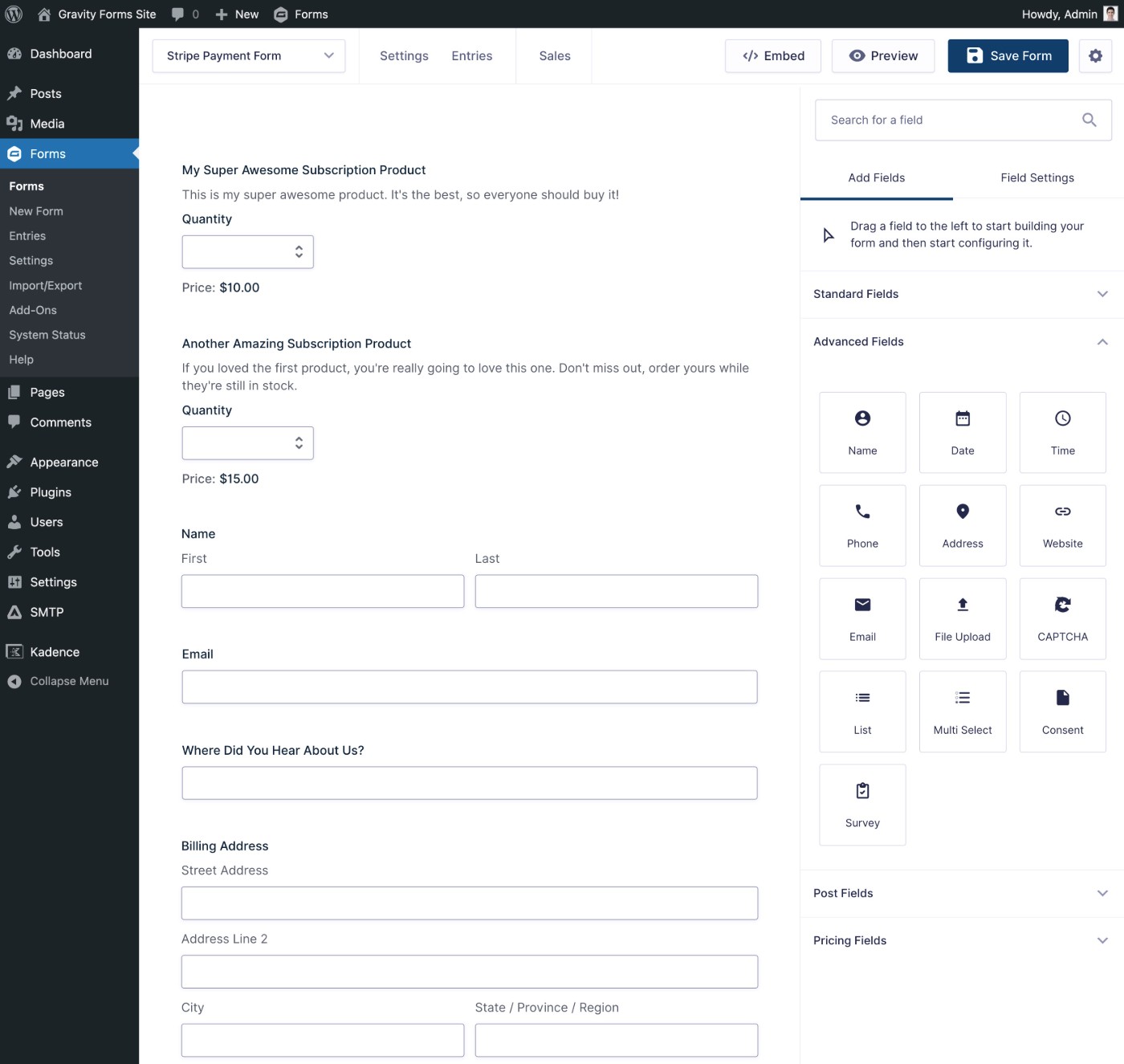
For example, the Gravity Forms plugin lets you use a drag-and-drop builder to create pretty much any type of web form, from basic contact forms to payment forms, lead generation forms, email subscribe forms, user registration forms, and much more.
Wix
For a SaaS website builder, Wix is one of the more extensible platforms out there. The Wix App Market contains over 800+ official and third-party apps that you can use to extend your Wix website and integrate with additional tools.
This selection includes both free and paid apps, with many apps using a freemium model where you get limited functionality for free and then must pay to remove limits and/or access more features.
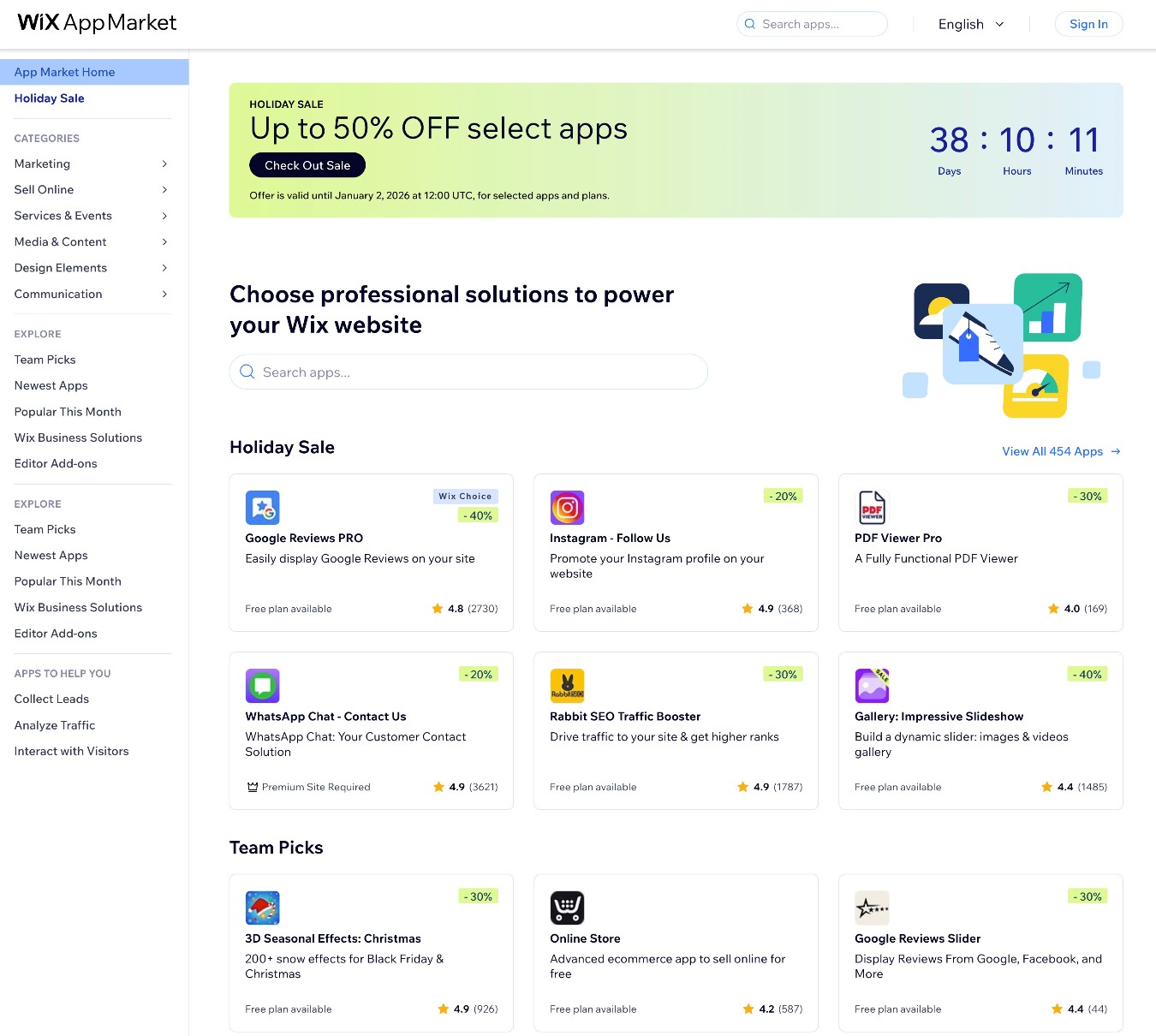
However, while having 800+ apps is a lot for a website builder, it’s still nowhere near the 60,000+ plugins available for WordPress.
Design options
WordPress and Wix both use the same fundamental approach to design:
- You choose a theme/template as your site’s starting point (or, in Wix’s case, you can also have AI generate one for you).
- You customize that theme/template to make it your own.
Let’s look at it in more detail…
WordPress
To control the design of your site, you can choose from thousands of pre-made WordPress themes.
There are over 14,000 free themes at the WordPress.org theme directory alone, plus thousands of additional free and premium themes that you can find at other marketplaces or get directly from developers.
Regardless of what your site is about, you’re pretty much guaranteed to find a WordPress theme that can get you a good starting point.
Once you install your theme, you get code-free options to customize it to your unique situation.
Exactly how you customize your WordPress theme will depend on the theme that you choose.
Some of the most popular WordPress themes use the WordPress Customizer. This interface gives you code-free options in a sidebar to customize sitewide designs, while letting you see a live preview of your site on the right side.
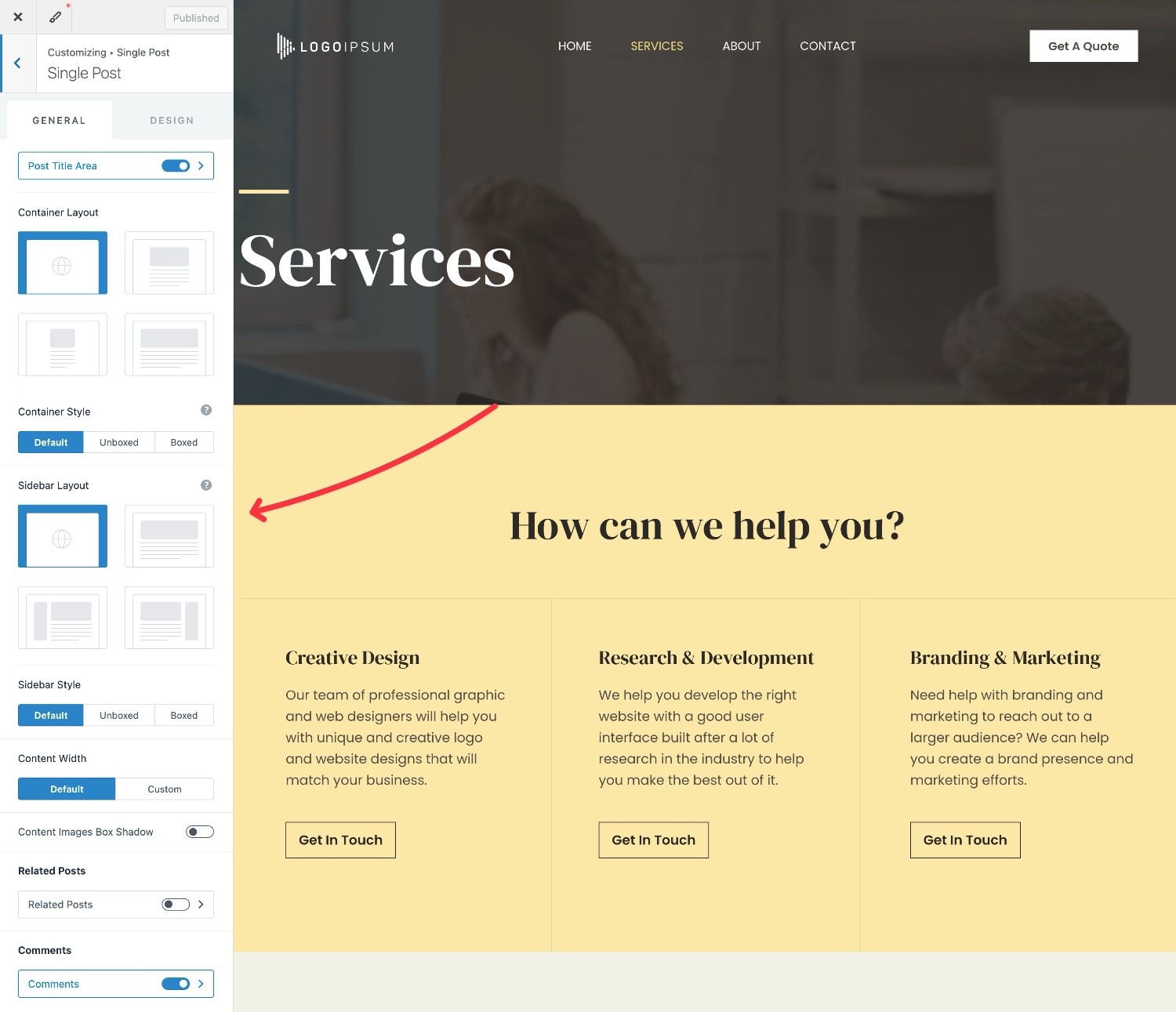
You can also customize page-level designs using the block editor, which we’ll cover in the next section.
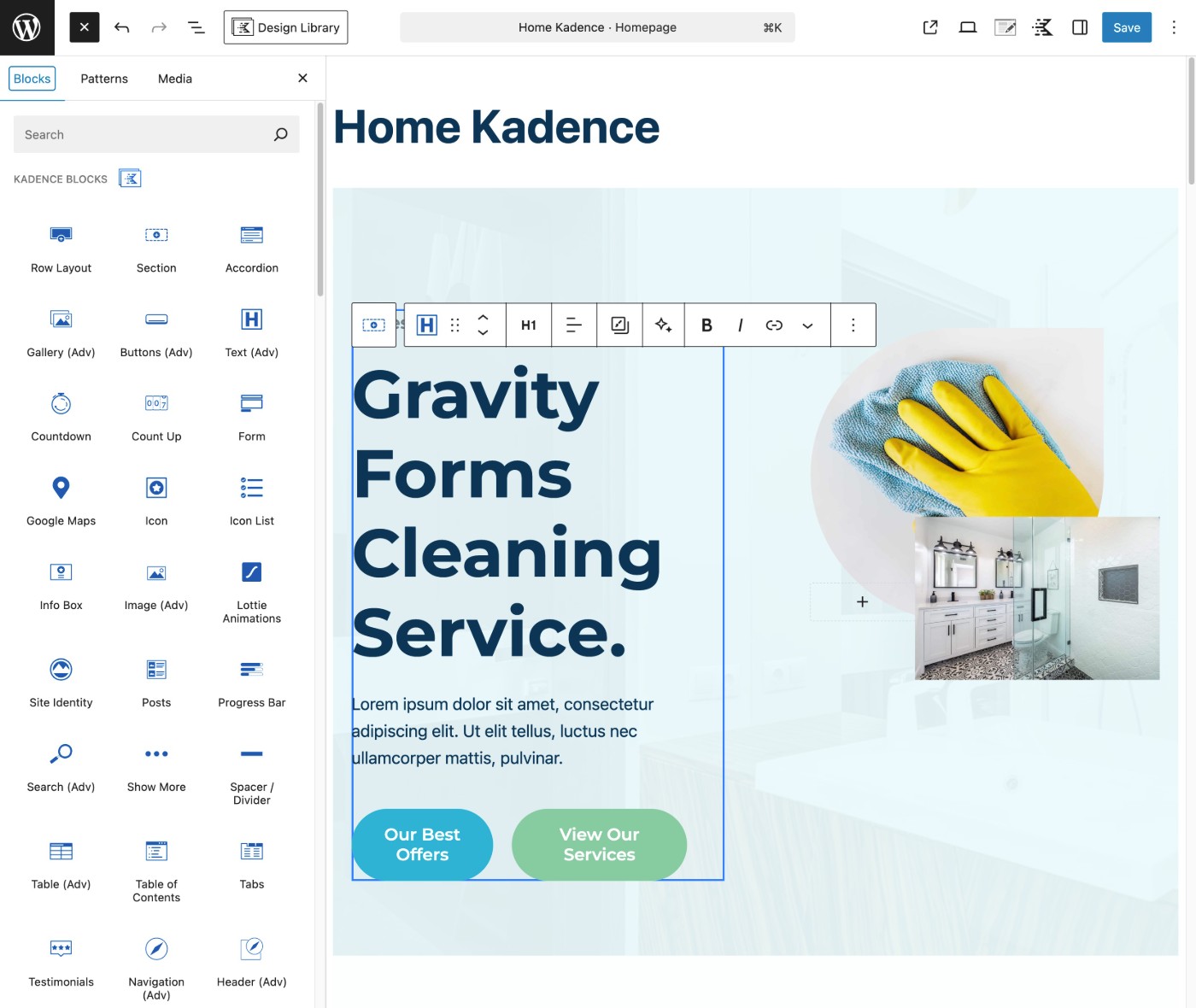
Some newer themes also let you customize your theme’s design and templates using the block editor.
If you’re a more technical user (or if you’re planning to hire a developer), you’re also free to customize every part of your site’s design using code. You could just add a few bits of custom CSS, or you could dig into the underlying source code.
Wix
As we mentioned earlier, Wix gives you two options to set up the basic design of your site:
- AI generator – You can use Wix’s AI to generate a unique design for your site based on your inputs. The designs are usually pretty basic, but they can work fine for simple portfolio or brochure websites.
- Pre-made templates – You can choose one of the 900+ pre-made templates that Wix offers. Some of these templates look great and are unique, while others are pretty simple, cookie-cutter designs.
Regardless of your starting point, you’ll be able to customize the design of your site using Wix’s visual, drag-and-drop website builder.
At first, the builder can feel a little overwhelming, as it’s packed with a ton of options. However, it does give you a lot of flexibility for customizing your site, once you learn how everything works.
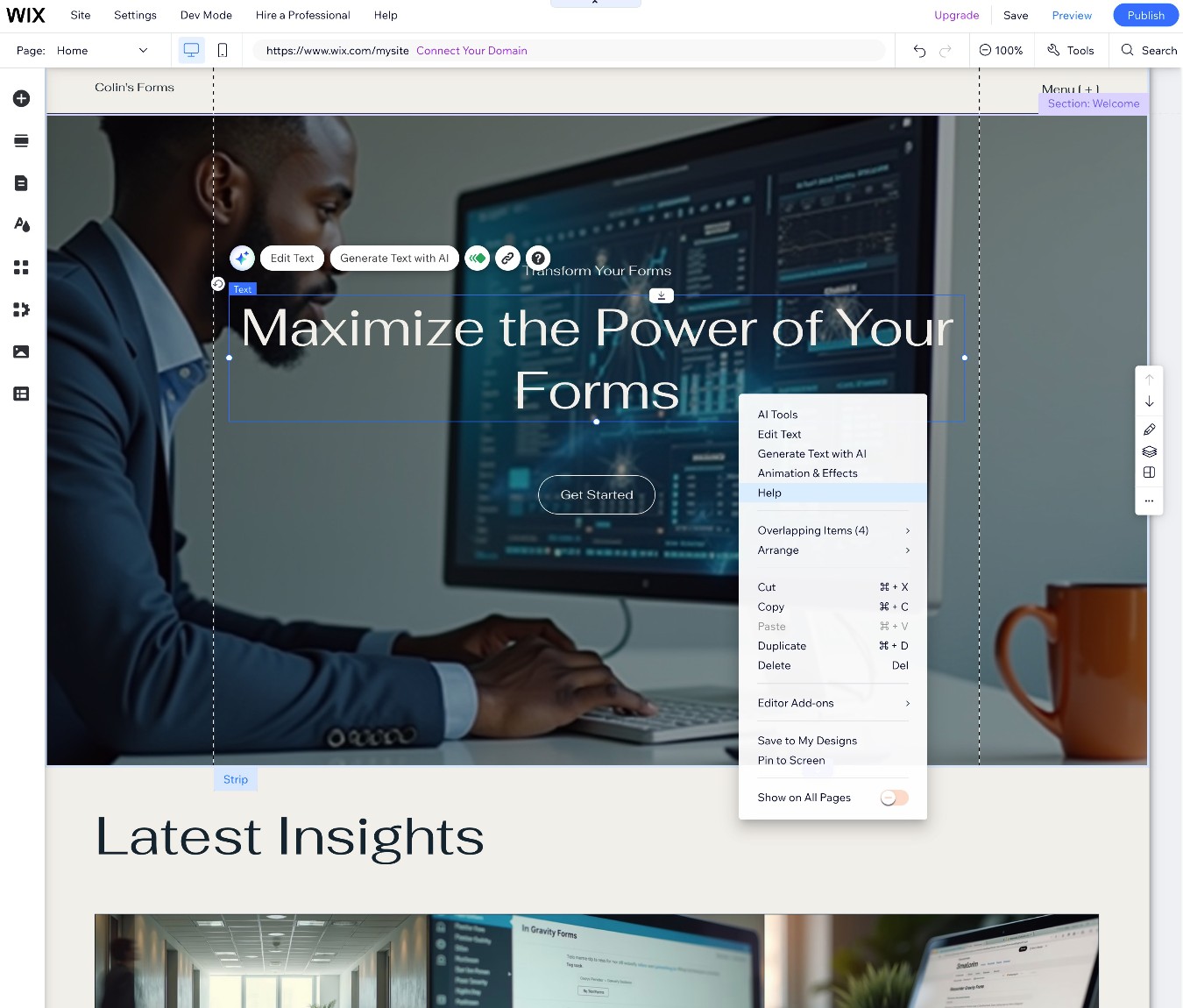
One important difference between Wix vs WordPress is that you cannot change your template after you publish your site. With WordPress, you can change your theme whenever you want without losing your content. But with Wix, your only option would be to completely rebuild your site using the new template.
For this reason, it’s really important to choose the right design for your site from day one if you use Wix. This can also make it a bit tricky if you need to change your site as your business grows and evolves, as you might run into limitations with your design.
Content creation experience
In addition to setting up the sitewide design of your site, you’ll probably spend a lot of your time adding content to your site, whether that’s service pages, blog posts, or anything else.
Let’s look at the content creation experience in both tools…
WordPress
Because of how many WordPress plugins are out there, you can pretty much make the WordPress content creation experience into whatever you want it to be.
The default WordPress editor, however, uses a block-based approach.
Adding text content is as simple as clicking and typing, just like any text editor. But if you want to go beyond plain text, you can choose from tons of different blocks:
- You can use blocks to add content elements, such as buttons, images, quotes, embedded videos, files, and lots more.
- You can use blocks to create layouts by placing blocks inside other blocks. This lets you easily create multi-column layouts, add borders and backgrounds to sections, and lots more.
Here’s an example of what it looks like:
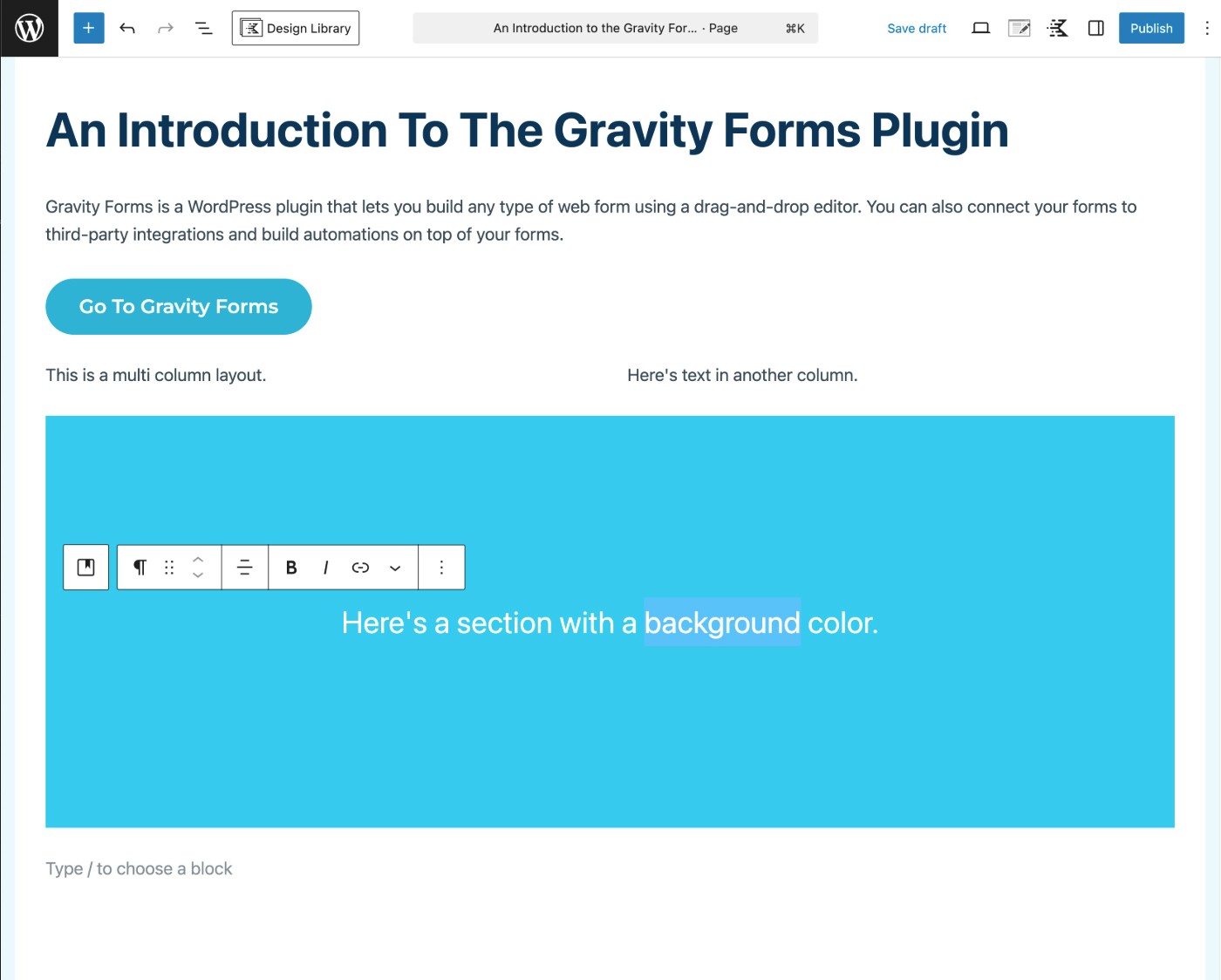
By default, WordPress uses this block editor pretty much everywhere. It’s what you’ll use to design core pages on your site, write blog posts, publish other types of content, etc. If you’re using a theme that supports it, you can even use the block editor to customize your site’s templates and styles, as we mentioned above.
However, you’re always free to install plugins to adjust the WordPress content creation experience to better fit your needs – either for all the content you publish or just certain types of content:
- If you want an even more visual, drag-and-drop design experience like Wix, you can find tons of WordPress builder plugins. Elementor is the most popular one, but there are also lots of other choices.
- If you publish a lot of basic text content and want a more barebones editor, you could use the classic WordPress TinyMCE editor or one of the other barebones editors.
Wix
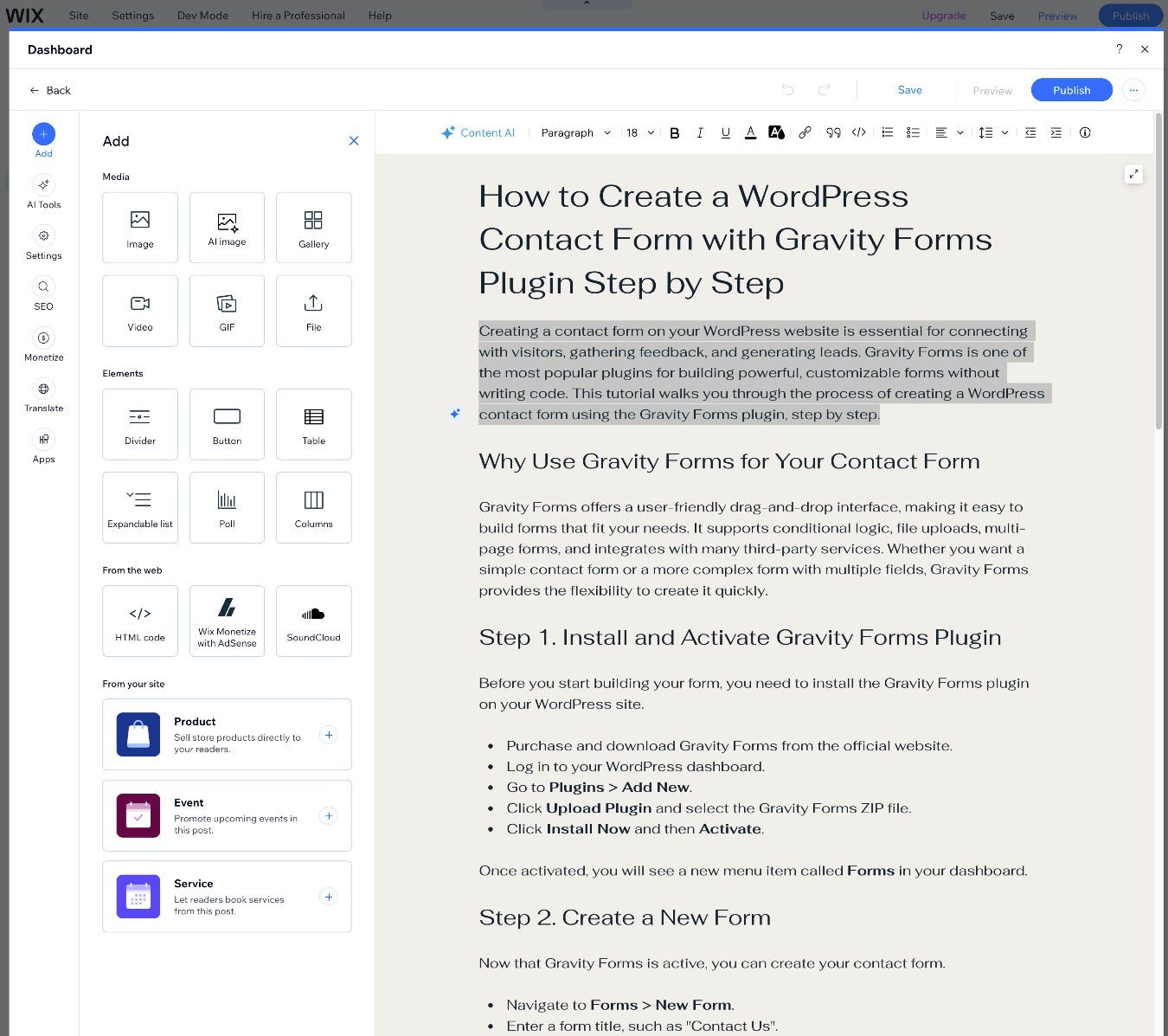
In addition to the visual builder that you can use to customize your site’s design, Wix also gives you a more stripped-down text editor for creating content, such as blog posts.
You can create text by clicking and typing. It also makes it easy to add some basic content and layout elements, such as buttons and columns.
The content editor also includes built-in AI writing tools, which you might find useful if you want to use AI to create content on your site. You can add AI writing tools to WordPress using plugins, but they don’t come built-in as they do with Wix.
Pricing and costs
Comparing WordPress vs Wix pricing can be a little difficult because there are a lot of variables involved.
Regardless of whether you choose WordPress or Wix, the cost of your website will depend on your unique use case, including details such as the amount of traffic your site receives, the complexity of your site, what kinds of features you need on your site, etc.
With that being said, WordPress generally can be more affordable than Wix. So, if you want to keep the costs of your site down, WordPress could be a better option.
Let’s go through everything in more detail…
WordPress
The core WordPress software is 100% free, but there are some other costs associated with running a WordPress website.
The only unavoidable cost is purchasing web hosting, which is what you’ll use to power the WordPress software. On the low end, hosting can cost as little as $5-$10 per month. For a more premium service, prices might start more in the $15-$30 per month range.
Beyond hosting, there are some variable costs that go into making a WordPress website:
- Theme – It’s totally fine to use a free theme. If you want a premium theme, though, they usually cost around $60.
- Plugins – There are 59,000+ free plugins available at WordPress.org, but you’ll likely want to purchase at least a few premium plugins for key functionality. Simple plugins might cost $10, while more complex plugins could go into the hundreds. Most are somewhere in between – for example, the Gravity Forms plugin starts at $59.
Putting these costs together, it is possible to build a functioning WordPress site for as little as $5 per month ($60 per year).
However, a more realistic estimate for most sites would be in the range of $120-$400 per year. This would allow you to purchase more premium hosting, along with a few key premium plugins like Gravity Forms.
Wix
Wix uses fixed, SaaS-style billing for the core website builder.
There are four different plans for the core builder – all of the prices below assume that you pay the entire yearly amount upfront. If you want to pay monthly (which is allowed on some plans), you’ll pay a higher rate.
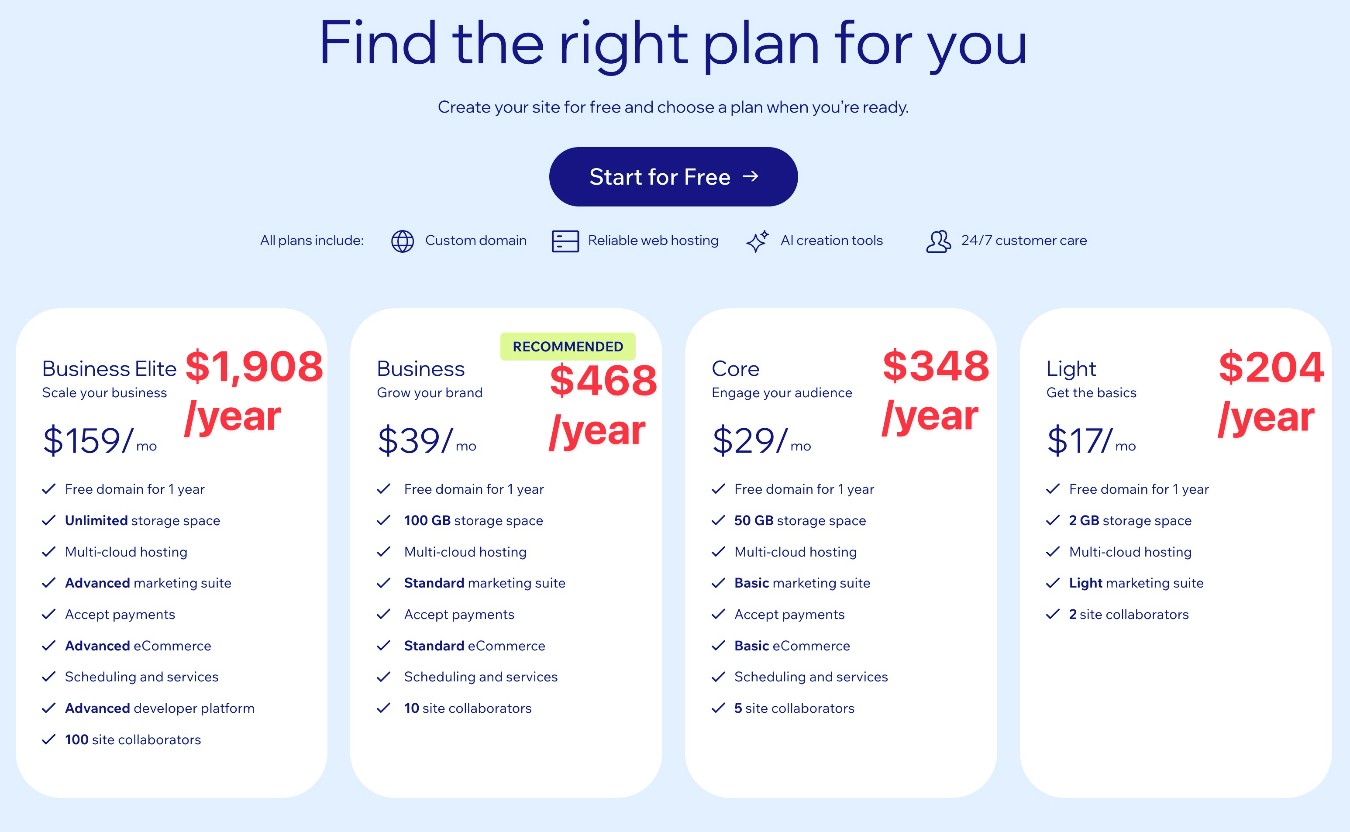
While Wix’s plans do start at $204 per year for the Light plan, most businesses will want to go with at least the $468 per year Business plan, as you’ll need that plan to access Wix’s standard marketing suite.
Lower-tier plans also have other notable limitations. For example, the Light plan only lets you create up to four lead capture forms with a maximum of 10 fields per form.
Another advantage of WordPress is that you never need to deal with these types of arbitrary limitations. For example, the Gravity Forms WordPress plugin lets you create unlimited forms with unlimited fields in each form, regardless of which license you choose.
In addition to what you pay for the core Wix builder, you also might need to pay for some of the Wix apps that you’re using. The price will vary depending on the app, but apps use recurring SaaS-style billing, just like Wix itself.
For example, the Google Reviews PRO app costs $5.99 per month if you want to display more than 10 reviews on your site. If you’re using a lot of Wix apps, these recurring costs can quickly add up.
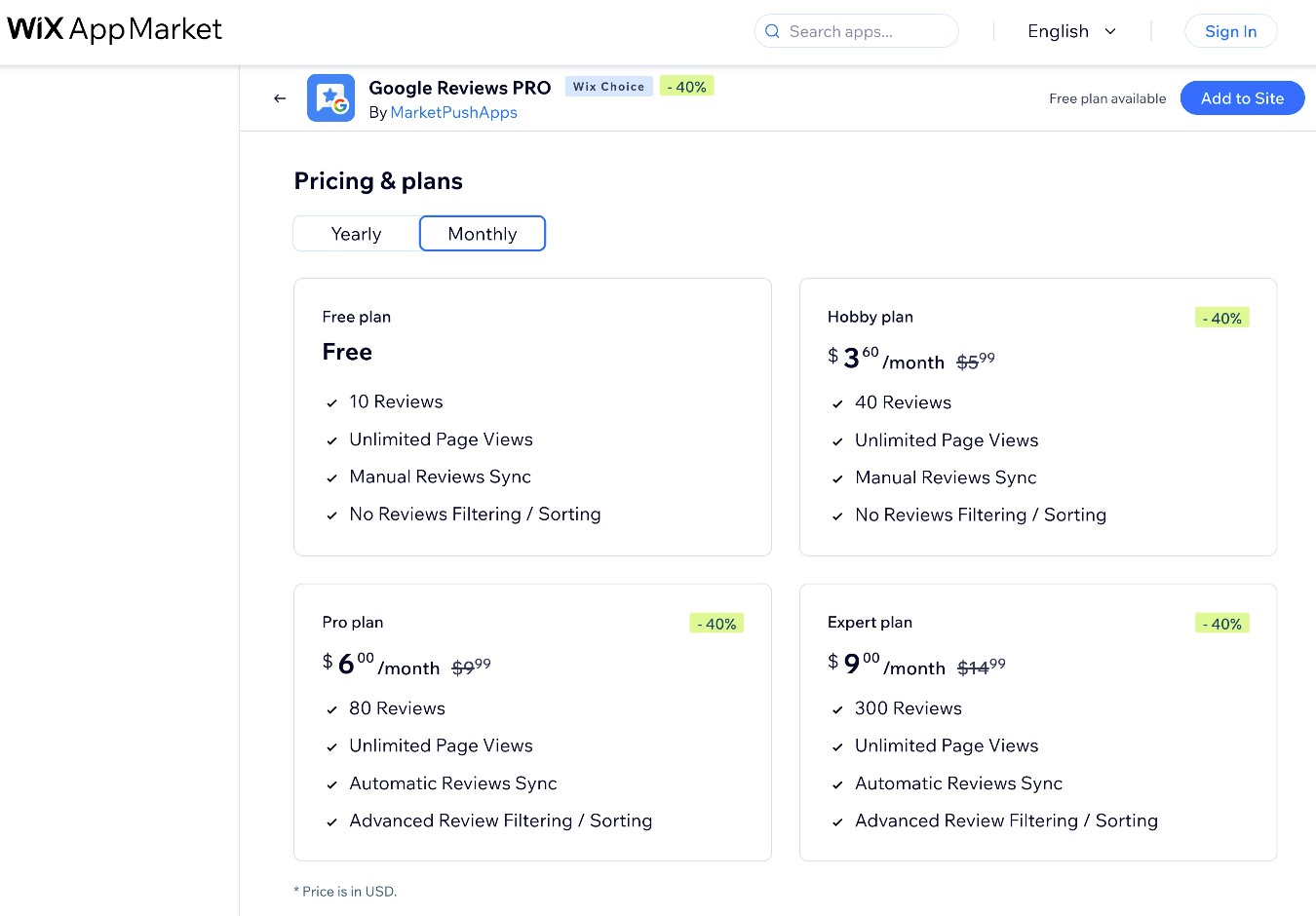
If you combine the cost of the core Wix builder with a few premium apps, you could easily be paying $60+ per month for a basic business website.
How to make WordPress like Wix
If you want to get the best of both worlds, there are some strategies that you can use to make WordPress more like Wix:
- Hosted experience (easy setup and maintenance) – If you want to use WordPress but don’t want to deal with self-hosting the software on your own web hosting, you can use one of the “WordPress website as a platform” services like WordPress.com. Make sure to choose at least the Business plan, though, so that you can install your own WordPress plugins.
- Forms – Wix includes its own online form builder, but WordPress doesn’t have one in the core software. To fix this, you can install a flexible form plugin like Gravity Forms.
- Visual, drag-and-drop design editor – If you want to build your site with visual design like the Wix editor, you can install a WordPress page builder plugin like Elementor (or one of the many other options).
- Ecommerce – the Gravity Forms plugin can handle lightweight ecommerce use cases by letting you create flexible payment forms. If you need more robust ecommerce functionality like what Wix offers, you can install the WooCommerce plugin.
These are just a few ideas for how to make WordPress more like Wix. If there’s another Wix feature that’s important to you, you can probably find a WordPress plugin for that, too.
Final thoughts
In the end, WordPress and Wix both have their pros and cons. Choosing the right tool for your website comes down to your specific situation.
For most businesses, however, WordPress might be the best solution. It gives you much more control and flexibility than Wix, while also giving you the chance to save money.
While Wix might be a tiny bit simpler to use because of its hosted, SaaS approach, WordPress is still something that even non-technical users can use to build a website. If it weren’t, there’s no way that WordPress could’ve grown to power over 43% of all the websites on the internet.
Because of how extensible WordPress is, you can also install plugins to make WordPress more like Wix, which can give you the best of both worlds. For example, Gravity Forms can more than replace Wix’s form builder, and Elementor can go toe-to-toe with Wix’s editor if you’re after visual, drag-and-drop design.
If you want to try WordPress for yourself, we’ve created a guide that walks you through the entire process, starting with choosing a domain name, and then purchasing hosting and installing WordPress.

If you want to keep up-to-date with what’s happening on the blog sign up for the Gravity Forms newsletter!