Joomla vs WordPress: Choosing the best CMS for your business
 By Colin Newcomer
Published March 17, 2026
By Colin Newcomer
Published March 17, 2026
Trying to decide between Joomla vs WordPress to build your website?
Joomla and WordPress are both open-source content management systems that you can use to create a variety of different website types.
WordPress is used by over 43% of all websites, while Joomla is only used by 1.4%. Despite that huge difference in usage, that number still makes Joomla the second most popular open-source content management system (with WordPress obviously taking first place).
In our Joomla vs WordPress comparison, we’ll try to highlight the similarities and differences to help you choose the best content management system for your unique situation.
To make that happen, we’ll compare WordPress vs Joomla in the following areas:
- What you can build with each CMS
- Ease of use
- Extensibility
- Themes and design options
- Content creation experience
- Pricing and costs
What can you build with Joomla and WordPress?
Joomla and WordPress are very flexible in terms of the kinds of websites that you can build, which is a strong point in both.
You can use both Joomla and WordPress to build a variety of websites, including the following:
- Blogs and other types of publishing websites
- Business and corporate brochure websites
- Personal portfolios
- E-commerce stores
- Online courses
- Membership websites
- Online courses
- Knowledgebases
- Forums
- Multisite networks
- Custom content sites
- …lots more.
In terms of functionality in the actual core software, Joomla does have a few built-in advantages over WordPress that can be helpful for certain types of advanced websites:
- Custom fields – Joomla includes a core feature that lets you attach custom fields to content types. This can be helpful for storing custom data associated with your content.
- Robust user permissions system – Joomla includes a core feature that lets you define different types of user roles, including what type of access each user has.
- Multilingual support – Joomla includes built-in support for creating multilingual websites.
These are capabilities that you can add to WordPress. You’ll just need to use plugins – such as the User Role Editor plugin to manage user roles, the Advanced Custom Fields plugin to manage custom fields and content types, and a plugin like TranslatePress to create a multilingual website. More on plugins later.
At the same time, because Joomla has all of this built-in functionality, it can make it needlessly complex if you are just building a “normal” website, such as a blog, brochure website, portfolio, etc. The fact that WordPress keeps its core software a bit leaner and relies on plugins instead can make WordPress feel less overwhelming than Joomla.
Because most people are building more “normal” websites, WordPress is probably the better option for that reason (which is one reason why it’s so much more popular).
Let’s dig into ease of use in more detail…
Ease of use
We’ll divide our ease-of-use comparison into two sections:
- Setting up your website with Joomla or WordPress
- Managing your website with Joomla or WordPress
Site setup process
Joomla and WordPress are both open-source content management systems. As a result, the basic setup process will be the same for both platforms:
- Purchase your own web hosting to power the software. Joomla and WordPress generally have similar requirements, and both will run on most hosting services.
- Install the software on your web hosting, whether that’s Joomla or WordPress. Most hosts offer some type of auto-installer tool to simplify the process – usually it’s just a matter of clicking some buttons.
- Connect your domain name to your website.
- Manage your website from the software’s dashboard, which we’ll discuss in the next section.
Although the basic process is the same, most people will probably find the WordPress site setup process to still be easier. This is for a couple of reasons:
- Many hosting services have created custom site setup experiences for WordPress because of its popularity. This can lead to a more user-friendly setup experience, especially for non-technical users.
- There are a lot more resources around setting up WordPress – again, because of its popularity. These can include blog posts, YouTube videos, forums, social communities, etc.
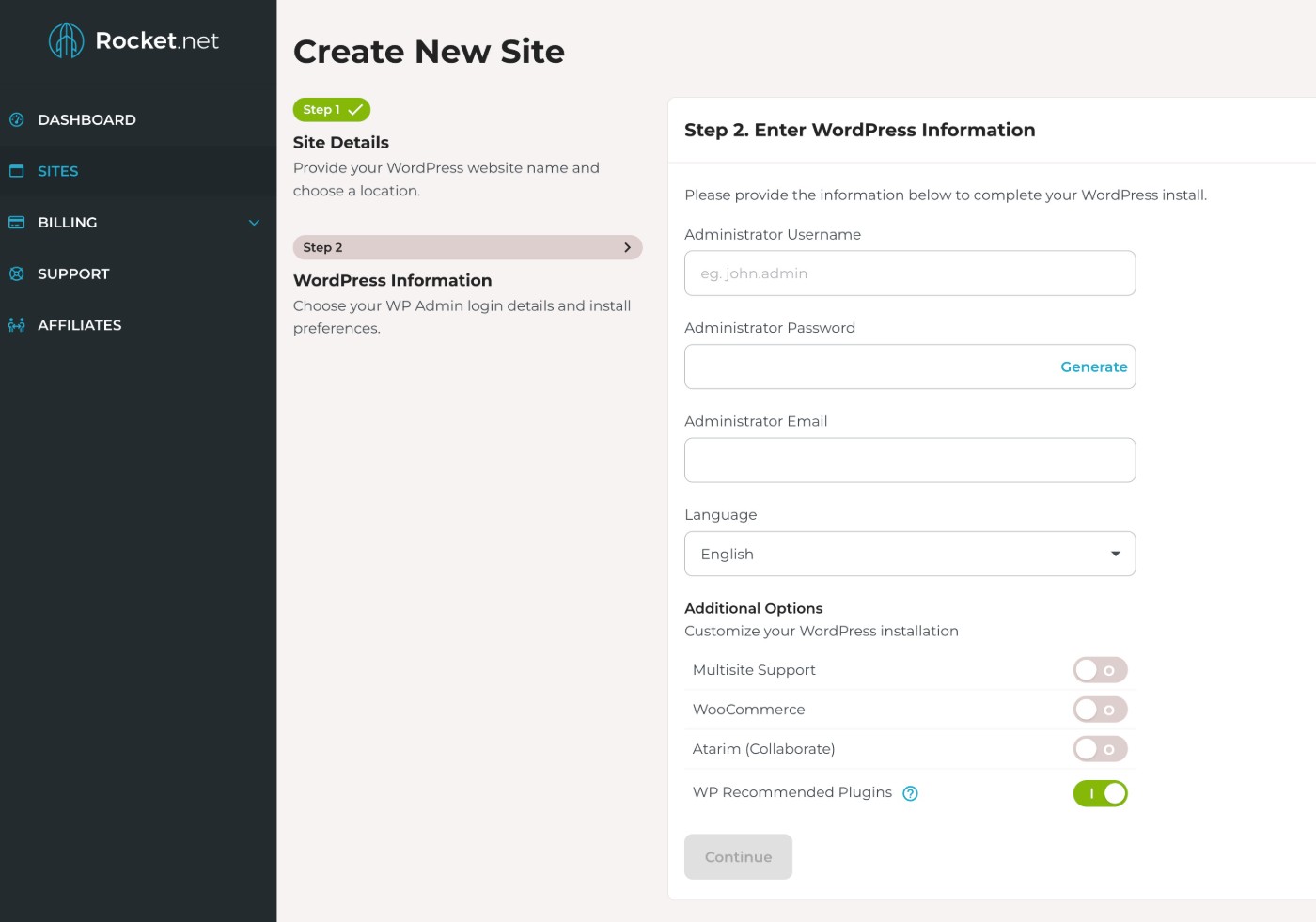
For example, here’s how simple it is to install WordPress at Rocket.net, a dedicated WordPress hosting provider.
Site management process
Once you install the software, both Joomla and WordPress offer non-technical dashboards to help you manage your website.
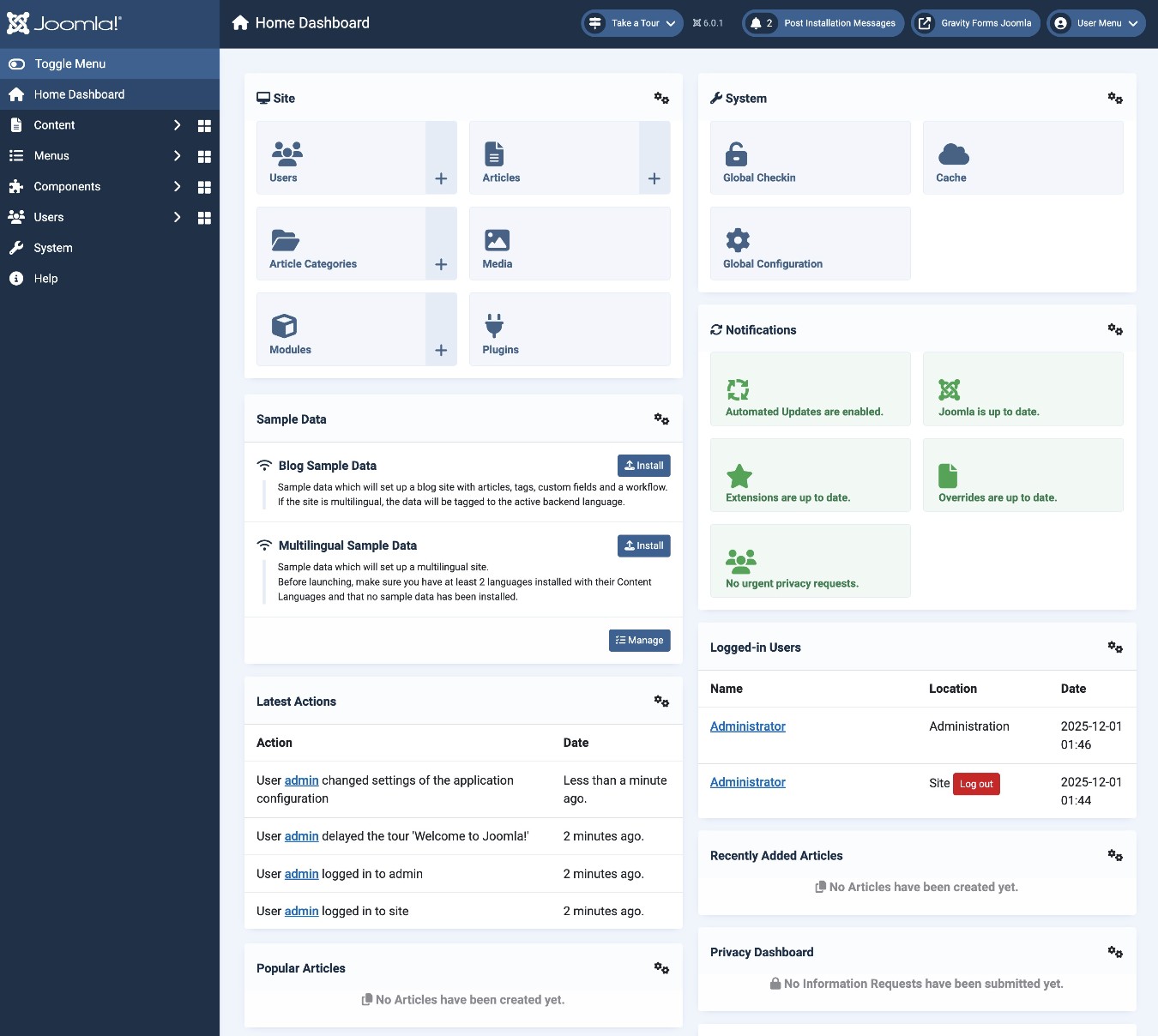
Here’s what the main dashboard looks like with Joomla version 6:
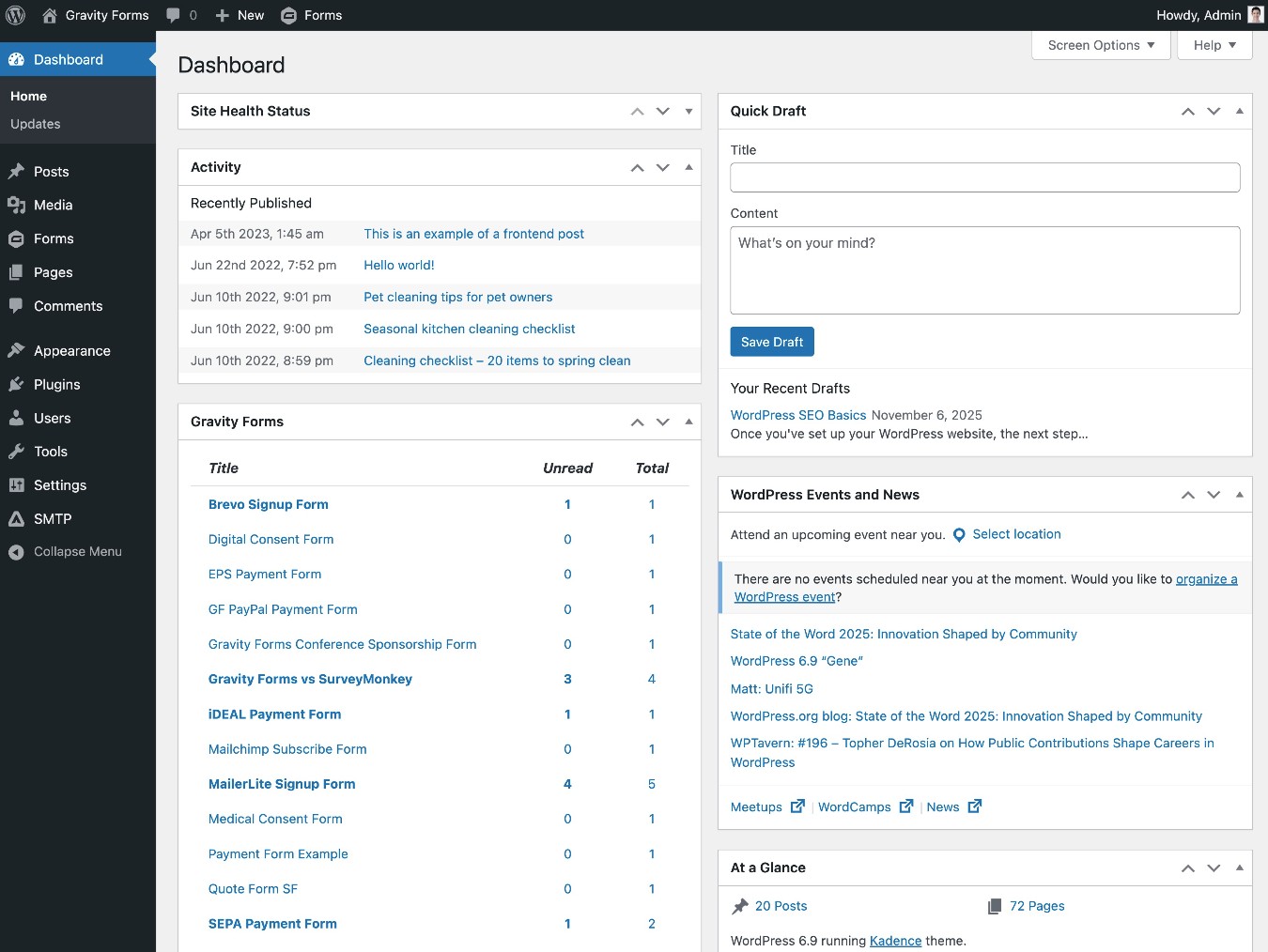
Here’s what the main dashboard looks like with WordPress:
While you don’t need any special technical knowledge to manage either platform, most people will probably find the WordPress dashboard to be easier to use. Again, this is for a few reasons:
- Joomla’s dashboard has a lot more settings in the core software. While this can be nice from a flexibility perspective, it can also feel a little overwhelming and adds to Joomla’s higher learning curve. Because WordPress relies more on plugins, you can pick and choose which features to add to your dashboard and avoid being overwhelmed by features that you don’t need.
- WordPress’s dashboard is generally better suited for non-technical users. For example, you get more visual, code-free design tools with WordPress, which we’ll cover a little later on.
- As with the setup process, there are just generally a lot more learning resources and communities to help you manage a WordPress website.
Extensibility
Extensibility refers to the ability to extend the core software with add-ons that offer more features, integrations, etc. Joomla calls these add-ons “extensions” while WordPress calls them “plugins”.
WordPress offers a significantly larger extension library than Joomla does, which means that WordPress can give you more flexibility for customizing your website to your unique situation.
With that being said, both platforms offer more pre-made extensions than the majority of other website builders and content systems.
Joomla extensions
In total, Joomla lists over 4,700 extensions at the official Joomla Extensions Directory.
However, it’s important to note that not all of these extensions are compatible with every version of Joomla. This is because Joomla does not have as big of a focus on backward compatibility as WordPress does, often requiring a special extension to help with backward compatibility.
For example, at the Joomla Extensions Directory, only ~1,100 of the plugins are listed as being compatible with Joomla 6 (the newest version of the Joomla software at the time that we’re writing our comparison). You might be able to access additional extensions by using a backwards compatibility plugin, but it’s not guaranteed.
You can also find some additional extensions directly from developers, but this doesn’t greatly change the number of available extensions.
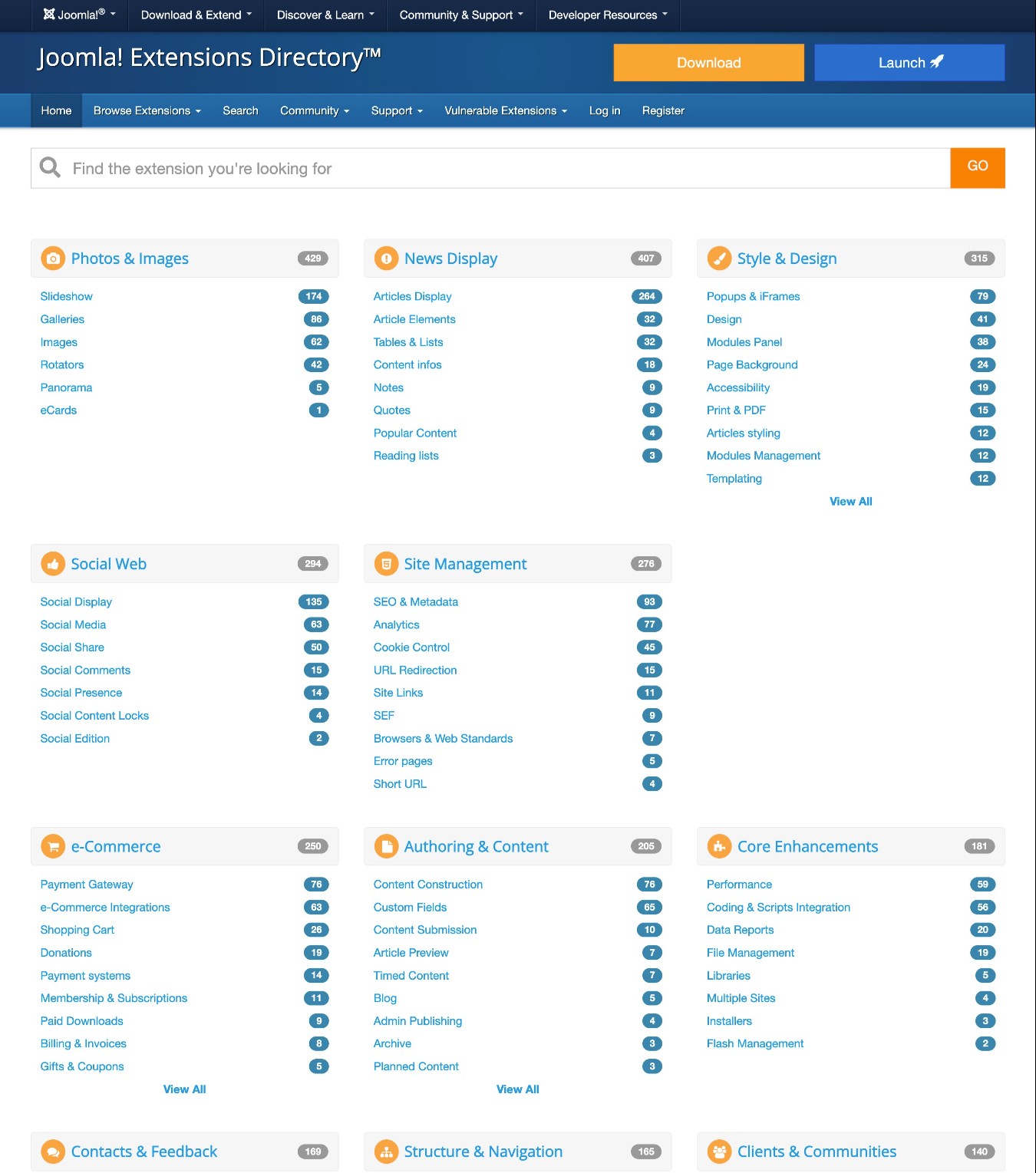
Joomla’s plugins cover a range of different functionality, including adding ecommerce features, form builders, social media integrations, new design experiences, and much more.
WordPress plugins
WordPress offers the largest extension marketplace of any CMS/website builder.
There are already over 60,000 free plugins listed at the official WordPress.org plugin directory. Then, there are thousands of additional plugins at other plugin marketplaces or available directly from developers.
Because of WordPress’s focus on backward compatibility, pretty much all of these plugins should work with any somewhat recent version of WordPress, without requiring any additional effort on your part.
WordPress plugins can do pretty much anything, from adding small features and integrations to turning your website into a fully functioning ecommerce store.
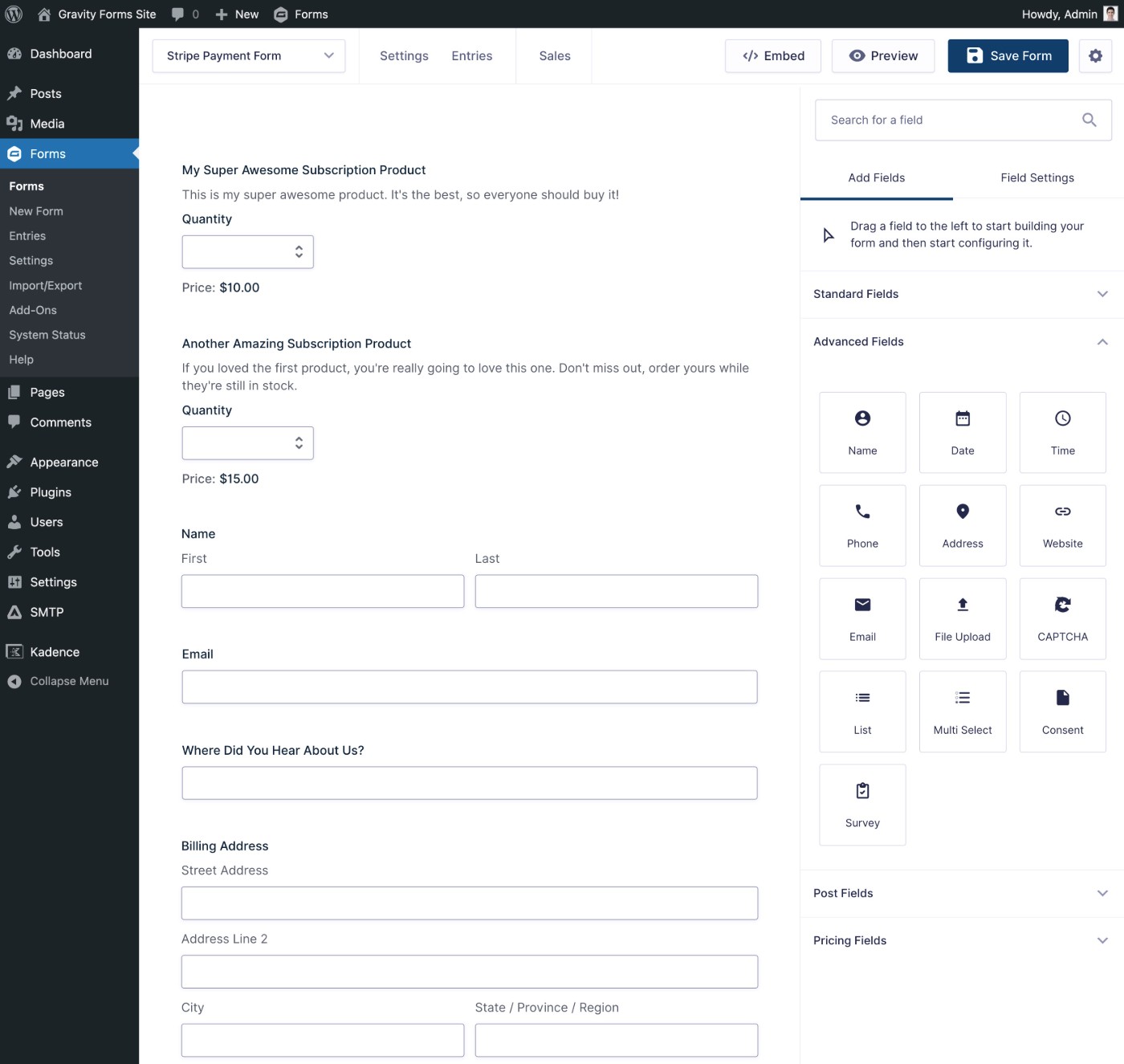
For example, the Gravity Forms plugin lets you use a drag-and-drop builder to create pretty much any type of web form and integrate with a variety of services. You can use it for contact forms, payment forms, lead generation forms, email subscribe forms, user registration forms, and lots more.
Themes and design options
Both Joomla and WordPress let you control the design of your site using themes – WordPress calls them “themes” while Joomla calls them “templates”.
While both tools have a large selection of available themes, WordPress wins when it comes to the number of available options.
Beyond just offering more themes to choose from, most people will probably find it easier to customize their chosen themes in WordPress. We’ll cover why below…
Joomla theme and design options
To control the design of a Joomla website, you can use templates.
While Joomla maintains its own directory for extensions, there’s no official directory for Joomla templates. However, you can find a variety of templates available from third-party developers and marketplaces.
While there’s no way to know exactly how many Joomla templates exist, there are definitely well over a thousand templates on offer. If you do use Joomla, it’s important to check if the template you’re looking at is compatible with the version of Joomla that you’re using, as that’s not always the case.
Once you choose a template, Joomla gives you some options to customize it. However, most people will probably find WordPress’s template/theme customization functionality to be more intuitive, especially for non-technical users.
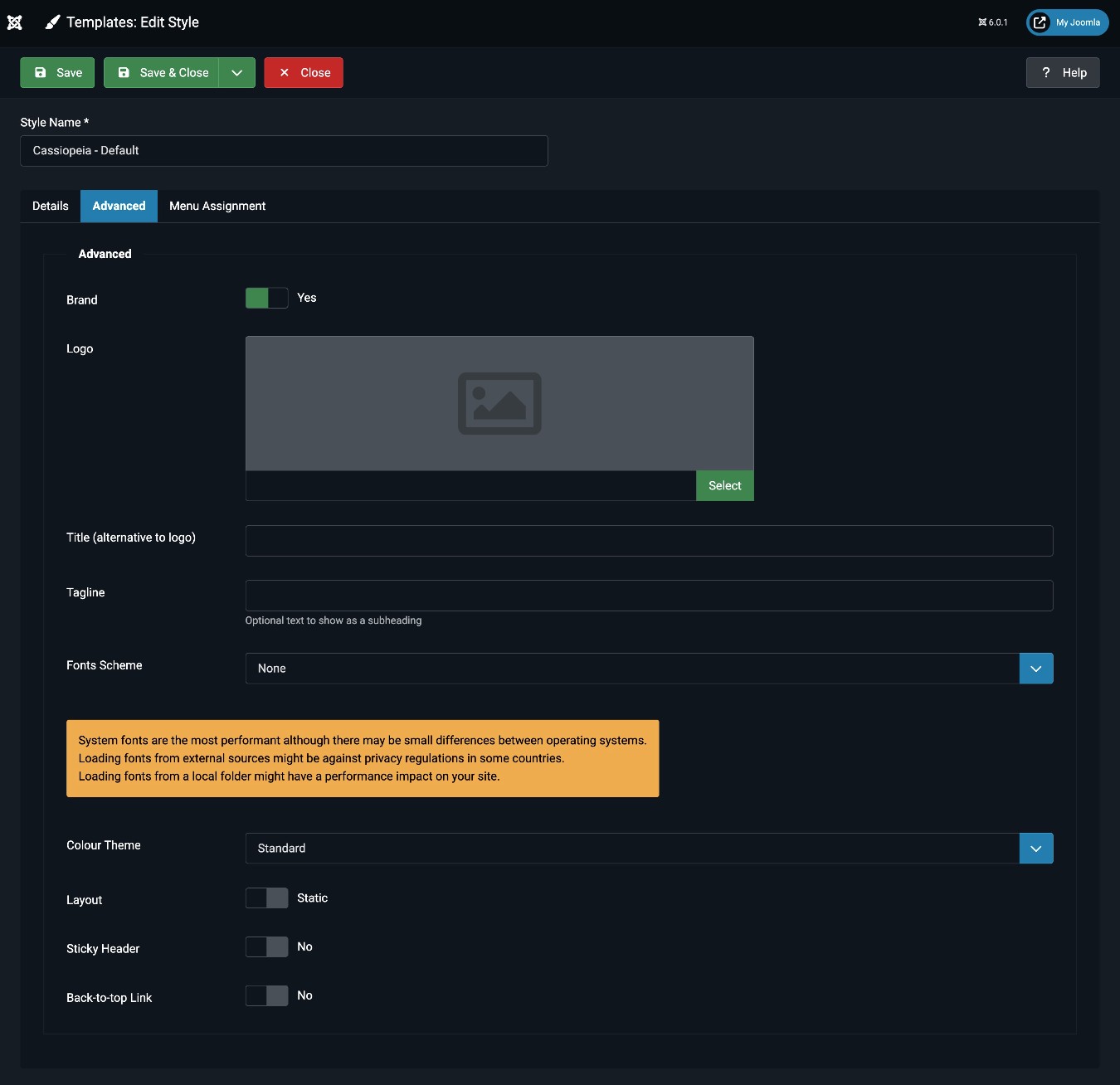
One advantage that Joomla does have, however, is the ability to install multiple templates and use different templates for different parts of your site. This could be useful if you offer radically different types of content on your site and want to clearly differentiate them with unique designs.
WordPress does give you the ability to create custom templates within a WordPress theme, but you can only have one “main” WordPress theme active on your site. This is a more niche use case, but it is an advantage that Joomla has.
WordPress theme and design options
You can find thousands of WordPress themes for pretty much any type of website.
There are over 14,000 free themes available at the WordPress.org theme directory alone, plus thousands of additional themes sold via other marketplaces or directly from developers.
You can only have one theme active at a time. However, as we mentioned above, most themes include multiple templates that you can use for different types of content. Or, you can always create your own custom templates for your theme using the editor, a builder plugin, or by hiring a developer.
How you customize your chosen WordPress theme will depend on the theme. WordPress currently offers two core experiences, and some themes build their own custom settings areas.
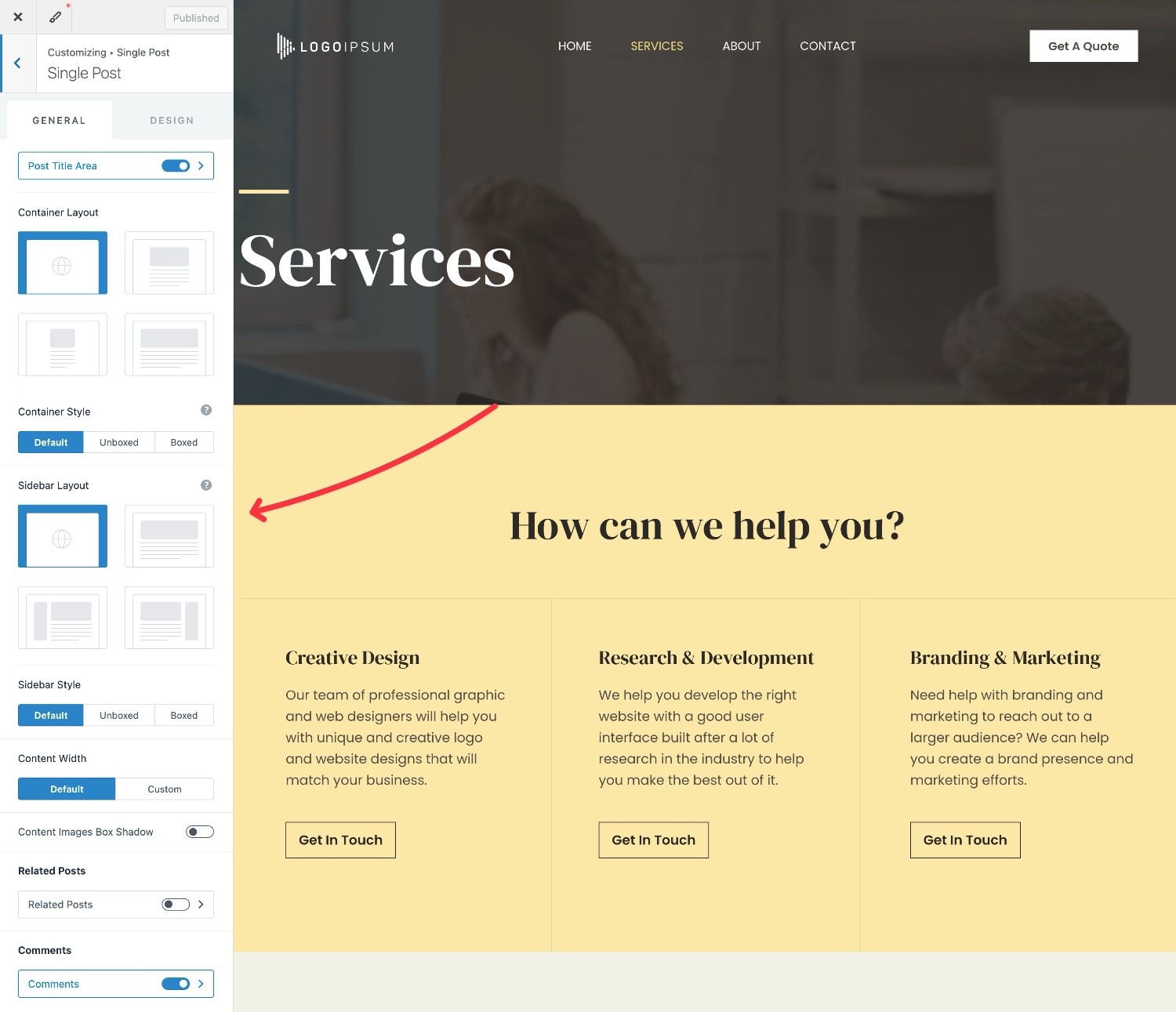
Currently, the most common approach is to use the WordPress Customizer. This gives you a real-time preview of your design on the right and a sidebar on the left where you can make changes using simple settings.
Some WordPress themes also use the WordPress block editor, which is the “new” approach. In these themes, you can customize all of your site’s layouts using the native WordPress block editor, which we’ll discuss in the next section.
Either way, you’ll be able to customize your theme without needing any technical knowledge, and the process is usually simpler and more intuitive than Joomla.
Content creation experience
While both WordPress and Joomla let you use plugins to customize the content creation experience, both tools also include built-in editors that you can use to create content.
In this section, we’ll compare what the built-in editors look like, while also touching on some of those options for customizing the content creation experience.
Joomla editor
The built-in Joomla Article Editor is very basic, especially when compared to WordPress. While it makes basic text formatting easy – such as bold, italics, underline, etc. – it’s not easy to go beyond that.
For example, even inserting something simple like a button requires custom HTML. If you want to add any type of formatting – such as backgrounds for certain sections of text – you’ll also need to use custom HTML.
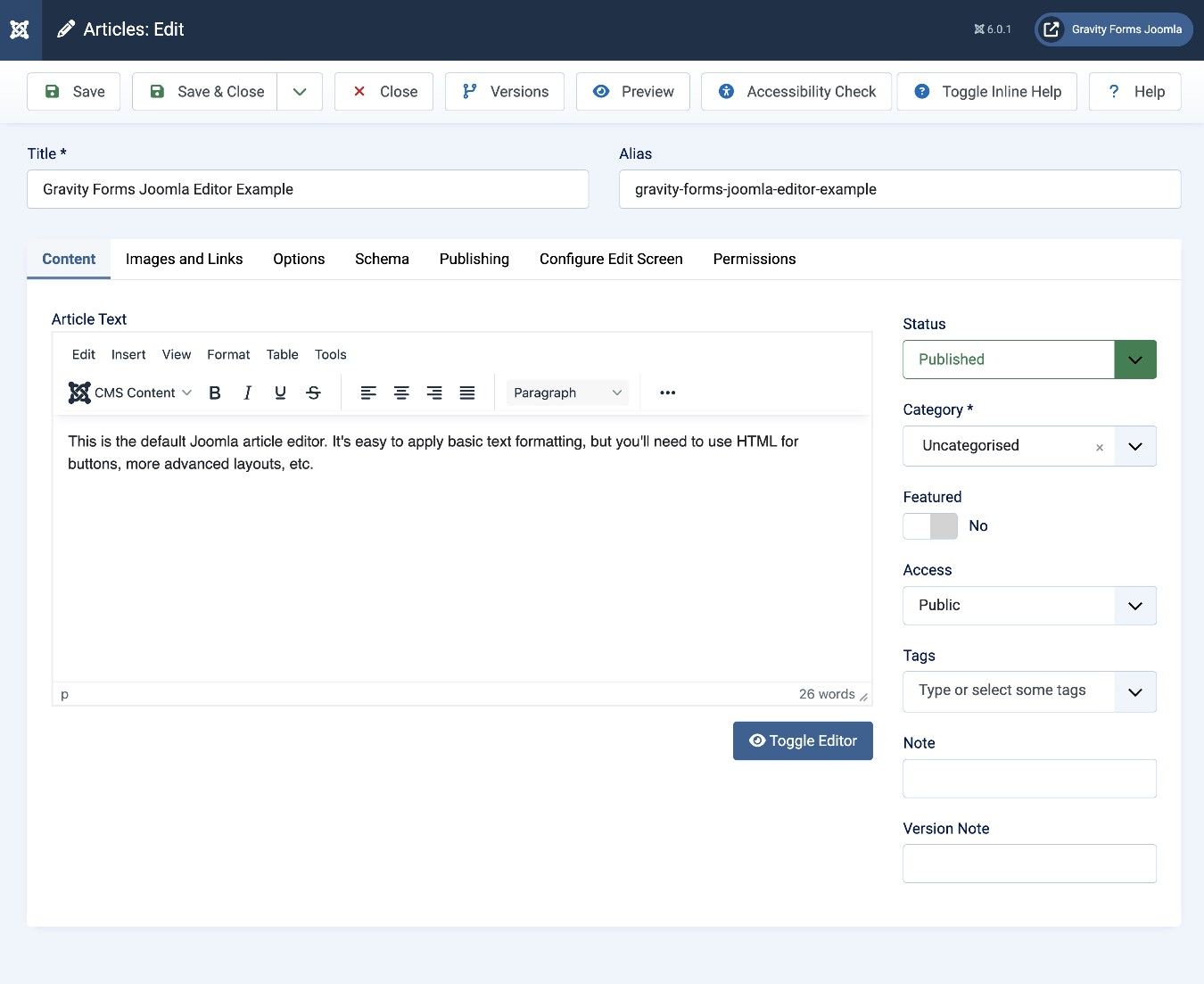
You can find some third-party extensions to give you more flexibility for building pages, such as a drag-and-drop page builder. However, the selection is fairly limited, and the capabilities of the builders that are available are behind the capabilities available in third-party WordPress builder plugins.
WordPress editor
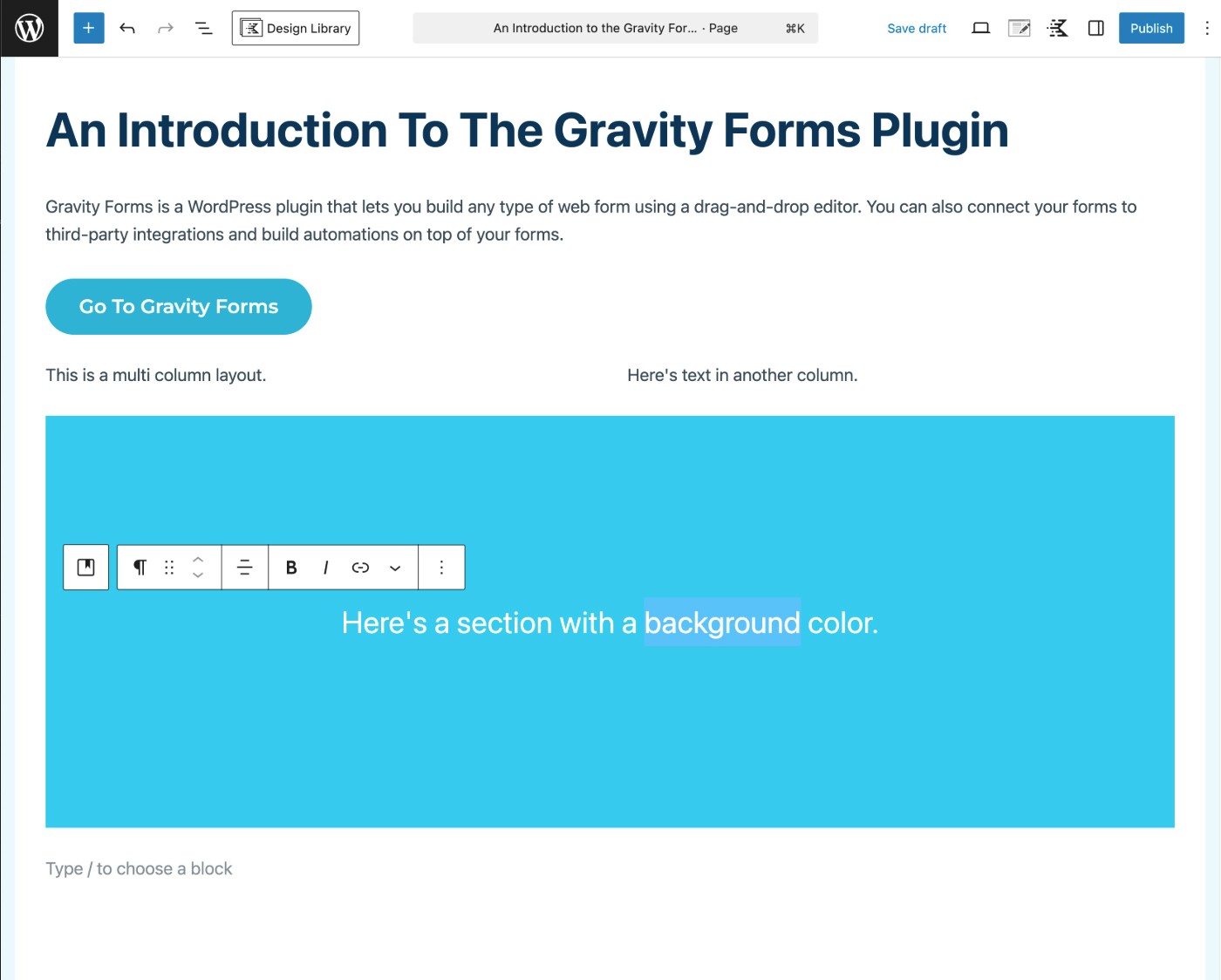
When compared to Joomla, the built-in WordPress editor gives you a lot more power for creating custom layouts and inserting elements like buttons, forms, etc. At the same time, it’s still quite easy to use as a basic text editor.
You can use it to create blog posts, basic text pages, or even design more visually unique pages.
Instead of being just a text editor like Joomla, the WordPress editor uses a block-based approach:
- If you want to add text, you can click and type, just like Microsoft Word (or the Joomla editor).
- If you want to insert another element, you can add a block. You can find blocks for buttons, forms, and lots more.
You can also nest blocks inside other blocks, which gives you a lot of control over your content’s layout. For example, you can create multi-column layouts, add a background to a specific part of your page, and more.
It’s also easy to re-arrange blocks, including support for dragging and dropping blocks as needed, and you also get close to a 100% accurate visual preview of your design.
If you’d prefer a more stripped-down text editor like Joomla, you can also easily access that on WordPress by installing the Classic Editor plugin. This lets you access the older WordPress TinyMCE editor, which works a lot like Joomla’s editor.
Or, if you want an even more visual, drag-and-drop design experience, there are tons of builder plugins, with Elementor being one of the most popular. You can use these builder plugins to design individual pieces of content or even design your entire WordPress theme.
Pricing and costs
Because both Joomla and WordPress are open-source projects, the core software is 100% free to use for both platforms.
However, regardless of whether you choose Joomla or WordPress, you will have some related costs. With both platforms, these are the three biggest costs:
- Web hosting – You’ll need hosting to power the software and your website. Joomla and WordPress have similar hosting requirements, so the costs will be similar either way. Expect to pay $5-$10 per month on the very low end, but more realistically in the $15-$30 per month range for a “normal” website.
- Themes – There are lots of free themes available for both Joomla and WordPress, so you might not need to pay anything. If you do want a premium theme, the cost is again similar for both platforms, with most premium themes being in the $50-$80 range for both WordPress and Joomla.
- Plugins/extensions – There are plenty of free extensions available for both Joomla and WordPress. For premium plugins/extensions, there’s a lot of variation, but prices are generally in similar ranges. For example, the Gravity Forms WordPress plugin starts at $59, and the Convert Forms Joomla extension starts at €49.
Basically, you probably won’t notice large differences between Joomla vs WordPress pricing, unless you have some type of outlier situation.
Where there can be more noticeable differences is if you need any custom development work, which may or may not apply to your situation.
In general, WordPress development work can be a bit cheaper than Joomla development work. A big part of this is because WordPress’s global popularity means there are a ton of WordPress experts all around the world and at all different price points.
Final thoughts
Overall, WordPress and Joomla both share a lot of similarities:
- They’re both free, open-source content management systems.
- You can use both platforms to build a variety of different website types, from simple brochure websites to e-commerce stores or membership sites.
- They both let you extend your site with add-ons – “plugins” for WordPress and “extensions” for Joomla.
- They both let you use themes to control the design of your site – “themes” for WordPress and “templates” for Joomla.
However, WordPress is probably the better option for most situations, which is why WordPress powers over 43% of all the websites on the internet, and Joomla powers just 1.4%.
Here are some of the main reasons why:
- WordPress has a smaller learning curve, and most people will find WordPress easier to use, especially for non-technical users.
- WordPress has a much larger library of plugins, which gives you more options for extending your site with new features and integrations. For example, you can use the Gravity Forms plugin to build pretty much any type of web form and connect with tons of different services.
- WordPress has a larger library of themes, and most people will find it easier to customize WordPress themes.
- WordPress has a much larger user base, which makes it easier to find communities and learning resources.
Joomla does have better built-in core support for custom content structures, user access controls, and multilingual abilities. However, these are all features that you can easily add to WordPress using plugins, so there’s no real advantage in the end.
Basically, unless you have a specific, articulable reason why Joomla is better for your use case, you’re probably better off using WordPress.
If you’re ready to get started with WordPress, we’ve created an entire guide that takes you through every step of the process, starting with choosing a domain name, and then purchasing hosting and installing WordPress.

If you want to keep up-to-date with what’s happening on the blog sign up for the Gravity Forms newsletter!