HubSpot vs Mailchimp: An honest comparison in 2026
 By Colin Newcomer
Published March 31, 2026
By Colin Newcomer
Published March 31, 2026
Trying to choose between HubSpot vs Mailchimp for your business?
HubSpot and Mailchimp are two well-known platforms, but they have some differences in approach, so it’s important to understand which one best fits your business’s unique situation.
Mailchimp is more focused on email marketing, with a basic CRM to back that up. HubSpot offers a more powerful CRM, with tools for sales, marketing, customer service, and more.
To help you make the right choice, we’ll compare Mailchimp vs HubSpot in the following categories:
- The target customer of each tool
- Functionality and scope of features
- Ease of use
- Customizability
- Pricing
If your business uses WordPress, we’ll also cover how the Gravity Forms plugin can help you integrate your WordPress website with both Mailchimp and HubSpot.
Target audiences: Who uses HubSpot and Mailchimp?
Before we get into the more detailed comparison, we think it’s useful to start with a quick rundown of what types of businesses are most likely to use each service:
- Mailchimp is primarily used by small and medium businesses, though it does offer some enterprise solutions. Mailchimp’s primary focus is on offering digital marketing tools, including an integrated CRM.
- HubSpot is used by businesses of all sizes, with plans for small, medium, and enterprise businesses. It offers a more robust CRM with features covering marketing, sales, customer service, and more.
These are not hard rules, and you’ll find businesses of all sizes using both tools. However, understanding the difference in emphasis can help you understand other differences in the tools and nudge you in the right direction.
Functionality and scope of features: What can you do with each tool?
We touched on this in the previous section, but we now want to dig into the functionality and scope of features in each tool…
HubSpot functionality and scope of features
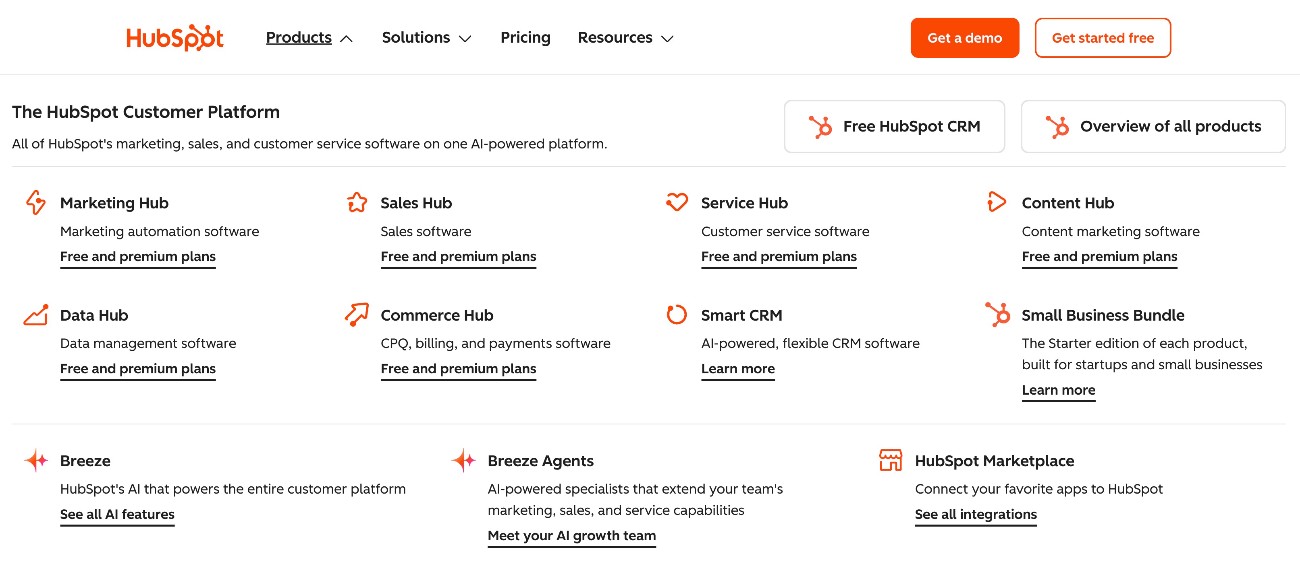
HubSpot’s core functionality is its CRM, which it calls the Smart CRM.
If you want to extend the core CRM, HubSpot offers six different “hubs”, each of which focuses on a specific area.
You can choose to use features from all of the hubs if you want an all-in-one solution (HubSpot calls this its “Customer Platform”). Or, you could just choose specific hubs if you want to focus on certain areas.
Here are the six hubs that HubSpot currently offers:
- Marketing Hub – This hub includes a variety of tools to help businesses improve their marketing, including robust marketing automation functionality. HubSpot’s Marketing Hub covers email marketing, social media marketing, and other areas. In general, this hub has the most overlap with Mailchimp’s features.
- Sales Hub – This hub extends the core CRM with more powerful tools to manage the entire sales cycle.
- Service Hub – This hub helps businesses offer support via multiple channels, including letting you use both human and AI customer service agents.
- Content Hub/CMS Hub – While this won’t be that useful if your business is already using WordPress, this hub can help you create a website or blog, including built-in content personalization.
- Data Hub -Previously called Operations Hub, this hub helps businesses aggregate different data sources and uncover actionable insights.
- Commerce Hub – This hub is not a full ecommerce solution, but it does include payment functionality such as invoices, subscriptions, and payment links.
HubSpot has also moved into AI with its Breeze AI tool. This tool is integrated into many of the different hubs, offering AI functionality that’s specific to each hub.
Mailchimp functionality and scope of features
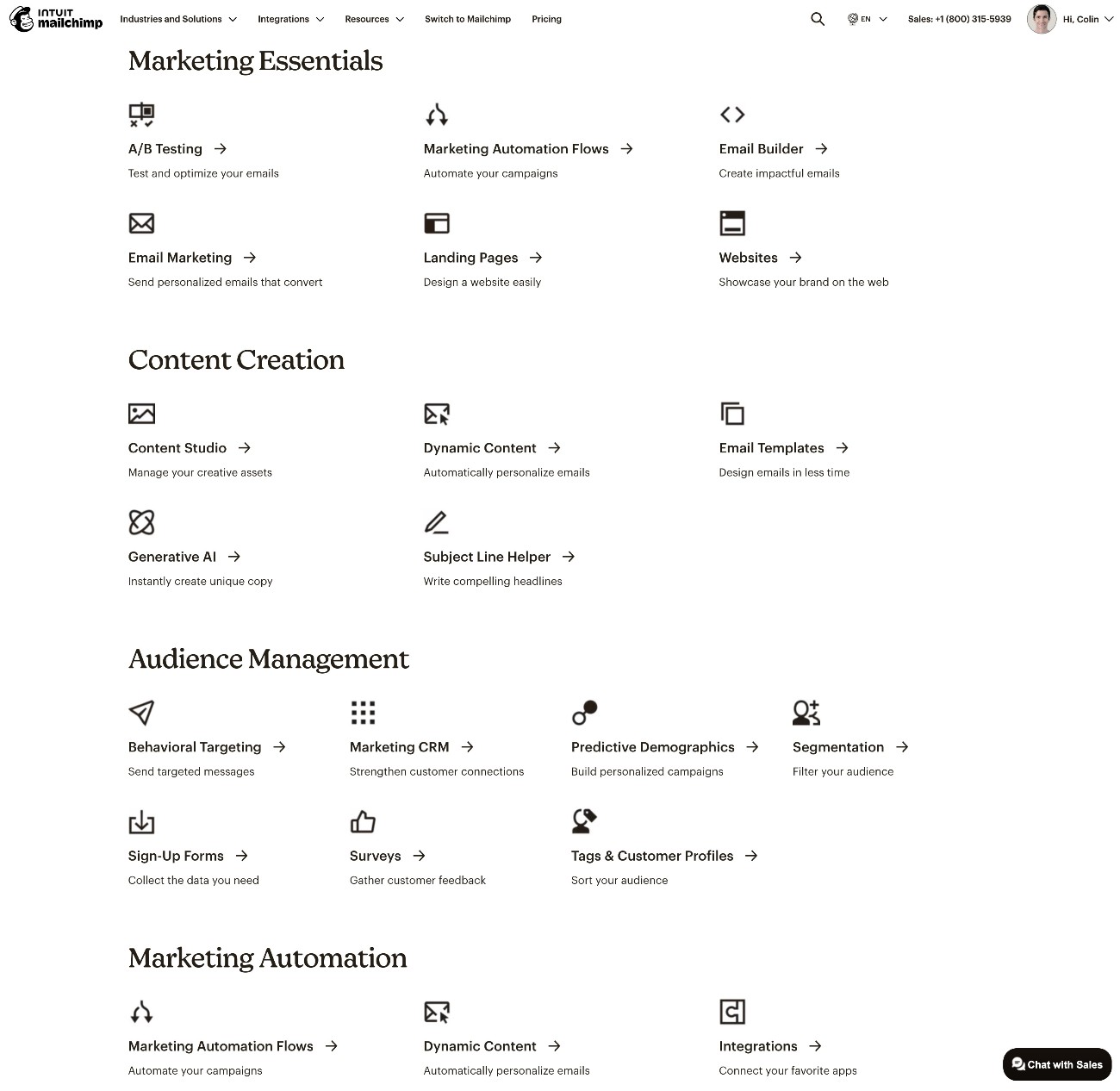
Whereas the core of HubSpot has always been its CRM, Mailchimp got its start as an email marketing service, before later expanding to offer a basic marketing CRM.
In general, Mailchimp’s focus is narrower than HubSpot’s, focusing more exclusively on digital marketing tools.
The core of Mailchimp’s functionality is its email marketing tools, which share the most overlap with HubSpot’s Marketing Hub.
You get essential features including the following:
- Visual, drag-and-drop email builder
- Segmentation
- Visual automation builder
- AI content tools for text and images
In addition to its email marketing and CRM, Mailchimp also offers some other digital marketing tools:
- Social media marketing tools – Mailchimp can help you create social media ads and post organic social media content.
- SMS marketing – You can send text messages to customers in 12 different countries.
- Website builder – You can create entire websites or just landing pages, which is similar to HubSpot’s Content Hub.
- Transactional email – You can use Mailchimp to send your site’s transactional emails in addition to marketing emails. If you’ve built your website with WordPress, you can use the Gravity SMTP plugin to send WordPress transactional emails with Mailchimp.
However, Mailchimp lacks the robust sales, customer service, and operations tools that HubSpot offers.
Ease of use: Which tool is easier to use?
In general, both HubSpot and Mailchimp are easy to use, even for non-technical users. This is especially true when comparing both of them to a more complex solution like Salesforce, which has a higher learning curve.
Because both HubSpot and Mailchimp target small businesses as a key part of their customer bases, it’s important that both tools are accessible even to small teams that might not be able to dedicate an entire position to learning a CRM.
Both offer well-designed interfaces, visual builders for emails and forms, visual automation builders, and so on.
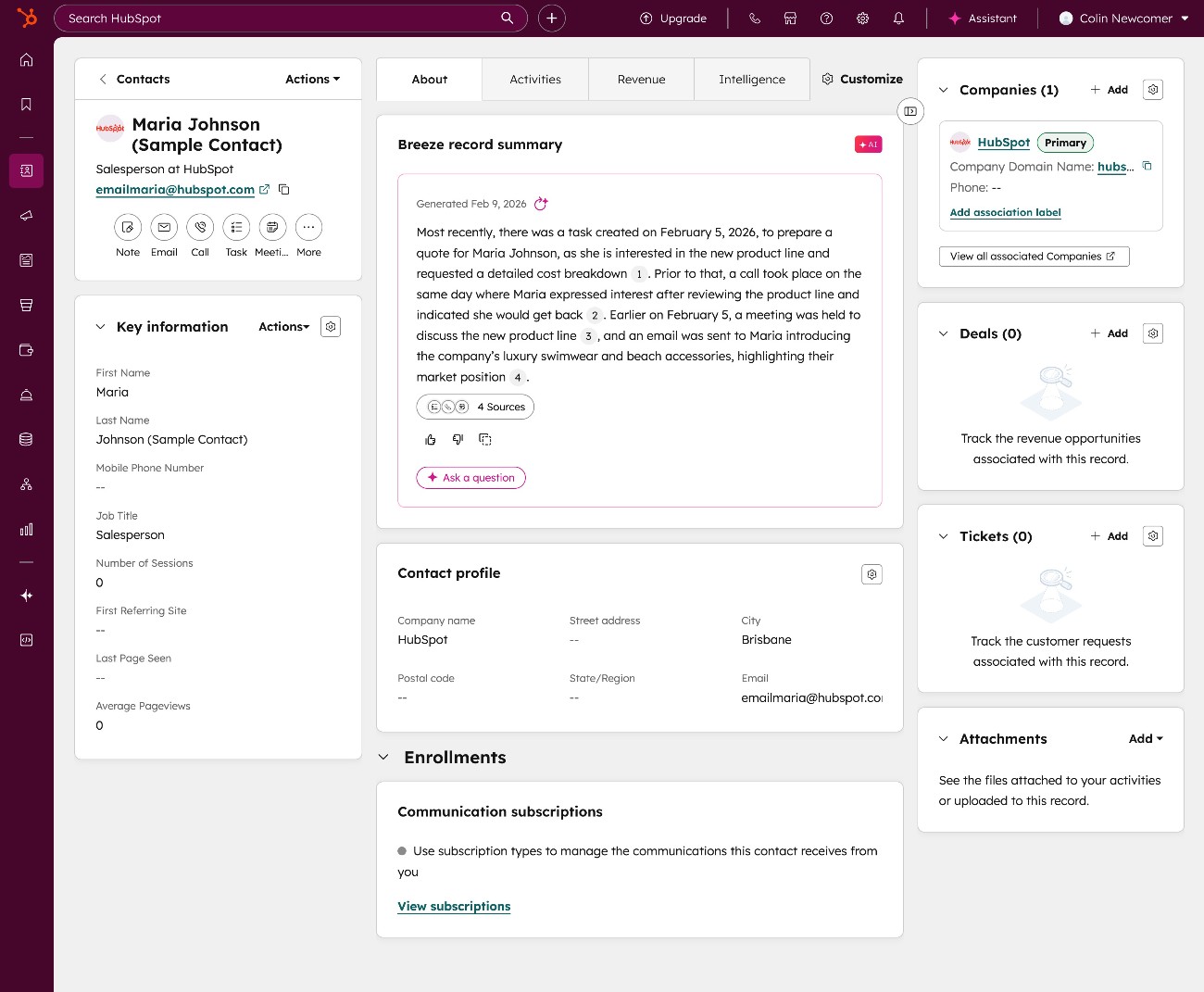
To give you an idea, here’s a peek at the interface of both tools.
Here’s what the contact details page looks like in HubSpot:
And here’s what the contact details page looks like in Mailchimp:
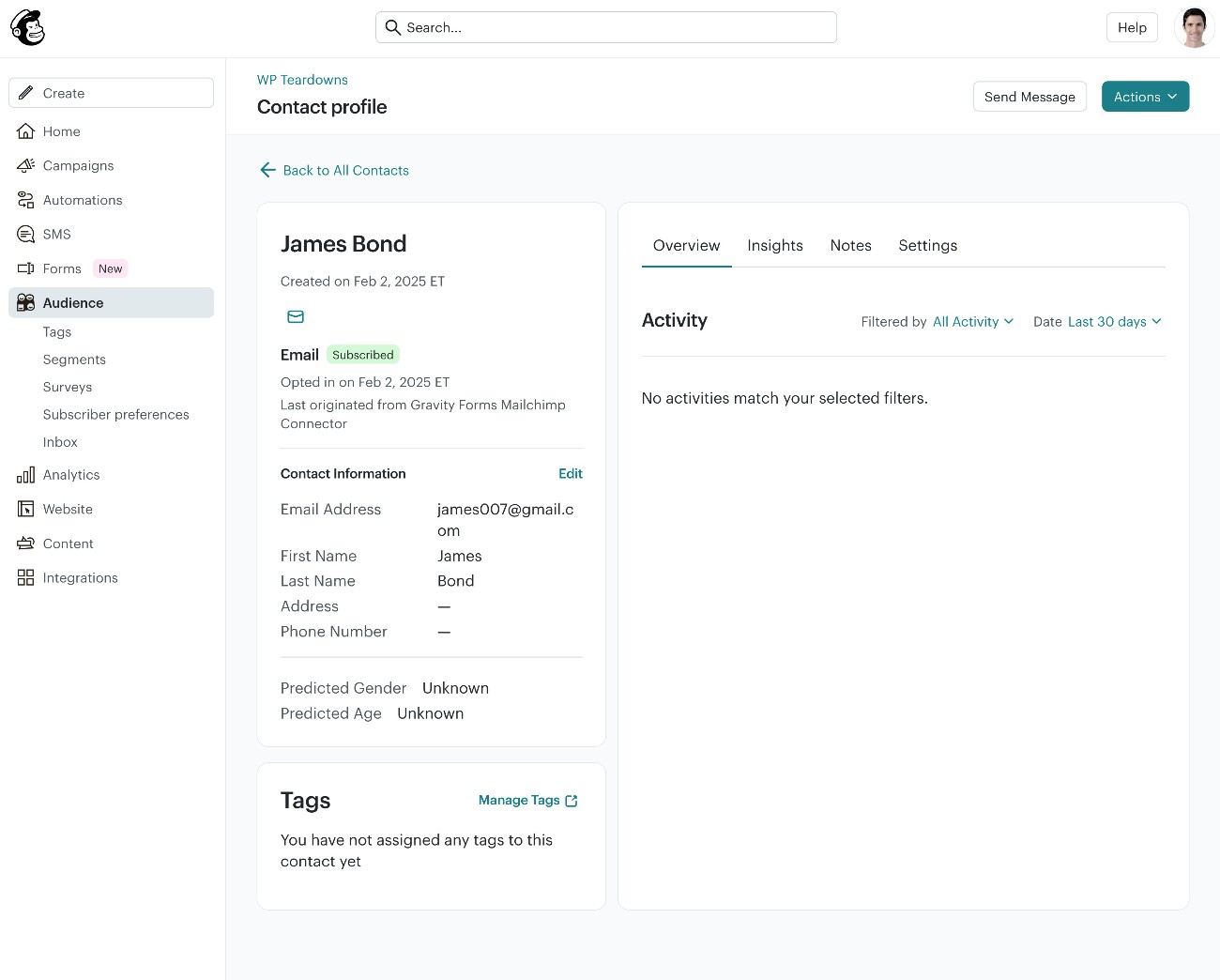
All in all, there’s no clear winner here and you should feel confident that you and your team will be able to quickly get up and running regardless of which tool you choose.
Customizability: Which tool gives you more options for customization?
While the default configuration in both HubSpot and Mailchimp is a great starting point for most businesses, you’ll still probably want to customize it a bit to make it your own. For example, collecting information in custom fields, setting up custom automations, etc.
While Mailchimp can handle the basic customizations that most small businesses need, HubSpot is the better option when it comes to giving you the ability to fully customize your CRM.
HubSpot gives you multiple ways to customize everything, which you can choose based on your needs and technical knowledge level.
For example, HubSpot offers an app integration marketplace for off-the-shelf solutions, a visual automation builder, a JavaScript framework for building custom elements, programmable automations, support for custom data structures, and more.
Mailchimp offers support for custom fields and a visual builder for marketing automations, but it lacks the more in-depth support for custom data structures that HubSpot offers.
Basically:
- If you’re running a small business and you just want to store some data in custom fields and set up some basic marketing automations, both services can get that done.
- If you need more robust support for custom data structures and UI elements, HubSpot will be the better option.
Pricing: What will you pay for HubSpot vs Mailchimp?
Comparing HubSpot vs Mailchimp pricing can be a little bit complicated because there are a lot of variables within each service.
In this section, we’ll try to compare things on as even a basis as possible.
Before going into more detail, it’s important to understand one fundamental difference in how Mailchimp and HubSpot determine their prices:
- Within each plan tier, HubSpot’s prices are primarily determined by the number of seats that you need (users who will have access to HubSpot). Even on the free plan, HubSpot lets you essentially store unlimited contacts.
- Within each plan tier, Mailchimp’s prices are primarily determined by the number of contacts that you need to store. So, as you store more contacts in your CRM, you’ll need to pay more money. Mailchimp does have some seat limits on its lower-tier plans, but Mailchimp’s highest tier plan supports unlimited seats.
Of course, there are plenty of other differences, which we’ll try to cover below…
HubSpot and Mailchimp free versions
To help you get started, both HubSpot and Mailchimp offer free plans that you can use to access core functionality.
One of the big differences between the free plans is the number of contacts that you can store:
- HubSpot’s free plan lets you store up to one million contacts. There are limits on associated details (such as the number of emails you can send per month), but you can essentially store unlimited contacts even on the free plan.
- Mailchimp’s free plan only lets you store up to 250 contacts.
Because of this difference, HubSpot’s free plan is probably more usable than Mailchimp’s free plan for most businesses, unless you know that you’ll be under the 250 contact limit.
However, most businesses will probably want to upgrade to a premium plan at some point, regardless of which service they start on.
Mailchimp pricing
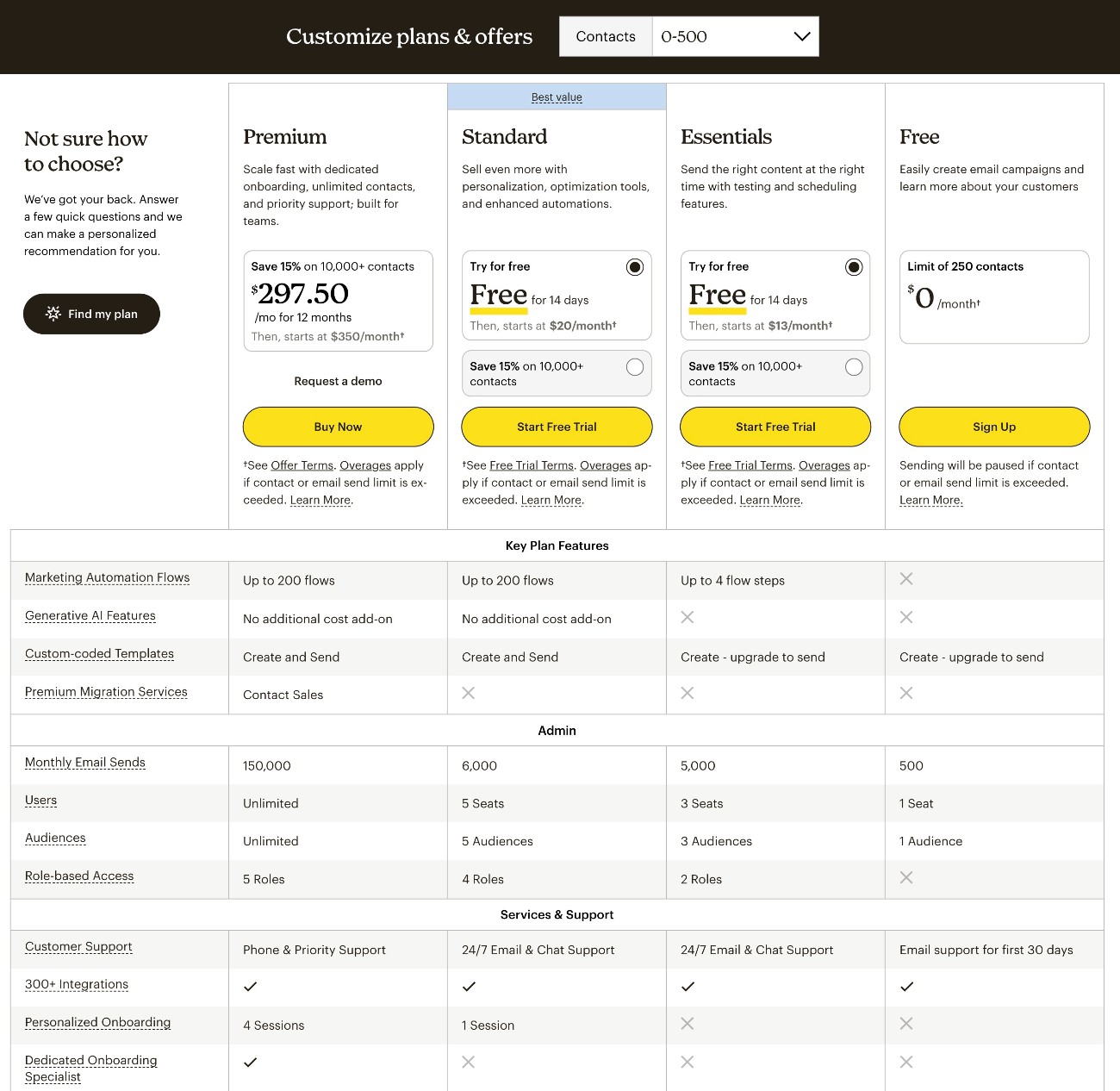
Mailchimp offers three different paid email marketing plans, with the price of each tier depending on the number of contacts you have. There are also other associated limits, such as the number of monthly email sends and marketing automation flows.
Here are the starting prices for Mailchimp’s email marketing plans for the lowest number of contacts:
- Essentials – from $13 per month for up to 500 contacts.
- Standard – from $20 per month for up to 500 contacts.
- Premium – from $350 per month for up to 10,000 contacts.
If you want to use Mailchimp’s website builder, it starts at $10 per month.
HubSpot pricing
HubSpot has a lot more pricing variables than Mailchimp.
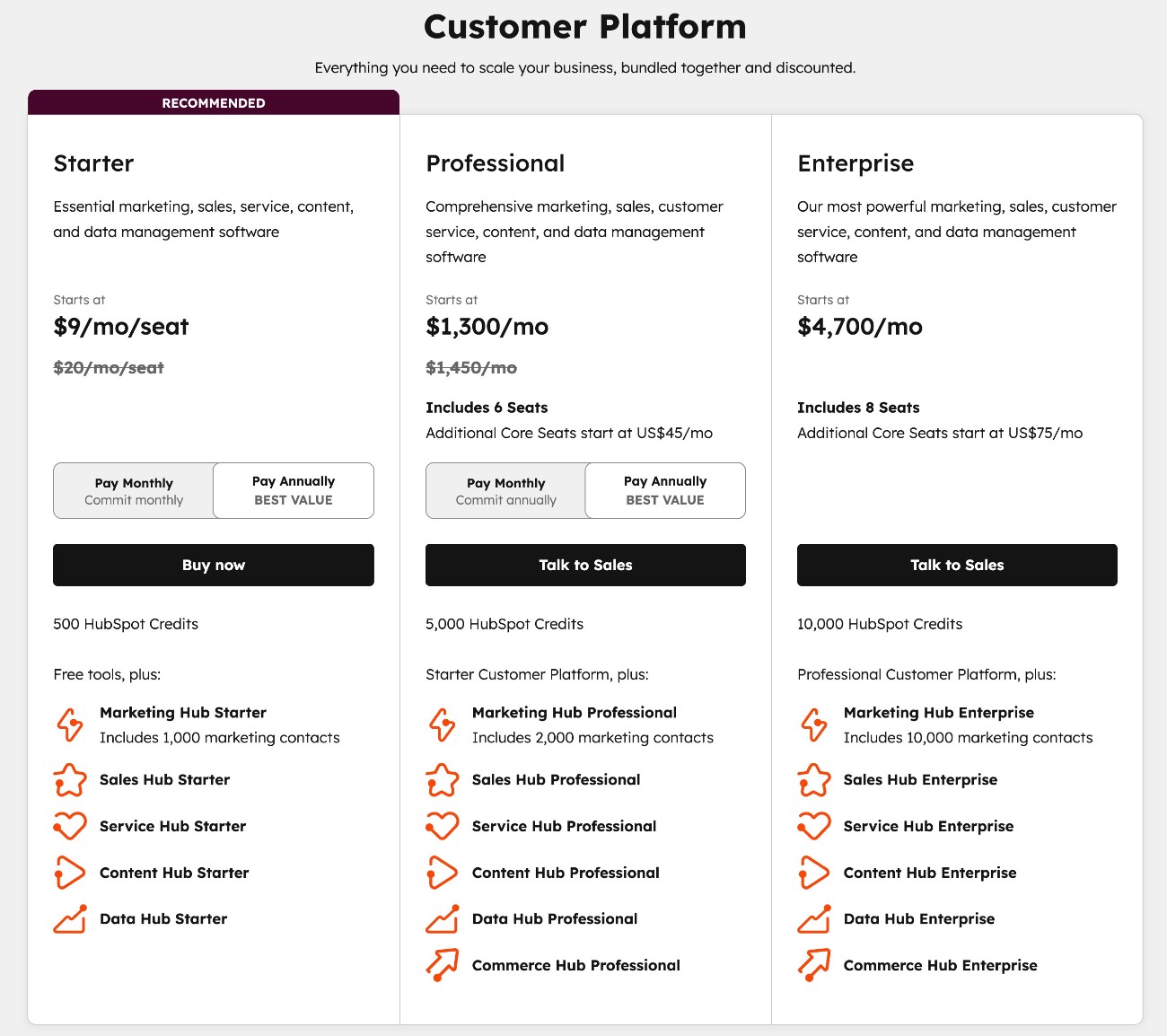
If you want access to all-in-one functionality for marketing, sales, and customer service, you might want to go with HubSpot’s Customer Platform, which has the following starting prices:
- Starter – from $9 per month per seat, with annual billing.
- Professional – from $1,300 per month, with annual billing. The base price includes six seats and you can add more seats from $45/month/seat.
- Enterprise – from $4,300 per month, with annual billing. The base price includes eight seats and you can add more seats from $75/month/seat.
You can also purchase individual hubs, instead of the entire Customer Platform.
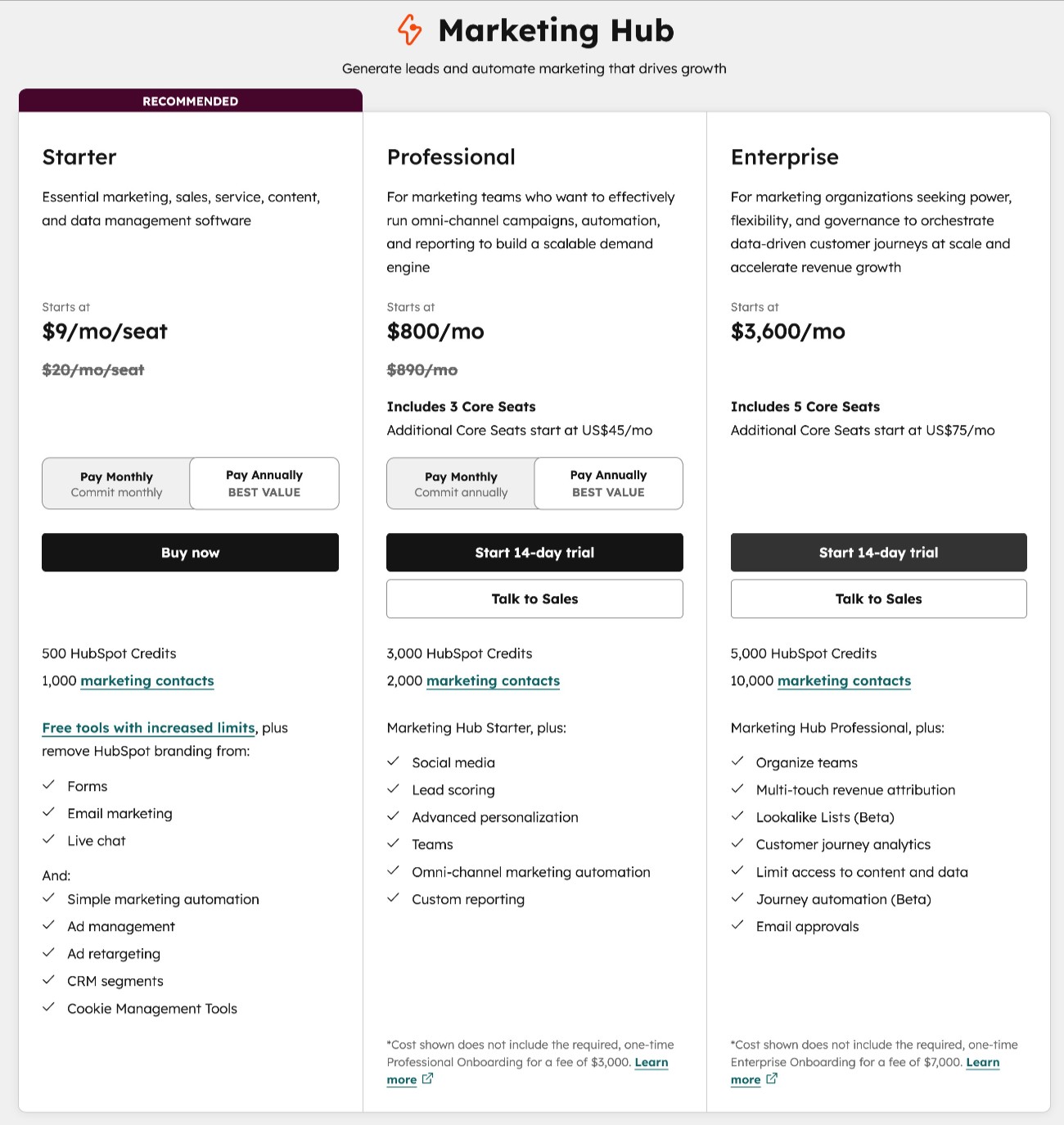
The most direct pricing comparison between HubSpot vs Mailchimp is probably HubSpot’s Marketing Hub, which starts very affordably but quickly rises in price if you get into the enterprise options:
- Starter – from $9 per month per seat, with annual billing.
- Professional – from $800 per month, with annual billing. The base price includes three seats and you can add more seats from $45/month/seat.
- Enterprise – from $3,600 per month, with annual billing. The base price includes five seats and you can add more seats from $75/month/seat.
WordPress connections with HubSpot and Mailchimp
If you’re using WordPress for your website, the Gravity Forms plugin can help you integrate WordPress with both HubSpot and Mailchimp.
With Gravity Forms, you’ll be able to connect all of the forms on your site directly to your CRM. You can add/update contacts, map form data to CRM fields, apply tags, and more.
You can use this ability to create dedicated lead generation forms. Or, you can also add a CRM integration to other types of forms that you create, such as payment forms or user registration forms.
Gravity Forms HubSpot Add-On
The Gravity Forms HubSpot Add-On is available on all Gravity Forms licenses.
Here are some of the other notable features in the add-on:
- Control lead status, stage, and owner – as part of adding a contact to HubSpot, you can customize its contact owner, lead status, and lifecycle stage. If you need more flexibility, you can also use conditional logic rules to apply different owners or statuses based on how a person fills out the form.
- Map form fields to HubSpot fields – you can map data from your WordPress form fields to fields in HubSpot, including support for any custom fields that you’ve added in HubSpot.
- Add conditional logic rules – you can choose to only add a contact to HubSpot if they fill out the form a certain way. Or, you could choose to sync a contact in a different way depending on how they fill out the form (such as selecting a different contact owner).
If you want to see the HubSpot Add-On in more detail, you can read our guide on creating a HubSpot contact form in WordPress.
Gravity Forms Mailchimp Add-On
Like the HubSpot Add-On, the Gravity Forms Mailchimp Add-On is also available on all Gravity Forms licenses.
It lets you sync some or all of your forms directly to your Mailchimp audience(s). When a person submits the form, you can add that person as a contact in your Mailchimp audience.
Here are some of the other notable features in the add-on:
- Map form fields to Mailchimp – you can map data from your form fields to fields in Mailchimp, including support for custom fields.
- Add conditional logic rules – you can choose to only add a contact to your audience if they meet certain conditions, such as checking an opt-in box in your form.
- Add tags and notes in Mailchimp – you can apply tags or add notes when syncing a contact to your audience. You can also use Gravity Forms merge tags to dynamically insert data from your form in the tag or note.
- Enable double opt-in – you can choose to enable Mailchimp’s double opt-in functionality, which means that contacts will only be added to your audience if they click a link in a confirmation email that Mailchimp sends them after they submit the form.
If you want to see the Mailchimp Add-On in more detail, you can read our guide on using Mailchimp with Gravity Forms. We also have a complete guide on using Mailchimp with WordPress.
Final thoughts on HubSpot vs Mailchimp
HubSpot and Mailchimp are both quality platforms, but there are enough differences between the two that you’ll want to make sure you’re choosing the right option for your needs.
If your main focus is email marketing and you just want a basic CRM to pair with that (along with some other digital marketing tools), Mailchimp could be the better option. It’s easy to use, includes robust email marketing functionality, and can be more affordable than HubSpot in many situations.
However, if you want a more powerful CRM with a broader focus and a higher level of customizability, HubSpot is probably the better option. You can use it for marketing, sales, customer service, and more. It’s also just generally more flexible than Mailchimp in terms of how you can configure it.
Regardless of whether you choose HubSpot or Mailchimp, the Gravity Forms plugin can help you integrate your WordPress website with either service.
The Gravity Forms Mailchimp Add-On and HubSpot Add-On are both available on all Gravity Forms licenses.
If you’re not a Gravity Forms user yet, you can purchase your license today to get started.

If you want to keep up-to-date with what’s happening on the blog sign up for the Gravity Forms newsletter!