Wise vs PayPal comparison: How to choose for your business
 By Colin Newcomer
Published March 3, 2026
By Colin Newcomer
Published March 3, 2026

Trying to choose between Wise vs PayPal to receive payments for your WordPress website or business?
Wise and PayPal both give you the ability to receive payments in a variety of currencies, including holding multiple currencies inside a single account.
However, while PayPal and Wise do share some similarities, there are also some very large differences between the two. Understanding these differences is essential if you want to choose the right service for your business.
To help you decide, we’re going to compare these two services in the following areas:
- Key differences, and the different situations in which to consider each service
- Supported payment methods
- Supported currencies
- Fees and exchange rates
If you’re using WordPress for your website, we’ll also cover how you can use Wise and PayPal to accept payments on WordPress using the Gravity Forms plugin.
Key differences in Wise vs PayPal, and when to use each
Before we dig into a more nitty-gritty comparison of specific areas, let’s start with some general introductions to Wise and PayPal, along with when it makes sense to use each service.
Wise

Formerly known as Transferwise, Wise is a fintech company with a focus on international money transfers and multi-currency accounts. It offers both personal accounts and business-focused accounts via its Wise Business platform.
If you need to send/receive money between different countries/currencies and/or you want to hold different currencies within a single account, those are areas where Wise can really excel.
However, it’s important to note that Wise is not a full-service payment processor like PayPal (or other services like Stripe or Square).
Here are some of the things that Wise can do well – if you fit with these situations, you might want to consider Wise for your business:
- Requesting payments from customers – Wise lets you create payment links, QR codes, or invoices to request payment. This can make it a good option for situations where you proactively request payments from your customers (rather than, say, a general e-commerce store, where customers pay you without you needing to provide a request or payment link).
- Holding multiple currencies in a single account – You can hold more than 40 different currencies in a single Wise Business account.
- Accessing real bank account credentials – For 25+ of its supported currencies, Wise can give you a real bank account number and other details. This lets customers send money directly to your bank account, without needing them to have a Wise account.
- Converting currencies – Wise offers very competitive rates for converting currencies (especially for higher volumes), so it could be a good option if that’s something that you need to do a lot. You get the accurate mid-market rate and just pay a transaction fee for the conversion, which is usually better than PayPal’s currency conversion rates.
PayPal
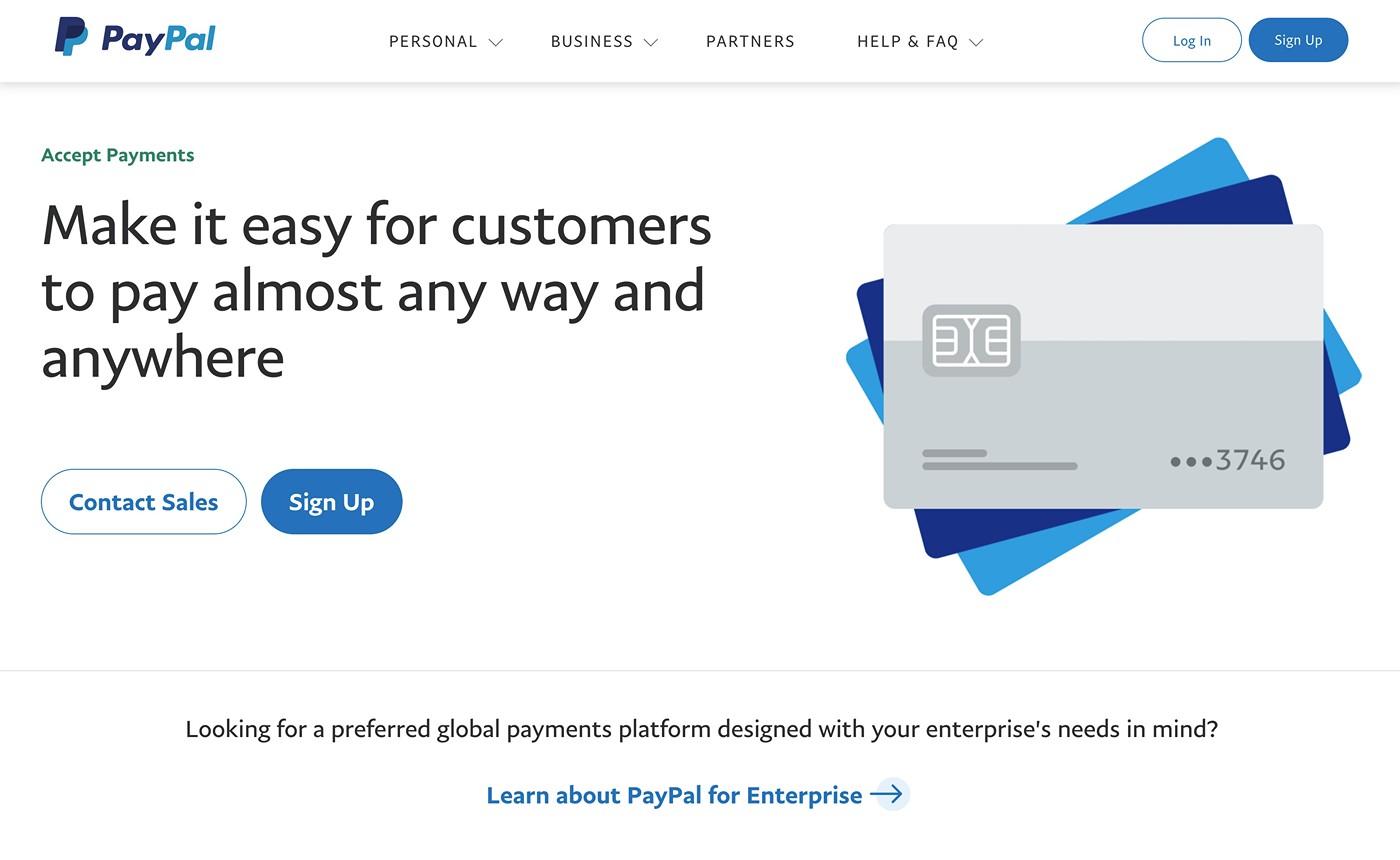
PayPal is an online payment system that makes it easy to send and receive money using a variety of different methods, including credit cards, debit cards, bank transfers, and more.
In general, PayPal has a much broader scope of functionality than Wise, which could be an important distinction depending on your use cases.
You can use it to receive money directly from individuals. Or, you can also use it as a payment gateway. For example, if you were running an e-commerce store, you could use PayPal in your checkout process.
PayPal also offers some of the multi-currency features that Wise does. For example, you can hold multiple currencies in your account and convert currencies.
Here are some of the areas where PayPal excels when compared to Wise:
- Accepting credit card payments – PayPal lets you directly accept credit card payments. While Wise indirectly accepts credit cards by letting people fund their Wise accounts using a credit card, Wise has very high fees for credit cards, and some credit cards will treat these as a cash advance. PayPal lets you accept card payments as regular transactions, which is simpler and better for your customers.
- Brand recognition – PayPal is one of the most widely recognized payment platforms in the world, so it could be a good option if you want to leverage that recognition and trust. Many people will already have a PayPal account, as well. Wise has built a good brand, but it still doesn’t have the global recognition of PayPal.
- True payment gateway – PayPal lets customers pay directly as part of the checkout process, whereas Wise requires customers to manually make a payment via Wise (or by sending a bank transfer). For example, you could use it as part of a WordPress payment form that you create with Gravity Forms.
- E-commerce usage – if you’re searching for a payment processing solution for a simple or advanced e-commerce implementation, PayPal is generally better suited for that than Wise.
Supported payment methods
PayPal offers broader support for different payment methods than Wise does. If you want to let customers pay you via a variety of methods – especially via credit or debit cards – that could make PayPal a better option.
Wise
With Wise, you can primarily send and receive money in two different ways:
- Wise balances – You and others can send or receive money using account balances inside Wise.
- Bank transfers – You can send and receive bank transfers via methods like ACH, SWIFT, and iDEAL, as well as wire transfers. For many of the currencies that Wise supports, you get real bank credentials to receive bank transfers directly. You and others can also fund Wise balances using bank transfers.
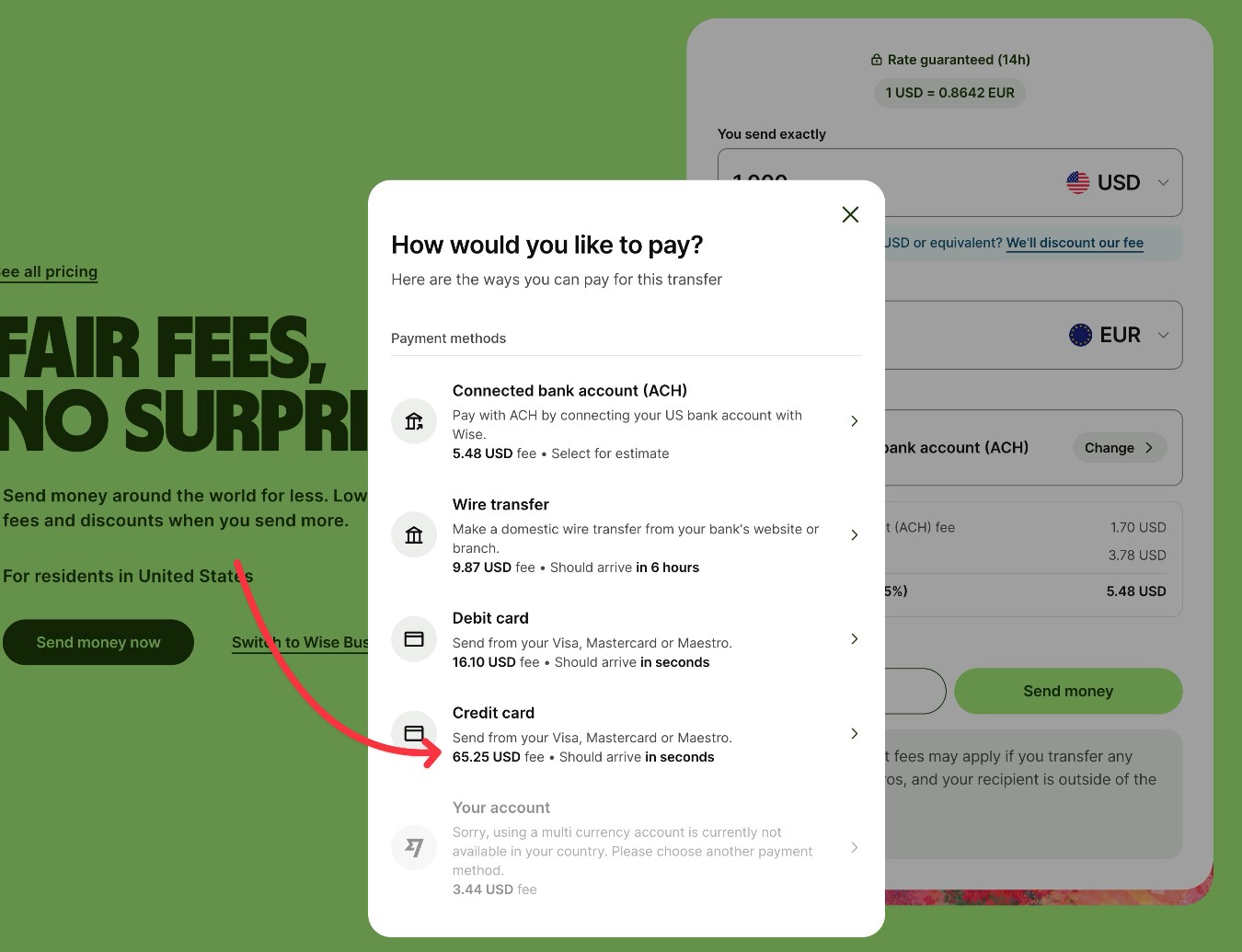
Wise does let users fund their account balances or send payments using credit or debit cards. However, the fees are quite high, so it’s really not a viable option in most situations. For example, to fund $1,000 USD, it would cost $12.50 with a debit card and $65.70 with a credit card.
Overall, Wise works best if you primarily need to accept payments via bank transfers (or customers’ existing Wise balances). The fact that Wise gives you actual bank credentials for many of its currencies is unique compared to PayPal, because customers can send money directly to your bank credentials without needing to involve an intermediary like PayPal.
PayPal
PayPal lets customers pay you via a variety of different methods, including the following:
- Credit or debit cards – Customers can use all major credit cards to pay you directly by entering their credit card details. Or, they can also pay with cards that they’ve saved to their PayPal accounts. More importantly, PayPal offers competitive processing rates, similar to any other payment processor.
- PayPal balances – Customers can pay using their existing PayPal balances.
- Digital wallets – Customers can use popular digital wallets, including Apple Pay, Google Pay, and Venmo.
- Bank transfer/debit methods – Customers can use popular bank transfer methods, including ACH transfers (in the USA) and Bancontact, EPS, iDEAL, and SEPA (in Europe).
- Buy now, pay later (BNPL) – Customers can use PayPal’s own Pay Later service, as well as Klarna.
You can browse all of PayPal’s supported methods here.
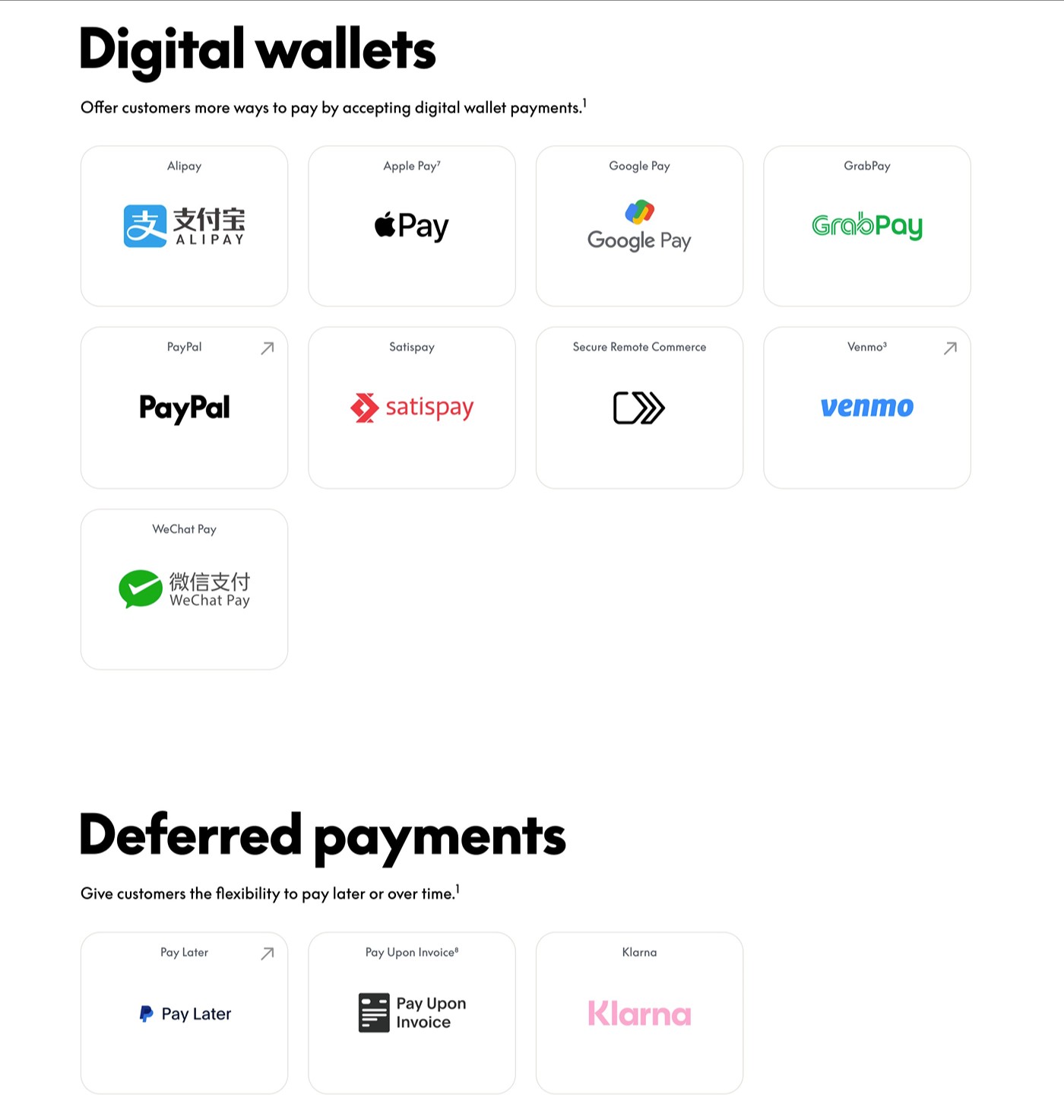
Overall, if you want to make it easy for customers to pay with credit cards, digital wallets, or BNPL services, PayPal is probably the better option.
Supported currencies
In general, Wise offers broader currency support, though both services support major global currencies.
Let’s get into the specific differences…
Wise
The exact list of available currencies will depend on whether you’re just looking to convert currencies or if you’re looking to actually hold a balance in a certain currency.
Currently, Wise supports the following:
- Convert between over 140+ different global currencies at the mid-market rate.
- Add money to your account using 25+ different currencies.
- Hold balances in over 40+ different currencies.
- Get real bank credentials to receive money by outside bank transfer in 25+ different currencies. 23 of those currencies also let you receive money using SWIFT transfers.
You can view more details about currency support on this page. To see the currencies that are available for conversion, you can use Wise’s currency converter calculator.
PayPal
Currently, PayPal supports 24+ different currencies for holding balances and payments, which is a bit lower than the 40+ currencies that Wise lets you hold balances in.
A few of the currencies are only available to accounts created in that region (Brazilian Real, Chinese Renminbi, and Malaysian Ringgit), but most are available to anyone.
You can view the full list of PayPal’s supported currencies on this page.
Fees and exchange rates
There are two main “fees” that you’ll encounter with Wise and PayPal:
- Processing/transaction fees – These are processing rates or fees that you’ll pay to receive a payment from someone else.
- Currency exchange rates – If you’re converting between two different currencies (one of the main purposes of Wise), there might be fees associated with that.
Each service can be cheaper in certain situations, so there’s really no one-size-fits-all answer about whether Wise or PayPal is more expensive to receive money.
Processing/transaction fees
Both Wise and PayPal will charge you different fees to accept payments. It’s hard to compare these fees because the services work in slightly different ways, but we’ll do our best.
Wise
With Wise, it’s free to receive money in most situations, though Wise will charge you to receive wire transfers or Swift payments (and it will charge people to send money, in some situations). Wise will also charge a fee when you fund your account using different methods or send payments.
Here are some example fees for sending $1,000 USD – you can see that using a credit card costs around 6.5%, whereas most payment processors charge more in the 3% range (including PayPal).
Wise also charges a fee when you convert currencies – you can use this calculator to determine the fee.
PayPal
PayPal currently charges the following rates for payments in the USA:
- Online card payments – 2.99% + $0.49 per transaction
- PayPal checkout – 3.49% + $0.49 per transaction
- PayPal Guest checkout – 3.49% + $0.49 per transaction
- Pay with Venmo – 3.49% + $0.49 per transaction
- Alternative Payment Method (e.g. Apple Pay) – 2.89% + $0.29 per transaction
- In-person payments (via PayPal’s Zettle POS) – 2.29% + $0.09 per transaction
- Manual card entry card payments – 3.49% + $0.09
This page has more details on PayPal’s USA fees. Here are PayPal’s fees for some other countries:
For currency conversions, PayPal typically adds about a 3-4% fee to the mid-market rate, which we’ll discuss in the next section.
Exchange rates
For international payments and conversions, currency exchange rates are another important consideration.
Some services will offer “zero fee” conversions but give you a bad exchange rate, which means that you could actually end up “paying” more than a service with an upfront fee and a good exchange rate.
Wise offers much better exchange rates than PayPal (and most other currency conversion services).
With Wise, you get the mid-market rate, which is the midpoint between the buy and sell rates that have been determined by the market. Wise is able to offer the actual mid-market rate by charging you a fixed fee when you convert money, rather than trying to hide its fees with a bad exchange rate.

PayPal, on the other hand, adds a markup on top of the mid-market rate – usually an extra 3-4%.
Basically, while we do encourage you to check the rates for the specific currencies that you’re converting between, Wise will almost always be 3-4% “cheaper” than PayPal, especially if you’re converting large amounts.
Using Wise and PayPal with WordPress and Gravity Forms
If you’re using WordPress for your business’s website and you want to accept payments through your website, it’s important to consider how Wise and PayPal integrate with WordPress.
If you want to accept payments as part of a form or some type of structured checkout process, PayPal is probably the better option.
With the right tools, such as Gravity Forms, you can use PayPal as a true payment gateway. Customers can enter their payment details (e.g. their credit card number) in a form on your site and make a direct payment.
In contrast, Wise generally requires you to manually send an invoice or payment link based on a customer’s request (or provide your account credentials for customers to manually make a payment).
PayPal Checkout Add-On
Gravity Forms has its own official PayPal Checkout Add-On, which is available on the Pro, Elite, and Nonprofit licenses.
The Gravity Forms PayPal Checkout Add-On offers multiple ways to accept payments with PayPal:
- PayPal Checkout – Customers can log in to their PayPal account to pay with their balance or any of the other payment methods that they’ve added to PayPal (e.g. a credit card or bank transfer).
- Direct card entry – Customers can enter their credit/debit card details correctly, which does not require them to have a PayPal account.
- Venmo – Customers can make payments using Venmo.
Here are some other key features of the PayPal Checkout Add-On:
- One-time payments – You can accept one-time payments using any payment method.
- Subscription payments – If using PayPal Checkout, you can accept customizable subscription payments. You can choose how often to bill customers, and there’s also an option to automatically stop billing after a certain number of billing cycles (e.g. for a payment plan). Customers can also manage their subscriptions from their PayPal accounts.
- Free trials and one-time setup fees – For subscription payments, you can offer free trials and/or add a one-time signup fee that only applies to the first payment.
- Authorize and capture – You can authorize a customer’s card when they submit the form, but wait to capture the payment until later.
- WordPress dashboard payment management – You can refund one-time payments directly from the WordPress dashboard.
To learn more about how it works, you can read our complete guide to Gravity Forms and PayPal.
Wise
Currently, there is no dedicated solution to integrate Wise with either WordPress or Gravity Forms. Again, this is because Wise isn’t a true payment gateway solution like WordPress is.
However, with the flexibility of Gravity Forms, you could find some creative ways to use Wise for WordPress payments, albeit with some manual actions required.
For example, let’s say you want to add a Wise payment option to a payment form that you’re creating. You could do something like this:
- Add an option to the form for Wise.
- If a user chooses Wise as their preferred payment method, use conditional logic to show them a custom confirmation message after they submit the form.
- In the confirmation message, include a Wise Quick Pay link that lets customers send money to your Wise account. Or, you could just choose to manually invoice customers after they submit the form. You could even build a structured business process workflow for this by adding the Gravity Flow plugin.
If you feel comfortable with some custom development, you could automate this process even further using the Wise API and Gravity Forms webhooks.
Overall, if you want to accept payments directly from your form, using Gravity Forms and the Gravity Forms PayPal Checkout Add-On is probably your best option. But if Wise is the best fit for your site for other reasons, you can find ways to integrate Wise payments into WordPress and Gravity Forms.
Final thoughts on Wise vs PayPal
Wise and PayPal both let you accept online payments in multiple currencies, but there are still some pretty notable differences between the two.
Choosing between the two will depend on factors such as the following:
- The type of payments that you want to accept – For example, whether you want to accept credit/debit card payments or you only need to accept bank transfers. PayPal is generally a much better option if you need to accept card payments.
- How customers will pay – PayPal can be a true payment gateway, which gives you more flexibility for letting customers make their own payments. With Wise, you’ll need to send them payment links/invoices or have them manually initiate a transfer. This usually makes PayPal a much better option for any type of e-commerce use case, such as creating a payment form on WordPress.
- How important currency conversions are – If you’re going to be converting between currencies a lot, Wise could be a better option, especially for larger conversions where its more competitive rates will save you 3-4%.
If you’re using WordPress for your website and you want to accept payments directly, PayPal is probably the better option. With Gravity Forms and the Gravity Forms PayPal Checkout Add-On, you can create WordPress payment forms that let people pay directly from the form using their credit/debit cards, their PayPal balances, and/or Venmo.
If you’re ready to get started with WordPress payments using PayPal, purchase a Pro, Elite, or Nonprofit license today.

If you want to keep up-to-date with what’s happening on the blog sign up for the Gravity Forms newsletter!