
Referral tracking and UTM tracking for Gravity Forms, so you always know where your leads come from.
Referral Source Tracking captures the referrer, UTM parameters, and ad click IDs behind each submission and saves them onto the entry as its lead source. You’ll see which search engine, social network, AI assistant, email, or ad campaign drove each lead, right inside your Gravity Forms entries. UTM tracking runs on every form automatically, so there’s nothing to rebuild.
What can you do with Referral Source Tracking?
- ✅ See the source of each entry (search, social, AI assistants, email, or paid ads) right in the Gravity Forms Entries view
- ✅ Capture UTM parameters and ad click IDs like gclid, msclkid, and gbraid automatically
- ✅ Capture both first-touch and last-touch attribution, so you see what created the lead and what closed it
- ✅ Chart your sources, campaigns, and trends in the built-in Reports dashboard
- ✅ Get a weekly or monthly email digest of your top sources and campaigns
- ✅ Send the source into your CRM, notifications, and webhooks with merge tags
Lead source tracking on every entry
Each Gravity Forms entry gets a labeled source, so you can tell whether a lead came from Google Ads, Meta, Bing, LinkedIn, TikTok, an AI assistant, an email campaign, or organic search. Common sources are labeled for you automatically:
- Search and ads: Google Ads, Google Organic, Microsoft Ads, Bing Organic, Facebook, LinkedIn, X, Reddit, TikTok, Pinterest, Snapchat, Yahoo, DuckDuckGo, Yandex
- AI assistants: ChatGPT, Perplexity, Microsoft Copilot, Gemini, Claude, Grok, DeepSeek
- Email platforms: Mailchimp, Constant Contact, Salesforce Pardot, HubSpot
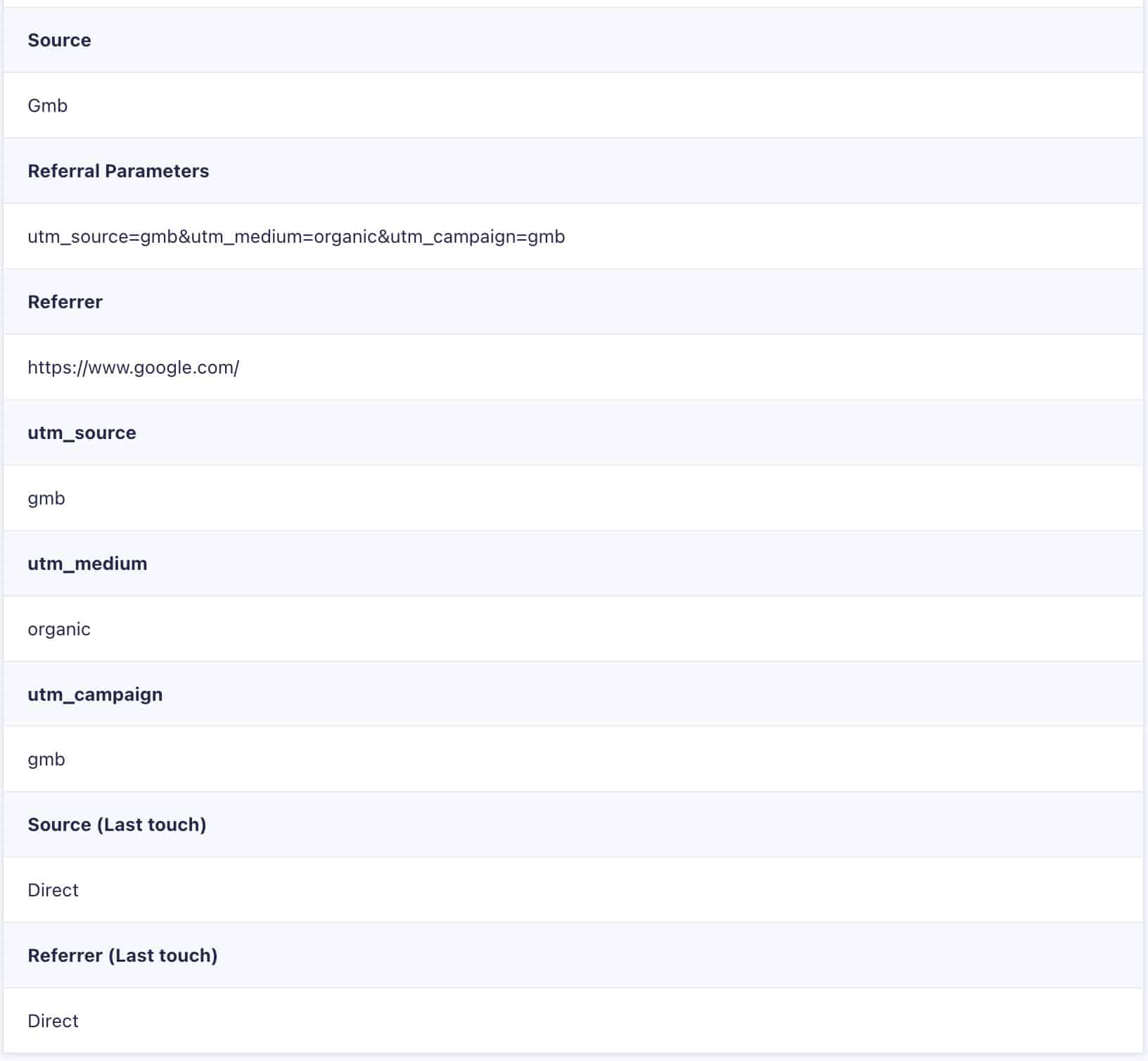
Capture UTMs and ad click IDs automatically
There’s nothing to rebuild and no field IDs to look up. Tracking fields are added and filled in on every form, storing the full UTM and click-ID detail behind each entry:
- UTM parameters: utm_source, utm_medium, utm_campaign, utm_term, utm_content, utm_id
- Click IDs: gclid, gbraid, wbraid, msclkid, li_fat_id, rdt_cid, ttclid, pin_cid, snap_cid, mc_cid, mc_eid, dclid, fbclid
First-touch and last-touch attribution
Attribution is how you credit the source that actually produced a lead, and Referral Source Tracking captures the two mechanisms that matter most:
- First-touch attribution. The original source that first brought a visitor in. If someone finds you through a Google Ad on Monday and submits your form on Thursday, the entry still credits that first ad, thanks to a configurable attribution window (7 days by default).
- Last-touch attribution. The most recent source right before they submitted, so you can see which channel finally closed the deal.
Turn on one or both. First-touch tells you what created the lead, last-touch tells you what converted it, and with both stored on the entry you never have to guess which channel to credit.
See it all in the Reports dashboard
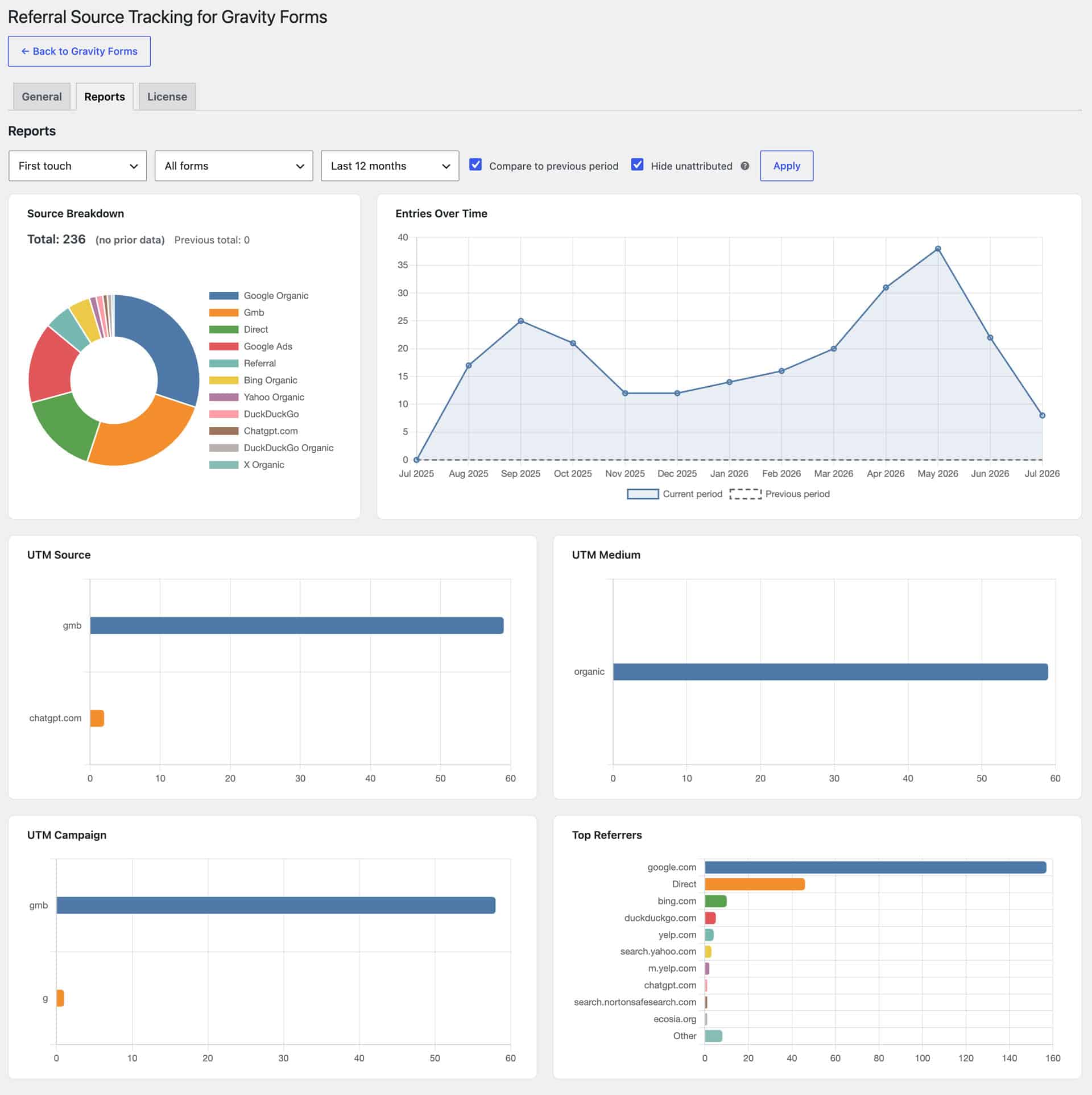
The built-in Reports dashboard charts your entries for you:
- Source breakdown across your channels
- Submissions over time
- Top UTM source, medium, and campaign
- Top referrers
Filter by form and date range, compare against the previous period, and hide unattributed traffic. Flip every chart between first-touch and last-touch with a single toggle. Your selections are saved for the next time you open it.
Weekly and monthly email digests
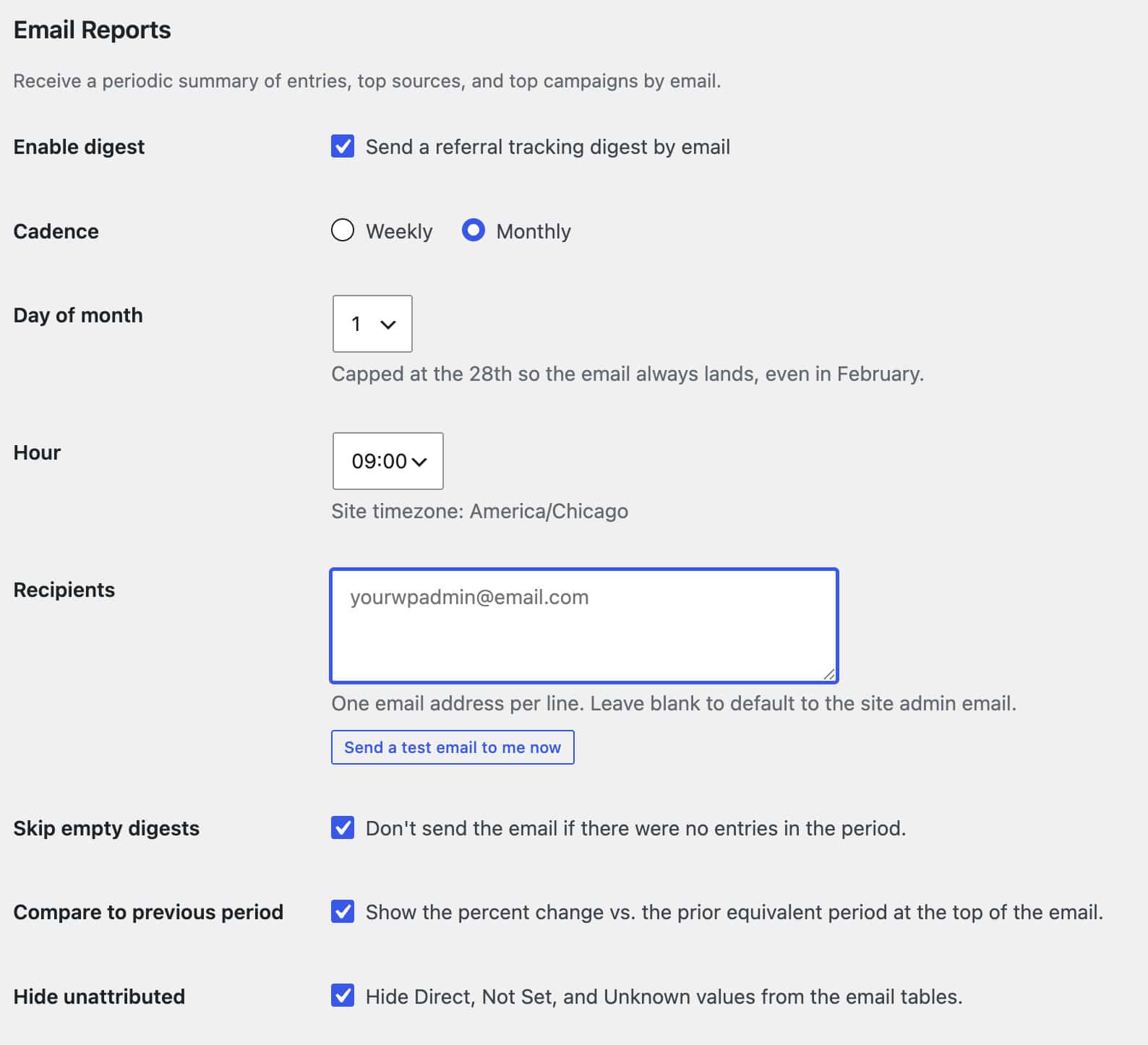
Schedule a digest of your top sources and top campaigns, with an optional comparison against the previous period. It goes out weekly or monthly to one or more recipients in your site’s timezone. You can skip empty digests, and send yourself a test email to see exactly what lands in the inbox.
Route the source into your CRM and notifications
Add merge tags like {pb_ref_source}, {pb_ref_utm_source}, {pb_ref_utm_campaign}, and {pb_ref_clid} to your notifications, confirmations, webhooks, and feeds. The source rides along with the entry into your CRM, help desk, or spreadsheet, with no field IDs to track down. If your CRM or webhook add-on only maps from a form’s saved fields, one click adds editor-visible mirror fields so your tracking data shows up in its dropdowns.
The same merge tags can feed your analytics, too. Drop them into a Redirect confirmation’s query string to pass the captured source, campaign, and click ID to your own GA4 or Google Tag Manager setup on your thank-you page. The plugin doesn’t send anything itself — it makes the captured values available, and your existing tags decide what to do with them.
Add your own custom sources
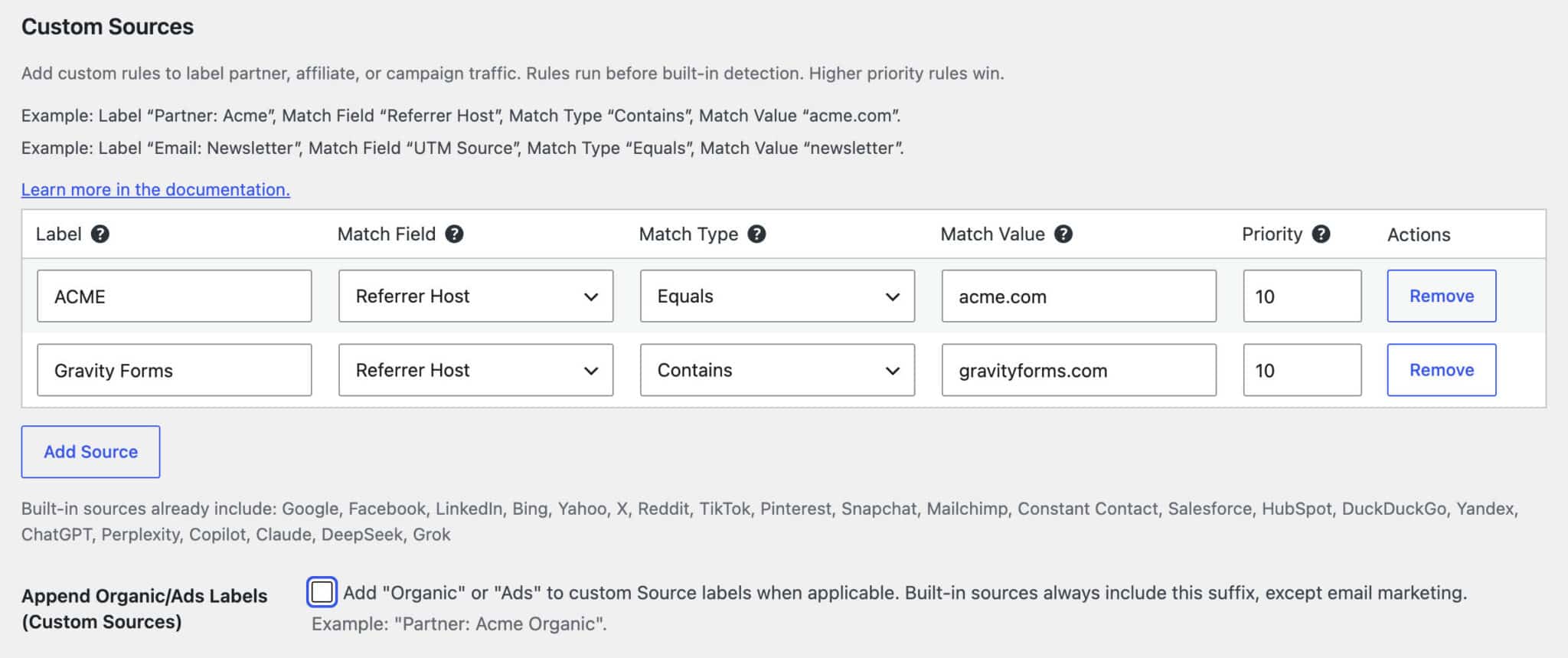
When the default Referral label or a raw utm_source value isn’t specific enough, add your own rules for partner sites, affiliate referrals, named campaigns, branded shorteners, and employee links. Match on the referrer host or any UTM value, pick Contains or Equals, set a priority, and your label shows up on every matching entry.
Privacy-safe by design
Your attribution data stays in your WordPress database as part of the Gravity Forms entry. The plugin never fires pixels or sends conversion events to ad platforms or analytics on its own, and no extra PII is captured by default. For stricter setups, an optional consent gate holds attribution data until the visitor grants consent through your cookie banner, so it fits a GDPR- and CCPA-friendly workflow. It works alongside GA4 and Google Ads, adding the lead-level source data those tools leave out. If you do want that data in GA4, you stay in control: you can forward the captured values into your own GA4 or Google Tag Manager setup with merge tags, so nothing leaves your site unless you choose to set it up.
Works everywhere Gravity Forms does
- AJAX and standard forms. Tracking runs client-side, so both are covered.
- Caching and CDN friendly. Compatible with most caching and CDN setups.
- Every form, automatically. New and existing forms are tracked with no per-form setup.
- WordPress Multisite compatible. Network-activate once to track across subsites.
- Translation-ready. Ships with 16 bundled languages.
Brewed by Plugin Brewery
We build focused, well-supported add-ons for Gravity Forms.
- Purpose-built for Gravity Forms.
Every plugin uses the Gravity Forms Add-On Framework, so it fits right into the admin you already know. - Actively maintained.
Updates keep up with new ad platforms, click IDs, and AI-assistant referrers as they show up. - Support from the people who build it.
We answer questions and help with minor customizations ourselves. - Backed by a 15-day money-back guarantee.
Try it on your own forms and see the data for yourself.
Looking for more from your forms?
Here’s some of what our other Plugin Brewery add-ons can do.
| Plugin | TLDR; |
|---|---|
| Google Ads Tracking for Gravity Forms | Capture ad click IDs and tie Gravity Forms submissions back to your campaigns. |
| Salesforce Integration for Gravity Forms | Send Gravity Forms entries, and their source data, straight into Salesforce. |
| Address Autocomplete for Gravity Forms | Add Google-powered address autocomplete to your Gravity Forms address fields. |
| Multi-Form Anti-Spam Image CAPTCHA | Block spam submissions with a lightweight image CAPTCHA across all your forms. |
Questions? Reach out to us. We’re glad to help with Gravity Forms and anything else WordPress.